Desert Online General Trading LLC
Dubai, United Arab Emirates
Desert Online General Trading LLC
Dubai, United Arab Emirates

🚀 Elevate your Wi-Fi game — because buffering is so last decade!
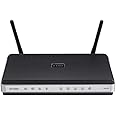
The D-Link DIR-615 Wireless N Router delivers up to 300 Mbps speed with advanced 802.11n technology, dual external antennas for superior range, and built-in firewall plus parental controls for secure, managed internet access. Featuring 4 Ethernet ports and a smart QoS engine, it’s designed to keep your home or office network fast, reliable, and safe.
| RAM | 4 GB |
| Wireless Type | 2.4 GHz Radio Frequency |
| National Stock Number | 7025-01-601-5345 |
| Brand | D-Link |
| Series | DIR-615 |
| Item model number | DIR-615 |
| Operating System | Linux |
| Item Weight | 3.21 ounces |
| Product Dimensions | 75.98 x 46.06 x 11.81 inches |
| Item Dimensions LxWxH | 75.98 x 46.06 x 11.81 inches |
| Color | One Color |
| Number of Processors | 1 |
| Computer Memory Type | SDRAM |
| Manufacturer | D-Link Systems, Inc. |
| ASIN | B000Y9PAXY |
| National Stock Number | 7025-01-601-5345 |
| Is Discontinued By Manufacturer | No |
| Date First Available | May 6, 2009 |
M**Z
Easy to setup but unreliable connection
This is the first and only router I've ever installed. I found the setup very simple and straightforward. I've had the router for over 2 years now and I used to go 2 or more weeks without any problem and then suddenly not being able to connect until I reset it. Lately, I've been having to reset the router 4 to 6 times a day. I have 2 teenagers at home who have smart phones, an iPad, 2 laptops, a Wii and 2 smart tv's that stream Netflix and other content. I suppose we get heavy use out of our router, but it's very irritating to have to go and reset it several times a day. If you plan to get heavy use out of your router you might want to look for something else.23 Dec 2013 Review update: Thanks to Mike's question about updating the firmware I checked to see if I had the latest and sure enough it was several versions behind. I had pressed the button within the Admin console before to check for firmware updates and it always came back with "This Firmware is the latest version". However, when I went to the D-Link site I found that there were several updates ahead of mine. I followed the instructions and installed the firmware update about a week ago. The only snag I ran into was restoring my original configuration file. It simply did not work and I had to manually apply my old configuration settings (passwords, etc.). I'm going to wait a few months and if I don't have any more problems I will up the rating.
Trustpilot
2 months ago
3 days ago