
DOWNLOAD THE APP


Customer Services
Copyright © 2025 Desertcart Holdings Limited
DOWNLOAD THE APP
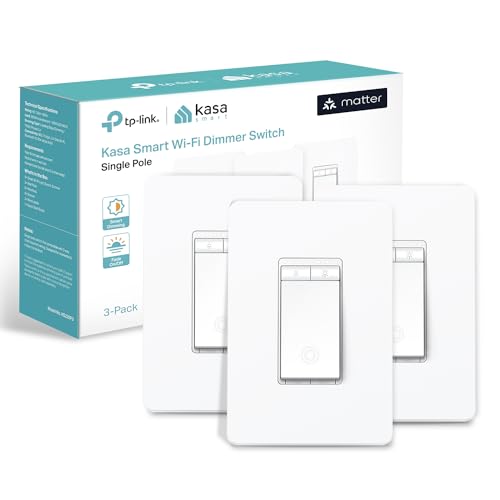


💡 Elevate your smart home game with the Kasa Matter Dimmer—where control meets convenience!
The Kasa Smart Matter Dimmer Switch KS225P3 is a UL-certified, 3-pack smart dimmer designed for professional-grade home automation. It supports the new Matter protocol for seamless cross-platform compatibility with Apple Home, Alexa, Google Home, and SmartThings. Featuring a wide 1%-100% dimming range, voice control, remote app management, and advanced scheduling, it requires a neutral wire and 2.4GHz Wi-Fi. Installation is guided via the Kasa app, making it ideal for users with basic electrical knowledge seeking to future-proof their smart home.


| ASIN | B0C9KJT36W |
| Item model number | KS225P3 |
| Manufacturer | TP-Link |
| Product Dimensions | 12.8 x 8.46 x 4.52 cm; 414 g |
J**N
This smart dimmer switch works very well, but installation may be challenging for someone with no electrical experience. I have some basic electrical knowledge, so I was able to install it without major issues, but I wouldn’t call it beginner-friendly. Once installed, it performs exactly as expected. Being able to turn lights on and off remotely is extremely convenient, especially at night—I really like not having to get up to turn the lights off before going to bed. The dimming function works smoothly, and the connection has been stable. I did run into one limitation in my condo: not all switch boxes had enough space. The switch itself is deeper than standard switches, so I couldn’t install it everywhere and had to limit it to rooms where there was enough space in the wall box. Despite that, the switches I was able to install are working great. Overall, it’s a solid and reliable smart dimmer, and I would recommend it—just make sure you have enough space in your switch box and some basic wiring knowledge before installing.
D**O
I have had a smart home with 50+ devices for about a decade, since Apple first brought out its HomeKit smart home system. I have a lot of experience with the benefits and also the many hassles of smart home devices. Firstly let me comment on the physical product itself, and the company behind it. Great design. Great quality. Committed brand, with a good track record I think you can trust. Easy to physically install if you are comfortable with connecting wires, and can turn off a circuit breaker. You MUST have white "neutral" wires, which typically any electrical system done since the 1980's will have. Instructions are straight forward. You might discover some of your existing switches are not wired in typical ways. If this is the case and you don't fully understand it, get an electrician. I think most people will be okay. BUT … from an all around software setup perspective, this is by far the most aggravating installation experience I ever had - until it wasn't. This is the FIRST Matter protocol device I have installed in my Apple Home. I DO have the required Matter/Thread routers that are needed. In this case of an Apple Home, several Apple TVs and HomePods. If you use Google Home, or Alexa, or other you MUST also have in your home a “Matter Hub” capable product from Google or Alexa respectively. I spent almost a full time week, googling, trying various things, getting frustrated, and I would rate myself a 9/10 on expertise in this area. Until I learned the best trick. You HAVE to FULLY commit if you want to move to the Matter, protocol and I think you SHOULD. Even if you do at first get it working without this drastic step, I think you are just pushing hidden problems into the future. Start FRESH. All those smart home rules, profiles, pairings, etc you have built over the years - you should DELETE THEM ALL, and FACTORY RESET ALL your smart home devices. Delete your ENTIRE home profile. Start over completely. Drastic yes. But just like it is much easier to build a quality new home from scratch, rather than patchy renovations to an existing home, the same applies to a smart home when moving to a very different technology, in this case “Matter”. If you want to get into the Matter ecosystem, and I think any serious smart home enthusiast SHOULD, you have to understand that you are much more on your own right now than by sticking with a current proprietary ecosystem. The attempt to make Matter work with many different platforms, means the ability for product manufacturers, and Ecosystems - like Apple, Google, or Alexa support, to assist you is very limited, even when they want to. One MORE step. Do the same with your router. FACTORY RESET. It also plays a core essential role in the reliability of your smart home. If you have a cheap router you should really consider something higher end. When I took the deep dive, and started from scratch, I was able to set up all my Matter devices with ease. Another suggestion - just because matter claims to be able to support multiple home ecosystems out of the box, DON’T do that. You are asking for trouble, Pick 1 like HomeKit as I did, or Google Home, or Alexa, or SmartThings, or other platforms, and do EVERYTHING on that ONE platform. Also install the manufacturer specific apps for direct control of your devices, outside of any ecosystem. Reduce complexity, don’t embrace it. Yes, Matter is still quite frustrating, but most of the issues should be solvable through updated ecosystem software and product firmware. I still believe it will become THE standard, likely the ONLY standard in the future. So unless you need features not yet supported by Matter, I think Matter devices are worth the initial pain, to future proof your investment. Hope that helps !
V**D
Making your house smart shouldn’t be hard, and it shouldn’t involve creating accounts for the different devices you want to use. And it definitely shouldn’t involve giving up your privacy just so you can talk to your dining room lights. Until recently that’s what you had to do regardless of which smart system (Alexa, Google Home, Apple HomeKit, or Samsung Smartthings) you used. No system included everything you might want to use, your doorbell camera might be from Ring and your smart lock might be from Schlage. You’d have to create accounts in each then integrate them into your smart system. The new Smart home standard, called MATTER, attempts to change all of that by establishing compatibility standards for smart systems and devices without the need to create accounts or give up any privacy. If the device is MATTER compatible and your smart system works with MATTER, you just scan a QR code and the device is integrated. Simple, easy, done. If you’re a HomeKit user, this was a godsend. More smart device makers are adhering to the MATTER standards and these Kasa single pole smart dimmers shows just it should be done! Installation is marginally more complicated than installing a regular single pole switch. Once installed and powered, the dimmer works like any normal manual dimmer. The magic happens when you add the device to HomeKit. In HomeKit->add device, you scan the QR code. After about a minute HomeKit asks you a few more questions about how you want to integrate the switch. Answer those and you’re done! No new accounts or passwords you have to remember. The dimmers just work! Of course, Kasa would love for you to open an account so they can bombard you with info about other products they offer, but you don’t have to do it. The only reason you may decide to get an account is for firmware updates, but those are relatively rare. They look great too. I highly recommend these dimmers.
Y**G
The Kasa smart switch works great, with a full set of features and smooth control through the app. However, there is a minor issue: while it stays connected in the Tapo app, it sometimes shows as offline in Google Home when connected via Matter. Not sure if this is a Google Home issue or a Kasa issue, but hopefully it can be improved.
J**Y
These are cool and useful light switches to dim the lights in the bathroom so when you get up in the middle of the night, you can dim the lights enough to see what you're doing and your aim is good. Installation and setup was very easy that even a child could do it.
Trustpilot
5 days ago
2 weeks ago