We remain fully operational. Our teams are working around the clock to ensure your deliveries continue safely.

DOWNLOAD THE APP


Customer Services
Copyright © 2025 Desertcart Holdings Limited
DOWNLOAD THE APP

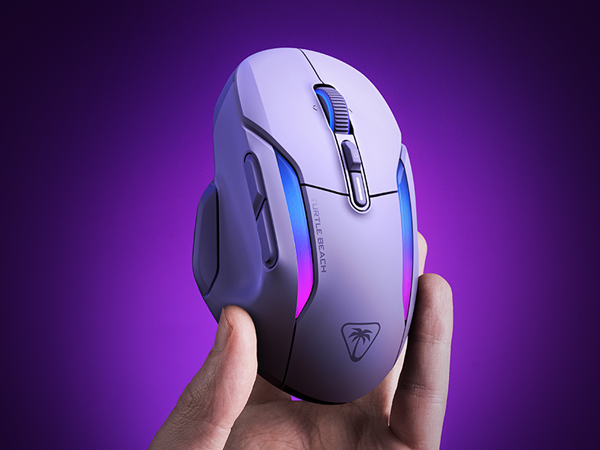
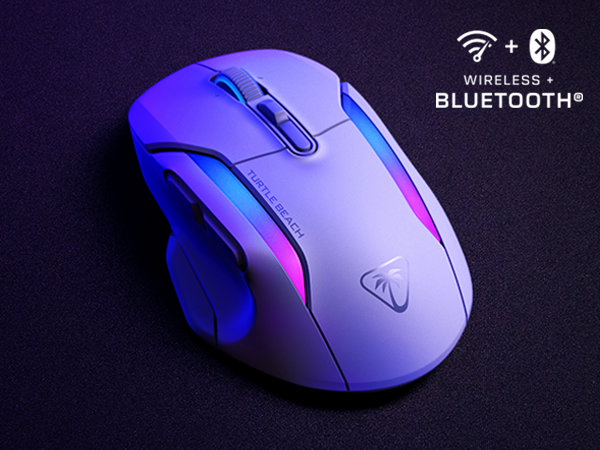
🎮 Elevate your game with precision, power, and style — the Kone II Air is your wireless weapon of choice.
The Turtle Beach Kone II Air is a high-performance wireless gaming mouse featuring an ergonomic design for medium to large hands, a staggering 350-hour battery life via Bluetooth, and a 26,000 DPI Owl-Eye optical sensor for ultra-precise tracking. With 21 customizable inputs enabled by Easy-Shift [+] technology, durable TITAN Optical Switches rated for 100 million clicks, and dual-zone RGB lighting, it offers professional-grade control and style. The included PhantomFlex USB-C charging cable ensures uninterrupted play, while NVIDIA Reflex compatibility delivers sub-25ms latency for competitive edge.




| ASIN | B0D9MDY56X |
| Additional Features | Ergonomic Design |
| Antenna Location | Gaming |
| Are Batteries Included | Yes |
| Are Batteries Required | Yes |
| Battery Average Life | 350 Hours |
| Best Sellers Rank | #3,068 in Video Games ( See Top 100 in Video Games ) #163 in PC Gaming Mice |
| Brand | Turtle Beach |
| Built-In Media | PhantomFlex USB-C to USB-A Charging Cable and Grip Tape, Quick Start Guide, Turtle Beach Kone II Air Mouse, Wireless USB-A Transmitter and USB-USB-C Transmitter Adapter |
| Button Quantity | 12 |
| Color | Arctic White |
| Compatible Devices | Personal Computer |
| Connectivity Technology | Bluetooth |
| Customer Reviews | 4.0 out of 5 stars 914 Reviews |
| Enclosure Material | PTFE |
| Global Trade Identification Number | 00731855711055 |
| Hand Orientation | Ambidextrous |
| Hardware Platform | PC |
| Item Dimensions L x W | 7.05"L x 4.53"W |
| Item Height | 3.25 inches |
| Item Weight | 0.2 Pounds |
| Manufacturer | Turtle Beach |
| Model Name | KONE2AW |
| Model Number | TBM-1104-15 |
| Mouse Maximum Sensitivity | 26000 Dots per Inch |
| Movement Detection | Optical |
| Movement Detection Technology | Optical |
| Number of Batteries | 1 Lithium Polymer batteries required. (included) |
| Number of Buttons | 12 |
| Operating System | Windows |
| Power Source | Battery Powered |
| Range | Up to 130 Hours hours |
| Special Feature | Ergonomic Design |
| Style Name | Modern |
| Theme | Video Game |
| UPC | 731855711055 |
| Warranty Description | 1 Year Manufacturer |
A**R
Reasonable alternative to Logitech G700s and G604
I am a long time user of the Logitech G700s and the G604. I never want to use another mouse, but they are getting more and more expensive to find on ebay, refurbished etc.... and so for years I have had a long term search for a potential replacement. I looked at this mouse many times when it was made under Roccat. Recently, when my G604 began having sticky clicking issues again, I knew it was time to at least try this mouse out. I've only had this mouse for a few days, but will update if this changes. Out of the box I found it very comfortable in my hand and familiar to the grip of the Logitech mice. Initially, I had a lot of trouble with the setup and almost returned it within the first 30 minutes. I connected the mouse via Bluetooth and I found I couldn't access any of the customization options in the Swarm II software. Several YouTube videos later, I decided to try the USB dongle connection - this instantly unlocked all of the customization options in the software. I have not switched back to bluetooth yet to see if the USB connection is necessary for this to stay in place. I prefer Bluetooth since computers have fewer and fewer USB ports. Once I was able to customize the mouse - learning that the 'Hot Key' and not 'Macro' option was a better setting for my needs (I just want to be able to click a button and have something specific happen, usually tied to a keystroke) It took some experimenting but I think I have it the way I like it. The switches feel much better on this mouse - I know the quality of them is higher than Logitech which is why those mice keep dying. I do find the side switches on the scroll wheel to be a little stiffer and require more force to wheel click left and right - but this is likely only an issue for some people. If you are a die hard Logitech G700 or G604 lover and are searching for a future alternative, I would consider this a very reasonable alternative. The form and function are similar enough. I wish it had 6 side buttons instead of 4. I still haven't put the side 'shift' button to the test and while I appreciate the expanded functions, I'm not convinced it will be useful for my work or play style. I don't want to have to think about what mode I'm in or what a button will do now. Like many people, I rely on muscle memory. I still hold out hope that Logitech will someday recreate these mice with the quality they deserve. The number of used, refurbished mice from those models and they prices they sell for should tell Logitech that there is a group of consumers with very strong preferences for those mice and features. MMO keypads and 20 buttons on the side does not work for me. My thumb doesn't have time or energy for that many blind buttons to navigate. I am hopeful that this mouse will last longer than Logitech does for me, and I am pleased that after years of searching, I have found something close.
J**T
Solid upgrade over the old version
I bought this as a replacement for my older Kone AIMO that the third thumb button died on. I also have the older Vulcan Pro keyboard, which Swarm 2 does not support, so I was a little concerned with having two versions of Swarm installed, but that does not appear to be an issue. As someone with large hands, it's always been tough finding a comfortable mouse, and I really like the feel of the Kone in the hand. It's just the right size if you have larger hands. Everything was well packaged. I like that the dongle comes with the adapter that you can mount closer to the mouse. That's a nice feature. The cord is probably the softest, most flexible usb cable I've ever seen. Should be zero issues with it misbehaving while connected to the mouse. Setup was quick and easy. The mouse was immediately recognized in Swarm 2, and found an update for it, which took about 20 or 30 seconds to install. The RGB matches the older Kone as well. Using the same values the color perfectly matches what I have set on the old version. One big upgrade for me is the clicky/freewheel scrolling option. That's the one thing I've always missed since I had my old logitech, and having it here is great! The grip tapes were a bit fiddly to get on, but I think they should remain well stuck for a good long while. My old Kone had started to show a lot of wear in the thumb area, so I think the grip tape might extend the longevity pretty well, and it provides a decent improvement in grip. I do wish that the protective film on the skates had included peel tabs on it, but that's a minor gripe. All in all this is a solid upgrade over my old Kone, and if you are a large handed individual like me, this is a pretty good option for a gaming mouse.
B**S
Overall great, but some minor issues
After using it a week or two I’m pretty happy with how it works. I was using the older version of this from roccat (they name changed) before and thought I’d just upgrade. Works the same way just not corded. Battery life seems fine, I just set it on the charger each night. I have forgotten and it’s taken me through more than one day. There’s a few things I don’t like however, and is why I opted to give 4 stars instead of 5. 1. The top button behind the wheel is super easy to accidentally click, and since this is a profile button, switching mid game when things get fast paced is a potential issue. I decided to just make every profile work the same way, don’t need different ones.. that was the work around for me. 2. I have had an instance where the keys assigned seem to not register it’s been pressed, but another does. Once the other was pressed it started registering again. 3. Sometimes the buttons seem to get stuck? This has happened enough times that I do see it being a legitimate concern down the road. I’m not hard on my mouses, I only upgraded because I upgraded everything else and figured why not. The problems happen so randomly and seldomly that it has not been an issue that made me go back to my previous mouse. I think the price makes sense, it remains one of the most comfortable mouse’s I’ve ever used, and the easy shift key is a game changer (I changed mine to be literally “shift” so I get more easily reached/casted spells for my game.) If you feel like you need a mouse with side buttons but two isn’t cutting it and 6-12 feels absurd.. perfect mouse.
E**.
Superior comfort, super light and 1/2 price of competitors
I had to return the first one I received as it had an issue where every time it woke up, it would automatically right-click. Very weird. I exchanged it for another and the second mouse doesn't have this issue. Overall, I would say this mouse is fantastic. I've been gaming and working with Roccat Kone Pure Ultra mice for over 10 years (5 years per mouse) and the right-handed shape of these mice is just perfect for my smallish hands. I was sad to see that Roccat was bought by Turtle Beach, but decided to take a gamble and stick with the spiritual successor of my favorite mouse, the Turtle Beach Pure Air - and I'm glad I did! The form factor is still exactly the same, which is fantastic for right-handers with smallish hands. While the previous Roccat version was already pretty light, this mouse is even lighter at 54g (and even 10% lighter than the highly lauded 60g Logitech Superlight 2). This isn't my first wireless mouse, but it's my first daily driver from the wireless camp, and it works great with the little supplied dongle. Professional reviews complain about the battery life versus other mice but for me it's fine. I charge it less than once every two weeks with intensive use. The supplied USB cord is USB A to C and is a very nice, light-weight braided (Paracord?) cable, making the mouse quite comfortable to use wired if you forgot to charge it overnight. Its max polling rate is 1000Hz, both wired and wireless (with the dongle), which I'm perfectly happy with. Some high-end mice go up to 4kHz, but I find that to be far beyond the point of diminishing returns. Most gaming monitors cap-out at 144Hz, so I don't see the point of updating your mouse position 30x more often than your monitor can show you. I admittedly haven't tested the performance over Bluetooth though, but I can't think of a scenario where I'll need that. Importantly, the click on both the left and right buttons is very good, if not great. It feels like my 5 year old Roccat's clicks are just slightly more sensitive, which I like, but this could be due to age and it's a close call either way. The specs list that this mouse has optical switches for both primary mouse buttons, but I can't say if this has improved anything. They just work well. The scroll wheel is actually quite nice, with a soft, gentle stepping as you scroll instead of harsh, clicky steps or completely smooth scrolling. The extra side-buttons are fine. I haven't used them much in gaming yet, but I can't foresee any issues. The DPI-switching button is at the very front left of the mouse, which I can't reach without releasing my grip. Therefore I wouldn't be comfortable trying to quickly switch DPIs mid-game so, while I don't do this anyway, it might be something to be aware of if you do. The Swarm 2 driver software is much nicer to use than the old Roccat Swarm software, although a few minor options have gone missing such as double-click speed. Of course you can still simply set those generic settings up in Windows. Popular options are all still there, such as configuring your lift-off distance (which is set deliciously low by default), polling rate, and DPI presets. It also shows you the current charge and handles updating the mouse and dongle's firmware at a click. The only thing I'm missing is more flexible lighting options for the logo, but I'm particularly picky about the look of my setup and the options are probably sufficient for most. Also, my hand is covering that 90% of the time and after a minute or two of idle time it switches off to save power, so you hardly see the lit logo anyway. And, as a nice little bonus, the logo is completely invisible when the lighting is off! It's surprising that this is one of the only mice that was designed to be able to hide the logo entirely if you wish. With the phenomenal ergonomic form-factor, super-light weight and pleasant buttons and scroll wheel, I highly recommend this mouse over its doubly priced counter-parts. Just be sure you're not a lefty and your hands aren't too big!
M**N
Garbage
EDIT: Changing score to 1 star (would give 0 if could). After less than 6 (SIX!!!!) months, this POS quit charging on the dock. Of course it's too late to return or exchange it now. Bought this to replace the ROCCAT LEADR that broke after seven years of heavy (ab)use (not surprising really). What WAS surprising however was the fact that ROCCAT was bought out by Turtle Beach, and the LEADR mouse was discontinued. I tried other multi-button mice and hated them all. LEADR's arrangement was ingenious for building muscle memory and worked perfectly. Kone offers something similar but with two extra side buttons instead of the paddle, only two auxiliary buttons on LMB, and none on RMB. The layout is similar enough to LEADR that I was able to adapt to it quickly, though I miss the auxiliary buttons on RMB and the extra thumb buttons are less intuitive than the up-down motion of LEADR's paddle. The mouse is also pleasantly large without being overly huge, and fills my palm nicely and comfortably, though again not quite as well as LEADR did. The charging dock is more reliable than that of the LEADR and is also smaller, which is good; and Turtle Beach's SWARM seems a lot less problematic than ROCCAT's version. So, for those looking to replace the broken down LEADR, this is probably your best bet to get something familiar and mostly similar. The mouse is also fairly reasonably priced, so there's that.
A**R
Lightweight and functional
I’ve been looking for a mouse like this for years. I have problems with heavy mice, as they make my hands and wrists hurt. This mouse is super light, but durable. I’ve been putting it through its paces on Borderlands 4. So far about over 300 hours using the mouse. I’ve had to charge it three times and always leave it on, so that seems about right. It’s not the comfiest mouse I’ve used, but the weight is the tradeoff for that. It’s a no-frills, functional device with good battery life that won’t strain your hands. Probably would help with aim too for competitive people.
J**Y
decent
I like the mouse by the product description is misleading. You do not get anywhere near 100 hours of use from the mouse on a charge. I have to put the mouse on charge every other day or else the battery dies. There is no visual indication the battery is low on the mouse. You would have to go into the program for the mouse. The mouse program dose not stay on the profile you last had it on. Often Ill find the mouse is not working properly and have to go in and charge the mouse profile back to the one it was left on. The shift button to change the operation of the buttons on the mouse is very easy to accidently push. But the mouse is very nice in of it self. Its lighter and smaller than I'm used to, with no way to add weight to the mouse. overall I'd give it a 3.5
J**T
Knocked it out of the park IMO
What can I say, I was skeptical when I learned that Turtle Beach had acquired ROCCAT, because aside from headsets, I had no experience with their peripherals especially mice since that's not what they're known for. With that being said Turtle Beach has really done the burst justice with the Burst II, the shape (symmetrical), the weight 47g, solid shell with no holes, includes grip tape. I have no issues claw gripping this mouse, I'm already matching and exceeding my scores in Aim Lab. I like the placement of the dpi button very innovative in my opinion, scroll wheel is tactile and notched just like the original. The mouse skates are phenomenal right out of the box, granted I am currently using a glass pad they glide like butter. As I've stated I'm very impressed with Turtle Beach, I hope we as a mouse community can continue to benefit from this competition of pushing the envelope foward with gaming mice. If you are looking for a light weight symmetrical mouse you will not be disappointed with this mouse especially if you like the original Burst. I'm really hoping to see an 8k version eventually. With this debut mouse coming in at this price point, I feel as though TB is attempting to dance with the big boys right out the gate, Logitech, Razer, Pulsar etc. They're off to a good start of I must say for their first mouse.
Trustpilot
2 weeks ago
4 days ago