
DOWNLOAD THE APP


Customer Services
Copyright © 2025 Desertcart Holdings Limited
DOWNLOAD THE APP

🎯 Level Up Your Game with Precision!
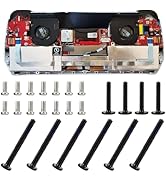
The Tighter Hall Joystick for Legion Go enhances your gaming experience with a 100% increase in rotation resistance, ensuring improved accuracy for FPS games. Built to last with a lifespan of up to 5 million rotations, it features zero drift technology and comes with easy installation tools, making it the perfect accessory for serious gamers.


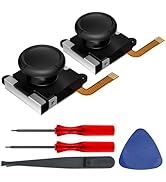
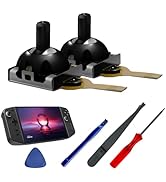
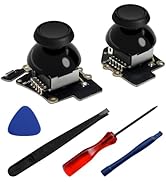


| Compatible Devices | Windows |
| Hardware Platform | PC/Mac/Linux |
R**0
Excellent quality
Feel great and tighter make game more fun
D**A
Legion Go Tighter Joysticks 🕹
The legion go tighter joysticks are one of the best mods I have ever done to my Legion Go. Upon receiving you get a box with a QR code to instructions and it even comes with all the tools you need to do the install. The install takes between 20-40 min. Be very careful with the smaller cables. The install is very easy to do however, just take your time and follow the instructions thoroughly. Upon finishing up, you notice the sticks immediately, it feels so much better in the hand and feels similar to the PS5 controller. I recommend this product 100%. Best purchase that I have made for my Legion Go.
S**.
I never minded the stock Legion Go thumb sticks until I tried these!
What a world of difference these new thumb sticks make. When I moved the sticks out of the box they didn't feel that different but when they are on, wow! I'm not big into shooters. When I play Helldivers 2 or Rivals I just use my gaming PC. I'm 3/4 of the way through Control played exclusively on the Legion Go. I played it for 2 hours after I installed these, and I couldn't believe the difference. 100x better. I'll be playing more shooters on the Go now. I'm sure these new sticks will elevate any game. Cant wait to try Sekiro next. The installation was kind of a pain. I've done the 81wh battery, and the magnetic D pad mods so I figured these would not be too bad. The battery was nothing compared to this. The left stick is a breeze. I knew what to expect because I've opened it before. It's pretty minimal in there. If you know nothing about opening up electronics I recommend doing the d-pad mod first. Get a metal circular d-pad here and a 3d printed magnetic d-pad cross specifically for the Legion Go off Etsy and try that. The hardest part is getting the the latch to connect to the body back in place correctly. The right controller took twice as long. There are seven different tiny cables with tiny connectors to deal with in addition to the latch. Plus you need to remove the mouse skate sticker with a heat gun if you want to use it again. I used a hair dryer and some heat tape to protect the sensor and button. I feel lucky I had both. It took me around 2 hours total. I wish I took pics. The only ones I can provide now is what the mouse skate looks like after reapplying. I thought I was being careful too. It's a little mangled but works. I never really use mouse mode anyway so no biggie. You can get a new one directly from Lenovo if you fudge it. I also included pics from the d-pad mod so you can get an idea of it looks like when you open it up. If you have patience and even an ounce of technical know how you should do this mod. Follow the video and you should be fine. You'll love it.
C**N
UPDATED: Worse than stock as far as calibration
Circularity is poor, as well as centering. The feel is wonderful but I have stick drift. Installed them relatively easily as I have experience. Sticks are in perfect. I if I can't adjust it to good I am going to remove , put back in the stock and return. UPDATE: ended up being the stick ends. Without them it was a perfect circle ⭕. So I learned how to calibrate them and did a little trim on the bottom of the stick ends and it's perfect now. It was not the sticks it was me. Advice is learn how to calibrate the sticks before buying and you are good to purchase. Make sure to have the right tools.
A**.
Enhanced control: Hall effect joysticks deliver
These Hall Effect Joysticks for the Legion Go significantly improve precision, especially for FPS games, eliminating frustrating drift issues. The installation, while requiring some care, is worth the upgrade for the enhanced control and responsiveness they provide. Durability is a key feature, with the joysticks designed to withstand extensive use, ensuring long-lasting performance. If you're a serious Legion Go gamer, investing in these Hall Effect Joysticks is a must-have upgrade for a more accurate and enjoyable gaming experience.
S**E
I didn’t know how much I needed these.
While doing research on the Legion Go I read a review that stated they installed these and it improved their experience. I played for a bit with the stock joysticks and would often get frustrated because of the lack of control I felt with them. After reading many reviews about these joysticks I decided to give them a shot and I am very glad I did. Installing them isn’t too difficult; just follow the video that comes up after scanning the QR code included with them. If you take your time and don’t force anything then installation is straightforward. I would recommend watching the video all the way through at least once before beginning for a better understanding. I didn’t do that and had to pause and rewind a lot; I wish I had taken the time to view it before beginning and it would have been even smoother. If you want tighter control and a smoother gameplay then I highly recommend these. They have improved my gaming experience with the Legion Go and am very confident they will for you too.
G**L
Me gusta
Buen producto
G**D
Awesomeness at a steal!
Awesome kit, Hall effect sticks as described and fits/works perfect for both legion go upgrade and Logitech gcloud upgrade. Marginal difference for Go but night and day improvement over stock gcloud that developed drift! Everything needed
Trustpilot
1 month ago
4 days ago