
DOWNLOAD THE APP


Customer Services
Copyright © 2025 Desertcart Holdings Limited
DOWNLOAD THE APP


🎥 Capture Every Moment, Stream Without Limits!
The AMZHRLY 4K HDMI to USB 2.0 Video Capture Card delivers crisp 1080p@60FPS video capture from 4K@60FPS HDMI sources with ultra-low latency preview. Compatible across major OS platforms and popular streaming software, it offers plug-and-play convenience without external power. Its compact, anti-static aluminum design and included USB extension cable make it ideal for professional streaming, gaming, teaching, and live broadcasting setups.


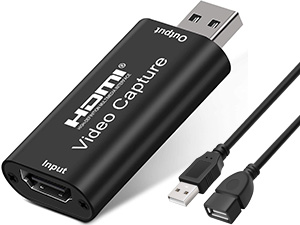


| ASIN | B0974MJY14 |
| Best Sellers Rank | #80,895 in Computers ( See Top 100 in Computers ) #110 in Internal TV Tuner & Video Capture Cards |
| Item model number | ZKHTAVCC21V30HZ20 |
| Manufacturer | AMZHRLY |
| Package Dimensions | 14.5 x 11.61 x 1.5 cm; 21.4 g |
S**B
This is a fairly decent HDMI/USB 3.0 adapter that just works (plug'n'play for Windows*) without any user intervention during driver install. It's able to take 4K@60FPS as input; however, the OUTPUT is only supported at 1080p@60FPS which is considered to be low by today's standard but is still adequate in most cases. Though, it is higher than MANY other budget capture adapters since most of them only support 1080p@30Hz as output. The quality for both video and audio are pretty decent without much degradation for a 1080p video. ✔ Note that this is one of the very few of similar style (and to a certain degree price tag) that's actually rated for USB 3.0 (see below for verification). Nearly all others with similar style and size are actually USB 2.0 (and about half the price as well). With that being said, USB 2.0 is capable of at least around 25-30 Mbps (varies quite a bit depending on a number of factors but 25Mbps is the min with 33 Mbps being the typical max) and that's usually more than adequate for 1080p @ 60Hz assuming the source is a high quality 4K source. As such, if you don't required USB 3.0 speed, there are many other options and alternatives out there that are $15-$20 less. The overall physical build seems decent without any visible defects and it has an aluminum alloy casing (that all/most others have as well). Similar to most others, it has an USB-A male connector along with an USB-A male/female extension cable should you find it helpful (it does for me). It would've been great if it comes with a USB-A/C adapter or cable for systems that only has a USB-C port The extension cable is particularly useful or even preferable for some for those that have a tight space around the USB ports because this adapter is slightly larger (and the curved shape certainly doesn't help either) than your ordinary USB flash drives etc and it might NOT fit well or could block other USB ports if it were to be inserted directly into the USB port on your computer (particularly for laptops where it might have limited space). It eliminates this issue by using the extension cable provided. I should also mention that this is the very FIRST one (of this particular size/style) that actually allows for various FPS section other than 'Match Output FPS' in OBS (pic 12) without generating a ton of errors in the log (pic 13) including 50 FPS which I sometimes do require. This is better than all others (in this price range) for this reason alone for me personally although your requirements might be different than mine. For those who are curious, the sample video is encoded using QuickSync H.264 with balanced target and high profile with a CBR of 2500Kbps and B Frames of 3 (nothing fancy here). The original spec is shown below. ### Format: Matroska Format version: Version 2 File size: 18.9 MiB Duration: 59 s 0 ms Overall bit rate: 2 690 kb/s Writing application: libmatroska 1.4.1 Video ID: 1 Format: AVC Format/Info: Advanced Video Codec Format profile: High@L4 Format settings, CABAC: Yes Format settings, ReFrames: 2 frames Codec ID: V_MPEG4/ISO/AVC Duration: 59 s 0 ms Bit rate mode: Constant Nominal bit rate: 2 500 kb/s Width: 1 920 pixels Height: 1 080 pixels Display aspect ratio: 16:9 Frame rate mode: Constant Frame rate: 30.000 FPS Color space: YUV Chroma subsampling: 4:2:0 Bit depth: 8 bits Scan type: Progressive Bits/(Pixel*Frame): 0.040 Default: No Forced: No Audio ID: 2 Format: AAC Format/Info: Advanced Audio Codec Format profile: LC Codec ID: A_AAC Duration: 59 s 0 ms Channel(s): 2 channels Channel positions: Front: L R Sampling rate: 48.0 kHz Frame rate: 46.875 FPS (1024 spf) Compression mode: Lossy Delay relative to video: 5 ms Default: No Forced: No ### ≡ Value All things considered, this is a fairly decent HDMI/USB 3.0 capture adapter that works as expected with decent video/audio quality and it's reasonably priced at $39 for its usability, overall video/audio quality, and its overall performance.
S**.
Works perfectly from mirrorless camera into my laptop and treats the camera as an optional camera choice in the setting.
V**.
I’ve been using this HD video capture card to capture VHS tapes on my Mac with QuickTime, and it’s been working flawlessly. Setup was quick and easy—just plug it in, and it’s good to go. No issues with drivers or extra software, which makes it super convenient. The capture quality is great, and everything runs smoothly without any problems. It’s been perfect for digitizing old tapes, and I haven’t run into any glitches or disconnects. If you’re looking for a reliable and straightforward capture card to work with a Mac, this one is a solid choice. It does exactly what I need, and I’ve had no issues at all. Highly recommend!
D**R
I was replacing an older HDMI converter on an older system with a upgraded camera. The computer only had USB-2 inputs and the new to us Cannon video camera only would do 1080P at 50fps (720 for any other framerate), but once I figured out the camera settings and got the input settings right in OBS, the picture was amazing, even when electronically zoomed. OBS recognized it right off. Works great. No regrets. I included the new picture and the old picture, using the same camera/computer/everything but the HDMI input. The one that is brighter and appears lower res is the old picture, the one that is more yellow is the new picture. The new picture is how it looks to the eye.
J**R
This was ultimately the work around needed for me to use my Canon EOS R50 on the Nintendo Switch 2. Looks very sharp and conveniently includes a USB extender. There's a bit of lag, but not too much. My signal chain also used USB C OTG Adapter just to plug it into the top USB C port on the Switch 2. I like that it's made of metal as well, which is surprising for a device that's around $21. It's ultimately a cost effective work around for Mirrorless cameras that aren't recognized by Switch 2 over USB.
Trustpilot
2 days ago
1 month ago