
🖨️ Print Smart, Save Big, Stay Connected!
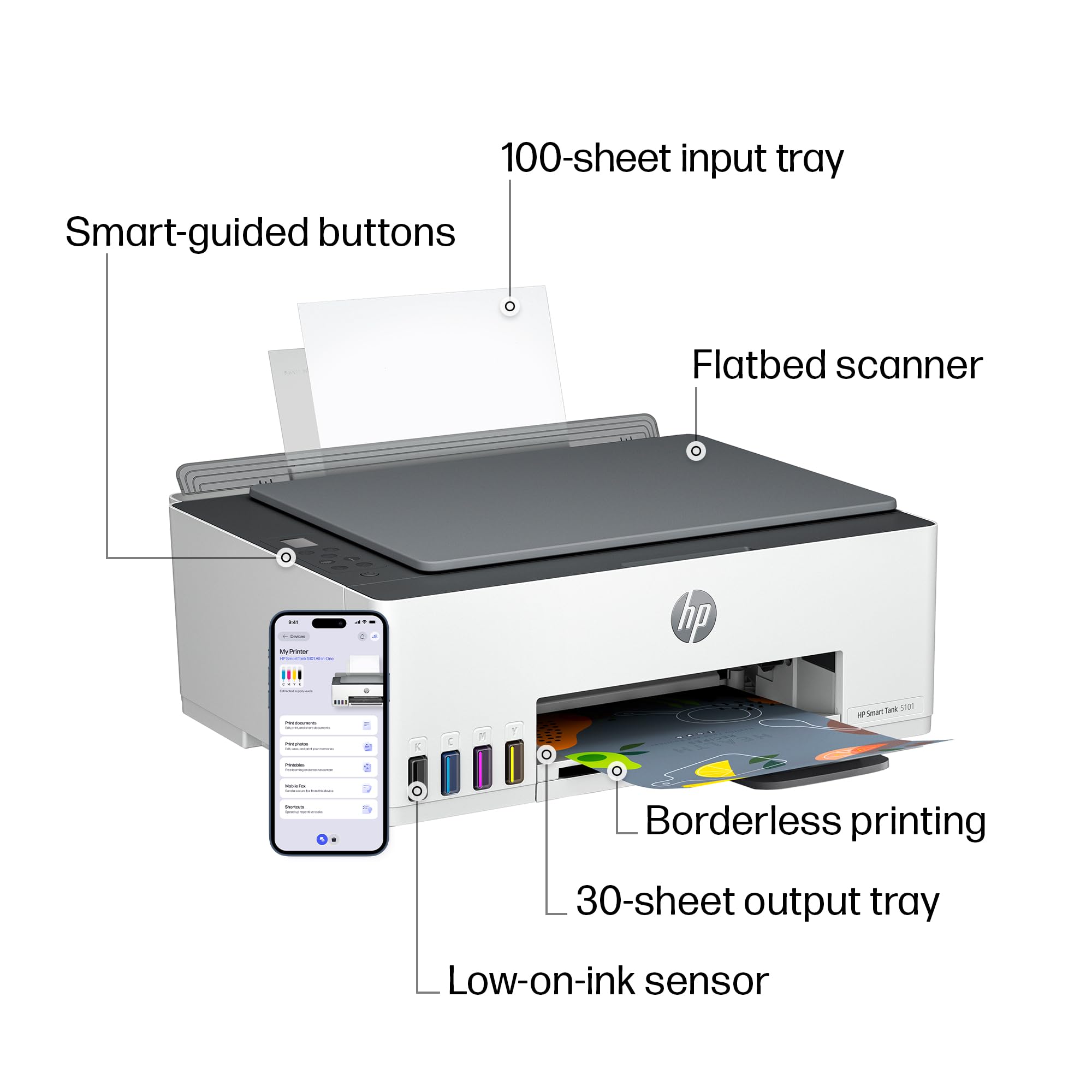
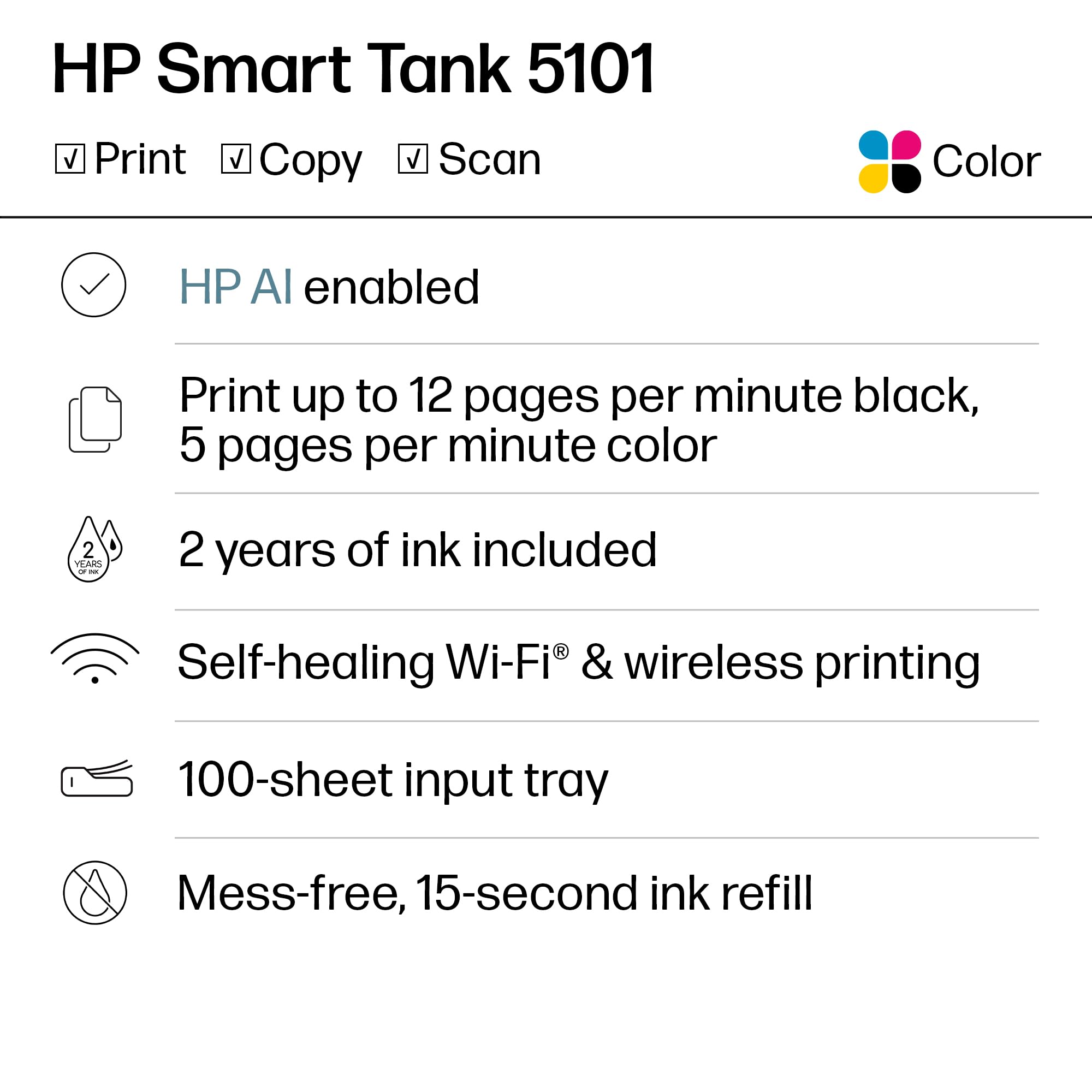
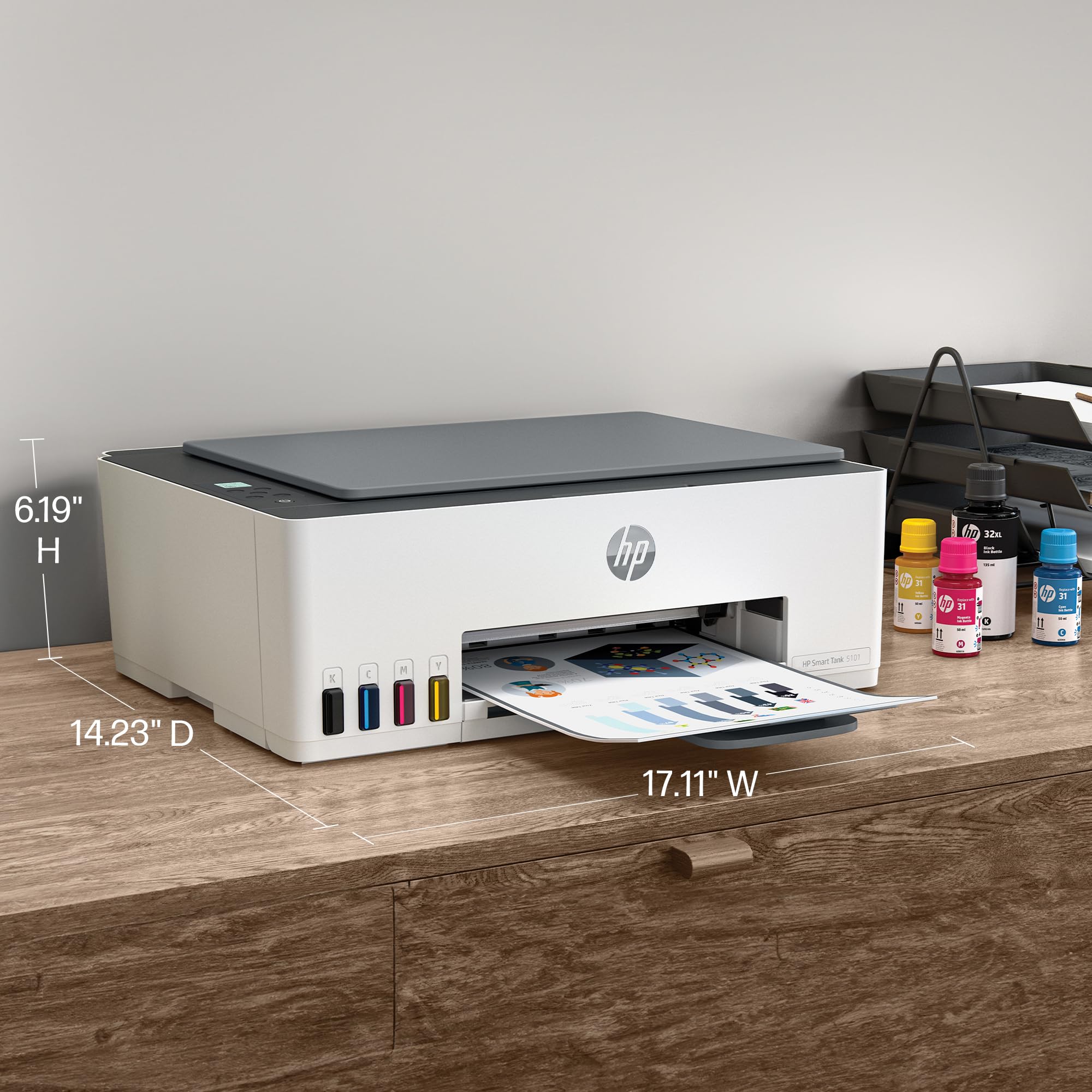
The HP Smart Tank 5101 is a wireless all-in-one ink tank printer designed for high-volume home and office use. It delivers fast printing speeds of 12 ppm black and 5 ppm color, includes up to 2 years of original HP ink for up to 6,000 pages, and supports mobile printing via a user-friendly app. With borderless photo printing, self-healing Wi-Fi, and multifunction capabilities (print, copy, scan), it offers professional-quality output and seamless connectivity in a compact, easy-to-use design.




| ASIN | B0BL466Y41 |
| Additional Printer Functions | Copy, Scan |
| B&W Pages per Minute | 12 ppm |
| Best Sellers Rank | #2,509 in Office Products ( See Top 100 in Office Products ) #5 in Ink Tank Printers |
| Brand | HP |
| Built-In Media | HP 31 Cyan Original Ink Bottle (50ml), HP 31 Magenta Original Ink Bottle (50ml), HP 31 Yellow Original Ink Bottle (50ml), HP 32XL Black Original Ink Bottle (135ml), HP Smart Tank 5101 All-in-One Printer |
| Color | White |
| Color Depth | 24 bpp |
| Color Pages per Minute | 5 ppm |
| Compatible Cartridge | North America: HP 32XL 135-ml Black Original Ink Bottle 1VV24AN; HP 31 Cyan Original Ink Bottle 1VU26AN; HP 31 Magenta Original Ink Bottle 1VU27AN; HP 31 Yellow Original Ink Bottle 1VU28AN. |
| Compatible Devices | Laptops, PC, Smartphones, Tablets |
| Control Method | App, Touch |
| Controller Type | Amazon Alexa, Android, IOS, Hand Control |
| Customer Reviews | 3.8 out of 5 stars 4,338 Reviews |
| Display Type | LCD |
| Dual-sided printing | No |
| Duplex | Manual |
| Hardware Interface | USB 2.0 |
| Initial Page Print Time | A4 Black 14 sec; A4 Color 21 sec Seconds |
| Ink Color | Black, Cyan, Magenta, Yellow |
| Item Dimensions D x W x H | 14.23"D x 17.11"W x 6.19"H |
| Item Height | 6.19 inches |
| Item Type Name | Inkjet Printer |
| Item Weight | 11.09 Pounds |
| Manufacturer | HP |
| Maximum Copies Per Run | 99 |
| Maximum Copy Resolution Black and White | 600 |
| Maximum Copy Resolution Color | Up to 600 dpi |
| Maximum Print Resolution Black and White | 1200 x 1200 Dots Per Inch |
| Maximum Sheet Capacity | 100 |
| Maximum print Resolution Color | 4800 x 1200 Dots Per Inch |
| Media Size Maximum | 8.5 x 14 inch |
| Model Name | ST 5101 AIO |
| Model Number | ST 5101 AIO |
| Model Series | Smart Tank 5101 |
| Number of Drivers | 2 |
| Number of Trays | 1 |
| Other Special Features of the Product | Refillable Ink Tank, Network-Ready , Auto Power On, Borderless Printing, Energy Star |
| Paper Size | 3.5" x 5", 4" x 6", 5" x 7", 8" x 10", 8.5" x 11", 8.5" x 14", A4, A6, half letter, legal, executive) Inches |
| Power Consumption | 0.11 Watts |
| Print media | Envelopes, Glossy photo paper, Paper (plain) |
| Printer Connectivity Type | Wireless |
| Printer Output Type | Color |
| Printer Type | HP Thermal Inkjet |
| Processor Count | 1 |
| Resolution | Black 1200 x 1200 rendered dpi; Color 4800 x 1200 optimized dpi color (When printing from a computer and 1200 input dpi) |
| Scanner Type | Flatbed |
| Series Number | 5101 |
| Specific Uses For Product | Home and home office |
| Total USB 2.0 Ports | 1 |
| Total Usb Ports | 1 |
| UPC | 196068963484 |
| Unit Count | 1.0 Count |
| Warranty Description | 1 year |
| Warranty Type | Limited |
E**M
Great Wireless Printer for Home Office Use
I recently purchased the HP Smart Tank 5101 Wireless All-in-One Ink Tank Printer, and so far I’ve been very impressed. The setup instructions were clear and easy to follow, and installing the ink was straightforward with no mess. My first print job came out crisp and high quality, which immediately gave me confidence in the printer. I’m primarily using this printer for labels and real estate documents, so I don’t anticipate heavy ink usage, but the print quality has been excellent across the board. The Wi-Fi connectivity works seamlessly, and being able to print directly from my phone has been incredibly convenient. Overall, this printer has exceeded my expectations and has been a great addition to my home office. I’m very happy with the performance and print quality so far.
G**S
Excellent high quality 3-in-1 printer
this is a solid well built printer. It is a good size but not too large. It scans/copies perfectly and prints flawlessly in black & white and in color. It’s very easy to setup if you download the HP app, create an account to sign in, and then select add device (+) and then the app will literally walk you through every step of the setup process. It even comes with cartridges and ink that they say lasts up to 2 years. If it does, that would make this an incredible value for the money! Oh and it connects easily to wifi and has maintained a strong connection ever since the initial setup.
M**K
😡 A Nightmare in a Box: The HP Smart Tank 5101 is a Total Fail
😡 A Nightmare in a Box: The HP Smart Tank 5101 is a Total Fail Purchasing the HP Smart Tank 5101 Wireless All-in-One Ink Tank as a gift turned out to be an absolute disaster. It's not just a bad printer; it's a useless paperweight that has caused nothing but frustration, especially since it was a gift sent out of the country and is now impossible to return. Key Failure Points: A Litany of Errors This machine failed at the most basic tasks, making its "Wireless All-in-One" designation an outright lie: • Driver Installation Hell: The drivers would not upload properly, no matter how many times I tried to download the official software or troubleshoot. The setup process was essentially dead on arrival. • Zero Wireless Connectivity: It will not connect to WiFi. The "Wireless" feature is non-existent. Without a successful connection or working drivers, it's impossible to even begin using the print functions. • Spooling Issues Before First Use: The print queue, or spooling, seems to be fundamentally flawed or permanently confused. Even when attempting simple test pages (or maybe just because the drivers failed), the system threw up errors suggesting a spooling issue. How a brand-new machine can have spooler problems when it's never successfully printed is beyond comprehension. The Final Insult: A Costly, Unreturnable Brick This printer was purchased and sent out of the country as a gift, received in December 2024. Because it never worked from the moment it was unboxed and we are now too far away for a return, this "gift" has become an expensive piece of junk. It's utterly unacceptable that a major brand like HP sells a product this defective. Do not buy this printer. Save your money, time, and sanity. I gave it 1 star because that was only low option!
R**S
Works well until it goes to sleep
I have two of these and they work well and the quality of printing is good. The only problem I've noticed is that if the printer is allowed to go to sleep, the network can't wake it up so that the only option when you want to print it to restart it from scratch. Which is pain if you have items in the que. They won't print after restart and then you have to clear them manually from the Win11Pro cache.
W**S
Superior Performance and Economical Operation Well Worth the Price
After going through one cheap printer after another (paying for them through the expensive print cartridges they require), very impressed with this machine. Setup was a snap using HP's well-designed app. Print quality, including photo printing, crisp and better than those cheaper models. Easy to monitor ink quantity. Last cheap printer, a Cannon, had constant problems maintaining a solid WiFi connection. Not sure what the HP's claimed "WiFi healing" means, but this machine's connection has been rock solid. Scanning function easy to use. Would have preferred having two feed/tray options as I need to sometimes print labels and photos, in addition to standard letter size, but the single feed option can be adjusted to smaller paper size as needed.
D**D
Any needed instruction for printer, are easily remedied by going to HP website!
This printer seems to be excellent!!! I've only had it in operation for about a week, but my wife and I are really pleased with it. The only thing we were not happy with, was the setup instruction pages! But we made it through, and now the simplicity of operation and the print quality are excellent! Note: the brevity of instructions for the printer, are easily remedied by going to HP website!
S**M
Prints are Incredible
I have a professional strength Epson ecotank that was about $1,400. I had a client though and my Epson is a pigment based printer and the paper I had for this client's wedding would not take pigment based ink so I bought this cheap inkjet to try and complete my order. I was able to di the order (although the black ink is pigment based so it caused a bit of an issue) but I have consistently found that this HP prints better, more vibrant, more true prints than my MUCH, MUCH more expensive Epson. Plus, the Epson's printheads become clogged easier than this HP (the HPs have never clogged even though I do not use it often). It does print slowly and I have never been able to connect it wirelessly but, for the cost, the prints are outstanding.
C**N
Most disappointing HP Printer i have ever owned
Dear HP, why has your printer quality dropped so much? I have Only owned HP printers for as long as i can remember, mostly having good success with them. The best printer i ever had was my first, a Deskjet from the 90's. While the color wasn't the premium level they have today (so they say), i used that thing like mad for more than 6 years. After that one, each NEW printer lasted less than the one before that. My last one was the HP ENVY 6055e (purchased in 2023). It lasted me 1 year and the #1 reason i got rid of it was same issue i'm having today with the Smart Tank. Before the 6055e was an Envy Photo 7858 (purchased in 2021); I really liked how well everything looked when printed, but i struggled to get it to print after a year. In the end i was hand feeding it every time to make it work. My brother has that printer and still hand feeds each sheet. The Smart Tank 5101 I purchased on April 14, 2025 (currently doing the review 7 months later). I got this for 2 reasons: 1) to fix the paper load issue, and 2)I was hoping to print my own designed sublimations to press on to shirts. Well, not even a year yet and by far, this is the worst HP Printer i have ever owned. I waited this long to do the review as i really wanted it to work out and at nearly $200, i had my fingers crossed. 30 minutes now trying to print TWO LABELS and the printer finally fed the label sheet, but then it spit it out with nothing on it. I'm back to trying to get this to print The gravity feed on the Smart Tank i thought would make things better, but if anything it's worse. No matter how many pages i stick in, 1, 20 or 40, it doesn't matter as majority of the time i can't get anything to print. Paper, labels, card stock, doesn't matter thick or thin, i find myself having to fight 20+ minutes to print ONE page. I've tried talking to HP reps and they explain how to do the cleaning maintenance, something i've done with these for 25+ years and to load more paper into the feed. I don't have any more that i could even load this thing with; this is just insanity. On this Smart Tank, i thought maybe it's like the others and i need to clean off the wheels. Uh, there's no easy way to clean the rollers as there are no panels on the bottom or back that come off. As a matter of fact, if you have a jam, the only way to get in is thru the front panel (and no the scanner bed does not lift open); best have some long pliers or tweezers to reach in there, especially if you have big hands They do have a display for errors and print info, but it's just symbols, no words and is on the top, in the middle of the printer. If i want to attempt to read it, i have no choice but to stand up to look directly down at it; you can't read it from any other angle. The old printers had it on the front face and had words. I can't get these labels to print. Even removed the label sheet, still nothing. Those 1-star reviews for this printer are increasing and now i know why. Holy Wait Time Batman, it finally loaded and started printing; 45 minutes to print one sheet. It's a good thing i didn't have a hammer in this room, as the ungentle persuasion was a thought for a while. The page i got to print, was not my 2 labels i needed. I just said to heck with it and printed a full sheet on glossy photo paper and it printed. I tried for a second page, just as a test and NOPE, back to the same issues as before. I give up. This was the first printer in a long time that i got Brand New, not a refurbished model and did not up for the extended warranty, which in the end is gonna cost me dearly. I have 2 HP OMEN PCs and like them both, they have worked great and are chuck full of name brand components. As for the Smart Tank if anyone else gets this, i hope you don't have the same issues because it is so frustrating.
Trustpilot
1 month ago
3 days ago



