
🚶♂️ Step up your rewards game—no walking required!
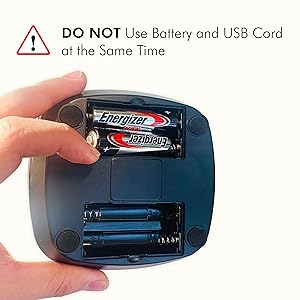
The S SOLER SNYZO Phone Swing is a premium, quiet phone rocker designed to automatically simulate walking by shaking smartphones up to 6.7 inches, compatible with popular pedometer apps like GoogleFit and Pokemon Go Adventure Sync. Powered by USB or 4 AA batteries, it can generate approximately 7,500 steps per hour, helping users earn rewards without leaving their desk or couch. Its skidproof base and noise-minimizing design make it discreet and stable, backed by a 30-day satisfaction guarantee and dedicated customer support.



| ASIN | B086H4L964 |
| Best Sellers Rank | #20,464 in Mobile Phones & Communication Products ( See Top 100 in Mobile Phones & Communication Products ) #333 in Cell Phone Stands |
| Item model number | Soler-1 |
| Manufacturer | Soler |
| Product Dimensions | 10.16 x 10.16 x 17.78 cm; 259 g |
D**E
I've had my "swing," as I call it, for nearly a year now, and use it just about every night. I've had a few issues but have resolved them either by myself or with the help of Terry at SolerShaker's customer service. TIP 1: Take the case off your phone. The swing works best with a light load, I've found. For instance, it works better with my old Samsung Galaxy S7 than my mom's newer, bigger, and heavier A51. That's not to say it doesn't work with the A51, it does, but the swing needs more power to propel the heavier phone, meaning fresh batteries or a new cord. If the swing doesn't want to work with your phone or makes a ticking/clicking sound as it passes over the magnet, lighten the load and give it more power. (Never use batteries and cord simultaneously, though!) TIP 2: If you set the swing on a soft, flat surface, like carpet or a rug, or perhaps a towel on a table or countertop, it'll hold steady while it swings. I've never been able to put it on a hard surface, it scoots around and wobbles as if the base isn't heavy enough to hold it still under the phone's weight, but it works perfectly on the carpeted floor next to my bed. Another issue I've experienced is the original white cord got worn out and faulty. I never kinked it or folded it or anything, yet the wire casing tore and exposed the wires. It stopped working as efficiently and eventually got very, very hot when plugged in and smelled like it was burning. STOP use if you experience that as well! I switched to using batteries, but it needs 4 AAs and lasts about 3 weeks; I can't afford to go through that many batteries that quickly. I contacted the seller and asked if it was possible to get just a new cord, and an agent named Terry responded in under an hour--in the middle of the night, no less. He sent me not one new cord, but TWO, as well as a new base, I assume in case the new cords weren't compatible with the base I had, since the new cords were slightly different than the original. But the best part--he didn't charge me a cent, not for the items, not for shipping. He also followed up and made sure the cords had worked without any issues. It's not a perfect or even high-quality product, but customer service like that makes up for it!!! If I had one recommendation for SolerShaker, it would be to make the arms attached to the base, or at least the rubber bits, glow in the dark. I tend to turn out the lights and read on my phone until I'm drowsy, but when you're going from looking into the light of your phone to the pitch black next to the bed (I don't have a nightstand or lamp), it's hard to see where the black swing is, even after your eyes adjust.
P**D
Macht was es soll
J**.
Las piezas venian gastadas y rayadas, parece que ya fue usado por un buen tiempo.
M**W
Works well. Used it for Pokemon Go. Records between 5-10km/hour of use. Holds my Pixel 6 phone even with the case on. Does have to be powered via USB. Very little noise (I was able to sleep beside it while it was being used without it waking me up). However, can't attach a power charging cable to the phone while it is being used as it throws off the swing of the rocker.
C**G
Working As Expected. Easy to Setup, looks like it works by having an electronic magnet in the base and the bottom of the phone holder to ensure it constantly swings For Android Users (Most likely works the same way for IOS too): - Download Google Fit - Link Google Account to Poke Go / Ensure Adventure Sync is on / Sign into Google Fit with Google Account / Force Close Poke Go - To ensure you're getting distance, start an activity on the App (Treadmill Walking) you'll see the KMs add up including the steps - Relog into Poke Go the KMs will sync the KMs
Trustpilot
3 days ago
1 month ago



