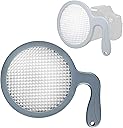
This is a preliminary review of the JJC white balance filter. I will also offer a basic comparison with the Expodisc (version 1 aluminum). The JJC is very large and according to the packaging, can handle up to a 100mm lens. The product does seem a little flimsy and I'm not sure of the long term durability, but I am hopeful that it will last if I do not abuse it. Compared to the expo disc it is very flexible, but as long as it holds up, that's OK with me because of the lower price point of the JJC. I also notice that the JJC has the prism type material on both sides versus the expo disc having the prism material only on the outside and a smooth translucent white material on the inside. As far as performance goes, the JJC seems to get the job done. Based on preliminary comparison testing(my Expodisc came in today from ebay), the JJC delivers accurate results, although see below for more on accuracy. One caveat with these types of filters: using these things with consistent results seems to be an art in itself. Some situation are relatively simple, while others are trickier. Doing research online should be of much help. Documentation with the JJC is sparse while the Expodisc has a nice booklet guiding me through the difficulties we will encounter under the practically infinite lighting conditions in our world. Now as to the performance differences with the Expodisc, which I assume many are interested in because of it's popularity: The JJC appears a little warmer than the neutral Expo(without blue warming gel), but a little cooler than the ver. 1 Expo with the provided blue warming gel. As for dead on accuracy, I can't say for sure which one is more so, but I present this as a comparison at this time. For those wanting Accuracy(presumably what these products are about)this is important and when/if I get a better handle on this important metric, I will update this review. These discs may not always be necessary, but there are times when auto white balance will be fooled. That's when you pull this out. However, I also think it's a good idea to get used to "eyeballing" the color temp so we are better able to "dial in" the temp using our own trained color perception to provide the image we want, whether that's dead on accuracy, a little warm or a little cool. This can be done through Kelvin or WB fine tuning as often the presets are not what we want or need. In case anyone's interested, if you can find a CTB filter light enough (1/8 or lighter), you should be able to attach it to the JJC and turn it into a warming WB filter as Expoimaging has done with their product. Conversely, If you can find a light enough CTO filter, you can cool the image. As already stated if my long term experience/results differ, I will update this review. All in all, for the price, this is a good buy, particularly for someone who wants to try it or experiment without the investment of an Expo disc. Edit September 2015: As for comparing the JJC with the Expodisc, I spoke to an Expodisc rep and she told me the warming model I have is calibrated for use with the warming gel, but not calibrated with the gel removed. In other words, taking the gel out doesn't necessarily give a neutral result. It may or may not. It seems like a small point, but I add it for sake of accuracy and clarity. On the use of these types of white balance tools in general: Back in January 2015, though not hired, I took shots at my wife's nephews wedding shower (yes men were invited). I did not have this tool at the time and ran into mixed tungsten lighting and left it on AWB. I normally shoot JPEG and found WB correction really tough and wasn't completely happy with the results, although the nephew and everybody else seemed to love the results. Going forward to March 2015, I had my WB tools and found florescent lighting at the wedding. I decided to go with the Expodisc because of the warming gel. I couldn't have been happier with the results! Beautiful and consistent JPEGs throughout! I shared them through Photobucket and he was very appreciative and happy. Recently I got a call from the nephew. He told me he was disappointed with the shots from the pro that he hired (she used digital and film Nikons and took 5 months to get the finished photos to him) and asked if I would mail a DVD to him with the full size files that I took. Needless to say, that was a very rewarding feeling. I tell this story because whether you use JJC or Expodisc, it really does work. Especially if you shoot or want to shoot JPEG. If I was going to use the JJC for people shots, I would experiment with a warming gel to warm up the image a bit, since so many people will prefer this. Then you would have more options. One more thing: I have been looking for a simple yet effective post processing tool. I have not yet climbed the sharp learning curve with Photoshop, etc. because I really don't want to spend even more time in front of my computer. For the wedding shots I used Athentech Perfectly Clear with excellent results. Many of the shots look nothing short of glamour shots! They make plugins and are also working on a standalone version currently in Beta stage.