
DOWNLOAD THE APP


Customer Services
Copyright © 2025 Desertcart Holdings Limited
DOWNLOAD THE APP

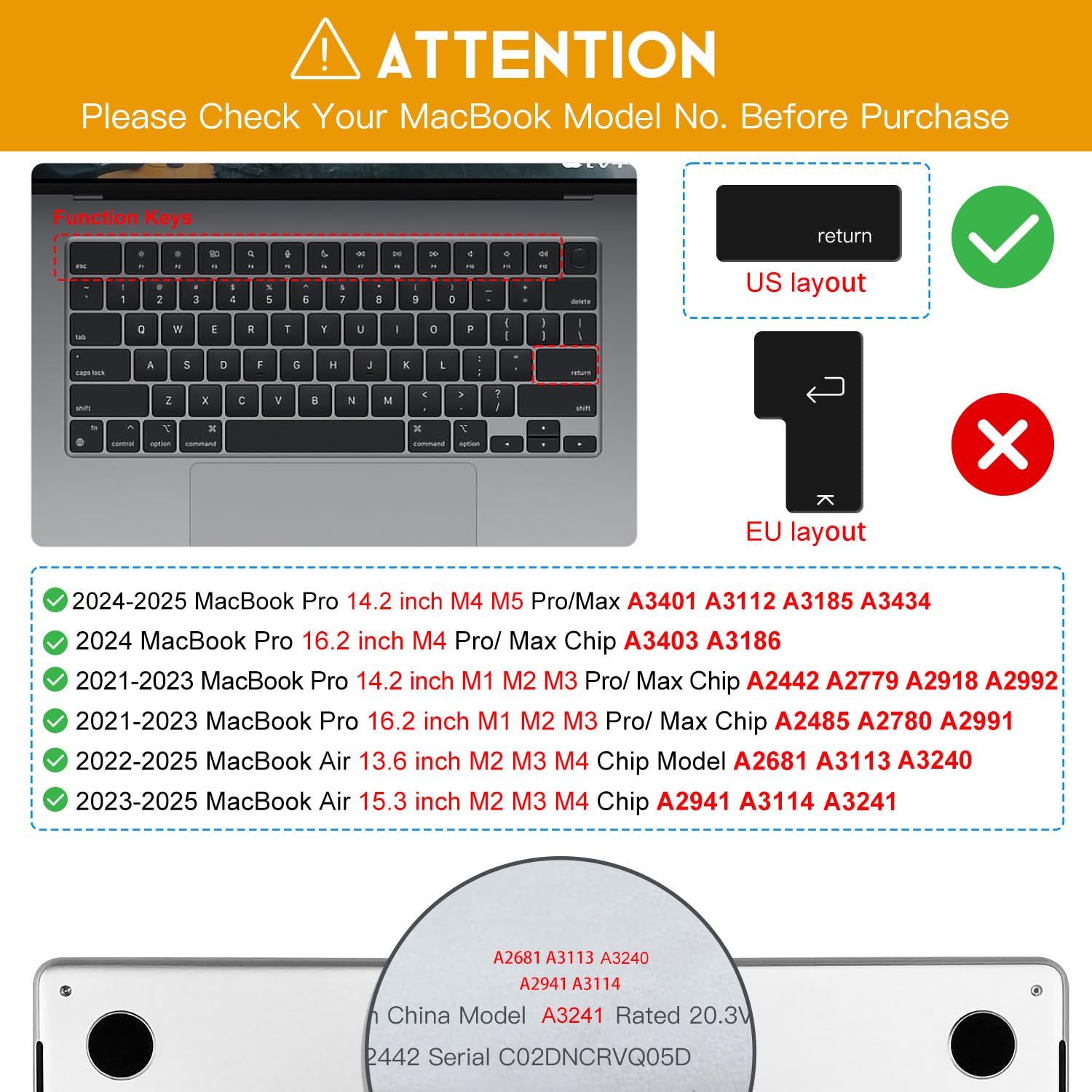


🖥️ Protect your MacBook’s soul with invisible armor — because your keyboard deserves VIP treatment.
This premium keyboard cover is a precision-engineered, ultra-thin (0.12mm) TPU protector designed exclusively for 2021-2025 MacBook Air and Pro models (13.6" to 16"), including M1 through M5 chips. It offers crystal-clear transparency to preserve your MacBook’s aesthetic and backlit keys, reduces typing noise, and is washable and reusable for sustainable, long-lasting protection. Its non-slip, flexible material ensures a perfect fit without interfering with typing, making it an essential accessory for professionals who demand both style and durability.


| ASIN | B09PNRSSTK |
| Best Sellers Rank | #5 in Computer Keyboard Skins |
| Brand | CaseBuy |
| Color | Clear |
| Customer Reviews | 4.3 4.3 out of 5 stars (4,525) |
| Date First Available | January 4, 2022 |
| Item Dimensions LxWxH | 11.02 x 4.53 x 0.2 inches |
| Item Weight | 1.76 ounces |
| Item model number | MacBook Pro 14" 16" A2442 A2485 A2681 |
| Manufacturer | CaseBuy |
| Product Dimensions | 11.02 x 4.53 x 0.2 inches |
| Series | MacBook Pro 13" M2 A2681 MacBook Pro 14" & 16" A2442 A2485 |
| Standing screen display size | 15 Inches |
W**E
fits perfectly, nice feel, black cover is gorgeous
The black CaseBuy keyboard cover fits perfectly on the MacBook Air 2022 M2: it lays perfectly flat and stays firmly in place without any sideways or up and down movement. At least on the midnight blue MacBook Air is absolutely gorgeous since the letters and symbols are printed on the cover itself, so you don’t have to look through a semi-transparent cover at the keyboard itself, which usually results in the characters looking slightly hazy or blurred. When you remove the cover from the packaging you may be struck by how impressively heavy it is. (The weight (13g) isn’t enough to make your MacBook Air feel noticeably heavier.) The silica gel material has a soft and slightly grippy feel that I prefer to the hard, smooth plastic of the MacBook Air keyboard. The product information says that it reduces keyboard noise. The cover does slightly dampen or dull the sound of the MacBook Air 2002 M2 keyboard, but the difference is pretty small and the original keyboard is already fairly quiet. The trade-off on using this cover (and similar covers) is that you need to push the keys a little harder when you type. I did some experiments by lifting up the right half of the cover and alternately tapping keys on the covered and uncovered side. A light tap that was sufficient to activate a key on the uncovered side was insufficient to activate a key on the covered side. This difference in force required is very noticeable at first: I noticed that I need to hit the keys harder and occasionally didn’t hit a key hard enough to activate it. But you quickly get used to the need for greater pressure and only issue is whether it reduces your typing speed or, if you have an orthopedic issue, causes more strain to your hands and wrists. Here are my recommendations based on decades of using different keyboards and keyboard covers and coming from a perspective of being obsessive about keeping my MacBook Pro looking pristine and being very sensitive to keyboard pressure due to wrist and hand orthopedic issues: 1. If you do a huge amount of typing and have a light touch and type at a desk: get an external keyboard (including the Apple Magic keyboard) that has a lighter touch than the MacBook Air’s keyboard and also allows you to elevate the MacBook Air on a stand for better ergonomics. 2. If you have orthopedic issues, try the fairly decent Apple Dictation which is fairly accurate for most dictation but doesn’t allow voice corrections and lacks many of the features of Nuance’s Dragon Dictation, which is no longer available for MacOS (except in a web browser application) and is quite expensive. 3. If you’re worried about spilling liquids on your keyboard or leave your Mac open for many hours each day and are worried about getting dust on it, the cover is a no-brainer. You can always remove the cover temporarily during bouts of intense typing. (The cover is very easy to remove and reinstall and it seems robust enough that doing so shouldn’t tear it.) Also, if your keys tend to show fingerprints and you don’t like that, a cover is a good solution. 4. My solution is to leave the cover on most of the time but remove it occasionally for intense bouts of typing or, even better, type at a desk with an Apple Magic Keyboard or use the Dictation app. In terms of keyboard wear, here’s my experience: I used a different cover on a MacBook Pro for five years and, when I removed the cover to trade-in the MacBook Pro, the keyboard looked like it was brand new. (Of course, if the keyboard is aways covered it doesn’t really matter how it looks and I don’t think the condition of the keyboard affects trade-in value.) When I traded in my previous MacBook Air M1 after 2-3 years of use, the keyboard also looked new even though I didn’t use a keyboard cover. I didn’t use either computer that intensively since I tend to do most of my work on an iPad Pro with an older version of the Apple Keyboard Folio that has a keyboard with a softer touch but the characters on the keyboard wear off. Bottom line: I love this keyboard cover and would buy it again without hesitation. It fits perfectly and looks almost as nice as a “naked” keyboard (and better than the semi-transparent keyboard cover I used previously). I wish it didn’t increase the pressure needed to activate the keys, but that’s an issue with all keyboard covers I’ve tried and I think it’s a matter of chemistry and physics rather than a problem with this particular cover.
M**N
Fits great and doesn't slide!
This is an awesome keyboard cover! I tried one by ghost cover, and not only did it seem to not lie flat on the key board, it also moved around a ton. This one has a stickier silicone back side that does not allow it to move! Plus it's pastel rainbow and super cute!
L**A
Good to protect from liquid spills.
As a frequent traveler, this is a must-have item to protect the keyboard from the Macbook Pro. There's not much space on the tray table of a plane, so if you knock over your orange juice just like what I did, that'll cost you up to $500 in repairs at the APPLE store. Sure, the new keyboards are somewhat spill proof, the keys still may stick. Just place this cover over the keyboard to have more protection. Only gripe: The keyboard protector lifts up at the number keys when writing, but I think I'll get used to it. Also with skin oil etc. the keys need to be frequently cleaned as it just does not look pleasant. With this keyboard protector you can just remove it, clean it with soap water, dry it and then place it back on the keyboard. Seems durable and is fit for its intended purpose. Also should provide good dust protection. -1 star because of the protector lifts up when typing. Other than that: Recommended to buy. It's reasonably priced.
X**7
transparent color to see backlight
Perfectly fits on the keyboard, protects really well, great quality material, after years of use it seems like new, very easy to clean, the transparent color allows see the backlight, recommended
S**O
Satified!
Perfect fit and allows me to see every key on my MacBook Air keyboard! The colored cover darkened some keys, so i couldn't see them. The Clear cover is way bette!
R**R
Good enough
Pretty decent keyboard cover. I like that its thin and protects the keyboard from dust, etc. But, I find it pretty hard to press onto the keys. My finger needs extra work to press them. Not sure if its because im not used to it or its not fitting perfectly or something else. Without it, its not so hard to press. But with it, idk its kinda weird. Time will tell.
A**R
Good fit. No slipping
Fits good. Doesn’t move.
S**L
Product Failure — Don't Waste Your Money
I've been daily using this CaseBuy Keyboard Cover on my recently purchased laptop (interpretation: no previous exposure to skin oils, fingerprints, or wear and tear on keys) since removing my laptop from its box two-and-a-half months ago. Within that short time, the color has either faded or worn away to white; the letters and numbers are either gone or mostly gone; and almost the entire skin is bubbling/poofing up, excluding the far corners. I am constantly having to readjust the skin to fit it back down onto the keys — to mold or adhere at all, much less in proper alignment. I took a chance on this product; my result has been disappointing and annoying at best and downright prohibitive at worst. Don't waste your time, effort, or hard-earned money on this product failure.
R**R
Had one before this which was thin and not silicon. It broke to pieces after a year. Using from 1 month, this seems durable and keyboard backlight is also visible.
J**.
Great keyboard covers that fit perfectly
E**A
This product states that it fits Mac Book 14 pro, but it did not as you can see on the picture. Check your keyboard before and make sure that it aligns. I think that the description should have more details in the future, as I had to return the product.
H**I
I will use a keyboard cover when I have drinks near my Mac. It's harder than I thought to type comfortably with my fingers flying around.
A**A
Si on choisi la bonne taille, il s'adapte très bien au clavier d'origine. Je suis très satisfait et j'en ai acheté un deuxième pour mon autre appareil.
Trustpilot
1 month ago
3 weeks ago