

🚀 Power Your Connected Life with the Ultimate Wi-Fi Freedom
The Linksys WRT3200ACM is a high-performance AC3200 dual-band gigabit router featuring Tri-Stream 160 technology that doubles bandwidth for ultra-fast speeds up to 2.6 Gbps. Equipped with MU-MIMO, it delivers simultaneous high-speed Wi-Fi to multiple devices, perfect for busy smart homes. Open source firmware compatibility allows advanced customization, while beamforming enhances signal strength and coverage. With a user-friendly Smart Wi-Fi app and robust security protocols, it’s engineered for professionals demanding reliable, customizable, and future-proof home networking.


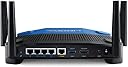


| ASIN | B01JOXW3YE |
| Antenna Location | Gaming |
| Antenna Type | Internal |
| Best Sellers Rank | #8,381 in Computers & Accessories ( See Top 100 in Computers & Accessories ) #297 in Computer Routers |
| Brand | Linksys |
| Built-In Media | Cable, Power Adapter, Quick Install Guide |
| Color | black |
| Compatible Devices | Cell Phones, Computers, Gaming Consoles, Laptops, Tablets |
| Connectivity Technology | Ethernet, Wi-Fi |
| Control Method | App |
| Controller Type | vera |
| Coverage | Large Household |
| Customer Reviews | 4.2 out of 5 stars 3,032 Reviews |
| Data Transfer Rate | 2160 Megabits Per Second |
| Frequency | 2.4 GHz |
| Frequency Band Class | Dual-Band |
| Global Trade Identification Number | 00745883714674 |
| Has Internet Connectivity | Yes |
| Has Security Updates | Yes |
| Is Modem Compatible | Yes |
| Item Dimensions L x W x H | 9.68"L x 2.04"W x 7.63"H |
| Item Type Name | Linksys MU-MIMO Gigabit Wi-Fi Wireless Router (WRT3200ACM) |
| Item Weight | 3.6 Pounds |
| LAN Port Bandwidth | Gigabit Ethernet |
| Manufacturer | Linksys |
| Maximum Upstream Data Transfer Rate | 1300 Megabits Per Second |
| Model Name | WRT3200ACM |
| Model Number | WRT3200ACM |
| Number of Antennas | 4 |
| Number of Ports | 4 |
| Operating System | MacOS (10.X or higher), Windows 7, Windows 8.1 (Works with Windows 10) |
| Other Special Features of the Product | Beamforming, Guest Mode, Parental Control |
| Router Firewall Security Level | True |
| Router Network Type | Wi-Fi |
| Security Protocol | WPA2-PSK |
| Special Feature | Beamforming , Guest Mode , Parental Control |
| UPC | 745883716876 745883714674 |
| Unit Count | 1.0 Count |
| Voltage | 240 Volts |
| Warranty Description | 18 month |
| Wireless Communication Standard | 802.11ac |
| Wireless Compability | 802.11ac |
M**N
WRT 3200ACM A very nice product, setup was very simple
WRT 3200ACM A very nice product, setup was very simple. Overall performance verses my 4 year old WD N900 router is much better; improved signal strength, improved throughput and so far no drop outs. I started getting drop outs on the old router when we exceeded 12 devices, the WRT has run flawlessly with up to 21 devices so far. The unit runs quiet and cool – no fan needed, which is nice since fan noise can be quiet annoying. I manually configured the router (enter 192.168.1.1 into your browser) and used “Smart Setup Tool” to get connected to the internet and do a basic configuration, the setup tool makes this very easy. After that I manually edited a few parameters to “personalize” the network, simplify management and optimize performance as follows: Changed name of the 5GHz network rather than accept the default of “Name of 2.4Ghz” appended with _5Ghz. Edited the guest network names and password and turned it off, I will switch it on if needed. Renamed some of the devices on the network map so that it is obvious which device is which. This make the network map much more useful. Edited the Host Name and Network Name, personal preference. Turned off the ability to manage this router wirelessly via Linksys Smart Wi-Fi (Connectivity – Administration tab) to reduce the chance of a wireless hack. Wireless networking defaults were not optimal for our network so I made the following changes: Set the 2.4 GHz network to 802.11gn. This router does not support 801.11b so I don’t think there is a difference between the mixed setting and the 802.11gn setting. I don’t have any legacy b only devices so this is not a problem. Not supporting 802.11b avoids the 2.4 GHz radio having to do gymnastics to talk to any b devices this helps 2.4 GHz throughput and avoids the slight decrease in n or g throughput that results from a mixed (with b) setting. I thought about using n only but since g and n can play together (the overhead associated with sending a legacy preamble before the HT preamble is small and g devices can interpret the n preamble) I left g available. I left the channel width setting on auto and it selected 40 MHz i.e., twice the width and double the data rate of the legacy channels. Set the 5 GHz network to ac only to allow optimum 5 GHz performance, I left the channel width setting on auto and it selected 80 MHz i.e., four times the width and four times the data rate of the legacy channels. I am not quite sure what they mean in the advertising info with regard to 160 MHz channel width since this device only has 4 antennas and 6 are needed to get 160 MHz bandwidth. I left the channel selection on auto for both networks. Restricting the router protocols has some potential disadvantages: 1. Legacy devices that are restricted to 2.4 GHz b and/or 5 GHz a and n only will not be able to connect, so if you have older devices this might be a problem. 2. If there are devices running 2.4 GHz b and 5 GHz a and n nearby they might interfere with your network and your network router might interfere with them. I am too far away from my neighbors for this to be a problem but if your neighbors are close you should probably use mixed mode. Given that the 802.11g protocol was released in 2003 and that manufactures built 802.11g chipsets before 2003 I doubt that many people have many 802.11b devices only. I would like to know if there is a difference between the between the 2.4 GHz mixed setting and the 2.4 GHz 802.11gn setting. Does the router listen for 802.11b signals and back off to allow legacy transmission to a legacy router when 2.4 GHz mixed is selected? I called tech support but the person I spoke too did not seem to know what I was talking about. Some users have reported signal strength gains, I measured the signal strength (using a Wi-Fi Analyzer on my phone) before and after installing the new router (in the same location). On the 2.4Ghz band the signal strength increased by an average of 3dB (double the power) running g and n protocols. This is not a huge improvement but will help in areas with marginal signal strength that are prone to signal drop outs. The increase in signal strength on 2.4Ghz varied from -1dB to 8dB, in looking at the results it looks like beam forming is working and increasing the signal strength in the areas with 2.4Ghz devices with up to an 8dB increase and an average of 4.5dB. On the 5 GHz band the signal strength increased by an average of 16dB (40 times the power) running mixed mode. This made some previously unreachable (for 5G Hz) areas of the house usable for Wi-Fi and is a great gain in signal strength. The 5 GHz radio designs have probably got a lot better in the last few years and this result alone is a good reason to buy this router. The increase in signal strength varied from 11dB to 20dB and did not seem to be affected by beam forming (possibly due to the fact that phone that I used to take the measurements was on the 5 GHz Wi-Fi network when I took the measurements). It is a good idea to back up your router configuration (Troubleshooting – Diagnostics tab) to allow a quick restore in the event you have to reset your router. The Troubleshooting Status report pages are very nice to have. It would be nice if you could search the router help information embedded on the router. The user guide does not cover as much as the help information on the router and he use of screen shots in the manual limit your ability to search (e.g., you cannot find Backup or Restore by searching the user manual). I am very happy with this product.
S**N
Certifiably Rock Solid!
I bought this back in 2017 with the intent of upgrading a then-10-year-old Linksys WRT54G router that had served with honor and distinction through many LAN parties, firmware flashes, and general abuse. As expected, the WRT3200ACM has been the rock-solid basis of my home network ever since its first power-on event. I have only upgraded the firmware once, and that was with the stock firmware from Linksys. No OpenWRT or third-party firmware, although I vehemently support using third-party firmware. My 54G had dd-wrt on it and I loved it! When I bought the 3200 new, it was not even on the list of supported routers! Now that it is? Meh... Ain't broke, don't mess with it. The range is great! I can be in my garage about 100 feet away (no obstructions but 1 thin wall) with nearly full signal. It makes playing my wifi radio in the garage so nice! The part that makes me so happy is the amount of wired and wireless objects I can have running on the same home network. My place is chock-full of wifi stuff: wireless lighting (maybe 20 bulbs now?), a couple of Samsung TVs, two wifi radios, several phones, some Alexa units, my girlfriend's tablet, a pair of home theater PCs, and a CPAP machine, all getting along with no conflicts. That's not even counting the wired PC and printers and other various bits of equipment being wired in through a managed HP 16-port network switch. I know it says 32 wireless things is the limit, but everything is still working just fine. For now. :)
T**N
I don't know whether my new Linksys router will hold up as well as my last one but so far I like it a lot.
I've waited a little over a month to review this product. As you can see it has so far "met my expectations". I've been using a Linksys WRT54GS Wireless-G Broadband Router for over 11 years and hope the Linksys WRT AC3200 Open Source Dual-Band Gigabit Smart Wireless Router serves me as well. I made the change because we've accumulated a bunch of devices connecting to the Internet through the router and felt a more up-to-date router might move data better. Also upgrading meant adding a frequency (5meg) so I was looking to improve speed that way. The installation went pretty well. After the initial part of the setup I was able to change the network SSID and password to my original router information so that saved me re-connecting each 2.4meg device (which for us was about a dozen devices-3 Roku's, 2 Kindles, 1 smart phone, 1 iPad, 1 iPod, 2 wireless printers, 1 network laser). All but the network laser printer took off immediately. My old network cable needed to be replaced by the cable that came with the new router to fix that problem. The 5meg frequency seems to reach anywhere in our home where we use laptops so they were connected to that network. Our DSL Internet service is adequate but not super fast (10 meg) but the system seems adequate even when the visiting kids make their VPN connections to work. The router runs quite cool considering it doesn't have a fan. Windows 10 seems to have Network Discovery hang-ups yet but that can be corrected by plugging in a USB memory stick. I tried it first with a spare memory stick which has subsequently been replaced with a faster, bigger capacity version formatted for NTFS which allows for some of my bigger files (video and data). The plus for plugging the memory stick in the back of the router is that it serves as a media server and you can play your music, video's and photos on a smart TV. I won't know whether my new Linksys router will last for a while but so far I like it a lot.
O**S
In response to op "Horrible Firmware - Don't buy!"
I really have to disagree with the OP stating horrible firmware. Although (s)he lays out very specific issues that were found, I really have to wonder if (s)he is as knowledgeable as is being conveyed in the post or if the problem is with the the actual router. It may also be that the OP is using the open source software to control everything - I currently do NOT have the need for the open source programs. Like the OP, I too have had this router for about 2 1/2 - 3 years and have NOT had any of the issues that the OP states. I am using an smb drive that has been formatted ntfs (the router ONLY recognizes NTFS, FAT AND HPS+ - NOT ExFAT - this IS documented in the manual). As far as security, the OP is in error that ONLY Admin has rw privileges. When you set up the share, you set up the user name, password and access (r or rw[d]). You can share the entire drive or individual folders - not sure how many folders, but a logical guess would be 256. I've had at least 4 firmware updates since I purchased this unit so unless the op flashed the firmware with an open source version I really can't understand why his router isn't updating. Finally, I believe the op mentioned that the unit was incapable if keeping assigned names, non-browser items e.g., printers, scanners etc and constantly looking at internal ip's. I have numerous "named" items that have a dedicated IP address assigned (by MAC address) and they have NOT changed nor reassigned to a different device. Maybe the op isn't assigning a static ip via MAC filter which might cause this kind of error - dynamic ip addressing could give the same device a different ip each time it assigns ip's which in turn could screw up names assigned to a specific ip. Non browser related issues, again I have not experienced this issue and I currently have several different printers, scanners etc that have dynamically assigned "static" ip's that do NOT & did Not use a browser to get setup - just assigned a dynamically assigned "static" address. Last, but certainly not least, the op stated that the router ONLY used its internal linksys dns server and constantly pinged all the attached addresses. Once again, I have NOT experienced this issue. I use OpenDNS for my dns server and the router really doesn't care - maybe the op didn't setup his dns server correctly or possibly didn't point the router to the correct STATIC address of the dns server. This "Could" possibly cause the router to be seeking a dns server on anything attached to the intranet e.g., pinging every internal ip constantly looking for a dns server and when not found resorts to a "known" dns server hard coded by linksys. The Only "possible" issue I've had with this router is the inability of Android file manager to find the smb share. No problem with Win or Mac items and I just found this issue late last night from a friend that uses an android phone. To be fair though, I really haven't had a chance to really troubleshoot the issue yet, quick search on Google regarding androids and smb on this router didn't result in any results. This is a great, rock solid router that has over performed in every area I've put it in to. It will reboot if it gets confused but in my application this has only happened 2-3 times since it was put in service (2.5 - 3 years ago). Oh, and I almost forgot, I've spoken to the linky support folks a couple of times - prior to COVID - and never had an issue and typically was on hold less than 15 mins (again, this WAS pre-Covid so it may well have changed since Covid). I have to recommend this unit if you A) are NOT needing a mesh system B) are NOT planning on using Open Source programs with this device - I really believe it would still work fine with the open source, but I have NOT tested this theory C) have researched known issues (or work arounds) with Android and smb drive D) want a corporate grade gig router with mu-mimo wifi - with the typical corporate issues regarding user friendliness during setup (unless you can deal with basic "default" settings)! Hope this helps!
K**F
Limited Options & Unreliable
The specs look good on paper, but I've used routers at a fraction of the price with so much more functionality. You can't set the router up without the web driven wizard (AFIAK). The darn thing keeps on asking you to create a cloud account with Linksys so you can administer the router remotely, although with severe limitations. While I haven't had any connectivity issues, I was expecting a lot more functionality for a device so expensive. This is by far the most expensive wireless router and least functional I've ever used. Flashing it to something stable and open source is still a pipe dream in late 2017. What you DO get for the high price: * An Internet speed test that requires Flash. Yes, that technology that even Adobe has told people to stop using years before this product was developed. Most people won't even get this to work unless they're using something from the Windows XP era. * "Parental controls", ie. block Internet from specific devices on a schedule time * Media prioritization, per device, port range, or a tiny list of 22 pre-populated games * Guest access ... yay. * A "network map", ie. a circle with the router in the middle and devices on the outside, where you can conveniently shut off Internet to these devices, set a static IP, or view the name, manufacturer, model, and OS based primarily on the hostname of the device and not the MAC address. Name an Android device "iPhone" and the router thinks it's an iPhone... * Dynamic DNS, but only for Dyn.com and NO-IP.com * A ton of external antennas, which is actually good * USB printer and internal Samba support to a connected drive * Apparently fast speeds and longer range over WiFi, even though the speeds will primarily be noticed with internal traffic Here's what you DON'T get for the high price: * SSH access * Bandwidth monitoring (it's hidden in the network map and doesn't actually appear to work at all) * Real-time graphs of anything * Syslog forwarding * Traffic shaping outside of media prioritization * SNMP * Internet accessible filesharing * Ability to actually block individual websites * And above all, you don't actually get stable DD-WRT support. It's December 2017 and I'm still waiting for a stable open source release. If you're looking for a router with true open source compatibility, come back to this device in late 2018 and it may be a viable option. The manufacturer just kinda threw this device to the world without actually supporting the open source aspect. They're relying on people's unpaid generosity to hack this and make other distros work on it. In a nutshell, nice hardware, but terrible user experience for someone who likes options. It's probably decent for someone with little technical knowhow, but even the layman should be disappointed by the lack of niceties like bandwidth monitoring and blacklisting. I'd give it more stars if it was one-third of the price. It's just too expensive and it hasn't gotten any cheaper from when I bought it in 2016. The value just isn't there for me. UPDATE #1: 8.5 months later and now my router is dropping all Wi-Fi connections until I do a hard reset of it. This has been happening about once an hour for the past few days now. Factory resetting and rolling back the firmware isn't helping. This is by far the most expensive and worst router I have ever owned. I've had Linksys routers just stop working in the past, but they usually lasted a few years at least. This really sucks for me because I'm 100% remote and rely on this stupid thing for me to make a living. Now I'll have to be hardwired to my Internet bridge until my non-Linksys router comes in to replace it. I had a wireless Internet company come out and hook me up last week. My speed was uncapped for a day at 175Mbps, verified by direct connecting my laptop to the wireless bridge. Then when I hooked up this router, it dropped down to 90Mbps on 802.11n and 110Mps on 802.11ac. Even hardwired to the router, I was only pulling in 110Mbps! This just goes to show that high prices don't mean higher quality with Linksys. I've never been so disappointed in a product before. This is the last Linksys product I'll ever buy. UPDATE #2: I went to Best Buy and bought a TP-Link - Archer AC1900 Dual-Band Wi-Fi Router. About eighty bucks less, very dated firmware, but a LOT more options. You can even throttle speeds per MAC address, which is pretty great, and it has SNMP support. From what I recall, I believe the Linksys tech alluded to the model having an overheating issue. They sent me a E8400 to replace this router, a few weeks after I already went out and bought the TP-Link (I had to work, after all). To sum up the replacement router, the interface is the same, except there's no built-in VPN server and no MU-MIMO. It also has no DD-WRT support whatsoever, which is why I bought the original router. I hooked up a USB drive to it to share files today, and I found that the internet completely drops for all devices when anyone is transferring files via FTP. For my money, the much cheaper TP-Link was well worth it, even though the latest firmware was from a year before I purchased it. It performs as well as either Linksys router and has a lot more features. It's kind of like a Linksys router from 10+ years ago, when the routers were a decent deal and were full of sensible options.
A**R
Solved problems with firmware....Indefinite "waiting" and "2118" errors, when it allows a log in...
Problems right from the start. Non-stop 2118 errors, when logged into 192.168.1.1, while trying to click on ANY of the options to manually config. If I don't get the 2118 error, it'll show a blank screen, or "waiting" indefinitely. Have to hard reset router regularly just to get it to work for a few minutes for a manual log-in. But, router won't save any settings or it gets stuck on the blank screen "waiting" forever. Youtube videos show others can click on an option and it comes up in a second or two but mine won't. Another error is that router keeps stating that internet is down, yet I can surf from another browser window or tab, like for this review. I've tried several different laptops, desktops, browsers, and operating systems, and 'no joy' with any plugged into this router, and even created a non-needed useless linksys login identity which just won't 'link' to this router either. I will RMA this failed unit and hope that the replacement works. If the replacement works, I will update this review accordingly. UPDATE: Well, Amazon over-nighted a replacement router. Same problems. When using ANY browser(IE, Firefox, Chrome), Windows 7,8,10(and even XP) with the antivirus and any/all security settings turned off, I just can't make ANY changes to the router from its browser log in. That's 2 routers in a row that can't be adjusted using a simple browser log in. Besides regular 2118 errors and indefinite "waiting", the new router also has 2117 errors. BTW, you can manually download the latest firmware. FW_WRT3200ACM_1.0.6.181063_prod is available for download and my routers shipped with 1.0.5.175944 which didn't not allow browser settings changes. If you can't log into router, you can't update it. The automatic firmware update(via Android phone app) doesn't see the latest firmware that you can manual download to a PC. Auto update(via Android app) says no new firmware is available even though the downloadable, from the Linksys website, firmware is newer than what the router is equipped with. Additional update and review, after battling with router #2 for a couple days, I decided to do another reset and just leave it alone. After a few hours, using the Linksys cellphone app, it finally was able to update itself with the previous mentioned firmware update. I would guess that the LInksys support made that happen. That did the trick and after a reboot, router is now responding to my browsers. I was able to config/save my settings and now the wireless network is working just fine. I don't want "email" log in, Linksys membership smart-wifi log in, or auto-anything-easy-quick config by default. Loses 1 star because firmware updates took a while to go from website to router's auto-update. Loses another star because router browser settings uses stupid silly "pop-up's" instead of normal browser pages like older routers. Pop-up script can easily be blocked by a pop-up blocker or script stopper(that is, a browser with some security settings). Pop-up's can also be stopped by aggressive antivirus-settings, browser ad-blockers,...... The engineer that wanted that should be fired. In the end, this router goes from 1 start to 3 stars. I don't want a "cool" router with apps and silly config page pop-ups. I want a usable router that I can manually set up quickly, update as needed, and then put to work! Linksys, get rid of the pop-up's when clicking on ANYTHING when accessing the router's menus. What was Linksys thinking? Every browser pretty much has a pop-up killer now. Update 12/22/2018: With the latest firmware and selective router manual configurations, router has served well until drowning during hurricane Michael. I'd wager most negatives reviews are caused by either older firmware, or not choosing the proper wireless options for your network. Since it ran nonstop since the firmware update without issues, I've bumped up the rating to 5 stars. If you buy this router, learn how to log into it(no quick setups or phone ap's), and go thru each step by step option. Eliminating "B" and "G" wireless using only "N" or "A/C".... is good start, setting priorities and specific options in your phones, laptops, TV, bluray, audio receiver..... can make your WIFI super fast, well managed, and safe. I replaced my flooded WRT AC3200 with the Gaming Router WRT32X(seriously lacking options and overly dumbed downed user interface). It too works great but I prefer the config/options of the non-gaming router. And, for better reception/distance, Linksys offers high gain antennas which are about twice as tall, and provides exceptional capability an acre away in my work shed. Current Firmware for the WRT AC3200ACM is 1.0.6.186168, released in January of 2018. If the router doesn't automatically update to this firmware, do a manual update.
S**L
The Sexiest, most Classic Router on the Market
I'm a sucker not only for performance, but also looks. Back when I got my first router, it was a Linksys WRT. The classic black & blue ones. I was absolutely driven to this one first by the looks which were a more modern version of their first models. The specs are also fantastic!! Since I've installed this router, I've had absolutely no problems with WiFi around the house, at all. 5GHz and 2.4GHz bands work very well together. The router was easy as cutting in to pie to setup. The mobile app kind of sucks though.. but I won't grade the router on something like that. I tried installing DD-WRT firmware on this router and it was very easy and supportive. I highly recommend this router to anyone who wants something that functions very well, looks very nice, and works with open sourced firmware. In the right hands, this router can be a very powerful asset for any home or business. I've owned it for a month now and have not had a single problem. Not a single reboot needed. Cons? I can't think of any! This router truly has everything any residential and even business person would need. I will however gripe about how you can't block a website to every device at once. You instead must block it to each device individually, to my understandings. But open sourced firmware like DD-WRT will have you covered there. One other con I suppose, there's no bandwidth meter that truly works on this router. Pros: - Looks amazing. Feels amazing. - Works very well. Runs without making a sound. - 5GHz & 2.4GHz bands for home & another set for Guest usage. - Very fast internet speeds. - Can work as a homegroup when a USB or eSATA HDD is connected. - Easy to set up. - Open Source Friendly (DD-WRT, etc). can have two firmwares installed at the same time (one active at a time) with its two separate partitions. - 4 powerful antennas which can be removed and replaced if necessary. - Handles multiple devices & 4K streaming without a problem at all. Great ping in games! - Future-proof with 1Gbps speeds & bandwidth handling across antennas. - Guest Networks & WPS (very unsecure) can be disabled. - Can be used with OpenVPN! Cons (kinda milking it here just to be fair. The router truly is great): - No menu for monitoring bandwidth usage or other fun statistics. - No easy way to block websites for all devices. Only each device individually. - Mobile app really lacks features & web interface does not allow usage in mobile browsers. - FTP feature seems not to allow individual FTP accounts to specified folders. - Almost no updates from Linksys in years. - Interface is difficult with assigning dedicated DHCP IPs to devices. Very picky with validating the IP, even when the specified IP would work perfectly.
T**.
Works for ExpressVPN, WiFi unstable
I bought this solely to use as a VPN router. NOTE: I am using ExpressVPN's custom firmware so your mileage may vary. I will try to keep the review of the hardware separate from the firmware. When it's working, this is great and does exactly what I need. The signal reaches every part of my house (3 stories) and even the (small) yard around it. The Ethernet ports are reliable and fast. I will say the router is bigger than it looks online, but that's no problem for me. I actually kind of like it because it makes me feel better about heat dissipation. Now to the review of the ExpressVPN custom firmware. Again, this is not the firmware that comes on the router. By installing the ExpressVPN firmware, you sacrifice some of the more advanced features and customization. For instance, you can't set custom DNS (e.g. for ad blocking). The port forwarding is sketchy sometimes, too; I have a few routers and a simple forward (e.g. port 80) doesn't always take and sometimes even reverts. When this happens, it will simply redirect to your router config (!! from the internet !!). Next issue, the WiFi will at times decide that none of the connected devices should receive internet. Setting daily reboots tends to help with this, but there are still random times when new devices can't connect and old devices drop internet access without any explanation. In addition, even when all is working fine, many smart home devices simply refuse to connect. I had to install a second router just to connect a lot of my devices. With the bad out of the way, I really do enjoy the ability to set VPN groups and even have DDNS auto-update all on the router. The interface is not super feature-rich, but that leads to a very simple and intuitive experience. My favorite is that you can even specify groups for "No VPN" or even "No internet". Overall, I would recommend it for the purpose of an ExpressVPN router, but I can't say how it works with the stock firmware.
Trustpilot
1 week ago
4 days ago