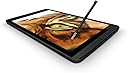
🖋️ Elevate every stroke—where creativity meets precision.
The NVIDIA DirectStylus 2 is a passive stylus optimized for the NVIDIA Shield Tablet, leveraging GPU acceleration to deliver low-latency, pressure-sensitive input. Its uniquely shaped chisel tip enables smooth, natural lines ideal for both artistic creation and professional note-taking, all without batteries or buttons. Compatible with integrated apps like NVIDIA Dabbler and Squid, it transforms your tablet into a powerful digital canvas and productivity tool.


| ASIN | B00LMRKZP0 |
| Are Batteries Included | No |
| Are Batteries Required | No |
| Brand | NVIDIA |
| Compatible Devices | Tablet |
| Customer Reviews | 4.1 out of 5 stars 109 Reviews |
| Item Dimensions | 6 x 1.8 x 0.6 inches |
| Item Weight | 0.05 Pounds |
| Item dimensions L x W x H | 6 x 1.8 x 0.6 inches |
| Manufacturer | NVIDIA CORP |
| Model Number | 930-81761-0100-000 |
| Number of Batteries | 1 Lithium Ion batteries required. |
| UPC | 850438005661 |
B**B
Great Tool for Taking Notes on Nvidia Shield
I started the habit of taking meeting notes in OneNote on my Samsung Note 4 phone. That worked pretty well and I liked having the notes immediately available on my pc. However, I was looking for the same functionality in a bit larger format. I didn't want anything as big and expensive as the big Samsung tablets, or an Ipad or Surface, so after looking around I bought the Nvidia Shield K1 8" tablet. It was just the size I was looking for and I thought the higher screen resolution would be the answer to my note taking search. That's when I discovered what having a "screen digitizer" really means. The Nvidia Shield K1 (and most similarly priced tablets) don't have digitizers. Trying to take notes with the typical rubber tipped stylus on the Nvidia Shield was a huge disappointment and I feared that I had just invested in nice android tablet, but not one for note taking. Without a digitizer, you can only write slowly, usually in large block letter. Certainly not ideal for taking notes during a meeting. Then, I decided to take a chance on the Nvidia Shield DirectStylus 2. Wow, what a difference. This stylus makes writing on the Nvidia Shield tablet a great experience. Now, don't think that this will equal the quality of handwritten notes on a tablet with a screen digitizer, but it comes really close. It is not an "active" pen, there are no buttons or batteries. I don't know why the shape an consistency of the rubber tip should make a difference, but it really does. If you don't need to use your tablet to take handwritten notes, then probably any rubber tipped stylus will work to flip pages and click icons. But if you want to use your Nvidia Shield for note taking, this little tool is well worth the money.

M**I
Active stylus features that impress from a stylus that is GPU-driven
After reading how this stylus works, I knew I wanted to try it. I have not been disappointed. It's a passive stylus that thinks it's an active one. It uses the GPU of the Shield Tablets to bring pressure sensitivity action. It works really well. It is smooth and those looking for stylus functionality will be pleased. The NVIDIA Dabbler app shows off the ability to paint and draw with realistic effects such as watercolor paint bleeding into the fibers of the "paper" as it dries. Some might find this as a gimmick but I like it. Squid is a note taking app also included and again shows off the usefulness of the stylus. Buying through Amazon was a little more expensive than NVIDIA directly but overall I'm satisfied. Give it a try if you are someone who likes to use a stylus.
A**Y
Expensive, but works
This is a pretty expensive little pen but it does work well with my Shield K1. The K1 didn't come with a stylus so I decided to buy this one to use with OneNote to take notes for some classes I needed to take. The technology works well, not as well as Samsung's S-Pen but well enough to get the job done and much much better than using one of those cheap capacitive stylus (styli?). My major gripe with it though is that it is THIN, like the size of a thick USB cable, with my large man-hands I get writer's cramp very quickly. With K1 there's also no place to store the stylus, so losing it is a real possibility. To fix the stylus being too thin, I wrapped the black section paracord 2 layers deep, which helps quite a bit.
A**R
Best pen I've ever used
If you have a shield tablet, you have no reason to avoid getting this. pros: - The input precision feels like using a mouse, it's great for loop drive linux, splashtop, and x86 emulators. - For painting it's just as sensitive to pressure as a drawing tablet that actually links to the pen. - No batteries or bluetooth needed. - Nub is really durable and shouldn't need the pen to be replaced for a long time. - It's very comfortable to hold for it's size. cons: - Nub is not replaceable, eventually, years from purchase, you may need to buy another whole new pen. - Newer versions of the tablet don't have a slot for the pen (unless you wanna do a case mod for it).
L**T
Must-have for drawing, so-so for games
Nice stylus. Allows for some impressive precision and pressure-variation with the Nvidia Shield. If you are drawing or writing on your Shield, this stylus is an amazing must-have. The body is thinner than a pen or pencil and has a square profile that I do not like...you essentially get four different rotational positions in your hand grip. The real value of this stylus is the cool chisel-tip, but it is hard to comfortably hold at just the right angle due to the square profile. Note that this stylus DOES NOT WORK WITH OTHER DEVICES that I have tried (Nexus 5, iPads, iPhones). Also, the stylus does not always register each tap if you are tapping around very quickly, as you may do in a game. For games, I prefer using a generic stylus with the big ball on the end. I lose a little precision, but its better than occasionally losing a tap.
R**T
Stylus with extra insight...
It is specifically designed for the use with the NVIDIA SHIELD tablet, only downfall is that the new SHIELD tablet has no place to hold it within the device. However, if you want an awesome tablet, under $200 for the tablet only, but blows away all other tablets, but it! You will not be disappointed. However, but it with the additional accessories....charger, stylus, controller. It's amazing!
I**S
Does not fit the tablet slot
Does not fit in the HP Stream 7 tablet stylus slot. It also does not connect well on the screen, sometimes requiring several taps before it's recognized by any device using this technology. I have the advice named tablet and several stylus phones in my family. Results are the same with each device. Price is too high for a sporadically working, hit and miss item.
T**S
If you draw or write, it is most-have
Works great. It is not as well supported in the actual apps like the Samsung s-pen, but it works just fine. For drawing and writing I consider it completely necessary. Also note that this isn't just a generic ''fat" stylus that works on any tab. It is designed to work with whatever tech that Nv idea has put into the Shield KI tablet.
Trustpilot
5 days ago
1 month ago