
DOWNLOAD THE APP


Customer Services
Copyright © 2025 Desertcart Holdings Limited
DOWNLOAD THE APP


💡 Light up your life, dim down the hassle — smart control made simple!
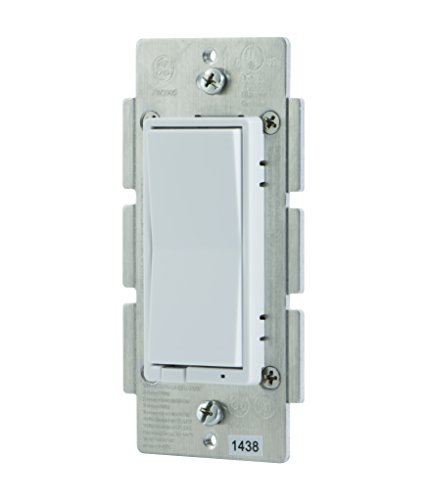
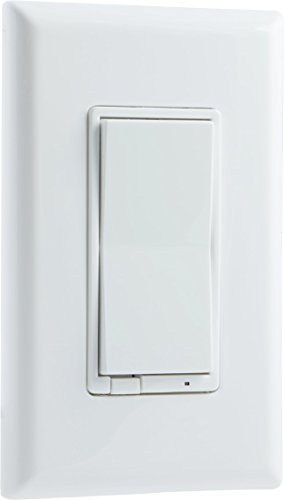
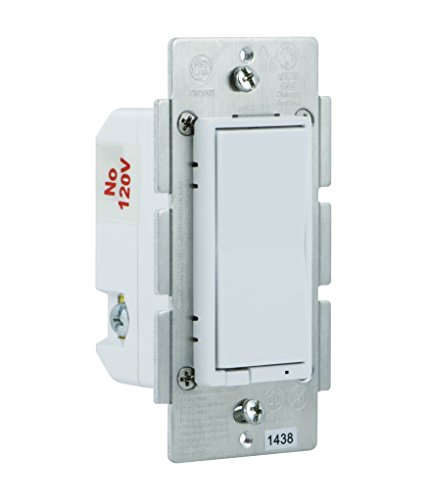
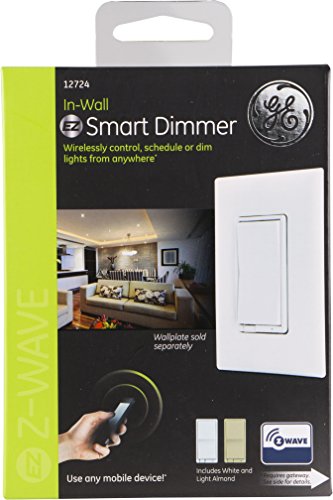
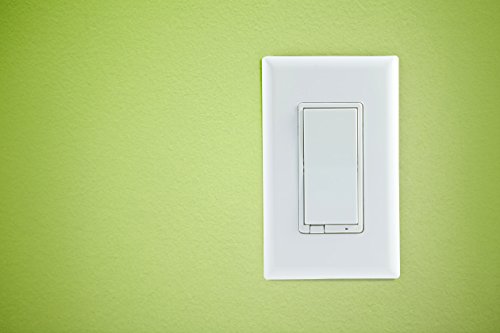
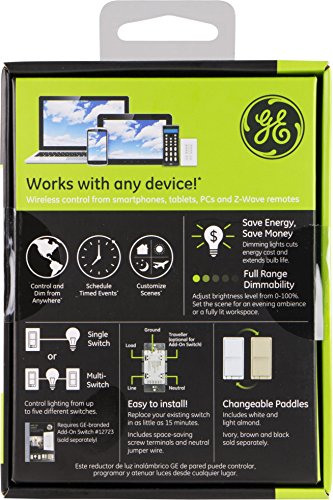
The GE Z-Wave Wireless Smart Lighting Control Dimmer Switch replaces standard in-wall switches to provide wireless, app and voice-controlled lighting with dimming capabilities up to 120 watts. Compatible with major smart home hubs including Amazon Alexa and SmartThings, it features a blue LED locator light and comes with white and almond paddles to match most wall plates. Designed for easy installation with screw terminals, it supports incandescent and LED bulbs, enabling seamless home automation and ambiance customization.
| ASIN | B006LQFHN2 |
| Actuator Type | Rotary |
| Batteries Included? | No |
| Batteries Required? | No |
| Best Sellers Rank | #1,616,175 in Tools & Home Improvement ( See Top 100 in Tools & Home Improvement ) #2,390 in Dimmer Switches |
| Brand | GE |
| Circuit Type | 1-way |
| Color | silver |
| Compatible Devices | iOS_compatible |
| Connectivity Protocol | Z-Wave |
| Connector Type | Screw |
| Contact Material | Copper |
| Contact Type | Normally Open |
| Control Method | Voice |
| Control Type | Remote, Voice |
| Controller Type | Amazon Alexa, SmartThings, Wink, nexia, vera |
| Customer Reviews | 4.0 4.0 out of 5 stars (704) |
| Date First Available | December 13, 2011 |
| Global Trade Identification Number | 00030878127240 |
| Included Components | 12724, Ge Z-Wave Smart Dimmer (In-Wall), Installation Guide, White And Light Almond Paddles |
| International Protection Rating | IP00 |
| Is Discontinued By Manufacturer | No |
| Item Package Quantity | 1 |
| Item Weight | 5.3 ounces |
| Item dimensions L x W x H | 2.37 x 7.27 x 8.21 inches |
| Item model number | 45612 |
| Lower Temperature Rating | 32 Degrees Fahrenheit |
| Manufacturer | Jasco |
| Number of Items | 1 |
| Number of Positions | 2 |
| Operating Voltage | 120 Volts |
| Operation Mode | Off |
| Part Number | 12724 |
| Product Dimensions | 2.37 x 7.27 x 8.21 inches |
| Shape | Square |
| Size | 3-inch x 3.54-inch x 5.5-inch |
| Special Features | 120 watts, LIMITED LIFETIME, Z-Wave Lighting |
| Style | Prev. Gen. Dimmer |
| Terminal | Screw |
| Type of Bulb | LED |
| Unit Count | 1.00 Count |
| Upper Temperature Rating | 104 Degrees Fahrenheit |
| Voltage | 120 Volts |
| Wattage | 500 watts |
J**E
Good start for my home automation.
As Amazon has bundled together all of the reviews for various GE Z-Wave controlled switches, receptacles and dimmers, this review is for the GE Z-Wave Smart Dimmer (In-Wall), 12724. I have a SmartThings hub and wanted to control our living room lights so I bought this switch. One of the big concerns I had was that there are reports of these buzzing. This switch is controlling 4 Cree 65W equivalent BR30 dimmable LED lights and notice no buzzing sound what so ever. Others have reported buzzing but for me even at the lowest setting with my ear on the switch, I hear no buzzing. In the "Customer Questions & Answers" some of the responses state that the buzzing others have experienced could have to do with the load or quality of the connected devices. The switch seems to be good quality. Installing it was pretty simple. You do have to have a neutral wire or the switch will not work. The package contains a small section of white wire to use as a pigtail for this. The package also include an almond color paddle. It doesn't include a wall plate though. After installing it, was able to easily connect it to my SmartThings up by using the mobile app to put it into discovery mode and then clicking the switch either up or down. The connection was immediate with no troubles. Under "Things" in the SmartThings app the switch reports off/ on status, the dimmer level with a slider to control dim level (see picture). There is also a button that allows you to control how the little blue LED light on the switch functions. The options are "Lit When Off" (default), "Lit When On" and "Never Lit". Lit When Off is good for finding the switch a little easier in the dark. Lit When On is good when you're controlling a device that can not be seen from the switch location such as an outside light. And Never On allows you to turn it off all the time if that light is just a bit too bright and annoying to you. All of this is available in the SmartThings mobile app. If you have a different controller, it's going to be different for you. Connecting it to the SmartThings hub allows me give full automation to these lights. I have them set them to turn on to 80% when my wife's cellphone "arrives" home after sunset. I also can remotely control them from anywhere using the SmartThings mobile app. After hooking it up to my SmartThings hub I was able to also connect it to my Amazon Echo through the SmartThings mobile app. Through the Echo and SmartThings you can turn them off, on and set dimmer levels using voice commands. You just say, "Alex, turn living room lights on", "Alexa, set living room lights to 50%". The action happens before the Echo can respond with, "Okay". Using the switch manually, you press and release the top part to turn the switch on and the bottom part to turn them off. Turning them on will dim the up to the last level you had them at and turning them off will dim them down to off. Press and hold the top part of the switch will turn the dim level up and press and hold the bottom to dim them down to the desired level. There is also a little pull out on the bottom to the left of the LED indicator light that turns the switch off all together. Pressing the any part of the switch will do nothing as long as this is pulled out. I really like this switch for it's quality, ease of use and the control it gives me in my home automation plan. I plan on adding GE Z-Wave fan controllers and dimmable switches to all my ceiling fans and I also plan to replace a few more room switches with this switch.
B**D
I'm kind of addicted to these now
Installed this with an add-on switch yesterday. It works so well, I'm trying to pace myself from replacing every switch in the house with z-wave. Installation is a little tricky if you've never messed with swapping out a switch before. The instructions aren't super clear, but if you study them long enough, it eventually makes enough sense. Here's what I had to do: 1.) Turn the light off. Kill the breaker to the switch. 2.) Unscrew the plate and existing switch. Popping the existing wires out of the back of the old switch was the hardest part here. 3.) Pull out the white wires (neutrals) from the back of the box 4.) Unscrew the wire nut off the neutrals. Add in the short neutral wire included in the GE switch box and screw the wire nut back on. 5.) Connect the 4 or 5 wires that are now open to the new switch: line, load, neutral, traveler (only if 3-way config), ground. 6.) Turn breaker on. Check to see you've got a blue LED. 7.) Put your hub in discovery mode. Push the switch once to make it pair. 8.) Turn breaker back off. Screw everything back in and put on a fitting plate. Done! A couple other notes for people who are totally new to this: Line = wire coming from the breaker Load = wire going to the light fixture Traveler = wire that runs between two (or more) switches that allows you to flip the same light on/off from multiple places. Normally red. It can be hard to tell which is which between line/load as both of these are usually black. From my experience, the line wire was almost always connected via wire nut in the back of the box while the load wire was just free by itself. The load wire was also generally closer to the traveler wire. **UPDATE: So I just finished an install of 4 of these in the same gangbox. It was a LOT harder than I expected. Things get immediately more complicated when you're putting in more than 1 of these in the same box. Here's what I ran into: 1.) Each of these switches takes a dedicated ground wire. However, all multi-switch boxes in my house have the ground wire daisy-chained and shared between them. This meant I had to cut the existing ground wire and run separate short ones from a wire nut to each switch. Very annoying. Really wish these things had some way to pass through the ground wire. Almost enough to drop this to 4 stars. 2.) The neutral wire bundle in the back of the box already has 4 in there. That means you can't just cram 4 more neutral wires from these switches into that same wire nut. I had to combine the 4 new neutrals into their own new bundle and then use a short wire that would connect the two wire nut bundles. Also annoying. 3.) Those metal tabs on the sides. The instructions say you "may" need to snap them off when installing multiple switches next to each other. There was no "may" about it for me as there's no way more than one of these things will fit into a box and plate with those tabs. The tabs themselves are not hard to remove as long as you use some large pliers (locking pliers make it easier). I did leave the outside tabs on the outer-most switches, though. 4.) Box space. Oh man. Because of #1 and #2, you end up adding a lot of extra wire into the back of the box. Things get really tight really fast. The majority of my time on this task was getting everything crammed back in. It was so tight that when I would push everything in, the box itself was sliding back deeper into the wall. The short screws I had would never reach to attach the switches to the box. So I went out and bought longer screws, which made it tons easier. I also ran into problems where every time I'd smash stuff in, some random wire in one of those bundles would pop out, and I've have to pull everything out and start over. Endless trips to the breaker and back. At least I hit my fitness tracker step goal. 5.) INSPECT USED UNITS. Closely. Most of the time they're fine, but two of mine were missing the neutral wire in the box (luckily I had extra wire to make my own). One of them had the screw totally broken off on the neutral wire port, so I had to try and rig the wire to stay put. Finally, one of them was actually the older version of the switch that doesn't even take a neutral wire, even though the box it came in had the newer model model # printed on it - that one's obviously getting returned. But in the end, all 4 switches work, and having them dimmable, networked, automated is glorious. I'm just glad I don't have any more 4-switch boxes.
E**3
I bought this device (GE Z-Wave Smart Dimmer) to put in place in my den
I bought this device (GE Z-Wave Smart Dimmer) to put in place in my den. It serves as the master switch in a two switch (3-pole) setup. This switch was very easy to install. This switch does require a nuetral connection because the switch itself requires constant power due to the Z-Wave antenna. Pay close attention to which wire is your traveler wire and which is your load, or else you may find yourself switch these two wires again when installing your add-on switch. This dimmer switch works extremely well. One thing that is a little irritating is that when you turn the light off, it doesn't go instantly off, it 'dims' all the way down slowly until it goes off. The process takes about 3 seconds but it's just a little annoying when you're used to the light instantly going off. Zwave communication is pretty good with my Wink Hub 2 controller. I had no issues linking this switch to my controller. I plan on buying another one of these with the add-on switch for my hallway light that is controlled by 2 switches.
L**G
THE GOOD 1. Dimming, motion, on/off, customizable settings through zwave Parameters 2. Integrates easily major IOT hubs, wink, Smartthings, Vera, HomeSeer and others 3. Uses zwave plus 500 series chip with adds up x2 the speed and range 4. Dimmer works with LED, Halogen and Dimmable CFL bulbs 5. Has adjustable motion sensitivity settings 6. Clean look just like a decora rocker switch 7. Can disable the led 8. Will work in single pole, 3 and 4 way setups. 9. The optional faceplate colors will blend into your decore, it comes with white and tan in the box but they also sell back and grey. 10. The wiring is very easy, you don't need to wrap the eletrical wire around a screw, they insert into a hole and you tighten down a nut. In most single gauge installations, no marionettes (wire nuts) are needed. Nuterual white wire required. THE DRAWBACKS 1. Ground wiring wraps a green screw, would be great if they were all injectable holes like the others. 2. When tapping on/off it dims to on/off which is fine, however the ramp rate it very slow. Most people first time press off for example and almost get the impression they did something wrong, but in 1/2 second it starts dimming to off. Would be a good 600 series chip firmware settings to have instant on/off as an option for improving user experience and first impressions. THE VERDICT There's not any switch like this on the market for zwave plus (or zigbee for that matter). Bottom line, get it, perfectly amazing, it will nicely compliment your smart home.
X**O
Lo tengo integrado a un vera compartido con otros dimmers Leviton, funciona bien sin embargo hay ocasiones que lo responde, cosa que no me pasa con los leviton.
B**R
I have a pendant light with GU 10 LED lamps and I wanted to control these lamps remotely. One option was to replace with Philips Hue GU 10 LEDs that come in packs of 2 @ $50 per pack. But that would have been costly as I have 5 lamps and I would have had to purchase 3 of the 2-pack units ($150). I replaced my existing dimmer with the GE Z-Wave dimmer and it works perfectly. I could link it to my Google Home through Smart Hub and can control using voice commands. I would strongly recommend this dimmer to anyone interested in automating some of their lights. Very good product. Installation is pretty easy in under 10 minutes. You would need a neutral wire coming to the box.
W**R
A good zwave switch, pairs easily with smartthings. Well made and I really like the feel of the switch. An indicator light can be configured to show when light off to find in the dark or to be on to signal when an outdoor light is on or just permanently on or off which is helpful. Installation can be challenging. 1. The unit is very bulky so it can become difficult to fit in the box especially if you have other switches and/or excess wire. 2. You do need to know how to install it, most light switches will have 2 wires and this will require 3 wires, you have to know where to connect the neutral to install correctly. This light switch requires direct power at all times that it can be connected wirelessly to your zwave hub. 3. Finally if you want to connect to a 3 way switch (2 switches for same light fixture) this will require 4 wires and may need an electrician to run a traveler between the two switches. If wired correctly the pairing of the two switches works seamlessly. Overall I have several in my house and they work great definitely recommend but if you aren't good with electrical ask for help.
J**J
This dimmer, mostly, does exactly what you'd want: * when it's off, tap the up rocker and it turns on to the brightness it was at before * when it's off, hold the up rocker and it turns on to where it was was before and then brightens to full brightness * when it's on, hold the up rocker to brighten it to full brightness * when it's on, hold the down rocker to dim it to minimal brightness (but see below) * when it's on, tap the down rocker to turn it off I think that about sums it up... no surprises there. But there is at least one gotcha: * if the dimmer is ON and you hold the DOWN rocker, it will dim all the way to 0%. Except 0% is not "off". This can be very confusing because if you look at your lights, you'll THINK they're OFF at this point. But if you tap UP (which you would expect to be turning your lights back on), nothing happens. If you tap DOWN, it then actually turns itself OFF... which is even more confusing because the next time you tap UP it'll turn itself back on to 0% (the brightness it was at last time it was on). At this point you're understandably confused - it doesn't matter what you tap, the light doesn't come on. The trick is to keep an eye on the blue indicator light at the bottom of the switch. The default behaviour for this (which can be reversed on some z-wave controllers) is to act as a night-light. So if the blue light is on, it means it thinks your controlled lights are off. If the blue light is off, it means it thinks your controlled lights are on... although they may be at 0% In my opinion, it would be smarter for the dimmer to automatically transition to OFF when it reaches "ON at 0%"... but that doesn't seem to be what it does. One further point to note: there seems to be some concern about dimmers and LED bulbs. Some people are seeing LED bulbs flicker when they're supposed to be turned off & it appears this might be related to controlling low wattage loads. For the record, I'm controlling 6 Leif 4W candle bulbs with this dimmer and have got no flicker problems.
Trustpilot
1 month ago
2 days ago