We remain fully operational. Our teams are working around the clock to ensure your deliveries continue safely.

DOWNLOAD THE APP


Customer Services
Copyright © 2025 Desertcart Holdings Limited
DOWNLOAD THE APP
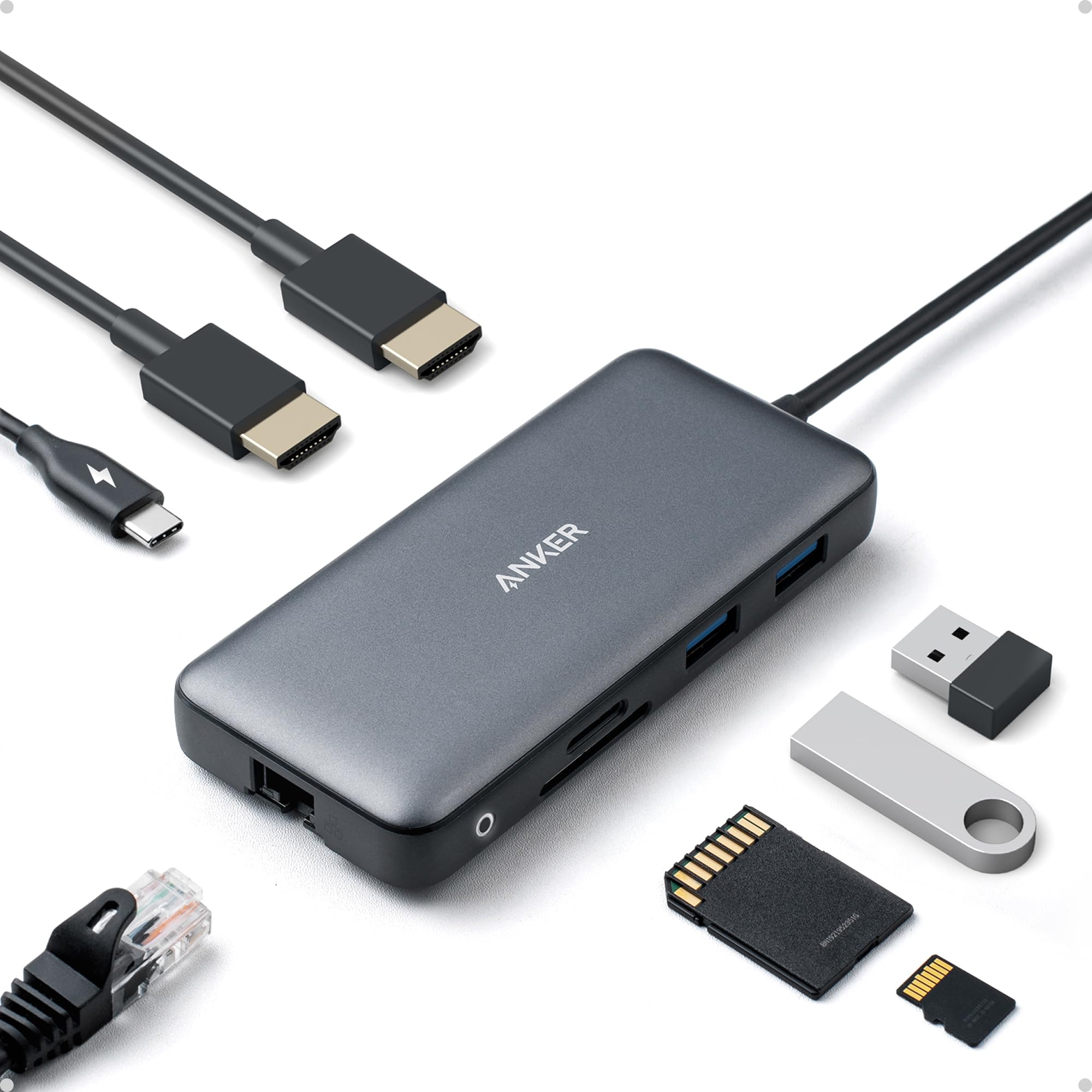
🚀 Elevate your desk game with power, speed, and style!
The Anker 8-in-1 USB-C Laptop Docking Station delivers dual 4K HDMI output, 85W power delivery charging, and 1 Gbps Ethernet connectivity in a sleek, compact aluminum design. Compatible with Windows, ChromeOS, and Thunderbolt laptops, it consolidates essential ports into one hub, boosting productivity and workspace efficiency for professionals on the go.


| ASIN | B0874M3KW4 |
| Additional Features | HDMI™️, Powered |
| Best Sellers Rank | #118 in Electronics ( See Top 100 in Electronics ) #2 in Laptop Docking Stations |
| Brand | Anker |
| Color | Gray |
| Compatible Devices | Full Functional USB C Lenovo/HP/Dell laptops, Macbook/iMac (For macOS, the displays on the both external monitors are identical) Compatible Devices Full Functional USB C Lenovo/HP/Dell laptops, Macbook/iMac (For macOS, the displays on the both external monitors are identical) See more |
| Customer Reviews | 4.3 out of 5 stars 6,108 Reviews |
| Data Transfer Rate | 5120 Megabytes Per Second |
| Enclosure Material | Aluminum |
| Hardware Interface | USB |
| Item Dimensions L x W x H | 4.65"L x 2.01"W x 0.69"H |
| Item Weight | 3.2 ounces |
| Manufacturer | Anker |
| Mfr Part Number | A83800A1 |
| Minimum Required Operating System Version | Windows 10 |
| Model Number | A83800A1 |
| Number of Ports | 8 |
| Operating System | Windows 10 |
| Special Feature | HDMI™️, Powered |
| Total USB Ports | 3 |
| Total Usb Ports | 3 |
| UPC | 194644032081 |
| Warranty Description | 18 months |
J**N
Really solid docking station
I’ve been using this Anker 8-in-1 docking station for a little while now, and honestly, it’s been a great upgrade for my setup. The dual HDMI ports work perfectly with my two monitors, and both displays look sharp in 4K. Plug-and-play was super easy — my laptop recognized everything right away. The hub itself feels sturdy and well-made, and it doesn’t take up much space on my desk. I also like that it has all the essential ports I need, so I’m not constantly unplugging and replugging things. My only small complaints are that it gets a bit warm when I’m running both monitors for a long time, and I wish the USB ports were spaced out a little more. Not huge issues, but worth mentioning. Overall, if you want a simple, reliable docking station for dual monitors, this one is a great choice. I’m happy with it and would definitely recommend it.
H**R
Easy to set up and reliable quality
Works well. Pretty easy to set up. I am usimg two external monitors and extending the acreens to different images. Clear images. Usb power from laptop and hdmi cables.to monitors. No issues so far. Would be very portable.
T**M
First anker product that has not worked
Updating my review - Anker reached out and provided a new docking station. I'm now a few weeks in and I've not experienced any cutting out of my second monitor. Thanks for the great customer care, Anker! ________________ I have had a great experience with most Anker products over the last 5+ years. This one is the exception. I've tried multiple (5 or 6) HDMI cables to run dual monitors off my work laptop and this cuts out incessantly from the HDMI attached to the device (monitor goes black for 2-5 seconds). My laptop runs dual monitors at work without issue. The only variable between work and home is this device. It has progressively worsened over the last 2 months to the point I have leave a review.
J**.
VERSATILITY, FUNCTIONALITY, AND PRACTICALITY
I work from home and the company I work for provided the equipment, which includes this docking station. After using this for a couple of days, I purchased one for my personal laptop. This docking station is small, versatile, easy to use and to setup. The dual hdmi ports allow me to have a second monitor aside from the company provided one for a total of 3 screens, including the laptop screen. The dual usb ports are useful for adding other accessories such as a keyboard, mouse, webcam, thumb drive, etc. For those wanting a hardwired connection, there is an ethernet port located on one side of the docking station. Though I've not used them, there are slots for SD memory cards and micro sd cards.
M**S
Reliable Docking Station with Smooth Dual‑Monitor Support
The Anker Laptop Docking Station Dual Monitor has been a strong addition to my workspace. The build quality is exactly what you expect from Anker—solid, compact, and cleanly designed. Setup was very straightforward, and it instantly turned my laptop into a much more functional desktop‑style environment. Dual‑monitor support works smoothly, with both displays recognized right away and no flickering or resolution issues. The range of ports is generous, making it easy to add peripherals without constantly swapping cables. I also appreciate that it keeps everything organized with just a single cable running to the laptop. Performance has been stable, with consistent connections and no random disconnects. It delivers fast charging as advertised and keeps everything running efficiently throughout the day. If you’re looking to expand your laptop’s capabilities and want a dependable docking station that handles dual‑monitor setups without hassle, this Anker dock is a great choice.
J**K
Works well, I suspect some design refinement in the future
Pros: * Typical Anker reliability; works exactly as advertised. * Sleek, small footprint. Cons: * Too light: The rigid HDMI cables coming into the back make it nearly impossible for the hub to sit flat on a desk without double-sided tape on the base or a similar solution. * Short fixed tail: The fixed 7.5" USB-C tail means your peripheral cables are crowded right next to your laptop, requiring the laptop to be within a confluence of cords, front and center. I'll try to solve this by buying longer HDMI cables so I can move the laptop to a side stand and off my desk workspace, but then the auxiliary ports will no longer be conveniently located. Pick your poison. I wish the fixed tail was replaced with a port so I could use one of my own USB-C cords, but that may lead performance degradation issues... Verdict: Reliable and works as advertised, but can contribute to desktop clutter.
M**Y
1 desktop PC, 3 monitors, 0 problems
I am writing a review of only the multi-monitor feature of this docking station. I bought a new desktop Windows PC which has two monitor outputs from its motherboard. One HDMI port and one Thunderbolt USB port. In other words, on-board capability for 2 monitors. In order to use 3 monitors I could have purchased the PC with an installed PCI video card for about $250. I chose to go another way. I connected the Anker docking station to the Thunderbolt port on the back of the PC. I then connected one monitor to PC HDMI port and 2 monitors to the two HDMI ports on the Anker docking station. No software to load, no special drivers. I just opened the normal Windows display screen and immediately saw 3 monitors numbered 1, 2, and 3. I set them up as independent (not mirrored). You can change which monitor is the master but in the end it was necessary to move the 3 HDMI connectors around a bit in order to get my monitors in the correct left, center, and right position. They are different size monitors and it was easy to assign the correct screen resolution to each monitor. Result, 3 monitor capability for $54 instead of $250. And I just noticed that the price for this Anker docking station has been reduced to $40. That's a real bargain.
S**X
Very compact, works well, may not output full power
Very small, works very well. Not sure about 85W output though. My power supply delivers 130W, this item should use 15W (as advertised), my laptop needs 85W but complains this is a slow charger. Still works ok. I would definitely recommend, maybe with a more powerful charger.
Trustpilot
3 days ago
3 weeks ago