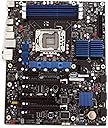
🚀 Power your workstation with Intel Extreme — where speed meets unstoppable performance!
The Intel DX58SO Extreme Series motherboard is a high-performance ATX board engineered for Intel Core i7-900 series processors with LGA1366 socket. It supports up to 16GB of triple-channel DDR3 memory, dual GPU setups via NVIDIA SLI or ATI CrossFireX, and features extensive connectivity including 12 USB ports and 6 SATA ports with RAID. Designed for enthusiasts and professionals, it offers advanced overclocking tools, 7.1 Dolby Digital audio, and gigabit Ethernet to deliver a powerhouse platform for gaming, content creation, and multitasking.
| ASIN | B001ISJONM |
| Batteries | 1 Lithium Metal batteries required. |
| Best Sellers Rank | #4,016 in Computer Motherboards |
| Customer Reviews | 4.1 4.1 out of 5 stars (65) |
| Date First Available | November 17, 2008 |
| Is Discontinued By Manufacturer | No |
| Item Weight | 3.26 pounds |
| Item model number | BOXDX58SO |
| Language | English |
| Manufacturer | INTEL - MOTHERBOARDS |
| Product Dimensions | 15.63 x 11.13 x 13.88 inches |
J**2
Great Motherboard
First off their is no IDE or PS/2 connections so be ready for that. After I got everything in my computer put together and ready to go I went to plug in my keyboard and it was usb only. So just find yourself an a adapter or get yourself a new keyboard. The price of DDR3 is cheap so its not so much a big deal to invest in. There is one PCI slot and now with the newer BIOS update its SLI compatible which is great since when I read the description it says that its only Crossfire ready. If you want to go with something beyond two way SLI than you may want to go with the EVGA model which has more DIMM slots as well. I was going to go with EVGA but my new case would not allow it and I don't have the budget for three cards. I like the way the board is situated with DIMM slots running vertical and looks like everything is closer to the processor than on other boards I have seen. I guess when everything is moving at light speed a smallest measurement closer makes a difference on a motherboard. Install is a cinch just make sure you take your time and don't rush and make a stupid mistake. I have found that in my experience I mess up on stupid things instead of something big. Overclocking has been a little more simplified on this board which is what you should probably do if you invest in these boards. Overall this board has everything that I need with lots of SATA and USB ports and its super fast with my i7 920 along with my 6 Gigs of Corsair Dominator DDR3. All I can say is I can't wait to get my hands into some overclocking when I get the free time. Keep in mind only 64 bit Vista will see anything above about 3 and a half gigs so if you don't want 64 than just be ready not to see what you put in. One minor issue is the setup of the PCI Express slots since I have an 8800 GTS (one of the fatties) and a Creative X-Fi sound card it doesn't leave room for another 8800 GTS without me having to remove my sound card. Its not that big of an issue though since I plan on getting a smaller newer card anyways. Though if you have a fat card like me and something in the PCI slot and want to run SLI you might run into trouble so that is worth noting in my mind. Is this board worth it though I would have to say absolutely yes. According to Intel sticking in a fourth stick will cause a degrade in performance so since most ram that's DDR3 come in three packs its not so much a big deal. Also when it first came on and I entered BIOS everything was recognized but I could not get the thing to boot my ROM drive and it would just sit there with a black screen and then it would ask me to select cd drive type 1 or 2. After about three hours or so it all of a sudden worked after I selected 1 it booted finally and everything was installed (operating system). The next problem was it would not restart and as soon as my computer would go off and come on again it would be a black screen going nowhere. Then I remembered update your BIOS dummy and I read all the notes and a lot of issues I had was fixed in the BIOS update including my restart problem. There was an issue also with my type of ROM drive not booting when put first in priority and that is the issue I had with trying to get it to boot to install my operating system. Now everything runs perfect and I could not be happier. The reason I put all this in my review was it did not go as smooth as I thought it would and someone else might have problems. If you do have issues just drop me a comment and maybe I can help you out just from what I had to do.
C**.
Great performance and it has almost all you need.
I bought this motherboard to use it with an Intel i7 950 processor. I bundled it with 16GB of RAM from Corsair and I am very happy with it. So far, just 2 weeks, it runs very fast with Windows 7 and Pinnacle Studio for A/V editing. Setting up the motherboard is easy. Make sure you connect all the power plugs required as specified in the setup instructions card. It also has one installation screw less than my previous Intel motherboard, so be careful to remove the post from the case before setting the motherboard down. This motherboard only has 1 PCI slot. This PCI slot will be very close to your video card if you got a two slots wide model. I had problems installing a PCI IDE controller (it likely is too slow for this application). I decided to remove the older ATA/133 hard drives I had, but if you need to keep your ATA hard drives, consider getting a PCIe compatible card or IDE-to-SATA adapters for each one of them. Be aware that the the DX58SO motherboard has the memory "above" the processor (above in my case refers to the top of the mid-tower I installed it in). So if you are thinking about buying an alternate cooling system for your processor (like the Cooler Master V8), you may not be able to install a memory fan kit properly (like the Corsair airflow fan system).
D**J
Its a Good moBo. but...
This is a good mother board for the average user. It works VERY nice is simple and good for any one building a new computer. The audio is WAY better than most. It has HD audio and plenty of USB bays and will support a USB 3.0 card. I am using this one currently in an Antec 902 case, intel i7 930, XFX ATI Radeon 5850 and corsair 650W power unit. Together they work very well. I am impressed and would recomend this MoBo. Intel did a good job on this mobo. BUT... While you can over clock your CPU, RAM and GPU you cant overclock them too much. THis MoBo isnt built for EXTREME overclocking but you can overclock them some. For my CPU I went from a 2.8 to a 3.33 with no proble. Any higher the PC wont work. If you want to have a MoBo that you can overclock your CPU to unbelieveable hights this one isnt it. But If you want one that works very well and allows you some overclocking then this is it. Other than that issue i love it. I use it mainly for Photography and some gaming.
S**C
The DX mainboard is a serious piece of kit for PC Enthusiasts. It comes with triple channel DDR3 RAM sockets, with a maximum memory model of 16GB but recommends to use 12GB (3x4GB). The CPU socket is LGA1366 accepts quad core processors of the Bloomfield, Nehalem, and Xeon range. Personally got an OEM CPU rated at 3.2GHz (quad core) for a fraction of the real retail price (without heat-sink and fan). Have yet to turn on the mainboard and play with the BIOS settings since I still require 6GB RAM (2GBx3) and GFX Card and hard drives. The mainboard is a full ATX board and barely fits into my case. The SATA cables provided only just make it into the SATA sockets and the cables are bending against the metal case wall. The SATA sockets are 3GB/s I believe. Or higher? It also comes with an SLI socket for joining two GFX Cards together rated at PCIe x16 sockets. Depending on the size of the GFX Cards I might have to remove the base fan to fit a second card. The mainboard comes with two on-board USB sockets, and at the rear is 8xUSB ports, firewire port, and two eSATA ports (rated at 3GB/s ~ ideal for an external blu-ray player/burner). Furthermore, at the rear is the 7.1 surround sound ports with digital optical out port for an alternative audio out. The board fits all modern cases and comes with a piece of metal to insert into the hole at the back of the case as per usual so the ports are molded into the case perfectly. One tip, if using this motherboard for a build to not install the board into the case until you've gotten the PCU and heatsink installed. I had to unscrew all the board and take it out the case to install the heatsink once I had purchased it since you require rear access to the board to screw it together. Hence the requirements for the raiser motherboard screws. All in all I would give this motherboard a 5/5 rating for simplicity of design. It comes with clear diagrams that you can sticker onto the case for future reference. Every port is listed, and you simply cannot insert a cable the wrong way ~ I tried! Everything fits only one way on this case making it really easy to install. Remember, there is a warning with the motherboard to plug in a x4 power line AND the regular x24 power line otherwise damage could result from turning the motherboard on without both power cables inserted. Overall, I'd recommend getting the biggest case your money can afford (Sniper case, anyone?) to give plenty of room for the board. That is my only complaint, the lack of space my case gives this board. A. Obrzut
V**N
Remember when you had to solder parts together or set fragile dip switches with a screwdriver? Well if, like me, you do, then that is now ancient history. The DX58SO is probably the best choice of motherboard if you want to build a core I7 system. However, as the chip type beds in, there are likely to be a number of good generic boards coming on the market, so shop around before deciding for yourself. The build went like a dream and everything worked first time. I had a simm failure two weeks into use, and additional posting error warnings from the motherboard would have helped with this at the time. That is the nearest thing I can say to a critisism. This board does not support IDE or PS2, so if, again like me, you are determined to re-use serviceable parts, you will need SATA/IDE adapter cards for hard drives/cd-roms, or PS2/USB adaptors for mouse/keyboard. These are available at Amazon. I will use the DX58SO again when I re-build my second PC in 2011.
Trustpilot
1 month ago
3 days ago