

🔋 Charge smarter, test faster — never miss a watt!
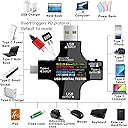
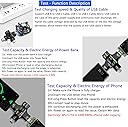
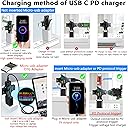
The KJ-KayJI USB C Tester is a compact, high-precision digital multimeter featuring a vibrant 9-mode IPS color screen. It measures voltage up to 32V, current, power, resistance, temperature, and capacity across USB A, USB C, and Micro-USB cables. Supporting fast charging standards PD3.0, QC3.0, and BC1.2, it ensures your chargers and cables deliver optimal performance. Ideal for tech-savvy professionals, it offers detailed diagnostics for chargers, cables, power banks, and wireless chargers, all in a sleek, portable form factor with included USB clip and alligator cables.





| ASIN | B07X3HST7V |
| Best Sellers Rank | #84,213 in Tools & Home Improvement ( See Top 100 in Tools & Home Improvement ) #126 in Multi Testers |
| Brand | KJ-KayJI |
| Brand Name | KJ-KayJI |
| Color | Black |
| Customer Reviews | 4.5 out of 5 stars 2,165 Reviews |
| Included Components | USB Tester+USB Clip cable |
| Item Dimensions | 2.5 x 2 x 0.4 inches |
| Item Height | 0.4 inches |
| Item Weight | 34.5 Grams |
| Item dimensions L x W x H | 2.5 x 2 x 0.4 inches |
| Manufacturer | KJ-KayJI |
| Maximum Operating Voltage | 32 Volts |
| Measurement Type | Multimeter |
| Minimum Operating Voltage | 3.6 Volts |
| Model | J7-C |
| Power Source | Usb-a,usb-c |
| Specification Met | CE, RoHS |
| Style | Power Tester |
| Style Name | Power Tester |
L**N
Works great!
This is high tech. User friendly. Compact piece of technology at your fingertips and quality is still there. Excellent display screen for voltage ,amps, milliamps and is an excellent quality meter with accurate readings. some things can be programmed for your personal taste of how it should be set. Many different screens. How many amp hours it takes to charge your battery or how many amp hours are left on your battery. It's extremely easy answers to all your electronic questions by reading the instructions to acquire the answer you're looking for. Has different languages but I forgot exactly which ones my apologies. Excellent value for the money. I consider this a must-have item for anybody that's into electronic troubleshooting and observing electrical input, output etc. Beautiful color screen, easy to read, small font. Well laid out display screen. Amazing piece of technology that works when you wanted to with quality behind it. Thanks
G**O
Great little tester, with some quirks
I use this for testing USB-C chargers, battery packs, and cables. I love that it gives you so much information - not just V and mA like the Satechi, but watts (which is the most important metric overall!) and also total charge (mAh) and total energy (mWh), elapsed time and more. I used it to know that my Pixel 2 XL wasn't getting 9V from the USB-C charger I was using; replacing that gave me much faster charges. The UI is a bit wonky; the "W" for watts is some kind of strange character, but you get used to it. To reset the charge time, total charge, and total energy, each one is a separate reset, so to reset all you have to double-click, then triple-click, then quad-click. The "input" and "output" USB-C ports are labeled backwards, and the "manual" (even the new one) is pretty hopeless. "Resistance" is a bit weird, it's just V/I as far as I can tell, a bit meaningless for this application. (It won't measure your resistors.) And I wish it had a display mode that showed watts in larger font. But on the good side, it's accurate, the display is clear, it has all the info you could want, I like that you can flip it upside down, and also it remembers your settings between uses which is great. And the multiple inputs & outputs are super useful. You can test pretty much anything USB-related with it. Although, it says it can test batteries: not really so much. It comes with alligator-clip cables which you can hook to a voltage source of 3V or more (i.e. not a AA or AAA battery) and it'll measure voltage, but not under load which is what a battery tester needs to do. That's not why I bought it though so I'm good with that. On the other hand, if you have a USB AA/AAA battery charger, you can hook this tester into that and measure the total charge sent to the batteries you're charging.
Y**U
Looks like a defective unit - UPDATE - Working unit!
I was very interested in this meter to verify power output of the numerous USB charging receptacles installed around my house, as well as fitness of the numerous USB charging cables. However, after reading the poor instruction sheet which has no diagnostic section I am going to have to return this unit. As picture shows, the unit displays voltage but no reading on amperage. Same across all charging ports tested. *** UPDATE *** Rack it up to my ignorance and also the quality of the product instructions, but the reason the image is showing 0.00 amps is because there is no load on the opposite side of the meter. When phone, tablet, laptop or other device is connected to the meter, it will register amperage, just fine. The product also has a nice feature of 180 degree rotation of the display. I would also mention that some individuals will find the display dimly lit. I had to use a magnifying glass or take a phone picture of the display to read some of the display modes. All in all, it is worth purchasing this meter, if you are curious about the fitness of your charging blocks, wall charging ports on A/C receptacles with USB chargering ports.
T**D
Handy to have around
We usually don’t ask what happens when we plug in the cable because we can’t. Being able to see which source is charging, which two sources actually produce the same amount of power, discovering my c-connection to my phone doesn’t actually transfer more than my micro USB does to my tablet .. etc… is great. And, of course … “Is that cord still working? Next stop: Figure out if that one car USB port really does have no power. Where, it really helped me, was with my ACER Switch 7 tablet style laptop. Slim, powerful, runs hard, but It needs aux power after 4hrs. Because it wants 19.5v (a PC standard), but most of the c-style chargers/batteries output +/- 20.5v (a Mac standard) it usually rejects the aux battery I bought for it. Turns out that rejection is brief, temporary and over just a few cycles. It’s not a perfect solution, but I found that after a few quick replugs, my battery quickly loses that top voltage and starts and is actually transferring 19.5v at 1.6A. Not showing the symbol I expected on the PC but it’s charging! Who knew? We’re used to flying blind and relying on what they give us, but being able to see what’s going on with this affordable device is great. There is a little c-port in the armpit of this device that didn’t work for me, but I quickly realized I didn’t need it anyway. I can do the same thing using the 4 main plugs. Bright readable characters for the main information, lots of subordinate info in tiny characters should you care. This little tool is very affordable for what it does. I didn’t realize how much I would use this, but now that I have it, I’m not giving it up. Simple, easy to use tool that I’m using a lot.
M**K
May need to reset it
At first the amp readings were far off. My 1 amp devices showed as drawing nearly 3 amps. I created a test circuit on my bench to draw 0.5 amps and this device showed 2 amps. I reset it and now all is well. To reset: single press button a few times to get to the Settings screen. Hold button down a couple of seconds to enter that screen. Once there, single click your way down to option #5 - "Default Set..." It will be the top option on the second Settings screen. Hold the button down on that and you'll get an "OK!" confirmation. To be safe I did the same on option #6 - Clear data. Maybe there were previous settings or old data from a prior customer or from the manufacturer during a test. I'm not sure what settings or data could cause the amps to be so off, but in any event, after doing that, the readings check out from my bench tests. I took my test circuit all the way down to 18mA. Using the included - and much appreciated - alligator clips, this device bounced back and forth between 0.01 and 0.02 amps. Well done for such an inexpensive and tiny little device! This is a very cool little instrument. I was surprised to see the screens showing the line graph readouts over time. Lots to explore and use with this. Well done to the manufacturer.
B**!
The instructions are a riddle wrapped in a mystery inside an enigma
When I saw this thing on Amazon, I thought it was the coolest thing ever, a USB tester plus a multimeter, plus a thermometer in a tiny package. In fact, the product does what it says it will do; the problem is paying close attention to what the product description actually says it will do, and not listening to your expectations of what it should do. For example, it's a voltmeter. It can accurately measure voltages between 3.6 and 35 volts. Just take the supplied probe, plug it into the input, and put the alligator clips to your battery -- oops, your 1.5 volt battery can't be measured, but you can check those 3.7 volt lithium ion batteries. I did test the voltmeter against a quality digital multimeter, and the two tracked to the 2nd decimal place. So while it won't replace your dedicated multimeter, you can check that 12V battery on the trolling motor. It doesn't do AC. It's an Ohmmeter. But the range is only 1 to 999.9 Ω, which is very limited compared to a dedicated multimeter. Also it can't really measure 1 Ω. If you tried, you'd trigger the overload protection (been there, done that with a 2.2 Ω resistor). To use the Ohmmeter, connect the input to a USB power source. The input voltage is applied to the test leads on the output side, so if more current is drawn than the USB tester allows, it shuts down. Also, the ohmmeter is extremely inaccurate. I connected a 120 Ω 1% resistor (checked with a digital multimeter as correct) and the USB tester said it was 144 Ω. Notice that the product description says nothing about the accuracy of resistance measurements. There's one other problem with resistance measurements: the display of the resistance value is tiny and blue against a black background. It's hard to read even with a magnifying glass because is so dim. The other values, although tiny, are in lighter colors. This doesn't show in my photo because the camera is compensating for the lack of brightness; however since the tester is basically useless as an Ohmmeter, the problem isn't all that serious in and of itself. The supplied USB to alligator clip probes make it easier to connect USB to a real multimeter. I took some time to explain how the voltmeter and ohmmeter functions work. That's because the instruction sheet says nothing about what to do with the probes. The instruction sheet is less than helpful, and explains little. If you can figure out how it works on your own, then parts of the manual start to make a little sense. The USB tester is supplied with a tiny micro USB adapter. Upon close inspection I found that it adapts micro USB to USB-A (there is already a USB-A input and output). The manual says "If the Micro USB port is not plugged into the attached small adapter, the tester cannot be used on a USB-C device." The reader is invited to inspect the accompanying photo showing the tester happily testing a USB-C device, a wireless keyboard that charges via USB-C without the adapter plugged in. In another place the manual gives you a hint by adding the letters PD. By searching the web, I found that this is short for "Power delivery" and what is actually going on is that this supposedly triggers a higher current dynamic charging mode for USB-C devices. I'm going to try really hard not to lose the tiny adapter, although I guess any micro USB cable would suffice. The instructions just don't explain what's going on. Oddly, while there is a Micro USB input, the instructions say not to test Micro USB cables. The manual also says, "When you plug in the charger, it is a Chinese interface. You can switch to the English interface by pressing the button." The display doesn't default to Chinese. My photo also shows a fit and finish problem -- the display is crooked. I did not actually notice this until I looked at the picture. The display is really quite small and it can be awkward to read plugged into a device that you can't get your head near, like behind a desktop computer. You really could benefit from having a nice long USB-A extension cable. There is a display button. Pressing it displays other panels of data not discussed by the manual. One of them shows voltages on other USB pins besides the main power pins. The instruction sheet ignores most of them except 3 that are for settings (none of which in my opinion should be changed). As for testing USB charging, it seems to work fine. You could find out the capacity of that USB charger battery pack, although, inexplicably you have to do some multiplication to get the right answer -- haven't quite gone through that. I got it to look at the current drain of some of my USB-charged devices, in particular portable radios that have rechargeable batteries. I'm also interested in the output of solar USB panels on emergency radios. It should do well for comparisons, but I wouldn't trust the accuracy given my experience with the Ohmmeter. I would have given this tester a higher score if it had a decent manual and didn't try to sell itself as a multimeter. It's a good USB tester with a nearly useless multimeter function, weighed down with a bad manual.
R**G
Works better than expected
I bought this primarily for measuring USB power draw and voltage on a few cables I had and some devices that would complain of "low voltage" when I had other devices that would fast-charge with using the same hardware. This can pretty much accept power in on any of the ports and will supply power out on any of the ports, which was surprising because it means you can measure power draw of USB-C laptops and other devices even when using a male/male USB-C cable. You can configure thresholds where it will alarm if the current draw gets over the limit or voltage gets above/below the limit and the screen can be rotated if you long-press the only button on it. I found it funny too that it seems to default to one of the 4 English screens, but will display one layout that is identical to one of the other layouts, but is all in Chinese. I would definitely recommend this if you are in the market for a USB power meter.
A**S
Great USB Tester For Inspections
I use this USB tester for RV inspections. It tests for voltage, currents, and wattage. When I test, I'm only interested in the voltage setting, but others might like to use this tester to monitor device power consumption. As with any USB tester, if the port is mounted upside down then the display faces backwards. That is easy to get around using a camera phone.
Trustpilot
4 days ago
1 week ago