


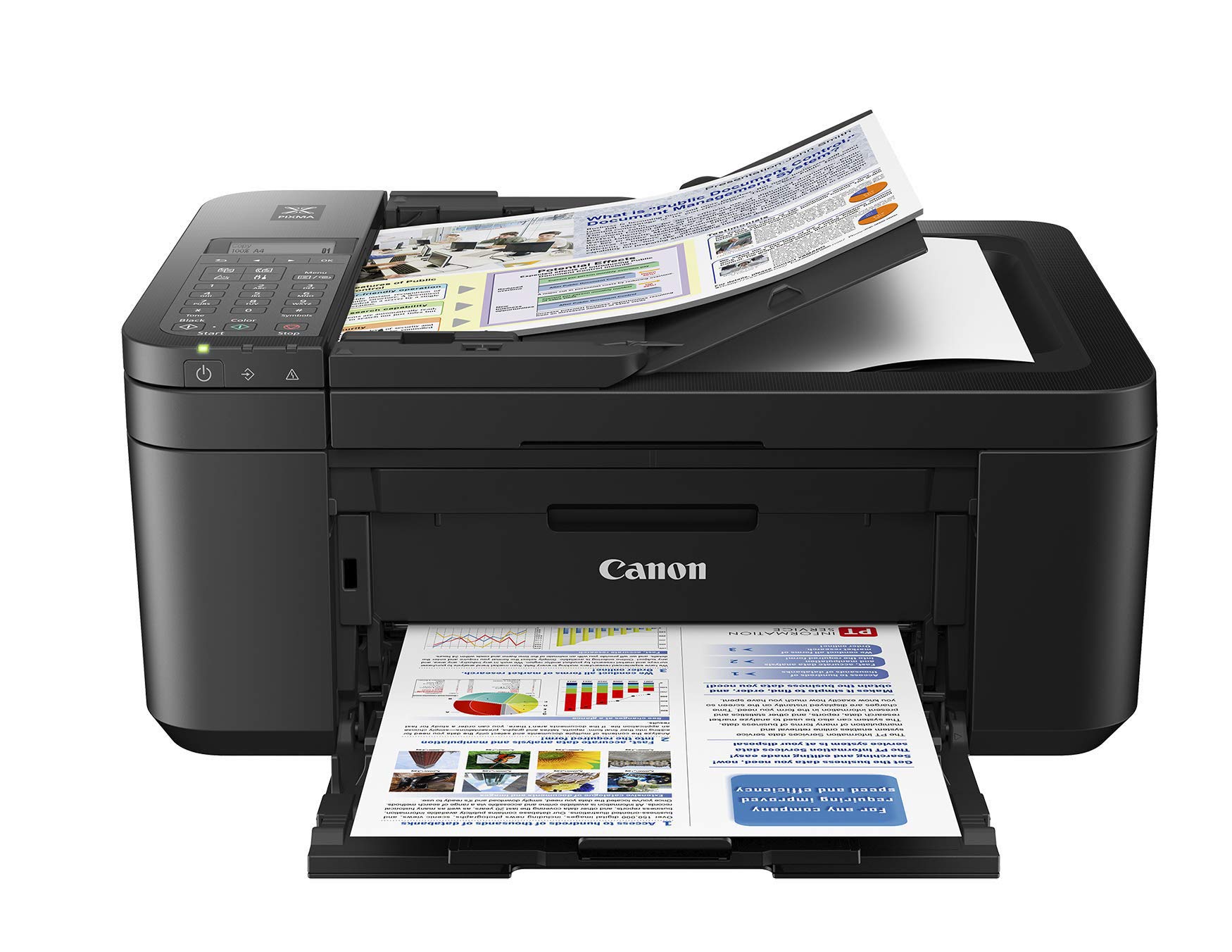


🚀 Elevate your office game with Canon PIXMA TR4527 — where speed meets style!
The Canon PIXMA TR4527 is a compact, wireless all-in-one inkjet printer designed for busy professionals. It delivers sharp prints at up to 8.8 pages per minute in black and 4.4 ppm in color, with a high resolution of 4800 x 1200 dpi. Featuring versatile connectivity options including USB and Wi-Fi, plus scanning, copying, and faxing capabilities, it streamlines office tasks while supporting mobile printing. Its smart paper handling with a 100-sheet tray and 20-sheet automatic feeder ensures efficiency for everyday business needs.
| ASIN | B07GQ2SN6S |
| Additional Printer functions | Fax |
| Best Sellers Rank | #127,657 in Electronics ( See Top 100 in Electronics ) #170 in Portable Photo Printers |
| Compatible Devices | Laptops, PC, Smartphones |
| Control Method | Voice |
| Controller Type | Amazon Alexa, Vera |
| Customer Reviews | 4.0 4.0 out of 5 stars (2,797) |
| Date First Available | August 16, 2018 |
| Dual-sided printing | Yes |
| Duplex | Automatic |
| Global Trade Identification Number | 00013803311075 |
| Hardware Interface | USB |
| Included Components | TR4527 |
| Ink Color | Black |
| Is Discontinued By Manufacturer | No |
| Item Weight | 16.37 pounds |
| Item model number | PIXMA TR4527 |
| Manufacturer | Canon |
| Max Input Sheet Capacity | 100 |
| Max copy resolution black-white | 600 x 1200 dpi |
| Max copy resolution color | 600 x 1200 dpi |
| Maximum Black and White Print Resolution | 4800 x 1200 dpi |
| Maximum Color Print Resolution | 4800 x 1200 dpi |
| Maximum Media Size | 11 x 17 inch |
| Memory Storage Capacity | 64 MB |
| Model Series | TR4527 |
| Number of Trays | 1 |
| Print media | Paper (plain) |
| Printer Ink Type | Ink |
| Product Dimensions | 3.44 x 7.77 x 7.21 inches |
| Scanner Type | Photo, Portable |
| Sheet Size | 8.5x11 |
| Supported Media Sizes | Letter (8.5 x 11 inches) |
| Total USB Ports | 1 |
| UPC | 013803311075 |
| Warranty Type | limited warranty |
| Wattage | 14 |
A**.
Easy to Use, Quality Prints/Copies
I'm very pleased with this printer/scanner/copier. As someone who's had difficulties in the past with setting up new printers, I was dreading getting a new one, but I found the setup to be fairly straightforward. The little instruction booklet that came with the printer was very detailed and clear, and going online to find the correct software was relatively easy, too. All in all, the setup only took about 7 minutes start to finish, and I was in business! The quality of the prints and copies I've made so far are great, and it prints quickly. TIPS: 1. When selecting your printer model on the Canon website to download the appropriate software, the exact model number will not show up – you need to select TR4500. 2. If you get an error message when adding the printer as a device on your laptop, just add the printer anyway. During the setup on my laptop (Mac), it told me there was an error and the printer could not be found. I continued with adding the printer anyway, and had zero problem finding the printer when I went to print wirelessly during the test print.
C**A
Set Up and Quality
Do not use the CD Rom to set up this printer. It is useless. Canon should eliminate it from the package. Go the Canon's website and download the necessary software. Also, the USB cord is not included. Thank goodness I saved the one from my Canon MX492 printer. Perhaps, the manufacturer should consider replacing the CD with a USB cord to connect the printer directly to the computer. This printer uses the same ink and USB cord as my MX492 printer. Those are two perks for purchasing a similar printer. As far as the quality of the printer is concern, it is all right. At least it prints faster than my old one.
S**I
Boat anchor
I bought this , although the printer/copy/fax I had prior lasted for EVER , no problems Different brand . I had it 9 yrs and they quit supporting it . Everything WORKED though . Urrgggg. So I bought this one . I have had it about 18 months and didnt use much. EVERYTIME I used it I got errors there was no paper in the tray . I'd mess with it and mess it till worked. Looked online and it's a very common issue with these I guess . Why do companies sell products that cost this much money [ It was 150.00 when I got it] KNOWING their product doesn't work correctly? Anyway , It did it again , but I was getting several error messages and the Canon website stated one of the errors meant in needed to be serviced . It wouldnt copy , scan, nothing . $150.00 boat anchor . I see they cheaper now . If someone wants to take a chance , go for it. I am not recommending you waste your money . I will not be buying another Canon product . Mine has allready gone to the dump
T**E
Tough to set up
I have had a Canon Pixma printer for over 10 years. Bought this new model when the old one wore out. The set-up was a nightmare - rather than 5 minutes, it took HOURS of phone calls and trial and error before I was able to connect it successfully to our laptops. I do not like the paper tray down on the bottom. The old one fed from the back. If the paper tray is bumped or moved in any way, the paper will not feed until you play around with it for a while. Certainly not an improvement over the old model. Once you can get it connected and the paper to feed, it works fine.
K**.
It uses the same type of ink cartridges my previous printer used.
I had just ordered and received three black ink cartridges and two color ink cartridges when my previous printer broke down. I thought I ordered the same model but I received a TR4527, which I love. This model is better than the TR4520. The TR4527 uses the same type of ink cartridges as my previous printer. It grabs the paper whether it is multi purpose or copy paper. Print quality is good. Have not printed any photos yet. The TR4527 prints using one step less in the process which speeds up the printing (compared to the TR4520.) Canon customer service as always been great for me.
N**K
Good printer
Solid printer from a good printer company, prints well and holds a fair amount of sheets. Comes with some ink but I got more as printers consume ink like we consume water. It is somewhat loud when printing but that is an odd complaint I think though true. Easy to hookup wire with driver disk included, not a fan of wifi printing most of the time and I went to set it up and it didnt see my router so I gave up immediately there so I cannot attest to wifi connect-ability but as a printer it prints.
T**L
Horrible tech support
I had it all hooked up, got online to get it setup and Got an error, contact tech support. The tech wanted access to my computer and money to help. I said I wasn’t paying him anything. Long story short and stupid me let him on my computer. He did get it fixed but also got into my logged on Amazon account and tried buying a gift card. He tried using an expired card. I was watching him do all this on my computer. I called him and he said it was for payment. I told him he had no right and he said the F off word to me and disconnected. I also found out this is a Canadian product, so support comes from Canada or so I was told when I tried contacting US Canon support. Printer works great and good quality prints.
G**N
Just Like My Other Canon PIXMA Printer
I was so happy to find this Canon PIXMA TR4527 on Amazon, I was looking for a Canon almost like the one I had because we liked it, we were used to it, and I had just ordered 2 packs of ink for the printer when it stopped working. So I went on Amazon, and it didn't take long for me to find the exact Printer, Copy, Scan & Fax, Canon PIXMA TR4500 SERIES.....and it took the same exact INK CARTRIDGES.......we are very happy customers.
K**S
Recently, I knew nothing about buying, setting up or using a printer. Those were the days. And this was fine because I had gotten along for years without one. Yea. Well. All good things... My life changed and it turned out I needed a printer and the sooner the better. So. I bought this printer. And, after a few panicked minutes when I was convinced that I would never get it working and so had just purchased a rather large doorstop, everything came together and...it worked! Works. It's good. That's my experience, for whatever that is worth. But, seriously, if *I* can set up this printer and it actually works, I gotta think just about anyone can do it. As for the actual printing, it's a bit on the slow side, but I don't care about that, I will rarely have to print out more than five double-sided pages at a time. I have nothing bad to say about the quality of the printed pages and, while I haven't yet printed out a picture, what colored things I have printed out looked okay. In any case! Good luck on your search for a printer and I hope this review was of some help.
J**S
This is the second time around with this printer. The previous one started giving me problems following a move to a new location. I had always been very satisfied with it so I decided that a replacement would be easier to do rather than taking a chance on a different printer and having to learn how to use it. So far, it is performing well and I am pleased that I replaced it with the same model.
L**.
Easy to set up and start using BUT sadly the unit malfunctioned right away - it printed for just under a week (good print quality actually). and one day printer error 5100 came up. I googled and followed instructions for clearing, including removing, replacing the cartridges (same ones not new one) and running align print head function, etc. The error finally cleared, but then the printing was completely misaligned. I tried several prints, even waited a day and tried again...reset it...alas...nothing worked.. I got another one and it seems to be working well. The only issue is a strange network thing that could be a windows problem, not a canon issue- handling network printers of same type (I have one at home as well, and one at the office, having trouble when I switch between them). This is a pretty technical glitch though and most people wouldn't have it. We really like having wireless and ability to print from phone- sometimes printer is slow for documents that have a lot of images ...it also does tend to stall and have to be reset a fair bit. For the price it seems good, and issues likely common in lower priced printers.
A**R
I am so disappointed in this printer. I bought it despite the other negative reviews, and I wish I had just gone to Wal Mart or Staples instead and bought one there. I am a student and require a reliable printer and don't have spare money laying around to buy a new one. It is so complicated to set up. Once I had it set up over the last two months it wouldn't print, wouldn't scan and it would connect and disconnect as it pleased. I would have to re-download the software on my computer to try and get anything to work.... Besides that I was going to keep using it because I didn't have extra money to buy a new one so I sucked it up although it was extremely inconvenient. Now the printer doesn't even print or recognize the black ink cartridge! I bought new ones to install thinking it was the cartridge, but thta didn't work. I got the original refilled - still doesn't work. I took it out and was going to print in colour BUT It won't print colour with out the black one installed. Now I have to cough up money I do not have during midterms when I need my printer the most! Not only is this an inconvenience and waste of money, but the issues this printer has caused is now affecting my education. Wish I could return it, but I am unfortunately past the return date. (I purchased in April 2019 and did not start using it until September 2019 when I went back to university.)
K**R
It's not a top-line printer so print quality is "good", certainly good enough for casual home use. After a miserable experience with a HP printer which wouldn't connect to wireless for love or money, this PIXMA was easy to set up and worked immediately. Highly recommended for anyone who needs an inexpensive colour printer that they can put anywhere (as long as there is wi-fi) in your house.
Trustpilot
1 week ago
2 weeks ago



