Desert Online General Trading LLC
Dubai, United Arab Emirates
Desert Online General Trading LLC
Dubai, United Arab Emirates


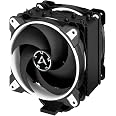
❄️ Stay Frosty, Game Hard: The Ultimate CPU Cooler for Next-Gen Performance
The ARCTIC Freezer 34 eSports DUO is a high-performance tower CPU cooler featuring 54 aluminum cooling fins and dual 120mm BioniX P-series fans in push-pull configuration. Designed for Intel LGA1700 and AMD AM5 sockets, it delivers targeted heat dissipation directly over the CPU DIE, supporting even 18-core processors. With a quiet 2.3 sones noise level and easy installation, it combines cutting-edge cooling efficiency with sleek white aesthetics, perfect for demanding gamers and professionals seeking reliable thermal management.


| Product Dimensions | 4.06"L x 4.88"W x 6.18"H |
| Brand | ARCTIC |
| Power Connector Type | 4-Pin |
| Voltage | 12 |
| Wattage | 210 watts |
| Cooling Method | Air |
| Compatible Devices | Intel Sockets: LGA1700, LGA1200, LGA1155, LGA1151, LGA1150, LGA2066, LGA2011(-3); AMD AM5, AM4 |
| Noise Level | 2.3 Sones |
| Material | Aluminum |
| Maximum Rotational Speed | 2100 RPM |
| Air Flow Capacity | 51.26 Liters Per Minute |
| UPC | 872767009790 |
| Global Trade Identification Number | 00872767009790, 04895213701877 |
| Manufacturer | ARCTIC |
| Number of Items | 1 |
| National Stock Number | 0 |
| Series | Freezer 34 eSports DUO Edition |
| Item model number | ACFRE00061A |
| Item Weight | 1.68 pounds |
| Item Dimensions LxWxH | 4.88 x 4.06 x 6.18 inches |
| Color | White |
| ASIN | B07MJGNJB3 |
| National Stock Number | 0 |
| Is Discontinued By Manufacturer | No |
| Date First Available | January 10, 2019 |
Z**Y
Great cooler, very quiet.
This cooler does its job, and does it well.It keeps my processor very cool, even on ridiculously hot days, during which my room becomes an oven.It's also incredibly quiet. Even when the fans are spinning at a high RPM, it's hardly noticeable. Of course, that's with my fan on and pointing towards me, but the fan is also like fifteen feet away because the only available outlet is on the other side of the room, so take that how you will. Even with the fan off though, it's practically silent. I'd say that they're trying to go after the big dogs like noctua, and they're doing great.Installation was kind of a pain at first because I didn't feel like removing any of my components before trying to install it, but once I removed my graphics card and rear exhaust, it was pretty smooth. If you don't want to take the whole pc apart and install it with a bare motherboard on a table, have someone hold the backplate in place or tape it there temporarily so you can screw the stand-offs in to mount the cooler. Short ones with one line are for amd boards, specifically AM4. The ones with two lines are for intel hoards, and it comes with an intel backplate, though it's not much of a plate, more like a bracket. I don't know what the long ones with no lines are for though, but there's a QR code that comes with it that you can scan for the online installation manual. Why they didn't just include a physical one is a wonder, but it's not hard to install it anyway, as long as you use the right standoffs (and remove some parts for room to work).As for the build quality, it's sturdy, doesn't rattle at all, and is overall very solid. It comes with thermal paste, but you may be better off getting better paste. I'm not sure what the pastes quality is, but I used their MX-4 that I got months ago with my cpu, and it's doing just fine.This is a great cooler, for a good price, especially when compared to the closest noctua cooler that offers about the same performance and low noise for about ten to twenty dollars more, depending on price fluctuation. Get this thing.
M**M
GREAT Value Cooler, DETAILED Review
I know this cooler has been reviewed to death, but I wanted to make a review for those of you who wanted some empirical data to look at when deciding. This cooler will be installed on a Ryzen 3700x, B450 Tomahawk motherboard, and it's replacing the stock Wraith Prism AMD cooler.Firstly, I chose to go with the black/grey version and the cooler looks great. So much better than the bare copper/aluminum Hyper 212's I ran previously. The fit and finish is nice, the fans look great with their braided cables, and everything was packaged well.Installation was very straightforward. Honestly it took me longer to remove the old thermal compound than it took me to install the new cooler. You'll have it swapped in less than 30 minutes. A few quick things to note here: 1) Run your PC for a good ~30 minutes or so before you take off the old cooler so that the old thermal compound is warm when you remove it. 2) When you remove the old cooler, disconnect it, TWIST it ~45 degrees, then pull it off of the CPU. This keeps you from ripping the CPU from the socket. 3) The B450 Tomahawk will not hold the backplate in place when the 4 screws are removed, so be sure you can access the rear of your mobo if you're swapping coolers. 4) For AM4, you will use the included stand-offs that have 1 notch cut in the sides of them. 5) When you apply the included thermal compound to the 34 Duo, you'll want a line along each heat pipe, 4 lines total. This is per manufacturer recommendations.At first the included "1 notch" standoffs appeared to be too short, but I just had to put more pressure on the backplate to start the threads. I tightened in a crisscross pattern and made sure all 4 screws were snug to slight resistance. Once on, the fans are daisy-chained and installed. These went on fine without having to remove the RAM.Now... what some of you may have come for: THE DATA. For the following tests I made sure that both cooler tests were done at the same AMBIENT room temperature, which was 74F. Now on to the data:3700x with PBO ENABLEDIdle Wraith Prism at Desktop: 34CIdle 34 Duo at Desktop: 29CPrism Cinebench R20 Run 1: 78.9c MAX34Duo Cinebench R20 Run 1: 69.1c MAXPrism Cinebench R20 5 Run Max: 80.4c MAX34Duo Cinebench R20 5 Run Max: 69.2c MAXPrism AIDA64 CPU Stress Test @ 2m30s: 60.5c MAX34Duo AIDA 64 CPU Stress Test @ 2m30s: 55.4c MAXPrism AIDA64 FPU Stress Test @ 20s: 83.4c MAX34Duo AIDA 64 FPU Stress Test @ 20s: 79.6c MAXFinal thoughts & summary... the 34Duo provided a 5C cooler Idle temperature, a 11.2C cooler max temperature during R20 runs, and a ~5C cooler max temp at CPU/FPU stress testing which is a worst case scenario. The MOST IMPORTANT thing to note here is that on average the 34 Duo is 5-10c cooler while also being much quieter and it never allowed the CPU to break above 80C.In my opinion these are highly impressive results and I definitely recommend this cooler above it's other similarly-priced competitors.
Trustpilot
1 week ago
2 months ago