Buy anything from 5,000+ international stores. One checkout price. No surprise fees. Join 2M+ shoppers on Desertcart.
Desertcart purchases this item on your behalf and handles shipping, customs, and support to Vietnam.
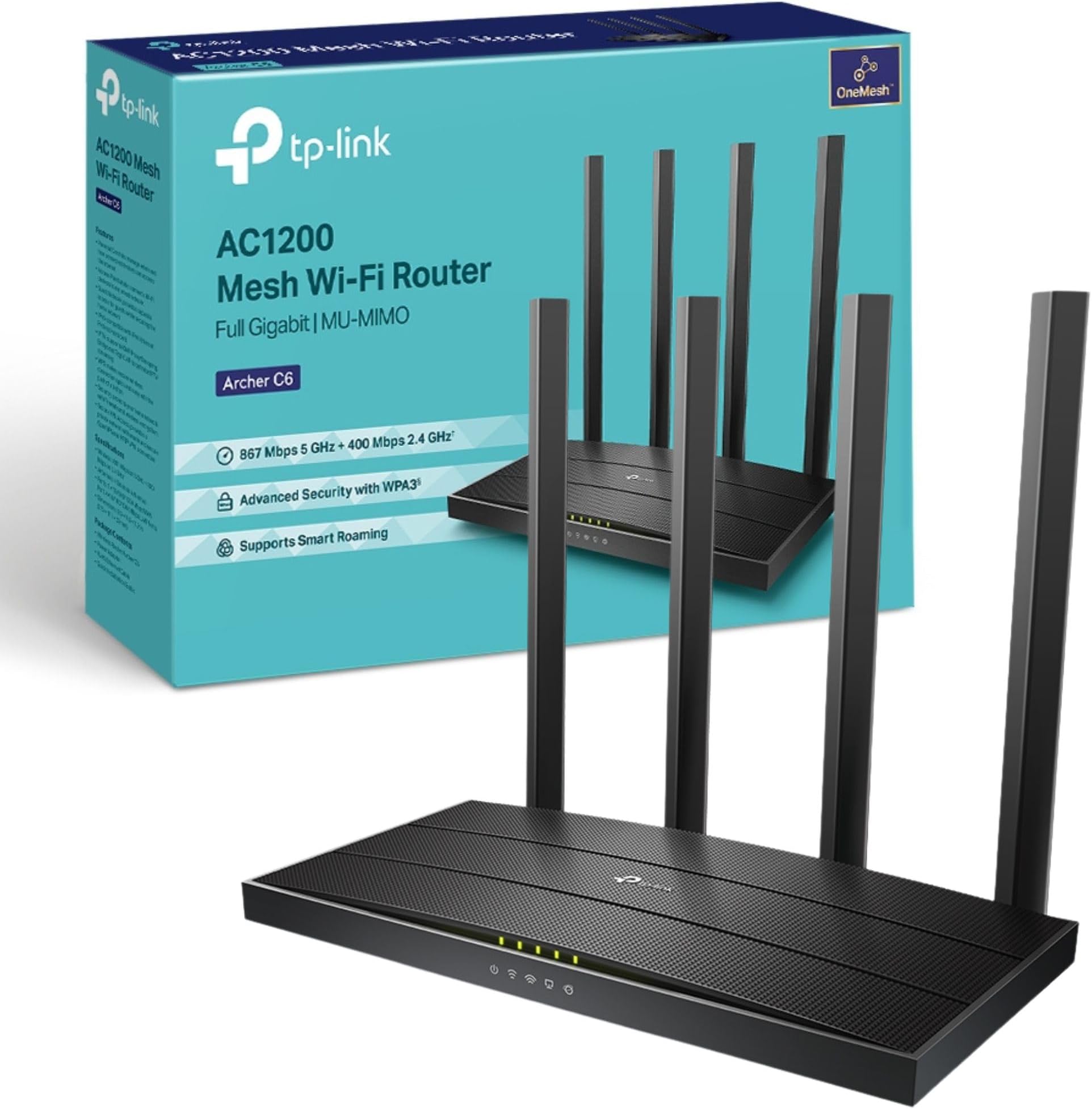
🚀 Power Your Smart Home with Archer C6 – The Ultimate WiFi Upgrade You Can’t Afford to Miss!
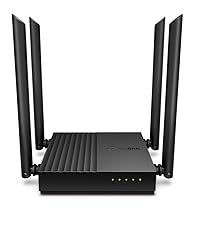
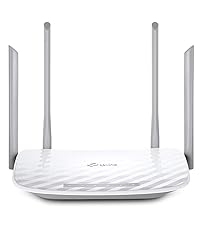
The TP-Link Archer C6 is a high-performance AC1200 dual-band WiFi 5 router delivering combined speeds up to 1200 Mbps. Equipped with MU-MIMO technology and four beamforming antennas, it ensures fast, reliable connections for multiple devices simultaneously. Its EasyMesh compatibility allows seamless whole-home coverage expansion, while advanced security features including WPA3 and VPN server support keep your network safe. Designed for easy setup and control via the TP-Link Tether app, the Archer C6 is ideal for gamers, streamers, and busy smart homes seeking robust, uninterrupted internet.


| ASIN | B07L5YRYF4 |
| Antenna Location | Home |
| Antenna Type | Fixed |
| Best Sellers Rank | 1,062 in Computers & Accessories ( See Top 100 in Computers & Accessories ) 4 in Routers |
| Box Contents | Power Adapter, Quick Installation Guide, RJ45 Ethernet Cable, Wireless Router Archer C6 |
| Brand | TP-Link |
| Brand Name | TP-Link |
| Colour | Black |
| Compatible Devices | Laptop, Personal Computer, Smart Television, Smartphone, Tablet |
| Compatible devices | Laptop, Personal Computer, Smart Television, Smartphone, Tablet |
| Connectivity Protocol | Wi-Fi (802.11ac), Ethernet |
| Connectivity Technology | Ethernet, Wi-Fi |
| Control Method | App |
| Controller Type | Ios |
| Country of Origin | China |
| Coverage | Boosted with Beamforming technology |
| Data Transfer Rate | 1200 Megabits Per Second |
| Frequency | 5 GHz |
| Frequency Band Class | Dual-Band |
| Frequency band class | Dual-Band |
| Global Trade Identification Number | 06935364089399 |
| Has Internet Connectivity | Yes |
| Has Security Updates | Yes |
| Is Modem Compatible | Yes |
| Item Dimensions L x W x H | 21.5L x 11.7W x 3.2H centimetres |
| Item Type Name | WiFi Router |
| Item Weight | 775 Grams |
| LAN Port Bandwidth | 1000 Mbps |
| Manufacturer | TP-Link |
| Manufacturer Part Number | ARCHER C6 |
| Maximum Upstream Data Transfer Rate | 866.7 Megabits Per Second |
| Model Name | Archer C6 |
| Model Number | Archer C6 |
| Model name | Archer C6 |
| Number of Antennas | 4 |
| Number of Ports | 5 |
| Operating System | Android and IOS |
| Other Special Features of the Product | Beamforming,Parental Control,Access Point Mode |
| Product Warranty | Manufacture's 3-year warranty |
| Router Firewall Security Level | High |
| Router Network Type | WIRELESS |
| Security Protocol | WEP, WPA-PSK, WPA2-PSK |
| Special feature | Beamforming , Parental Control, Access Point Mode |
| Unit Count | 1.0 count |
| Voltage | 230 Volts (AC) |
| Wi-Fi Generation | Wi-Fi 5 |
| Wireless Compability | 802.11ac, 802.11n |
| Wireless communication standard | 802.11ac, 802.11n |
A**T
Good for a week...
It was working great for the first week, love the app, setup was quick, speed was very good after adding all my devices first day. Then a week later it started to work intermittently and cycle between devices. Tried splitting WiFi 2.4G and 5G but same issue. I've since completed two factory resets and now the issue happens within an hour, regardless of how many devices are on the network. Checked surrounding area and very limited number of devices which could causes issues channel wise. Very strange, wish I could send it back to be honest. Checked online and seen others have similar issue.
S**T
Simple set up
Well I was worried about adding this to my old Deco's and then making it the main unit but I needn't have worried as set up via the app did it all for me, very happy with the purchase, just need to buy two more to replace my old 6e Deco's.. *edit, well a few weeks in its now being sent back, since adding this unit the other Deco's have been disconnecting constantly, my network has been so unstable since adding this I am going back to my older unit. *edit again I took the plunge and purchased the BE85 and unlike these units they 85's work fine and no issues.
X**K
Nice ornament
Be aware that whilst this states it can be used as a Wi-Fi extender, it can, but only in a Deco Mesh system, bought this for a specific purpose to go with my Starlink broadband but when trying to sort it out, the Deco App would only allow me to connect it as a wired router. Doing a little digging i found the following "You can use a TP-Link Deco unit to extend your Wi-Fi network by setting it up in Access Point Mode, connecting it to your existing router via an Ethernet cable to your network. Alternatively, Deco units can extend an existing Deco network wirelessly by adding them to your Deco app, but they cannot act as a range extender for a non-Deco router in a repeater-like mode.". It then went from a £189.99 extender to an ornament that was not fit for the purpose I needed due to misleading information within the advertisement; should be made clear that it can only extend with a Deco setup and nothing else.
C**Y
Atrocious! Great WHEN it works, but serious issue with connection and rebooting often required!
Absolutely atrocious!!! This product is amazing... when it’s working, WHEN! It has great range and transfer speeds, except the fact that it randomly starts dropping the internet from random devices over WiFi and needs rebooting a few times a day to fix it, very very annoying. It seems worse after lots of usage, but can do this randomly at anytime. Firmware updates etc haven’t fixed it, as such I couldn’t recommend this product.
L**R
No available User Manual when reviewed; LEDs unlabelled and invisible from front
From a known brand, this is their most affordable AC-mode router but thought adequate for its intended purpose. The "TP-Link Archer C6 AC1200 MU-MIMO Wireless Gigabit Cable Router, Wi-Fi Speed Up to 867 Mbps/5 GHz + 300 Mbps/2.4 GHz, 4 Gigabit LAN Ports, Supports Access Point Mode, Parental Control, Guest Wi-Fi, VPN". Primarily a router/modem, it also has optional functions that few may need. It also functions as a 'Guest Router' that allows others to have Internet access without the need to use your primary router. It offers MU-MIMO (multi-user support) and beam-forming technology to maximise signal strength (claimed to be increased by +5Db), respectively. While usable with any computer, TP-Link offer an app (Android and iOS versions available and essential to complete set-up) that allows control of several features via a suitable smart device. Many more aspects can be accessed, modified and controlled via a web browser via a PC or laptop. The LEDS are top-mounted, invisible from a front-on view or if the router is located above eye level. When received, there was just a Quick Set-up Guide which is typically limited in its scope. A downloadable manual (available for most TP-Link products) would have proven useful to resolve any usability issues but one does not currently exist although this is not a new product. Its array of LEDs is unlabelled and the QSG fails to include an explanatory illustration - an unforgiveable omission - and omitted reference to a required function. With a few minor issues encountered but no manual, it was returned.
A**M
Save your money, and buy something else
I'm not sure if I have a duff router, but this is the worst Wireless Router I have ever had the pleasure of soending a day and a half of my life trying to get to work. I have to admit that the set up is a breeze and the mobile application is excellent. This is only let down by the poor quality of the Router. Like I said it may be this unit, but it's the most unstable Router I have ever used.
C**H
Grand promises...Cheap parts.
Cheap kit dressed up in a brand. I'm on 1GB Virgin fibre and my router sits in the hallway 10ft away from my office PC, to run a cable from the router to my PC would need at least 10m of ethernet cable to be hidden, I picked up this router to be a satellite agent, in view of my existing router so even though wireless, it would have nothing getting in the way of a signal (while my various other devices unfortunately have a very thick wall) my sons Xbox is also in my office & he'll often complain about the wifi connection speeds. I connected the two routers up wirelessly (again, positioned so the signal would pass through a doorway, rather than a thick wall) put ethernet cables into my devices, hooked them up to this router & the speed is worse than my PC and Xbox receiving a wifi signal through a wall, so disappointed. It's common knowledge that the Xbox wifi capabilities is functional, but it's still pretty poor, so for this router to get outperformed while having the advantage of not receiving the signal through a thick wall is testament to this devices cheap parts. Do not buy.
S**Y
2.4 GHz network keeps dropping all clients
I brought this in September, at the price point and specs offered I was excited to receive this and have it solve all my Wifi problems...However... Very early on in the product's life, it started to kick all devices off of the 2.4ghz wifi network, requiring a reboot to get them back on. only for them to drop off again an hour or so later. I have googled high and low for a solution. It appears a lot of people, including Amazon customers here are having the same issue. I have spoken to TP-Link live chat. However, the solutions offered were very poor and not at all related to my issue. I'm not even sure they fully understood the problem, however, they insisted on me trying things which I explained I have already tried. I know my way around network equipment, I am by no means an expert, but this behavior is not normal for an AP / Router. I did try to send this as a private message to the seller, however, it appears there are no avenues to do so on this Amazon account. I would like to get in touch with you to discuss this, as I would ott expect a device such as this to fail so soon. I believe the device to be faulty.
A**R
Atende
Boa cobertura, atende ao proposto
H**I
Flawless entry-level router that hits above its weight-class.
This router (Archer C80) probably represents the last generation of Wifi-5 only devices, and as such is likely to be among the best we'll see of this kind. This device's pricing (~4.5K at the time of writing) puts it in the entry level, but make no mistake, this wireless router should work perfectly fine for most people. It's got a 3x3 MU-MIMO radio, with beam-forming, and every other wireless feature that is associated with Wave2 Wifi 5 routers. While it has excellent hardware features, note that it's quite light on advanced software features - so if you're looking for some specific feature, read the documentation before purchasing. As a basic wireless router, this device is almost perfect. I used this device to replace an aging TP-Link Archer C50 (v1), which only had a 100Mbit WAN port, and which couldn't handle more than 80Mbps over Wifi under the best of circumstances. I had two important considerations when purchasing this device: 1. To remove any kind of bottleneck on the 5Ghz frequency band. 2. To improve the usability of Wifi in a distant room (~10m, separated by 3 walls and furniture). ## Close-to-mid range performance After replacing the C50 with this device, my PC which is about 3m from the router, and seperated by 1 wall gets a flawless 150Mbps that my ISP offers (April 2021 Update: My ISP now offers 300 Mbps, and that works fine as well). External reviews indicate that this device should handle at least 600Mbps on 5Ghz. I have zero complaints about 5Ghz performance. 2.4Ghz is usually a "backup" band for these days, since all recent devices support 5Ghz 802.11ac at minimum. On my Poco F1, at ~3m line of sight, I get about 120 Mbps on 2.4Ghz, which I think is perfectly fine, considering the limitations of this frequency band. I'm always using 5Ghz nowadays anyway, which is now limited only by ISP's plan speed. ## Long-range performance In the more distant room (~10m, blocked by 3 walls and furniture), I have an old Dell laptop only has a 2.4Ghz radio. This couldn't even get a reliable Wifi signal with the older C50 router. While picking this device, I'd paid close attention to the wireless sensitivity specifications that TP-Link helpfully provides on its website, and noted that this device, while entry-level, sports some of the best numbers in its entire range, sometimes beating their highest end devices. I had high expectations from this router, and it did not let me down. After switching to the Archer C80, the old Dell laptop was able to get a solid connection with around 15 to 20 Mbps on the 2.4 Ghz band. However, since that speed wasn't good enough, I purchased a TP-Link T9UH adapter (AC1900) to see if that would improve things, and indeed it did. With the upgraded Wifi receiver, even the distant room got a reliable ~140 Mbps on the 5Ghz band. In this room, even my Poco F1 is unable to stay connected to the 5Ghz signal, so it probably also has to do with the excellent performance of the T9UH adapter, which is also a modern 3x3 MU-MIMO device that supports beamforming; the router and the adapter have matching specs. ## Conclusion At this price point, I don't think there is any alternative to this device. The closest modern TP-Link alternative is the Archer AX10, a first-generation Wifi-6 (802.11ax) device that I didn't have a use for. I don't own a single Wifi-6 device and it'll be a few years yet before Wifi-6 devices become commonplace. Also, Wifi-5 (5Ghz, 802.11ac) is clearly good enough for a couple of years; I doubt that Gigabit internet connections will become standard in the short-term and a ~500 Mbps connection from the ISP should be fine for ~99.99% of people for the next couple of years - a speed which the C80 should be able to handle perfectly fine.
C**E
Capable wireless AC router
Box comes with router, power adapter, network cable and an illustrated setup guide. Setup was straightforward and quick. Wifi signal is strong and stable; my MBP RSSI reading is -30 dBm, which is much higher than the previous wireless AC router (-38 dBm) that it replaces. Great buy and value.
S**N
Love It
Loved having a separated WiFi for the home devices, guests and home. USB port which can be used for local network storage. Among other software features.
B**.
Facile à paramétrer, nombreuses possibilités, bon rapport qualité prix
Très efficace, utilisé avec un tp-link re500e pour un réseau mesh. Grosse amélioration de la connexion wifi. Il est connecté à une bbox Proximus pour créer un sous réseau. Plus de soucis en cas de panne Proximus, ce réseau local reste fonctionnel (imprimante, nas, autres pc, HomeAssistant, …). J’ai également configuré un vpn WireGuard pour accéder à HomeAssistant quand je suis hors de chez moi.
Trustpilot
1 month ago
2 days ago