Buy anything from 5,000+ international stores. One checkout price. No surprise fees. Join 2M+ shoppers on Desertcart.
Desertcart purchases this item on your behalf and handles shipping, customs, and support to Vietnam.
⚡ Upgrade your laptop’s hustle with power-efficient speed!
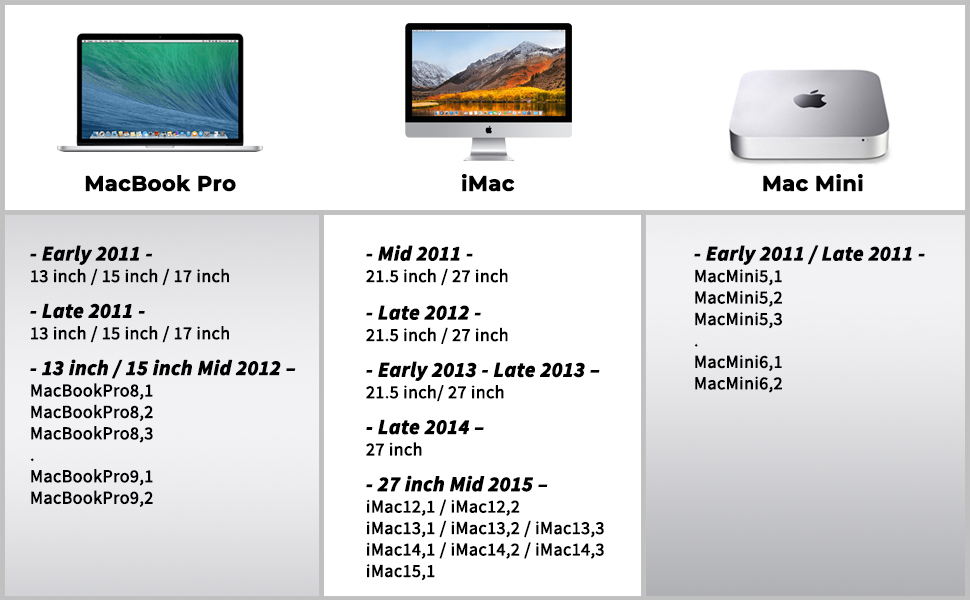
The Silicon Power DDR3L 16GB (2x8GB) RAM kit delivers a reliable 1600MHz speed with low 1.35V power consumption, designed specifically for laptops with a 204-pin SODIMM form factor. Compatible with popular MacBook Pro and iMac models from 2012-2013, this upgrade offers a significant performance boost for multitasking and gaming on older systems, all backed by a lifetime warranty for lasting confidence.


| ASIN | B07L8C37DH |
| Additional Features | Lightweight |
| Best Sellers Rank | #219 in Computer Memory |
| Brand | SP Silicon Power |
| Column Address Strobe Latency | 11 |
| Compatible Devices | Laptop |
| Computer Memory Size | 16 GB |
| Customer Reviews | 4.8 out of 5 stars 4,183 Reviews |
| Data Transfer Rate | 1600 MHz |
| Form Factor | 204-Pin |
| Global Trade Identification Number | 00886576042466 |
| Item Weight | 27 Grams |
| Manufacturer | SP Silicon Power |
| Memory Form Factor | UDIMM |
| Memory Generation | DDR3 |
| Memory Speed | 1600 MHz |
| Mfr Part Number | SU016GLSTU160N22AH |
| Model Name | SU016GLSTU160N22AH |
| Model Number | SU016GLSTU160N22AH |
| Number of Pins | 204 |
| RAM Memory Technology | DDR3 |
| RAM Size | 16 GB |
| Special Feature | Lightweight |
| UPC | 886576067650 886576042466 |
| Voltage | 1.35 Volts |
R**2
Used this to upgrade my older gaming laptop, performs really well!
I have used Silicon power in the past before and this ram works pretty well. Silicone power has been coming up as a pretty well trusted brand. I wanted to upgrade my older gaming laptop that is running 8 gb DDR3 (I know a bit older). I have been using this ram stick for several weeks now and there have been no issues. The specs for this ram is as followed 16 GB (2 x 8 gb) DDR3 1600 MHz. It works pretty well and it did increase my old gaming laptop performance. Now the only thing that is bottled necking it is my GPU. Speaking of gaming, this will work for that purpose and it does give your laptop a better performance. This is 2 ram sticks and not one (8 gb a stick). The ram pretty light to hold but make sure you discharge yourself by touching metal before handling any chips. If you are planning use this to upgrade basic laptop, this will work just fine although 8 gb is good enough for every day use. It is pretty easy to install but every laptop is different so do your research before purchasing ram. Also you need to unplug your computer before installing this ram (remove the battery if it one of those pull out batteries). I was able to remove the bottom panel of my laptop and just swap out the ram. It does not require any additional installation or setting changes (at least on my end) to make this work. The most important thing is to make sure you unplug your laptop from the power before you install this to avoid any problems. The ram is pretty simple looking and because it is laptop memory it does not have RGB. The performance is not bad and it is decent speed. It is an older memory so it is not as fast as DDR4 but that is okay. You can install this ram into some mini pc that run on laptop memory. This ram however does provide me with more than enough ram to surf the web and watch videos. I only use this for my gaming laptop and it also worked. There are no real heating issues with no heat sink. It performs pretty well. The packaging was actually pretty tough it actually took some effort to cut the ram out but I am glad it is well protected. The issues is that I had to cut and pull the ram out of the packaging. If you are going to cut it, just be careful not to hit the ram. Overall this is a very reasonably priced (for being an older ram) and inexpensive ram to have. It performance is strong and it really is an upgrade for my older lenovo gaming laptop.
K**A
Huge boost for older laptops!
Wow, DDR3 RAM has gotten very affordable! I picked up this kit for around a buck per GB of RAM, which is unthinkable even just a couple years ago. I had a couple of laptops sitting around that used DDR3 RAM still, and so I got these kits for them, and they slotted right in, and have been working great. I haven't run into any memory errors after install (I pretty much always immediately run MemTest86+ after swapping out RAM, just to know what I'm getting into, especially before getting rid of the old RAM). So far, I haven't run into any trouble with these kits. 16GB of RAM is about as much RAM as laptops that run DDR3 RAM can handle, and in just about every case I've done it, Windows 10 runs really well after the upgrade (in one case, I went from 4GB to 16GB, so that was a huge boost when running more than a few apps at once). These also run at their rated 1600MT/s, which is about as fast as one can expect most DDR3 laptops to run. All in all, in my experience, these seem to be a good way to max out the RAM of your older laptops.
R**R
Works for non-Mac too, and rare find
The fact that they sell 2x8GB for around ~16 USD/EUR is very nice. Almost ~1 USD/EUR per GB, very good pricing. These RAM sticks also come with the same kind of chips that are sold with higher-priced RAM. I checked myself the ones I received and they're indeed Samsung memory chips. First, it's not bad to find Samsung chips on these RAM sticks since they're actually quality chips. And also, that means you can get better quality chips for cheaper pricing when getting this item. Also, I don't expect that every RAM manufacturer makes their own chips from scratch. It's more about how they arrange their RAM stick and which quality they require for all its components. Here it's good quality. It cans work for dual-channel on boards that support it. The 'unbuffered' mention in the product description means that RAM is accessed directly by the motherboard, without a tiny controller between to 'buffer'/queue the read-writes. This didn't make the RAM sticks hotter for me, unlike what I could read online about unbuffered RAM. This had no effect whatsoever for me, and probably for all common types of computers too. It's still good to know what buffered & unbuffered means to make the best-educated judgement for what you want. Still, 2x8GB at this price is a rare find. I hope it stays available for later.
D**.
works great
works great
J**T
Fast and Easy Upgrade for my Old Laptop
This Review is For: Silicon Power Hynix IC Compatible for Apple DDR3 DDR3L 16GB (2x8GB) RAM 1600MHz (PC3 12800) 204 pin CL11 1.35V Non ECC Unbuffered SODIMM Laptop Notebook Memory RAM Module Upgrade By: SP Silicon Power Store ============================================ First -- I posted a question above on these modules regarding whether they are compatible with my 'HP Probook 650 G1', and asking for clarification as to whether these modules are DDR3L or the older DDR3. -- The vendor and several others responded that they are DDR3L and are compatible with my laptop. Many thanks to all of you for taking the time to respond. My old 'HP Probook 650 G1' laptop had two 4MB modules installed, which just meets the MINIMUM memory requirements for Windows 10 Pro 64-bit. And before the upgrade, Task Manager showed the previous 8MB of installed memory was often fully utilized. The laptop is still going strong and for my needs was pretty snappy, but I wanted to upgrade the memory before a big Photoshop project, and while appropriate memory modules are widely available. So I ordered this inexpensive plug & play 16GB kit, which was received two days later. Although not a remarkable transformation, this upgrade of two 8MB modules provided a noticeable increase in responsiveness. And I'm confident it will make my upcoming Photoshop project much more enjoyable. I liked the upgrade enough that I'll be ordering another 16MB kit for a second laptop that has (mismatched) 8MB and 4MB memory modules installed. It was a fast and easy install for my laptop, which instantly recognized the change on the next boot. Excellent price, fast shipping and easy upgrade - Doesn't get better than that! ============= Clarification: DDR3 vs. DDR3L One person responded to my posted questions stating that DDR3 and DDR3L memory modules are interchangeable, so it doesn't matter. But my Google results indicate they are only interchangeable on older motherboards that deliver 1.5v to the memory slots designed for DDR3. That's because DDR3 memory modules are meant to run on 1.5v while DDR3L are backwards compatible (dual voltage), so can run on 1.35v or 1.5v. (The 'L' in DDR3L represents Low Voltage.) The possible danger: Motherboards designed for DDR3L modules deliver 1.35v to the memory slots. That means a DDR3 module (designed to run on 1.5v) inserted into a DDR3L slot (supplying only 1.35v for the expected DDR3L modules) will be 'voltage-starved' and may become unstable or worse. - Although, I did read one post saying they had done so with no negative repercussions. MY SEARCH RESULTS A. Modules & Slots Visually Identical DDR3 and DDR3L memory modules are visually identical. The only difference is the voltage(s) they are designed to run on. Likewise, the physical memory slots they fit in are identical. B. Slot Voltages Motherboards supporting DDR3-style memory modules might supply 1.5v to the the memory slots to support the original DDR3 modules. OR, they might supply 1.35v to the memory slots to support the newer Low-voltage DDR3L modules. Check your motherboard specifications to be sure. C. Memory Module Voltages - DDR3 modules (1.5v only) should not be installed in a DDR3L slot (1.35v) - because they will receive less than the voltage they were designed for. - DDR3L modules (dual voltage) can be installed in a DDR3L Slot (1.35v) or in a DDR3 Slot (1.5v) - because they are backwards compatible and can use either voltage. ----------------------------------------------------- BOTTOM LINE - MATCHING MEMORY SLOTS TO MEMORY MODULES ----------------------------------------------------- DDR3 modules run on 1.5v only. DDR3L modules are dual voltage and will run on either 1.35v or 1.5v. * 1) DDR3 Slot (1.5v) - both DDR3 and DDR3L will work. * 2) DDR3L Slot (1.35v) - only DDR3L will work. ----------------------------------------------------- There's also the issue of whether you can mix DDR3 and DDR3L memory modules on motherboards supplying 1.5v to the memory slots (designed for DDR3 modules). Several people thought it not advisable as the immediate, short-term and long-term effects were unknown to them. I also grazed info from vendors and on tech sites that simply stated the modules are not compatible. It's unclear if they were referring to voltage issues described above, or maybe pairing issues. Ultimately I found no definitive answer as to mixing the two types of modules. My Personal Take-Away First, determine the type of memory the motherboard is designed for, and then follow the two starred points above. And to avoid having to chase down (possibly intermittent) compatibility issues later on, try not to mix DDR3 and DDR3L. But that's just me. You should do your own research and use your own judgement. You'll likely find some interesting info and LOTS of opinions. To get started, you might use the following search terms: ("DDR3" "DDR3L" "compatible")
J**N
Power house
I recently upgraded my laptop's memory with the Silicon Power Hynix IC Compatible for Apple DDR3 DDR3L 16GB RAM and I couldn't be happier with the results. This RAM module is a perfect fit for my device, with its 1600MHz speed and 1.35V power consumption ensuring smooth and fast performance. The installation process was a breeze, thanks to the clear instructions provided. I noticed a significant improvement in my laptop's speed and overall performance after upgrading to this RAM module. My applications now run more efficiently and multitasking is a breeze. The 204 pin CL11 design of this RAM module is compact and fits snugly into my laptop's memory slot. The non-ECC unbuffered feature ensures stability and reliability, making it a great choice for users looking to upgrade their memory without any hassle. I highly recommend the Silicon Power Hynix IC Compatible for Apple DDR3 DDR3L 16GB RAM to anyone looking to boost their laptop's performance. With its high-quality components and reliable performance, this RAM module is definitely worth the investment. Trust me, you won't be disappointed!
A**W
Works perfectly in my old Thinkpad
I got these to upgrade my old Thinkpad from college, I figured it couldn't hurt to increase the RAM since I still sometimes use it for drawing or graphic design work when I don't feel like sitting at my desk all day. I was surprised that it made such a big difference in performance, the laptop I have doesn't have many upgrade options besides this so I always thought it was a bit pointless but I'm still glad I got these
J**R
What's not to like?
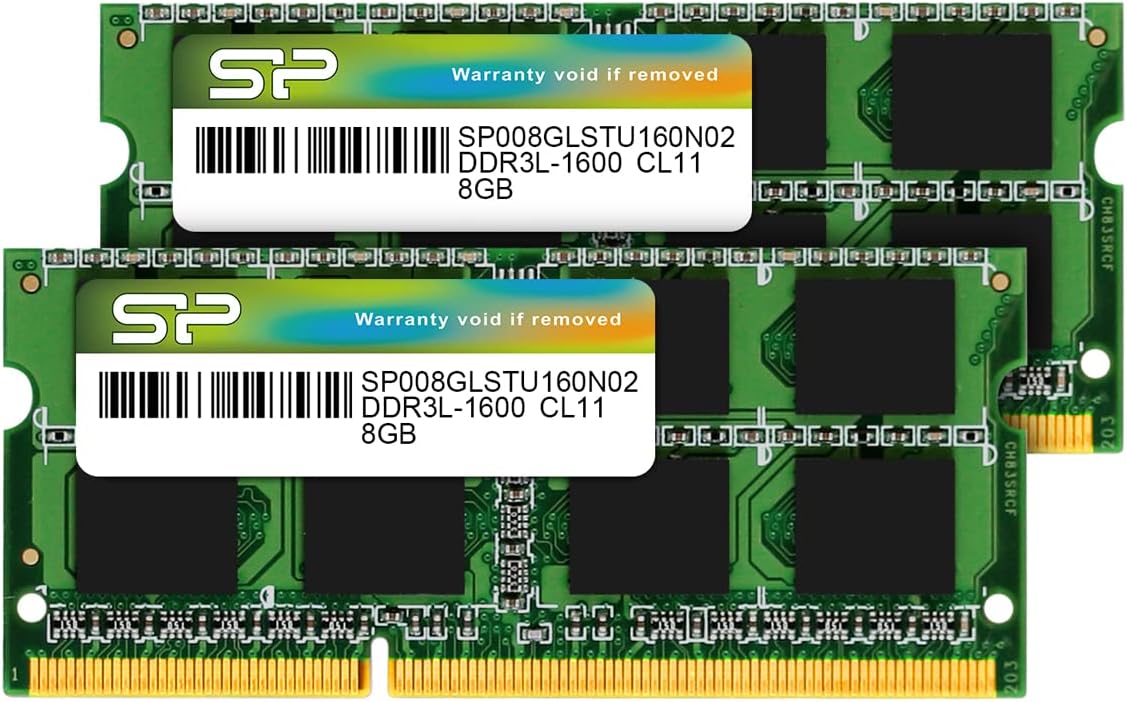
Good price point for these modules. I checked the new ram with memtest up to a 100%. All fine. I still use a 12+ years old i7 laptop Packard Bell EasyNote HS11HR which works still wonderful and the 2x4GB I had in there worked fine until one of the modules failed 2 weeks ago. Memtest showed errors. So I did the "swap game" and no matter which slot or one or two modules, the faulty one produced errors and the other one didn't. So at the point it was obvious it was the ram board. Generating freezers and kernel panics every day. Now with the new modules I do have twice the ram size and a little faster speed. With the life long warranty I won't have to worry. I guess the old faulty module may be revived with putting it into the oven and heat the solder up until it melts for a minute, unless a chip is faulty. They have so many solder points that may be the fault. Some spots there may have gotten brittle. But we shall see. For the price point though I just bought the new ones and have now twice the size of ram which bring that ole laptop more up to date. Plus then I still have the old ones if the one can be revived as backup or put into another laptop. The 10+ year old (always updated) bios had no issues to recognize the speed and size of the new ram modules! The cpu temperature is about the same as before. About 65 to 95 degrees dependent on the check algo. The manual of that old laptop stated it is only for 8GB max ram, but it has no issues whatsoever with the 16GB. See picture. I think for the price you cannot go wrong even if you just want to upgrade from 8 to 16GB. I do not use a swap file or drive for my Linux, so the 16GB come in handy as well. It is plenty of space.
L**J
great
Cheap ram, works excellently. Made in Taiwan, not china, so better quality
A**E
OK sur ancien PC portable Sony Vaio
Fonctionne parfaitement sur un PC portable Sony Vaio de 2012
W**S
Deutlicher Leistungsschub für meinen Laptop!
Ich habe mir das Silicon Power Laptop-Speichermodul geholt, um meinem älteren Notebook wieder etwas mehr Schwung zu geben – und ich bin absolut begeistert! Der Einbau war kinderleicht, dank der guten Verarbeitung und passgenauen Bauweise. Seit dem Upgrade startet mein Laptop deutlich schneller, Programme öffnen sich ohne lange Wartezeiten, und selbst bei mehreren gleichzeitig laufenden Anwendungen bleibt alles flüssig. Besonders positiv finde ich, dass das Modul nicht zu heiß wird und stabil läuft – auch nach längeren Arbeitssessions. Das Preis-Leistungs-Verhältnis ist top, und die Qualität steht namhaften Herstellern in nichts nach. Für alle, die ihrem Laptop unkompliziert und günstig einen Leistungsschub verpassen wollen, kann ich das Silicon Power Speichermodul nur wärmstens empfehlen.
H**S
Prima geheugen
Functioneert prima in een oude dell E5530 met Windows 11.
C**A
Buena memoria
Mi cliente ha quedado contento, y yo muy satisfecho de haberle podido ayudar, su ordenador funciona muy bien.
Trustpilot
1 month ago
3 weeks ago