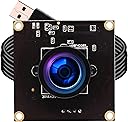
ELP-USBFHD08S-L29
Product ID: 88041667
Details
- BrandELP
- ColorBlack
- Connectivity TechnologyUSB
- Flash Memory TypeSD
- Maximum Aperture2 f_stop
- Maximum Focal Length2.9
⚡Up to 260FPS ultra-smooth
🌐120° wide angle lens
🎥1080P Full HD clarity
Desertcart purchases this item on your behalf and handles shipping, customs, and support to Vietnam.
🚀 Elevate your video game with ultra-smooth clarity and wide-angle power!
The ELP USB Camera features a 2.9mm wide-angle fisheye lens delivering 1080P Full HD video at 60FPS, with ultra-high frame rates up to 260FPS at lower resolutions. Compatible with Windows, Mac, Linux, and Android, it offers plug-and-play convenience and a broad 120° field of view, making it ideal for professional streaming, video conferencing, and creative projects.


| ASIN | B07DWXRKNL |
| Best Sellers Rank | #1,251 in Webcams |
| Brand | ELP |
| Built-In Media | USB Cable |
| Camcorder Type | Video Camera |
| Color | Black |
| Compatible Devices | Devices with a USB port and compatible operating systems (Windows XP and later, Linux with UVC, Mac-OS X 10.4.8 and later, Android 4.0 and later, and Wince with UVC) |
| Compatible Processors | Windows XP and later, Linux with UVC, Mac-OS X 10.4.8 and later, Android 4.0 and later, Wince with UVC |
| Connectivity Technology | USB |
| Customer Reviews | 3.9 out of 5 stars 51 Reviews |
| Display Resolution Maximum | 1920x1080 (FHD) |
| Effective Still Resolution | 2 mp |
| Effective Video Resolution | 1080 pixels |
| Exposure Control Type | Automatic |
| File Format | M-JPEG |
| Flash Memory Bus Interface Type | USB2.0 |
| Flash Memory Speed Class | C10 |
| Flash Memory Type | SD |
| Flash Memory Video Speed Class | 480 |
| Focus Type | Auto Focus |
| Form Factor | Compact |
| Image Aspect Ratio | 16:9 or 1.78:1 |
| Image stabilization | false |
| Item Weight | 0.09 kg |
| Lens Type | Fisheye |
| Log Gamma Curve | Possible but not confirmed |
| Manufacturer | ELP |
| Maximum Aperture | 2 f_stop |
| Maximum Focal Length | 2.9 millimeters |
| Minimum Aperture | 2 millimeters |
| Minimum Focal Length | 2.9 millimeters |
| Model Name | ELP-USBFHD08S-L29 ELP 2mp high speed usb camera module with wide angle 2.9mm lens for computer |
| Model Number | ELP-USBFHD08S-L29 |
| Operating System | Windows XP and later, Linux with UVC, Mac-OS X 10.4.8 and later, Android 4.0 and later, Wince with UVC |
| Photo Sensor Technology | CMOS |
| Screen Size | 3 inches |
| Sensor Type | CMOS |
| Shooting Modes | Automatic |
| Special Feature | 2mp 1080P FHD, CMOS OV4698, high speed 480P@100fps |
| Style Name | Minimalist |
| Supported Image Format | MJPEG, YUY2 |
| Upper Temperature Rating | 70 °C |
| Video Capture Format | MJPEG |
| Video Capture Resolution | 480p , 720p |
| Video Resolution | 480p, 720p |
| Viewing Angle | 120 degrees |
| Water Resistance Level | Not Water Resistant |
| White Balance Settings | Auto |
Trustpilot
4 days ago
3 days ago