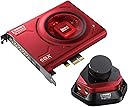
🎮 Elevate your game audio — hear every detail, own every moment.
The Creative Sound Blaster Zx PCIe Gaming Sound Card combines a high-performance headphone amplifier with an intuitive desktop Audio Control Module, delivering ultra-clear 116dB SNR audio, advanced SBX Pro Studio 3D surround sound, and a beam-forming microphone array. Designed for gamers and audiophiles alike, it offers seamless switching between headphones and speakers, Scout Mode for competitive advantage, and crystal-clear voice communication with noise filtering, making it a top-tier upgrade for immersive PC audio experiences.


| ASIN | B009XDWUCQ |
| Audio Output Mode | 5.1 |
| Best Sellers Rank | #176 in Computer Internal Sound Cards |
| Brand | Creative |
| Compatible Devices | Personal Computer |
| Customer Reviews | 4.3 out of 5 stars 569 Reviews |
| Global Trade Identification Number | 00054651181083 |
| Hardware Connectivity | Express Card |
| Hardware Interface | Express Card |
| Hardware Platform | Headphones, PC, Speakers |
| Item Weight | 0.4 Pounds |
| Manufacturer | Creative |
| Mfr Part Number | SB1506 |
| Model Name | Sound Blaster Zx |
| Model Number | SB1506 |
| Platform | Windows 7, Windows 8 |
| Signal-to-Noise Ratio | 116 dB |
| Surround Sound Channel Configuration | 5 1 |
| UPC | 054651181083 780746978121 168141621802 807320189190 546511810832 |
L**.
Very good soundcard; Slight-nitpicks are negligible.
The Sound Blaster Zx is considered the "second-best" within Creative's Z-series of soundcards. The card is easy to install in an available PCIe slot, and performs as expected in most aspects. Hardware: The soundcard itself has a very sleek design, and definitely helps accent in any red colored computer build; when powered on, it emits a red light that is bright enough to be noticeable, but isn't too intrusive. The card sports enough back ports for a 5.1 surround setup, as well as a microphone port and an amplified headphone port (all are standard 3.5mm ports as most would expect), along with digital-in and digital-out ports. There is also a plug on the inner end of the card to use for connecting front audio ports (headphones/mic). Along with the actual soundcard is an audio control module that can be plugged into any set of headphone/mic ports (I have mine plugged in to the front case ports). This volume control can support a set of either 2 3.5mm jacks or 2 1/4-inch jacks (each set is an input and output), but only one set can be used at one time. Very handy to have if you're using headphones and you like to adjust your volume on the fly without messing with anything software-wise. As a last note on the hardware, the EMI shielding seems to work well; the 116dB Signal-To-Noise Ratio is tried and true. Unless you have everything cranked almost all the way up, you won't hear any interference that could come about in other cards. Software: For the most part, the card's drivers and configuation software work as intended, but the design for the interoperability of how certain features work are slightly disappointing compared to the capability of Creative's older soundcards. I'll discuss the good stuff first: The software design isn't really hard to navigate; everything is sectioned off properly, and there are definitely quite a few features involved. Surround sound audio works very well, crystalizer allows for clear audio (I turned this feature down a bit, not because it sounds bad, but can make certain sound effects sound a bit strange in certain instances), and the bass, smart volume, and dialog adjustments work well for situations where you might need them. Cinematic settings are available for those who to make use of Dolby Digital Live or DTS Connect, and there are straightforward settings for the Mixer for all of your inputs and outputs, as well as a standard-use Equalizer. Although this card came out just a couple years ago, within a driver update (I believe during 2014), the Z-Series cards got native ASIO support; Creative really saved their bacon here, as I definitely need that for audio sequencing within FL Studio. However, it's here now and it works well at very small buffer-rates (5ms delay works very well for me while using external USB MIDI keyboards). Now, here are the caveats I ran into: Firstly, the biggest caveat I encountered is that the software "features" using a multipurpose input; this lets you pick which input device you want to use at a given time. However, this is the problem; you can only use one input at a time. Example case: You have your computer audio setup as usual, and you also have a game console setup to go through you line-in jack on the card. No problems here, as you can hear everything loud and clear, but you won't be able to use one of the microphone ports as well. This is incovienient for me, where I might be playing on the Xbox, but also want to talk to friends on the computer via VoIP (such as Teamspeak or Mumble); I simply wouldn't be able to do this with this particular setup. The workaround for this would be using the Xbox's digital-output to the soundcard's digital-in, since that digital-in port isn't considered as part of the multi-purpose input device. Again, this is nit-picky, but this was never a problem with Creative's previous cards. Secondly, the CrystalVoice features are fairly sub-par. Anyone who is familiar with the older Sound Blaster cards' software (particularly, the audio creation mode sub-set of settings) will find that they are much beyond what Creative has here with CrystalVoice. Also, if you try and monitor a microphone input (i.e. "Listen to this device") and use CrystalVoice in conjunction, there is a very noticeable delay, and effectively eliminates comfortably monitoring that input. Yet again, this is a nit-pick, but it wasn't a problem on older cards. Final Thoughts: For those who just want a soundcard that sounds good, and only need up to 5.1 surround, this card will most likely do you wonders. If you're like me, and you're used to particular sound setups and certain software features, you might run into a few things, most of which can be worked around. Either way, it should be more than capable of handling many situations, from movie watching to gaming, to even some in-depth audio recording and editing tasks.
R**N
Best Sound Blaster yet, worthy upgrade from X-Fi
First I'll start this review by saying that I was very skeptical when i ordered this. I've been debating getting one for weeks... or has it been months? At any rate, I decided to buy it and here's what i think: - I wasn't sure if i would really appreciate the 116dB SNR, but I DEFINITELY DO. This card sounds awesome. I hooked it up and plugged in my headphones and cranked up the volume (without playing anything) and could detect absolutely not hissing, buzzing or any sort of noise on the line. Usually with these canal headphones i hear some sort of noise (with onboard or even with my previous X-Fi card). I find this clarity to be very appreciable in music playback especially. - I was really worried about the microphone not working so well, especially after a couple negative reviews I've seen out there. But it is awesome. It, along with the CrystalVoice settings/processing, does an AMAZING job of filtering out all unwanted noise and picking up only your voice. Toggling the Noise Reduction on and off lets you tell just how much ambient noise this filters out without having much impact on the tone of your voice, and it does very very well. The whole "beam forming cone" thing works very well too, it doesnt pick up my voice if im just a couple feet to one side or the other. At first i was leaning forward and talking towards the mic, like i would with any cheap desktop mic. But after testing I realized that i could be sitting many feet away, leaning back and it still picks up my voice with absolutely no problems. The smartvolume on the mic works just as well as the SVM does for the speaker output - whispers from 4-5ft away were nearly the same volume as talking loudly right up by the mic. The only feature that I dont really care for is the Acoustic Echo Cancellation. I find that enabling it makes my voice choppy and harder to understand. Since this feature was intended to eliminate feedback in open-mic settings, and i only ever us Push-to-talk, this was a non-issue for me. I was worried that the mic build into the ACM on this model wouldtn pick up as well as the monitor-top model of the cheaper model due to the angle, but i have no complaints whatsoever. This microphone has allowed me to FINALLY stop wearing headsets during game. Now i can wear my preferred headphones or even just use my speakers and still communicate reliably with my teammates. Definitely NOT a gimmicky thing like i feared. - The new software is MUCH better than anything creative has put out yet. Everything/anything that you need to do is right there, easy and convenient. The interface is a lot better laid out and very quick and responsive, unlike the X-Fi control panel. Smart Volume Management (which has always been one of my fav features of recent soundblaster cards) is not only present, but well upgraded, allowing you to set the levels with a slider. One thing that I've been very impressed and entertained with are the voice effects you can do with this card. My friends and i spent a lot of time just goofing around and laughing at the voices. The "Elderly" setting really makes you sound like an old man! The male>female one really made me sound like a woman lol. Prank calling ppl with these effects using Google Voice provides hours of entertainment :) My friends XFi titanium has most of , if not all of, these effects, but they dont sound as good on his... i dunno if its his mic or if the processing has been improved, but yeah, it sounds great. The 10-band EQ is always nice to have too. The only thing i cant really comment on are the digital outputs and settings, since i dont use them, and the Scout Mode, since i havent tried it yet. - Hardware and connection wise, this card is much much better than past creative products. The card itself feels very high quality. I love the shielding and the red glowing LEDs under it go with my red case lighting awesomely. The jacks on the back seem like better quality than on my last card, and LOVE how the there is a separate mic and speaker output jack. Along with the toggle in the cards control panel, this allows you to leave your headphones and speakers connected at the same time and switch back and forth at will! No more swapping wires! The audio control module is just as high quality as the rest, and while in the end its just a cable extender with built in potentiometer for controlling the volume to the headphones plugged into it, i really love it. the knob is very smooth, and having the jacks RIGHT there on my desk behind my keyboard is so great. I never find myself running out of cable length anymore, even when using shorter cabled canal headphones like my Klipsch S4s. The ACM has a single, sleeved cable coming out the back of it that splits off into the 2 plugs at the end, one plugs into headphone jack and one plugs into mic jack, on the back of the card. I kinda wish there was a little more length to it, but its enough for my setup, and if you really needed more length you could easily extend it with some femal>male 3.5mm cables. Speaking of cables, the card also comes with a really nice RCA>3.5mm cable, which i replaced my other cable with (for connecting card to stereo system). Another thing I really appreciate is that, unlike my X-Fi, this card has your traditional connector pins on it for connecting the front audio panel jacks of your case. From the feel of the ACM knob, to the clarity of the sound, to the nice packaging it comes in, you can tell that Creative was really aiming to please ppl who like high quality audio products, and IMO they hit the mark perfectly. The improvement in sound clarity over my X-Fi Xtrememusic is about as drastic of a difference as between my motherboards onboard and the X-Fi was, back when i first got it. The beam-forming microphone not only works, but it works INCREDIBLY well. I use Nvidia's 3DVision and wearing the 3D glasses and wearing over/on-ear headsets is very uncomfortable together. I've been searching for a solution for years, and finally found it with this product. Just sitting back and enjoying the amazing audio with voice chat in total comfort is worth the price alone imo. The ability to toggle back and forth between speakers/headphones on the fly is so convenient too, and eliminates the wear on the jacks from continually swapping cables. it also severely decreased the amount of cable clutter in my setup - now i have everything perfectly routed and clean. If youre considering it, GET THIS CARD.
G**X
Performance card, premium price... and worth it.
I have been using an PCI XFi card with the front port for years now and was completely happy with that card, but I did not like how it had to be placed on my motherboard so I wanted to upgrade to a PCIE card and preferably Soundblaster. My old XFi is a heck of a card and I liked having all kinds of ports on the front, but the reviews for this were solid and the audio control mega-puck would be adequate (if needed I will use the ports on the card). Even without doing any monkeying around with settings I tested out the sounds to make sure it installed correctly, the sound was definitely a touch better straight out of the box. FWIW I am using an old 2:1 monsoon planar speaker set up (as no other set of speakers has made me happy) and Monoprice DJ headphones. The control puck is big a clunky, but I like it as it is not going to wander off like the one for my Monsoon speakers (which I have Velcro'd to my monitor stand. Some have complained about the sound quality coming out of the control puck, but that seems very nitpicky. I was happy with the sound quality but it is an accessory of convenience, if this is important to you As for settings, I went with the rock preset for now and that sounds best for music and for gaming that has been adequate. I knocked down the crystallization settings, but even with those set higher that bit of technology is better implemented on the ZX than the XFi. I will continue to fiddle around with the settings, but the ZX control panel offers up a robust set of controls... some I might never use. So... after about a week and getting the ZX the way I want it I can say I am very happy with the purchase (double so as Amazon had it on sale). Only gripe so far is it did not like coming out from sleep mode once. Not a huge deal, but I will be paying attention to this in case it is not a blip. The only real knock I can give the ZX is that unlike the XFi, there is no auto-sense when headphones are plugged in. I liked that feature quite a bit with the older card and front panel combination. Not a big deal, it is an issue of convenience and one I can live with. Overall, the superiority of what sound cards can do versus on board sound in clearly demonstrated, it is like comparing a VW bug versus a Mercedes Benz. For those upgrading from older sound cards this is probably worth the cost (it was for me). For audiophiles, the control puck may not be worth they extra bucks, but I like it.
W**2
More volume, more bass, more treble.....
After a poor experience with an external SoundBlaster, I vowed to never be a Creative customer again. Problem with that is, their internal cards are tried and true. And I have found when comparing specs to other brands, Creative meets or beats them for the most part and comes in at quite a bit cheaper. Finger crossed I never need warranty or support, as dealing with Creative is like pulling teeth. Seems to be a nice upgrade from my X-Fi Titanium, although it is possible my 6yr old X-Fi's output was not what it once was. I use the digital TosLink out to an 4x optical splitter, then on to 4 receivers. The output level seems like it is 3 times what the X-Fi put out (again, my X-Fi may have just plain been old and tired). The final output from the speakers is WAY louder than it once was. What used to be 90% of amplifier output is now achieved with 30%. For that, I absolutely love it!! Anything that can keep my amps running cooler is of course welcome. As far as the sound quality goes, it sounds as clean and clear as most Creative products. I cannot say it sounds any better or worse than the X-Fi. What it does have, is a higher bass ceiling. With an available sub gain, selectable crossover boost from 10Hz to 1Khz, and a 10 band EQ, there is way more bass available to my subs than I need. I have also found the treble has a higher ceiling too. Way brighter than I care for. As a result, the EQ now has the top and bottom couple bands pulled back as compared to the X-Fi. The SBX control panel is fair, but it did take a while to figure out how to get Dolby out of the Toslink. It also took a while to figure if I wanted stereo direct or 2.1 and if I wanted Dolby or DTS. 2.1 was the answer. Dolby also won over DTS as the final output was louder. In short, it took some screwing around to get it to settle down and sound like my X-Fi, but it was fun to play with and learn all the features, and the end result was worth it. The Audio Control Module (ACM) I won't use much. The 'phone amplifier in my receiver produces more volume and better bass. However, the ACM is well built. It is a nice heavy base with full rubber foot to keep it from sliding around. I also thought it was cool to include both 1/4" and 1/8" jacks, instead of an adapter that you can never find when you need it. The volume rheostat is super silky and smooth, although it lacks a soft stop. You can hear and feel the wiper arm hitting something when it has reached the end of its stroke. Should be fine as long as you are conscious of it and not slamming the volume to 11 every time..... I cannot comment on the cool LEDs, as I use a horizontal HTPC chassis with no windows. Most of the complaints I have read on this card appear to be driver related. It looks like they may have released this card prematurely, and the firmware guys had not yet ran it through the ringer in each available Windows option. It also appears they now have those bugs worked out. I am running on Windows 7, and the included CD-ROM had everything I needed in its most current revision. A Creative update check after installation revealed nothing more current, other than a couple of options and a trial I was not interested in. It should also be noted that Windows 7 found all the drivers it needed to run the card on its own. So if you don't care for or need any of the included software to further control sound quality, you won't even need the CD. **UPDATE*** 04.08.16 This could be some kinds gear glitch, idk..... But headphone through the ACM sounds like ass. Receiver 'phone jack, no issue. QC issue? - maybe something on the board, maybe my gear, idk... But it's prevalent through the ACM.... Best suggestion is - if your primary final driver is a headphone, do what you can to preview output prior to purchase. I, personally, give a rat's A*&. Through standard drivers, it is truly insane. Dolby Digital Live may as well be on stage...... ***UPDATE*** 0928.2021 - Retired, abandoned in the still in use HTPC tower. I now use an external DAC, a Schiit Gungnir. SOOOOOOOoooo silky smooth. As close as I can get to tubes with a digital source and solid state amps. The only downfalls is I don't have as much audio control as I had. The Creative software doesn't work with the DAC. I had to buy audio software so I at least had a 10 band EQ to play with.....
T**C
At long last, my sound problems have been solved!
At long last, my sound problems have been solved. I am absolutely delighted. I’m writing this review because I’m a happy customer, and I think that Creative deserves a good review. I was not compensated in any way. Paid the price listed. I have a Samsung phone, a Roku 4, and one of those new 4K TVs that use HDMI and optical (SPDIF) to handle sound output. I am also a gamer, so I want to be able to unify and configure the sound through my headset from my different audio sources. I tried different methods, including getting a mixer, various conversion cables, Bluetooth transmitter, etc. Nothing worked right. My final attempt was going to be to install a soundcard. I checked around, and it looked like the Sound Blaster Zx PCIe was my best option. I used to have a Sound Blaster when I was a younger gamer years ago, so I thought I may as well give it a try. First step, Hardware Installation: It was a tight fit against my video card, but that’s not the soundcard's fault. It’s relatively low-profile but it does have that hard casing with the LED red glow. It does not need any additional power besides what it gets from the motherboard. I was relieved, as my computer is already stuffed. Just pop it in, screw it in as usual, and go. Just like the old days. One of the new features appears to be the ACM (audio control module). It’s this little red device that plugs in to the back of the soundcard and exposes a bunch of audio inputs for you to plug into, such as a microphone or headphone. Probably does other things, but that’s what I’m using it for. It has an adjustable black knob. I did read some other review about having sound quality problems and low audio volume. I have not noticed that at all. Sounds just fine to me and plenty loud. Second step, Software Installation: This took about 20 minutes. Don’t pay any attention to the progress bar. Windows 7 64-bit does recognize the new soundcard, but don’t bother using Windows to install it. Just run the CD after you install the soundcard, and let setup.exe do what it does. It will have you reboot, check for auto updates (there are some), and then reboot again. Third step, Configuration: The Windows audio service will need to be started (if it isn’t, mine seemed to be disabled during installation). That issue was detected and fixed by either Windows or the installer (I couldn’t tell, which is why I mention it so you check it in your Windows "services"). The Windows audio service is what gives you that speaker icon on the bottom right-hand corner so you can adjust the different volumes of things. If you open “control panel”, and you go to “playback”, you should see the Sound Blaster Z listed, and it should be your default device. Configuration was going well so far, I could hear sound coming out of my headphones. But I couldn’t hear optical input until I did this configuration change. Open up the “Sound Blaster Control Panel”, and navigate to “Mixer,” and click on the configuration gear icon for digital-in. Then check “Listen to this device.” Now I can hear sound from the Roku and the PC, which is exactly what started me on this month-long journey! I can hear sound everywhere, sounds great, and all of the configuration options are all here. There’s more configuration windows and options- equalizer and so on- too many to list here, and more than I remember from when I was a younger gamer. There's even a little toggle button to switch between my external speakers and my headset. Final thoughts: I feel that Creative has targeted my audience- gamers- with this product. I have everything I wanted and then some for configuring games, TV, and music. For people that are audio fanatics, I can’t answer your question. I don’t know and can’t speak to what’s whatever kilohertz sound level of this decibel such and such, but I will tell you it sounds perfectly fine coming out of my headphones, and it has all of the connectors that you might want. As far as the driver install, there’s no worrying downloads from unknown websites. I don’t find any quality issues with the install, everything just worked. Hopefully that’s helpful and will spare somebody else from spending 30 days trying to do the same thing I did. Clearly should have bought a Sound Blaster first.
P**2
VERY IMPORTANT if you are looking into buying this...Please Read
There is a major flaw with the more expensive ZX model of this product. The Audio Control Module (ACM) that you are paying about $50 more, LOWERS the QUALITY of the audio signal versus plugging your headphones directly into the back of the sound card. Seriously, how has no one else caught this? I checked online and found no one complaining about this. So, I thought my ACM was defective. Amazon kindly sent me a replacement. I got the replacement and plugged the new ACM into the back of the sound card and then plugged my headphones in the ACM. SAME ISSUE. (I tried both the 3.5mm and 1/4in plugs) I then changed out the sound card with the new replacement card and reinstalled the software and drivers just to be sure.....SAME ISSUE. If you already own this.....and you love the ACM....you most likely did not compare it to the sound when your headphones are plugged directly into the back of the sound card. I noticed this dramatically because I did not use the ACM for the first week or so. I did all my initial testing in music and gaming without it. As soon as I plugged it in I thought something was wrong with my headphones or the sound card went bad on me. I quickly discovered that it was solely the AMC. PLUGGED INTO THE ACM - The sound is significantly softer making me believe that the built in AMP is being weakened by the ACM. This is a bigger issue for those that have high impedance headphones - Second it affects the balance and quality of sound. For example: While playing COD Black Ops 2 - I immediately noticed that the sound of my gun was muffled and recessed even at the same volume level. I then plugged my headphones directly into the back of the sound card...and it is so much better! Everything is louder, clearer, and precise. Don't believe me, try it out for yourself. I also immediately noticed that my music sounded worse playing through the ACM. The surround sound effect through the ACM sounds more tinny and echoy. So bottom line....the ACM degrades the sound quality significantly (I tested this with two ACMs). It baffles me that both Sound Blaster and Consumers have not noticed this issue with the ACM. I did find a forum of audiophiles debating if the ACM would degrade the sound quality and amp....but there was no definite answer and the topic ended with the assumption that it did not since Sound Blaster said it is the superior model. Please mark this review as helpful so others can see it before spending the extra money on this model...and if they do, hopefully they will do the sound test themselves and compare the sound difference. How knows, maybe I got two bad AMC in a row? I highly doubt it though. The Sound Card itself is very good and I highly recommend the Sound Blaster Z (not ZX)purchase to anyone. Great PC sound and software for customizing your preference of sound. You can plug in your gaming console via Toslink/spdif cable and and use the software for superior virtual surround effect (compared to Astro Mixamp or DSS/2)and customize your console gaming sound as well. The only down side to that, is that you need your PC to be on while you play a console game. Again, I highly recommend the Sound Card. Save yourself $50 and get the Z model. UPDATE - 4/20/13 So, I have brought this issue up with others on Head-Fi (audiophile website forums). Many others have tested this out for themselves and have reported back with the same problem. There have been many differnt headphones used and the problem exists with all of them (Superlux HS668b, Ultrasone Pro900, Sony V-6, Sennheiser 558...ect). It is worth noting that while the ACM degrades audio quality, the built in microphone on the ACM is better than the microphone on the Z model. I have tested out both mics and compared them with my Zalman Zm-Mic1 ($8) and the Zx mic is on par with the Zalman - while the Z model mic is not as good. Also, it seems the people with the ZxR model ($250) are not noticing a big difference in audio quality with the ACM. That does not mean it does not degrade the audio - but those I have conversed with on Head-fi stated that the audio was not significantly affected. So, MAYBE the ZxR model has a better ACM. UPDATE: 6/6/13: Here is a link to the Head-fi forum where I first started this conversation. The conversation goes on for several pages of the forum. My username on Head-fi is Povell42 Link: [...] Here is a link to the same forum (pg 31) where others agree with me and the user phrozenspite confirms that the same issue happens with his ZXR Model. Link: [...]
M**S
Great Every Day Gaming and Music Soundcard
I'm a long time gamer and PC builder back to shortly after Microsoft introduced Windows. I recently bought an Asus Z87 Sabertooth motherboard to go in my new system, which I built using the Win 7- 64 bit operating system. I also decided to try the onboard audio chip that uses Realtek technology. On-board sound is something I have never really tried before. Initially the sound seemed OK but that did not last and I will not dwell on it. Suffice it to say that after playing several games and music from several sources it was my determination that the Realtek sound was just not enough for my ear. In addition, neither was the Realtek control panel that gives the user somewhat less control over adjustments. As a result I bought the Creative SoundBlaster ZX SBX PCIE card with the audio control module. It was on sale on Amazon so I bought it even though it has some features I cannot use to the fullest with my old Logitech Z-680 speaker system. Someday I may replace those speakers so this card will be good for whatever I might buy to replace it. The net of all this is the card installed without a hitch, the software loaded perfectly, updated perfectly, and there have been no problems in games or music so far. I will say that I am familiar with the Creative software and also the Windows 7 settings for doing the installation based on having done this many times in the past. It is a somewhat more difficult task to install any sound card if you are not familiar with the Windows audio settings in the sound section of the control panel so have some experienced help available by phone if you are doing this for the first time. There are some instruction in the manual on the CD that comes with this SoundBlaster ZX SBX card but it deals mostly with the settings in their own controls and not so much with the required Windows settings. The software does it's best to install everything required, including configuring the Windows settings, but it doesn't always configure things 100% correctly, particularly if you have some older audio equipment in your computer system, like my Z-680 Logitech speaker system. In such cases you will need to go into the Windows Control Panel in the Hardware and Sound section and make some manual adjustments to those settings. You can do a Google search for how to configure those settings and you will undoubtedly find some help and perhaps a YouTube video that shows you how to do it step by step. The bottom line is you can't go wrong with this sound card as a very good sound card for every day gaming and music, unless you are a total audiophile. If you are a total audiophile then you need to look at one of the more expensive cards designed strictly for music and made by various manufacturers. All the best.
A**.
Takes a little configuring, but great results!
My Setup: Windows 8 Klipsch Promedia 2.1 (speakers) Sony MDR-V6 (headphones) Let me start by saying that sound cards aren't magic. I've made the mistake in the past of getting a new sound card and just expecting magical things to happen. They won't. Every card I've tried before had its strengths and weaknesses. Creative always tends to make gaming-oriented sound cards, while Asus, M-Audio, and others tend to make audiophile-oriented sound cards. All of them sound better than my motherboard's audio, but none of them are best at everything. I personally care more about the music experience, but wanted better sound across the board. With that said, I am really pleased with the Creative ZX. Upon opening the box, it was nice to see a product in this price range with a quality EMI shield, Nichicon capacitors, and even the included external device that acts as a microphone, volume controller, and headphone jack. It is, to my memory, a better value than anything I have gotten from Creative in the past. They also got the software right this time. It seems to be much lighter and less buggy than their old stuff, and it is genuinely useful. To those who wanted magic, the idea of using the software is both a good thing and a bad thing. If you just wanted to plug the card in and be on your merry way, well then you didn't want to have to do any tweaking. But the good news is that the software allows you to create profiles, and even has some presets that are relevant to gamers. With the out-of-the-box configuration, I found music sounding a little too harsh. The standard configuration exaggerates highs and lows (didn't help that I am using a bass heavy Klipsch 2.1 set), and makes you second guess whether or not you made the right purchase. Do not be discouraged. After messing around with the various settings and saving a few different configurations over the last day, I've got some great sounding profiles for listening to music, watching movies, and playing FPS games. If you just want to turn off all of the proprietary settings and get a flat response from the card, you can do that too. The card offers much more than that, but the sound card's quality will at least give you that extra clarity you were looking for -- provided you have decent enough speakers or headphones to pair it with.
J**.
Works great!
I noticed the difference immediately when playing games like Overwatch and Apex Legends. Sounds are much more crisp. It takes some tinkering in the software, but that has to be expected. The red glow matches my theme, and despite other reviews it's not overpowering. The only con I can think of was the nervousness I had thinking I may have just purchased a VERY expensive 25-foot Ethernet cable and not a sound card. But yes, this is the sound card.
S**R
se nota la diferencia.
Empaque de lujo, estéticamente bien lograda, fácil instalación, sonido impresionante con bocinas de 5.1 canales, yo lo he probado con las z906 y el sonido es espectacular para efectos especiales, tiene mayor amplificación, he probado el mismo video en una smart tv +bocinas 5.1 y en la computadora con la sbzx y las mismas bocinas z906 y todo suena más potente, tengo que usar menos volumen en la computadora porque todo retumba. Buena tarjeta, la volvería a comprar por su excelente rendimiento. Con la tarjeta de sonido integrada ni siquiera se escuchaban todas las bocinas z906, con la sbzx se aprovechan los 5.1 canales y el sonido envolvente es maravilloso, toda una nueva experiencia de sonido.
O**A
No está nada mal.
Es buen producto, realza los sonidos. Es fácil de utilizar, los drivers fallan un poco pero no es algo que no se pueda sobrellevar.
M**E
Great card
A way better then my on board sound card. I thought my realtek was good enough until I heard this sound card. I bought it mainly because of the S/PDIF output and this is a great add-on for PC games.
J**S
a good unit. Likewise
I wish it had some common-sense set-up descriptions,,, or maybe it does, and I just didn't find them... but overall, a good unit. Likewise, the two plugs from the volume control could be better-marked so it'd be easier to tell what jacks they plug-into on the unit. I underwent a 'bad' period with several full crashes and loud buzzings; doesn't seem to have affected the sound card in the least, it still works fine. Recommend.
Trustpilot
2 months ago
2 days ago