Buy anything from 5,000+ international stores. One checkout price. No surprise fees. Join 2M+ shoppers on Desertcart.
Desertcart purchases this item on your behalf and handles shipping, customs, and support to Vietnam.
🚀 Elevate your Windows workflow with precision and power in the palm of your hand!
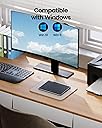
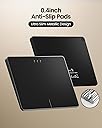
The ProtoArc T1 Plus is a premium Bluetooth trackpad designed exclusively for Windows 10/11 users, featuring a large 6.4-inch metal touch surface, multi-gesture support with up to four fingers, and seamless switching between three Bluetooth devices. Powered by a rechargeable 500mAh battery, it delivers up to 50 hours of wireless use with fast Type-C charging. Its ergonomic design combines physical left/right buttons with full-area touch controls, making it an ideal productivity tool for professionals seeking precision and convenience.


| ASIN | B0G1SLBRR5 |
| Additional Features | Ergonomic Design, Portable, Rechargeable |
| Antenna Location | Office |
| Are Batteries Included | No |
| Are Batteries Required | No |
| Battery Average Life | 50 Hours |
| Best Sellers Rank | #3 in Computer Touch Pads |
| Brand | ProtoArc |
| Button Quantity | 2 |
| Color | Black |
| Compatible Devices | Personal Computer |
| Connectivity Technology | Bluetooth |
| Customer Reviews | 3.9 out of 5 stars 54 Reviews |
| Hand Orientation | Ambidextrous |
| Hardware Platform | PC |
| Manufacturer | ProtoArc |
| Minimum Required Operating System Version | Windows 10 |
| Model Name | T1 Plus |
| Model Number | T1 Plus |
| Movement Detection | Optical |
| Movement Detection Technology | Optical |
| Number of Buttons | 2 |
| Operating System | Windows 10, Windows 11 |
| Power Source | Battery Powered |
| Special Feature | Ergonomic Design, Portable, Rechargeable |
| Unit Count | 1.0 Count |
| Warranty Description | 2 Year |
P**R
Perfectly acceptable trackpad
Though trackpads are not my favorite type of peripheral to use, this one is well worth the price. It is nicely packaged and has a premium feel when unboxing. The touch tracking is accurate, though the left and right click inputs are just a little bit stiff. Overall, I'm happy with this purchase.
J**Y
Good trackpad, but not perfect
This is a good trackpad. It connected easily via Bluetooth and works well. The only issue I currently have with it is click-and-drag. It just doesn’t work very intuitively and requires some finger gymnastics to accomplish.
G**D
Limited compatibility
The fact that this only works for one very specific OS makes this touchpad almost useless, and it's particularly frustrating because there's no reason to make such a limited device. Mac/Android/Linux all support Bluetooth touchpad devices and not supporting those operating systems with even basic functionality from this device was a huge mistake. I've been impressed by protoarc devices in the past, but this is a huge failure that makes me seriously question their product design leadership and I will probably think twice before supporting this brand in the future since they don't support the operating systems I use (android/linux).
E**.
Great trackpad for Windows PC
I have been using the device for 3 days on my Desktop PC and it is working great. Same as Apple trackpad. I am going to update my review, if I will experience any issue.
K**S
Performs best in a quiet EMI environment
In a live EMI (Electro Magnetic Interference) environment the unit struggles to keep sync with my PC. In a quiet environment it performs as well as the Magic Touchpad on my Mac.
B**S
Large wireless Windows trackpad with smooth precision and useful multi-gestures. 😊
This trackpad is basically an attempt to bring “laptop life” to a desktop setup, and it does a pretty convincing job. The ProtoArc T1 Plus is large, smooth, and has that clean white and silver look that quietly suggests productivity, even if it’s being used to scroll memes. The build feels solid enough for daily use, and the surface has a nice glide that doesn’t feel sticky or cheap. It’s the kind of accessory that makes a desk feel more intentional. Pairing it over Bluetooth on Windows 10 or 11 is mostly painless. Turn it on, pair it, and it’s ready to do its little gesture tricks, assuming Windows decides to cooperate that day. Multi-gesture support is the main reason to buy it, and when everything is working correctly, it’s genuinely convenient for scrolling, switching, and navigating without reaching for a mouse. It’s especially nice for people who prefer trackpads for creative work, casual browsing, or couch setups. Precision is good for a wireless trackpad, with responsive cursor movement that feels accurate for general use. It’s not a pro-grade drawing tablet replacement, but it handles everyday pointing, dragging, and two-finger scrolling cleanly. The large surface area helps, because gestures feel less cramped and less “finger gymnastics.” It’s a comfortable experience once muscle memory kicks in. There are still some limitations, because Windows trackpad life is not always as polished as certain other ecosystems. Gestures can feel inconsistent depending on settings, drivers, and what Windows updates are doing this week. Some users may need to tweak system touchpad settings or adjust sensitivity to get the behavior they expect. Also, if someone is very mouse-dependent for precision clicking or gaming, this won’t replace that, it’s a different workflow. Overall, it’s a great option for anyone who wants a large trackpad experience on Windows without being tied to a laptop. It looks good, feels smooth, and makes navigation easier once set up. The trade-offs are that Windows gesture support can be moody, and it won’t satisfy every use case. But for browsing, productivity, and gesture-based control, it’s a strong addition to a desk. 😊 Good Things 👍 Large smooth surface feels comfortable and precise 👍 Bluetooth pairing is simple on Windows 10 and 11 👍 Multi-gesture support is genuinely useful for navigation 👍 Clean white and silver design looks modern on a desk Bad Things 👎 Windows gesture behavior can be inconsistent depending on settings and updates 👎 May require tweaking sensitivity and touch settings to feel “right” 👎 Not ideal for gaming or ultra-precise mouse-style work 👎 Some users may miss physical scroll wheel feedback
S**Y
Worked well--for a while
Installation was easy. Instructions were clear and the trackpad connected to my Windows 11 PC with no difficulty. The touch surface required a little getting used to. Precision was good, but a little touchy in that there seemed to be a bit of jitter in cursor location. Touch gestures worked initially, but in the month since I began using the trackpad the gesture I use most frequently, the single-finger left click, has become unreliable. I often have to tap several times to have the click recognized. The left-click button in the lower left of the trackpad still works well, but I am disappointed that tapping with a single finger is so unreliable.
D**E
ProtoArc Bluetooth Trackpad - Very easy set up.
It's nice, I like it. I use a laptop with a touch pad mostly, but my main PC is mouse driven, so this gives me a touch pad with the same gestures that I have on my ThinkPad. 2 fingers together will scroll, 3 minimizes to the desktop. It didn't work too well with any of my styluses, but that may be a sensitivity issue. I rarely use one anyway. It's not a tablet, after all. It's able to connect to three different devices (Windows 10 or 11 only, no Mac's, sorry). I was able to pair it to my Galaxy S24 phone, but it really didn't do anything other than put a curser in the middle of the screen. Perhaps an old Windows 10 phone? It can't work in wired mode, so charge it periodically. The battery life seems to be good; I've not charged it in weeks. They offer toll free phone support Monday through Sunday if you need help and also an email address with an actual domain name (not @outlook.com or @yahoo.com) with which they sell other stuff they offer. Sorry, I can't mention the domain, but you can easily glean it from the seller's store. All that to say, that it gives me trust that they should be able to stand behind the warranty and support. It comes with a manual and a quick start guide for anything you need to know. It's nice that you don't have to hunt it down and download via website. Easy to use, just turn it on if you're connecting to Windows 11. I can't testify about Win 10, but it's really similar. Upon first power-on of the trackpad, My Windows 11 Bluetooth sensed it and offered to pair it. And then I started using it. So, even if you have to go into your Bluetooth settings, it should be really easy. The size is great for me. I love the real estate it affords! See the attached images. It also has rubber feet, so it doesn't slip around. Another thing that impressed me was a vinyl sticker which I could stick to the back of the unit, so I'd always have the tech support address. How thoughtful, knowing how advertisement brings in tons of problems. I mean really, try and get tech support these days! Great product, good buy for the money.
Trustpilot
1 month ago
2 days ago