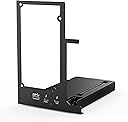
⚡ Unlock desktop-grade GPU power on your laptop—because your workflow deserves the best.
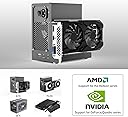
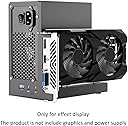
The YLIDXY eGPU Enclosure is a versatile external GPU dock compatible with Thunderbolt 3/4 and USB4 interfaces, delivering up to 40Gbps data transfer speeds. It supports 85W USB-C Power Delivery charging and multiple power supply types (ATX, SFX, FLEX, DC 12V), enabling seamless connection of NVIDIA and AMD PCIe graphics cards. Ideal for professionals and gamers seeking to supercharge laptops, NUCs, or mini PCs with high-performance GPU capabilities and daisy chain connectivity.


| ASIN | B0FW6W342H |
| Best Sellers Rank | #167,953 in Electronics ( See Top 100 in Electronics ) #1,509 in Laptop Docking Stations |
| Brand | YLIDXY |
| Color | Black |
| Compatible Devices | Desktop, Mini PC, NUC, laptop |
| Customer Reviews | 3.6 out of 5 stars 35 Reviews |
| Hardware Interface | Thunderbolt 3, Thunderbolt 4 |
| Input Voltage | 12 Volts (DC) |
| Item Dimensions L x W x H | 14.17"L x 7.17"W x 7.7"H |
| Item Weight | 1.2 Pounds |
| Manufacturer | YLIDXY |
| Number of Ports | 3 |
| Product Dimensions | 14.17"L x 7.17"W x 7.7"H |
| Total USB Ports | 1 |
| Total Usb Ports | 1 |
| Warranty Description | 1 Year |
| Wattage | 85 |
A**N
it works!
well, I was 99% sure that this eGPU will not work with surface laptor5. After few hours of struggling with software part( conflicts in GPU adapters ), I managed to run it. it works perfectly fine. Profiling GPU graphics, games, hard softs - all smooth. I still don't believe that it works. Note: only one remark here, Thunderbolt 4 cable is kinda weird inside box. it's worth to buy normal\stable T4 cable in addition to this eGPU frame.
B**E
Assembly is probably the most challenging. Know the hardware you're going to be using.
It's a great item for the price. I have much technical and programming experience and this egpu enclosure is pretty good easy to use at this price point.
M**S
Expensive Cheap Crap Avoid at All Costs
So this is two flimsy pieces of aluminum, a couple of screws, a crap adapter, because they didn't have the right part in the first place so they have to adapt it to make it fit the board they made. The board they made is garbage, you can't follow any of the traces because it's blacked out and the whole thing has a super cheap crap quality about it. If you smell closely, you'll pick up a faint odor of despair and sadness. If you put it up to your ear you can hear children crying. It would be one thing if this was a cheap product, like I don't know 20 bucks would about what it's worth, but no, they charge $149 for it. And mine lasted just long enough to get out of the Amazon return policy, just barely it failed a month and a half in because everything is held together so weakly. Seriously avoid this product it's no good.
D**N
Thunderbolt docks in general are just kind of flaky.
This TB 3/4 dock has been very flaky and difficult to get working. I can not recommend TB 3/4 docks in general unless and until they become no brainers during the setup. There were some very peculiar and specific steps to go through to get it to work at all and then it has worked ok (lower case ok). TB 3/4 in general is going to be slower than the graphics card can be, I get that part, but the setup should be more intuitive. Perhaps that is just inherent in any/all TB 3/4 docks. Generally I'd say stay away from TB docks, Oculink ones work much more cleanly and I suspect that M.2 PCIe docks may work fairly well, but the cords for these can be an issue in some machines.
B**L
Good as a temporary solution.
I had this for a couple of months. I'm using a GeForce RTX 4060 Ti. When I first set this up my impression was that it could of had more support for the power supply base has it kind of 'hangs' off. Relying on the firm metal plate to support it off the base of the device. Despite that I really liked the minimalistic design and looking at it looks very DIY/Hacky solution. Over the past several months it's worked really really well. It ran many games excellently and the video card/power supply I have barely make any noise. It was truly the best solution I've had for a traveler needing a video card processing solution on the go. However this morning it won't work anymore. It powers on and indicates with the 'power' light it is working. Also it has the indicator light indicating the Thunderbolt 4 wire is connected to the PC from the device. However I can not get the device to register the video card in Device Manager anymore. I took the device apart to ensure something wasn't unseeded. I checked the directions video from the amazon advertisement. Alas, nothing seems to be working to get this back in function. Nothing happed between sessions as I was using this just last night. I can on assume I got burnt on this product. For $150 lost on it I'm frustrated as I'll have to invest something similar or more to find and test a new solution. I recommend only getting this as a temporary solution as it can provide some functionality in a pinch, but don't count on this to last. It's not made from a place of quality. Consider a additional direction to take once this fails, or don't invest.
S**N
GPU Slot
so the reason why I'm leaving a so-so comment it works as intended but any graphics card that requires 3 slots front header to secure the screw wouldn't work. I went from using a 7900XT back to my 6900XT back down to a two-slot I wish that part was hollow all the way through I may need to modify the housing itself. With that being said keep this in mind when purchasing this device.
J**N
So far so good
Worked seamlessly with my Surface Pro9 i7, 32GB, with built in Intel Iris Graphics. Paired with the NVIDIA GTX 1660 Super, it is great for gaming. Hopefully it lasts longer than other reviewers.
J**S
got the whole GPU up
Perfect - got the whole GPU up and going - nice and compact -fits right beside the Comp.
S**N
It hard to set in the first time, and need to use proper psu.
Hard to set up in the first time
B**O
Funciona, mas não funciona
A transmissão de dados é instável, qualquer variação normal de energia, ele desconecta. E só conecta de novo se desconectar o cabo e conectar de novo, durante 1min a 2min ligado.
Trustpilot
2 months ago
5 days ago