
Desertcart purchases this item on your behalf and handles shipping, customs, and support to Vietnam.
🔥 Elevate your creativity with precision and speed — the RAY5 mini is your desktop game-changer!
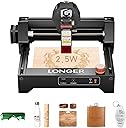
The LONGER RAY5 mini is a 2.5W desktop laser engraver designed for professionals and beginners alike, offering ultra-high precision (0.01 mm), fast engraving speeds (up to 12,000 mm/min), and versatile material compatibility including wood, leather, acrylic, and anodized aluminum. Its compact 130×140 mm working area, lightweight 2.34 kg frame, and advanced safety features like an emergency stop and laser shield make it ideal for home studios and small workshops. With WiFi, USB, and mobile app connectivity plus lifetime technical support, it’s a reliable, ready-to-use tool for creative laser engraving projects.
| ASIN | B0FH6S9FBN |
| Batteries Required? | No |
| Best Sellers Rank | 120,142 in DIY & Tools ( See Top 100 in DIY & Tools ) 90 in Engraving Tools |
| Colour | Black |
| Customer Reviews | 4.1 4.1 out of 5 stars (328) |
| Date First Available | 10 July 2025 |
| Guaranteed software updates until | unknown |
| Included Components | laser engraver |
| Item Package Quantity | 1 |
| Item Weight | 2.34 kg |
| Item model number | RAY5 mini |
| Manufacturer | LONGER |
| Material | Aluminum |
| Package Dimensions | 34.29 x 33.9 x 20.7 cm; 2.34 kg |
| Part Number | RAY5 mini 2.5w |
| Power Source | ac_dc |
| Size | 130 x 140 MM |
| Style | RAY5 mini |
C**N
Easy set up and use
I love this, it has become my new best friend. The free laser GRBl software works great, no need to buy the subscription software, just leav a donation. It took about 10 mins to put together, download and install the software and be up and ready to print. Just load a jpg image in to the GRBL, drag and drop. Set the image size you want, use 130 for maximum size in the width or hight and press create. It converts to a negative image. It works very much like an old dot matrix printer. Tip make sure any white is white in your background. It will skip white and make for faster printing. If it is off white it won't print anying but will take longer. This will give a print like finish. For deeper cut/printing raise the laser higher. For large surfaces, you can just move the printer around and layout your design a section at a time. There is a draw icon that moves the laser around the outer limits of the section it will use. I wanted to use this on some boxes that I am making for my grand kids, so I made an adjustable stand for it to sit on for higher objects. (They don't sell.anything for this. I would have baught one if they did). Very impressed with what this will do, especially for the money. Would definitely recommend for a starter like me.
M**S
Great engraver!
Well worth the money for what you can do with it. Just be aware it is not the best for cutting thin wood and won't engrave uncoated metal, but for engraving wood it is perfect. The app is also super easy to use.
F**T
Highly recommend for beginners
For beginners this is the perfect machine to start with as i use it through my mobile phone, only issue I have is the capacity of the sd card is too small and i keep having to delete files. Iqts already paid for itself and its ideal for smaller projects. Im already thinking about getting a larger machine to expand my ideas and attempt some local craft fair markets
T**N
Not perfect but functional
First time using a laser engraver. Very easy to set up the device it's self. It's shame it doesn't have it own dedicated software, but does works well with other software compatibility wise. Using the engraver is not straightforward as it requires trial and error on different materials. It not powerful enough for most metals contrary to product description. But good valued product for its size. And fully upgradeable.
E**9
Rubbish
Didn’t even work it keeps clacking trying to find home I’ve had an engineer try to set it up and an electrician friends both said it’s rubbish so sending it back
G**R
Fantastic Laser Engraver
Very pleased with this Laser engraver, top class. Works straight out the box. Perfect with my android phone on WiFi Highly Recommend
P**T
Good value
The Longer ray mini 5 engraver is good value working straight out of the box, and easy to use. At this point I would recommend this engraver, time will tell.
R**I
pay more for driver software
the laser works but is weak but what most annoyed me and I may. return this is that the software is £100 on top, I would not have brought this for £200 so very disappointed
R**N
Great
Does what it says. Great value and easy to adjust and use but is limited to no handle items. Some item need to be adjusted in software but comes with instructions to do so but they are on the smaller size font so kinda hard to read but plenty of online videos to find
J**R
Hace lo que quieras
Una verdadera pasada cuesta ponerla en marcha porque tiene muchos pasos, pero luego es una gozada como marca en metal, madera plstico, poniéndola en marcha con el movil no consigues hacer mucho, pero con ordenador lo que quieras, muy contento con la máquina, eso sí mucho cuidado con el laser y los ojos
D**.
Good cards for laser engraving, may require some fine tuning
This is a good variety of different colored cards that worked well with my laser engraver (a Creality Falcon 10W). On the test cards shown, I made the following test template: the left column was run at 200mm/s and the right column was engraved at 333 mm/s. The top row was 100% power, the middle was 75%, and the bottom row was 30%. My laser is a blue diode laser, so colors that absorbed the blue light engraved better than the blues which reflect it. The silver card, not surprisingly, did not engrave or mark in any way. At these settings, there were still varying levels of color left behind on the engraving. I did additional tests, lowering the speed and keeping the power level at 100%. I started seeing optimal results when the speed was around 50 mm/s. The cards are super thin. They look great when engraved, but you would want to protect them as you carry them, because the coloring can be scratched off, and it would be easy to bend them if they were kept in a wallet. If you can get the right settings for your laser engraver, it definitely makes an impression to be able to hand these business cards to friends and potential customers.
K**D
Engraving blank that isn't ONLY suitable for laser.... Works with Cricut or Silhouette too
I'm reviewing "Longer Premium Aluminum Business Cards & Etched Products - 50 PCS in 10 Colors, 0.21mm/0.01-inch Thickness - Durable, Multifunctional, Ideal for Personalization, Perfect for Various Occasions" which I received via the VINE program. I know these blanks are described as suitable for laser engraving, but laser isn't the only player in the engraving game. I have a Cricut Maker 3 and have been DYING to find a project/blank that I could try out engraving on. I figured at this price point and 50 blanks, if I goofed a few times ok, I'm not wasting much. I plugged the dimensions into my design software, and thought I'll make a little name plate for my cubicle at work. I lined up my blank and sent the design to my Maker. It did a great job! You have to choose a font that is a thin line font for it to look the best but for my first shot at this, holy guacamole! Hopefully my edited picture does it justice but I'm very impressed and can see making MANY more things with these blanks!
P**7
Works great as long as you get the settings right.
This thing is great as long as you get the Lightburn (or other software) settings right. The settings come with device on a printed sheet. Tip - It doesn't do as well with tumblers that aren't the same circumference top to bottom. This is the majority of tumblers. You can easily make yourself a jig in Lightburn. Take the outer circumference of the top of tumbler and create a circle the same size in Lightburn. Then take the outer circumference of the bottom of the tumbler and center this circle inside the other in Lightburn. Then cut this out of plywood. You will get a ring to put around the bottom of the tumbler to hold it parallel to the laser. Put this ring on before putting it on the rotary. Sometimes a little tape (duct, gorilla) will give extra assurance that it stays in place.
Trustpilot
3 days ago
1 month ago