Buy anything from 5,000+ international stores. One checkout price. No surprise fees. Join 2M+ shoppers on Desertcart.
Desertcart purchases this item on your behalf and handles shipping, customs, and support to Vietnam.
🖥️ Elevate Your Workspace, Command Your Day
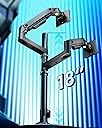
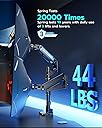
The ARES WING Dual Monitor Arm is a heavy-duty, ultra-flexible mounting solution designed for professional and gaming setups. Supporting monitors up to 49" and 44 lbs, it offers extensive ergonomic adjustments with industrial-grade gas springs for smooth, stable positioning. Enhanced with dual USB charging ports and easy installation options, it transforms any desk into a sleek, productivity powerhouse.

| Brand | ARES WING |
| Manufacturer | ARES WING |
| Model | GDT1004UCP-2BK |
| Package Dimensions | 42.9 x 30.91 x 11.91 cm; 7.66 kg |
| Item model number | GDT1004UCP-2BK |
| Compatible Devices | Monitor |
| Batteries Included | No |
| Batteries Required | No |
| Material | Aluminium |
| Mounting Type | Tabletop Mount |
| Manufacturer | ARES WING |
| Item Weight | 7 kg 660 g |
R**N
Solid & Sturdy Dual Arm, but Needs a Taller Rod and Better Cable Parts
I recently purchased the ARES WING Dual Monitor Arm for Ultrawide Heavy Duty Curved Monitors to hold my Samsung G9 OLED 49", and overall, the setup was quite smooth. The installation was easy and didn’t require any extra tools. Everything fit well, and mounting both monitors was straightforward. 🛠️ Build Quality & Performance The build feels very sturdy — it definitely gives confidence while handling heavy monitors. I had to set the gas spring tension to its maximum for the 49” ultrawide, and although it struggles a bit while lifting up, once positioned, it stays firmly in place without dropping, so that’s reassuring. However, there is a screw below the base that directly presses into the table, which will leave a permanent dent. A simple hack: place a handkerchief or soft cloth beneath it before tightening — it protects the table surface without affecting stability. 📏 Height & Adjustment Limitations My biggest concern is the height of the support rod. It should have been at least 6 inches taller. Due to this limitation: The ultrawide monitor sits too close to the table The top monitor barely gets enough room for height adjustment Stacking becomes a bit restrictive if both monitors are large That said, once adjusted, it stays in position very well — no sagging issues. 🧹 Desk Space & Cable Management It did help me free up desk space, but I now need extra space behind the table, as the arms extend outward quite a bit. Cable management is decent, but some parts arrived broken, especially the knobs meant to cover cables — they are quite fragile and need better material quality. 💰 Price vs Value I bought this for ₹28,531, and after some delivery delays, the price shot up by ₹10,000. Amazon support helped me get it delivered, but at this price point, the value doesn’t fully justify itself. No feature truly exceeded my expectations — especially since I received some damaged parts. ⚠️ Advice to Buyers If you have heavy or ultrawide monitors, make sure to buy heavy-duty gas spring mounts only — don’t opt for the cheaper ones. Check with multiple sellers before ordering to avoid support-related hassles. Protect the table with a cloth/pad before tightening the base screw! Final Verdict: A strong and capable monitor arm that holds heavy ultrawide monitors securely, but the short support rod and fragile cable cover parts bring down the overall experience. With a few improvements, this could be the perfect dual monitor arm.
A**E
20 December 2025: I am writing this immediately after setting everything up, so there is a possibility that this review may change and I will indicate if I ever make an edit to this, but I am thrilled. First paragraph is the story, second is the performance comparison, the third is the TL;DR for anyone in a hurry I have set the "ARES WING Dual Monitor Arm for Ultrawide Heavy Duty..." on my Secretlab MAGNUS Pro XL desk. I initially purchased one of the Secretlab (SL) single monitor arms to test out the feeling between monitor stand vs arm; now, without talking trash, the SL arm failed miserably. To add insult to injury I had to spend more than half the cost of the price of the SL arm to return it to the company because they do not cover return shipping fees. On the SL arm, I was supposed to be able to trust it to hold my monitor (Optix MPG321QRF QD) as it only weighs 16lbs (15.43lbs exactly) and the max weight on the SL arm is stated as 17lbs. Forgive my lengthy comparison between my experiences with the arms. I'm an educator and a nerd, so this one is for the people with the same level of OCD and anxiety as myself. SL ARM - In terms of the translational motion (that's the x, y, and z): motion along x (left to right), y (up and down), and z (backward and forward) felt jerky while repositioning the monitor. ARES - feels nearly fluid and and easily controlled. That's strike one for SL and plus for ARES. SL ARM - In terms of pitch (tilting up or down about the x axis) and yaw (swiveling left or right about the y axis): these were, at best, adequate, but weak; it holds, yet feels under supported and prone to drift under load. There was considerable force needed to change the pitch regardless of adjustments made to the screws and for a monitor that has very little to grab onto, this is, yet another strike. ARES - Sturdy and controlled, plus for ARES. SL ARM - In terms of the roll (tilting the monitor about the z axis): the display rolls off to either side and does not stay squared. the SL could not reliably hold a level horizon. ARES - No difficulties. That's three strikes for SL and three pluses for ARES. TL;DR: Mounted this to my MAGNUS Pro XL, it's sturdy, motion of the arms is fluid and stable, holds my screens without issue.
K**R
This new dual monitor has been a awesome upgrade to my workspace. It's taken my two Lenovo 45" monitors and stacked them with unlimited adjustment options like tilt and extending forward. The build quality is very solid and sturdy, holding both monitors securely without any wobble, even when adjusting the height or angle. Installation was pretty easy to follow and took about 30 minutes to put together. The additions of the cable-management system and built-in USB extension in the base is a nice touch. Overall, it’s a well-designed, reliable stand that significantly improves comfort, productivity, and desk space. I would recommend this to others.
J**J
Solid dual arm holds 34" monitors without issue. Free movement. Able to mount multiple ways.
A**J
I ordered a bunch of arms to set my Apple Displays up how I wanted them. I'm a graphics professional and these monitors are basically my main tools for work year in and year out, so I care a LOT how they are set up and where they are set up and ultimately what's holding them. I was tired of stands on my desk so I wanted to run some arms. I tried HumanScale, Ergotron, Knoll, etc - I set them all up and, for me, (quite surprisingly) these relatively cheap arms were the winners. I'm pretty snobish about my gear and I wish the more bougie brands were the winner, but I can't deny how grea these are. They were the most solid / no wobble vs the other options. They also look the best vs the others. No branding, subtle smiley face adjustment indicators, white VESA covers and a small but safe base. Ergotron had an ugly VESA plate and ugly clamp, HS arms were kind of bulky and too terminator-metallic (and sheesh the price). These are the cleanest looking, most solid arms out of the many that I tried. They do, in fact, tilt forward. You apply a light amount of pressure and then tighten them forward, works great. My top Studio Display is tilted forward. The cord management on these arms also SMOKED the $415 Ergotron options, way cleaner. My only semi-gripe (and someone else posted it about this arm) is that you *do* have to take the whole thing down to move it around on your desk. I see this as kind of a non-issue long term through because once my monitors are up its usually a LONG time before they need to be moved (rearranging my office or moving or something, I usually don't just move the arm around all the time. Also if you are doing it via grommet that's how it's going to work out anyway). It's a small pain in the beginning when you are setting up. Lastly, the set screws on the arms are chrome and if they were white, that'd be a nice touch to blend them into the arms better. Super small nit pick though. I'd buy these again any day.
M**D
Works great so far with my Samsung 49 G9 OLED. Also love how the mount doesn't need a lot of clearance in the bottom since it is screwed from the top. Smart!
Trustpilot
1 month ago
3 weeks ago