

Buy anything from 5,000+ international stores. One checkout price. No surprise fees. Join 2M+ shoppers on Desertcart.
Desertcart purchases this item on your behalf and handles shipping, customs, and support to Vietnam.
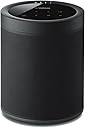
🎶 Elevate your space with sound that moves you — wireless, sleek, and effortlessly smart.
The Yamaha MusicCast 20 Wireless Speaker combines elegant, wall-mountable design with versatile streaming via Wi-Fi, Bluetooth 4.2, AirPlay, and Spotify Connect. With a 32-foot wireless range and Alexa voice control, it integrates seamlessly into multi-room setups or 5.1 surround sound systems, delivering rich stereo audio tailored for modern living spaces.


| ASIN | B07CK93ZZF |
| Additional Features | Stereo pairing;Radio |
| Age Range Description | Adult |
| Antenna Location | Music,Home Theater |
| Audio Driver Type | Dynamic Driver |
| Audio Output Mode | Stereo |
| Battery Average Life | 10 Hours |
| Best Sellers Rank | #51,842 in Electronics ( See Top 100 in Electronics ) #65 in Surround Sound Systems #3,487 in Earbud & In-Ear Headphones |
| Bluetooth Range | 32 Feet |
| Brand | Yamaha |
| Built-In Media | Speaker, manual |
| Color | Black |
| Compatible Devices | Home Theater |
| Connectivity Protocol | Bluetooth, Wi-Fi |
| Connectivity Technology | Bluetooth |
| Control Method | App |
| Controller Type | Amazon Alexa |
| Customer Package Type | Standard Packaging |
| Customer Reviews | 4.2 4.2 out of 5 stars (363) |
| Enclosure Material | Plastic Metal |
| Frequency Response | 40 Hz |
| Global Trade Identification Number | 00027108957302 |
| Is Waterproof | FALSE |
| Item Dimensions D x W x H | 5.2"D x 5.9"W x 7.9"H |
| Item Type Name | • Yamaha MusicCast 20 Wireless speaker for Streaming Music. Black. Works with Alexa. |
| Item Weight | 4.8 Pounds |
| MP3 player | No |
| Manufacturer | Yamaha |
| Maximum Range | 32 Feet |
| Model Name | WX-021BL |
| Model Number | WX-021BL |
| Mounting Type | Wall Mount |
| Number of Audio Channels | 5.1 |
| Number of Items | 1 |
| Number of Power Levels | 1 |
| Power Source | AC |
| Series Number | 21 |
| Speaker Maximum Output Power | 4 Watts |
| Speaker Size | 20.07 Centimeters |
| Speaker Type | Multi Room |
| Specific Uses For Product | Music, Home Theater, Wireless Surround |
| Subwoofer Connectivity Technology | Wireless |
| Tweeter Diameter | 1 Inches |
| UPC | 027108957302 |
| Unit Count | 1.0 Count |
| Warranty Description | 2 Year Manufacturer |
| Warranty Type | Manufacturer Warranty |
| Water Resistance Level | Not Water Resistant |
| Wireless Technology | Bluetooth, Wi-Fi |
| Woofer Diameter | 8.89 Centimeters |
N**W
Love these speakers!
The Yamaha Music Cast system is fantastic! These small speakers sound great and are soooo easy to set up. I now have a few in various rooms and have whole-house wireless music without drilling and running wires through attics and under the home. Did I mention they are soooo easy to set up? No, these are not massive, large speakers that will fill a huge room with driving bass by using just one speaker. They are what they are -- excellent smaller speakers well under $500 that sound great and are perfect for a typical-sized room in a house. They are good looking, discrete, and are easily tucked away within room decor. I put two on opposite corners of rooms and the rooms sound wonderful. I added a subwoofer in the larger living room next to my entertainment center. It's like I now live inside a big speaker shaped like a house, and the music comes from everywhere when I walk from room to room. It is exactly what I wanted and am very pleased. I have always found Yamaha audio equipment to be top notch. I also found the Music Cast app so easy to install on my phone and use. Don't know why some other people have said it is difficult to use. They must work for the competition and are planting negative reviews. I can easily use the app to control the volume speaker-by-speaker, use EQ settings speaker-by-speaker, set up presets with all speakers and levels already set up and accessible by choosing the correct preset number, or I can use presets to have certain speakers off when I want to listen in only one room downstairs and not bother other people upstairs, I can turn on and off the AV receiver and all speakers with the press of one button, can access Pandora and Spotify (those are the ones I use) without turning on my Smart TV or Blu-ray, can skip songs, make playlists, give thumbs up and down to songs, etc., etc, all from the app on my phone. I also have had no problems at all with music cutting in and out like some people have commented. That must be due to them having a poor wifi signal problem. I have a Netgear Orbi wifi system with satellites in two places throughout my two-story home. My wifi signal is fine and the speakers have not cut in and out or lost signal at all. Ever. Not even once. Remember, if you start adding six or more speakers, plus a wireless AV receiver, and have your cell phone set on wifi to control the app and the speakers, you have just added eight or more devices onto your wifi system, in addition to all the other devices that were already using your wifi. So, make sure you have a good wifi signal and all will be fine. So far, I am VERY happy with these Yamaha speakers and their Music Cast system.
S**N
Steps to add Speakers to 5.1.2 Surround Sound
Great speakers once you get them connected, the problem is that was a huge headache for me (at first). So much so, that I spent 3 days tinkering with these and my wireless network settings to no avail, only to box everything up in frustration with the intent on sending it all back. Fortunately, once I cooled off and waited for the holiday weekday to pass I called Yamaha, and thankfully they got me working. Initially, I could only get one speaker to add to my wireless network, but the second speaker simply would not add. I thought maybe it was a bad speaker, so I exchanged it at the store, but sure enough the new speaker also would not connect. After 3 days of trying, I finally called Yamaha, and they said it was common, and that a better method was available (though not in any manuals or guides). SO, if you are pulling your hair out trying to get your receiver and two speakers to connect for rear surround sound, here is the EASY way (using a receiver and two speakers): 1) HARD WIRE the receiver over ethernet and add it to the Yamaha Music Cast app. 2) Temporarily HARD WIRE the first speaker via ethernet as well, then add the device in the music cast app (give it a specific name like “Surround Left”) 3) Click on the SPEAKER in the music cast app, and go to information > network settings (then notate the IP address) 4) Open a browser on your PC, and go directly to the IP address of the speaker 5) Click on network settings 6) Click on "wired" and it should let you change it to "wireless" 7) Enter the SSID, security type, and password of your wireless network, then click OK 8) Disconnect the ethernet cable, & reboot the speaker (it should connect on its own over wireless now) 9) Now REMOVE the speaker from the music cast app altogether 10) Since the speaker is still connected to your wireless network, you should be able to reconnect it back into the music cast app by holding down “connect” on the top of the speaker for 5 seconds. 11) Repeat steps 2-10 with the second speaker 12) Once the receiver and two speakers are showing up in the app, CLOSE the music cast app completely (swipe up on an iOS device) 13) Re-open the app, click on the receiver, choose "music cast surround speakers" and now add the two speakers. 14) Once you see the “successful” message you should be set with wireless surround. Why these speakers have so much trouble being added wirelessly, or why Yamaha does not add the above steps in their manual is beyond me, but now that everything is connected properly they work great! ALSO: While the advertisement of the Yamaha Receiver and these speakers say they only work in 5.1 setups, the receiver DOES allow adding two extra "front presence" (i.e. height) speakers, making it 5.1.2 ....... (which is basically like 7.1), FYI ****** 8/6/19 UPDATE ***** I noticed after a while the speakers began going "in and out" occasionally. To fix this (which may have been overkill, but it worked for me) I moved everything wireless in my house to my 2.4Ghz "N" network, and reserved my 5Ghz "AC" network for nothing but these speakers. I also put a network extender in the room where these speakers are, so that the signal was uninterrupted through walls. Once I did those two things they've never once sounded choppy. Hope this helps others =)
B**M
Works fine as surround
The build quality of this speaker is great, very nicely designed, the sound is just fine but isn't worth it if you don't want to use it as wireless surround speaker. Connection is relatively easy: 1. Get musiccast controller app 2. Add your receiver first 3. Then add wireless speakers( I had issue connecting to virtual network it creates during the setup but it solved by restarting my phone and the speaker once) And that's it, just don't forget to turn surround speakers on in your receiver settings. Just 2 points: 1. If you you want to use them as surround speakers they can not be used as separate stereo speakers. ( you need to release speakers from your receiver within the app and then set them up as a stereo pair) 2. These speakers cant be used as zone 2 (basically zone 2 speakers must be wired) I'm happy with my purchase as there’s no alternative for wireless surround speakers as far as I know and I hate wires.
P**S
The Best one from Yamaha
B**.
Surround speaker, unobtrusive!
R**A
I bought the soundbar yas 408, a month back and was very impressed with the sound quality. However I was missing the wow factor. Now added the two music cast speakers and I am pleasantly surprised with the amazing surround sound experience. The only downside is that these are very expensive. I suggest all owners of the music cast sound bars to invest in the surround speakers to enjoy the high quality immersive experience
Trustpilot
1 month ago
3 weeks ago