We remain fully operational. Our teams are working around the clock to ensure your deliveries continue safely.

DOWNLOAD THE APP


Copyright © 2025 Desertcart Holdings Limited
DOWNLOAD THE APP
Buy anything from 5,000+ international stores. One checkout price. No surprise fees. Join 2M+ shoppers on Desertcart.
Desertcart purchases this item on your behalf and handles shipping, customs, and support to Vietnam.
🚀 Elevate Your Desk Game with Acer’s Ultimate 9-in-1 Docking Powerhouse!
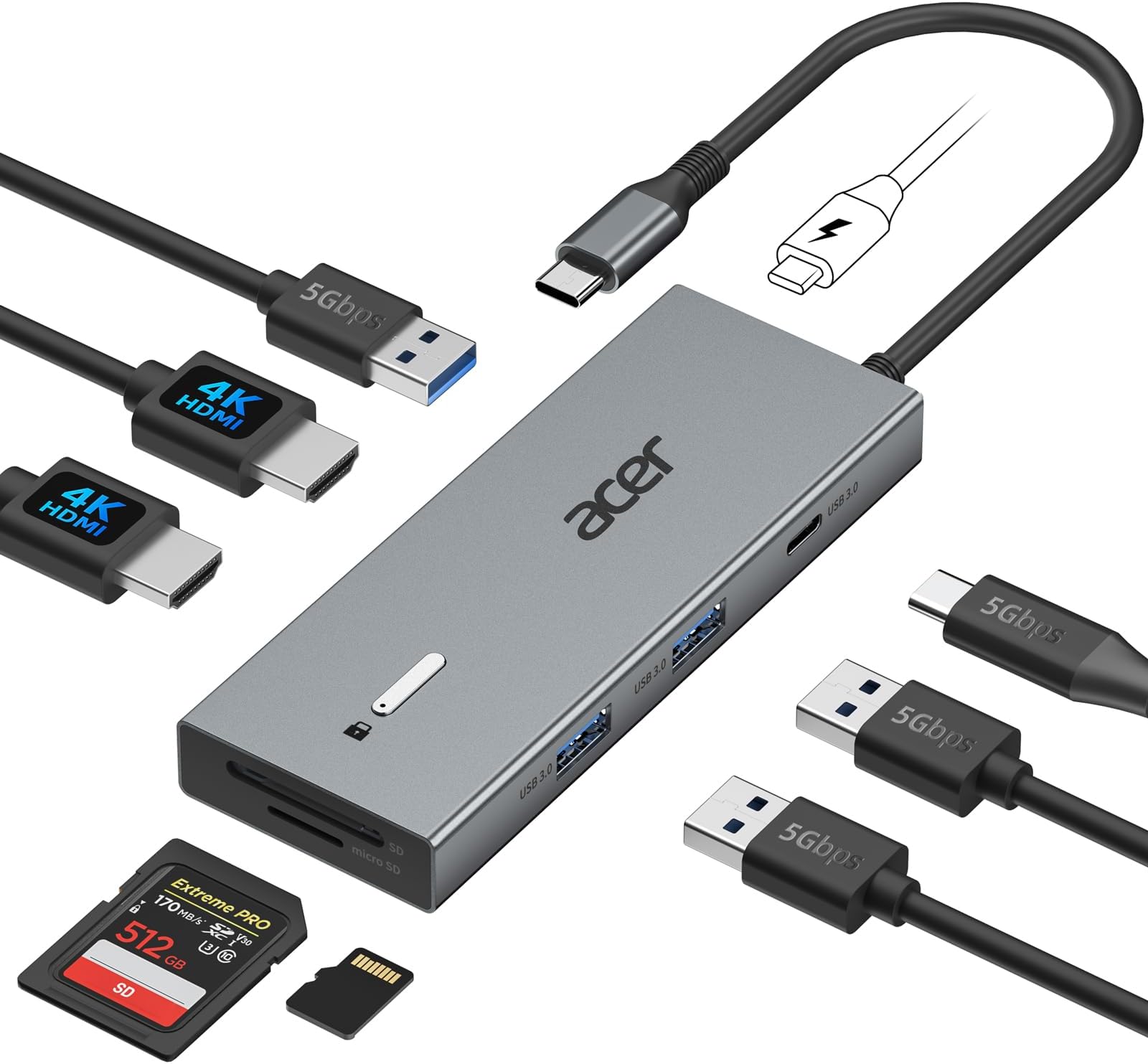
The Acer USB-C Docking Station is a versatile 9-in-1 hub designed for professionals seeking seamless dual 4K@60Hz display support, ultra-fast 5Gbps data transfer, and up to 100W power delivery. Compatible with major laptop brands and built with a sleek aluminum body, it consolidates multiple ports including HDMI, USB-A, USB-C, and SD/MicroSD slots into a compact, plug-and-play device that transforms any workspace into a productivity powerhouse.


| ASIN | B0DW85W3FV |
| Additional Features | Fast Charging |
| Best Sellers Rank | #845 in Electronics ( See Top 100 in Electronics ) #6 in Laptop Docking Stations |
| Brand | acer |
| Color | Grey |
| Compatible Devices | 𝐖𝐢𝐧𝐝𝐨𝐰𝐬 𝐚𝐧𝐝 𝐦𝐚𝐜𝐎𝐒 𝐝𝐞𝐯𝐢𝐜𝐞𝐬 𝐰𝐢𝐭𝐡 𝐃𝐢𝐬𝐩𝐥𝐚𝐲𝐏𝐨𝐫𝐭 𝐀𝐥𝐭𝐞𝐫𝐧𝐚𝐭𝐞 𝐌𝐨𝐝𝐞 (𝐃𝐏 𝐀𝐥𝐭 𝐌𝐨𝐝𝐞)—𝐒𝐮𝐩𝐩𝐨𝐫𝐭𝐢𝐧𝐠 𝐝𝐢𝐬𝐩𝐥𝐚𝐲, 𝐜𝐡𝐚𝐫𝐠𝐢𝐧𝐠, 𝐚𝐧𝐝 𝐝𝐚𝐭𝐚 𝐭𝐫𝐚𝐧𝐬𝐟𝐞𝐫. Including Acer, Dell, Lenovo, Surface, HP, ASUS, MacBook, Samsung laptops and smartphones, as well as accessories like mice and keyboards. Compatible Devices 𝐖𝐢𝐧𝐝𝐨𝐰𝐬 𝐚𝐧𝐝 𝐦𝐚𝐜𝐎𝐒 𝐝𝐞𝐯𝐢𝐜𝐞𝐬 𝐰𝐢𝐭𝐡 𝐃𝐢𝐬𝐩𝐥𝐚𝐲𝐏𝐨𝐫𝐭 𝐀𝐥𝐭𝐞𝐫𝐧𝐚𝐭𝐞 𝐌𝐨𝐝𝐞 (𝐃𝐏 𝐀𝐥𝐭 𝐌𝐨𝐝𝐞)—𝐒𝐮𝐩𝐩𝐨𝐫𝐭𝐢𝐧𝐠 𝐝𝐢𝐬𝐩𝐥𝐚𝐲, 𝐜𝐡𝐚𝐫𝐠𝐢𝐧𝐠, 𝐚𝐧𝐝 𝐝𝐚𝐭𝐚 𝐭𝐫𝐚𝐧𝐬𝐟𝐞𝐫. Including Acer, Dell, Lenovo, Surface, HP, ASUS, MacBook, Samsung laptops and smartphones, as well as accessories like mice and keyboards. See more |
| Customer Reviews | 4.2 out of 5 stars 2,160 Reviews |
| Data Transfer Rate | 5 Gigabits Per Second |
| Enclosure Material | Aluminum |
| Hardware Interface | HDMI , MicroSD, USB 3.0, USB Type C |
| Manufacturer | acer |
| Mfr Part Number | ODK4K0 |
| Model Number | ODK4K0 |
| Number of Ports | 9 |
| Operating System | Windows, macOS |
| Special Feature | Fast Charging |
| Total USB Ports | 4 |
| Total Usb Ports | 4 |
| UPC | 195133286442 |
| Warranty Description | 1 Year Manufacturer |
E**I
You are Going to Need a Different Power Supply
The product is really nice. It works well with my laptop. It has plenty of ports, and I like that it allows you to use SD and micro-SD cards. The cable is a little short; I probably should have opted for the version with the longer cord that plugs into the laptop. The only issue that I have is that I could not use my OEM power supply with the device. The OEM power supply is rated at 65W; however, when I plugged it into the docking station, I kept getting a low charging warning. So, I had to plug my power supply directly into my laptop and plug the docking station into the Thunderbolt port. That solved the problem, for me. Otherwise, I like the docking station. It is compact and is capable of doing what I need it to do. I would recommend this product to anyone who would ask me.
J**H
Possibly the best USB-C dongle I own
I’ve been using this dongle for the better part of a year now, and I’m legitimately blown away by its quality, ESPECIALLY for the price. To illustrate my points: this has replaced my Anker 555, which is a really phenomenal USB-C adapter. Firstly: the HDMI port DOES work with 4k60Hz. My big qualm with Anker dongles and docking stations is that, in my experience, they tend to only support up to 4k30Hz on older displays. My monitor at work is an ancient Asus ProArt 32 inch 4k, and it supports 4k60Hz. The Anker 555, 565, 575, and 310 all limit the monitor to 4k30Hz, which is a real pain. With this Acer dongle 4k60 runs perfectly fine across any monitor regardless of age or HDMI version (assuming the HDMI version in question supports 4k60 in the first place.) Additionally, I’m quite fond of the dongle’s port layout. It’s considerably slimmer than competitors, and I appreciate that the only port on the back is the PD in port. HDMI on the end opposite to the attached USB-C cable, and then the data and card slots on the side facing you. I work as a photographer, so I have to move a lot of hefty files around. I’ve been thoroughly impressed by the stability of this dongle’s connection, and I’ve even measured transfer speeds at up to 6Gbps when *ONLY* using an attached thunderbolt SSD. This isn’t how I normally use the dongle, of course, but after being impressed by the data transfer stability I wanted to measure it’s cap, hence the use of an SSD that exceeded the dock’s bandwidth limitations. This, while impressive, is not me saying that the dock has higher bandwidth than advertised. Rather, this is an indication that the dongle is a high grade USB 3.1 connection, where this sort of performance can be occasionally found in certain scenarios. I’ve found the dongle’s PD pass through charging to be reliable and safe. The dock, as expected, gets warm while in use, but it’s never been hot in my experience. Top it all off with the thoughtful placement of the PD port on the rear being positioned to connect the attached USB-C cable when not in use and you have a phenomenally designed, easy to use, and reliable product. 10/10, no complaints from me. This product has placed Acer on my list of trustworthy brands, 100%.
R**T
Works well! (Possible issues with SD card reader but also might just be the card)
Works well and fast! Usually have my monitor plugged into this to use on another device, no lag issues or anything. I've noticed. Works well with my Windows 10 and 11 devices, but I can't check how the HDMI ports on the 10 work. Not very heavy, I will say the cable is a bit short, which is made worse by the inconvenient placement of the SD card slots, causing the card to rub against the table if I need to place it on its side. The only major issue I've had so far is the SD card reader. I'm unsure if it's the unit or if it's the card itself, but it gives me near constant connectivity issues. Not the biggest deal, though. I only really use it for listening to music, basically. And other than that, so far it works fine.
T**S
Solid product and nicely compact and affordable.
Very solid product and nicely affordable. So far it is working well and data transfer thru the docking station is fast and flawless. I would definitely recommend this to a friend.
C**Z
Great Starter Docking System
This docking station was my first pick for a working office setup. I used this setup for 8 months, twice a week, for 10 hours a day. If you plan on using this for lighter use, this docking station is perfect for dual monitors, keyboard, and mouse. Unfortunately, for prolonged use it is not the best long term solution. I had to upgrade the docking station because it put a lot of stress on the work laptop and caused it to overheat. Overall, this product is great for lighter use, is small, and ready to plug and play. Just be sure to have a usb-c adapter to provide power and you should be good to go!
A**S
Easy set up.
Works like a charm! I took it out of the box, plugged in my two monitors then plugged it into my laptop and i got the same image on all three screens. Then I configured my laptop to extend the screen and each monitor had a different image. It worked perfectly.
T**.
It was good at first.
It started having problems after 2 months. Issues, connecting with the Hdmi cable. My laptop could detect the additional monitor however the monitor wasn't getting a signal. Also sometimes it wouldn't send power to my laptop. Even though the power cable was plugged in.
E**U
Gets work done
Works alright. Though my laptop is Acer sometimes I get a warning message stating slow charger connected.
Trustpilot
2 months ago
3 weeks ago