
🖨️ Print sharp, print smart, print anywhere — your portable office just got an upgrade!
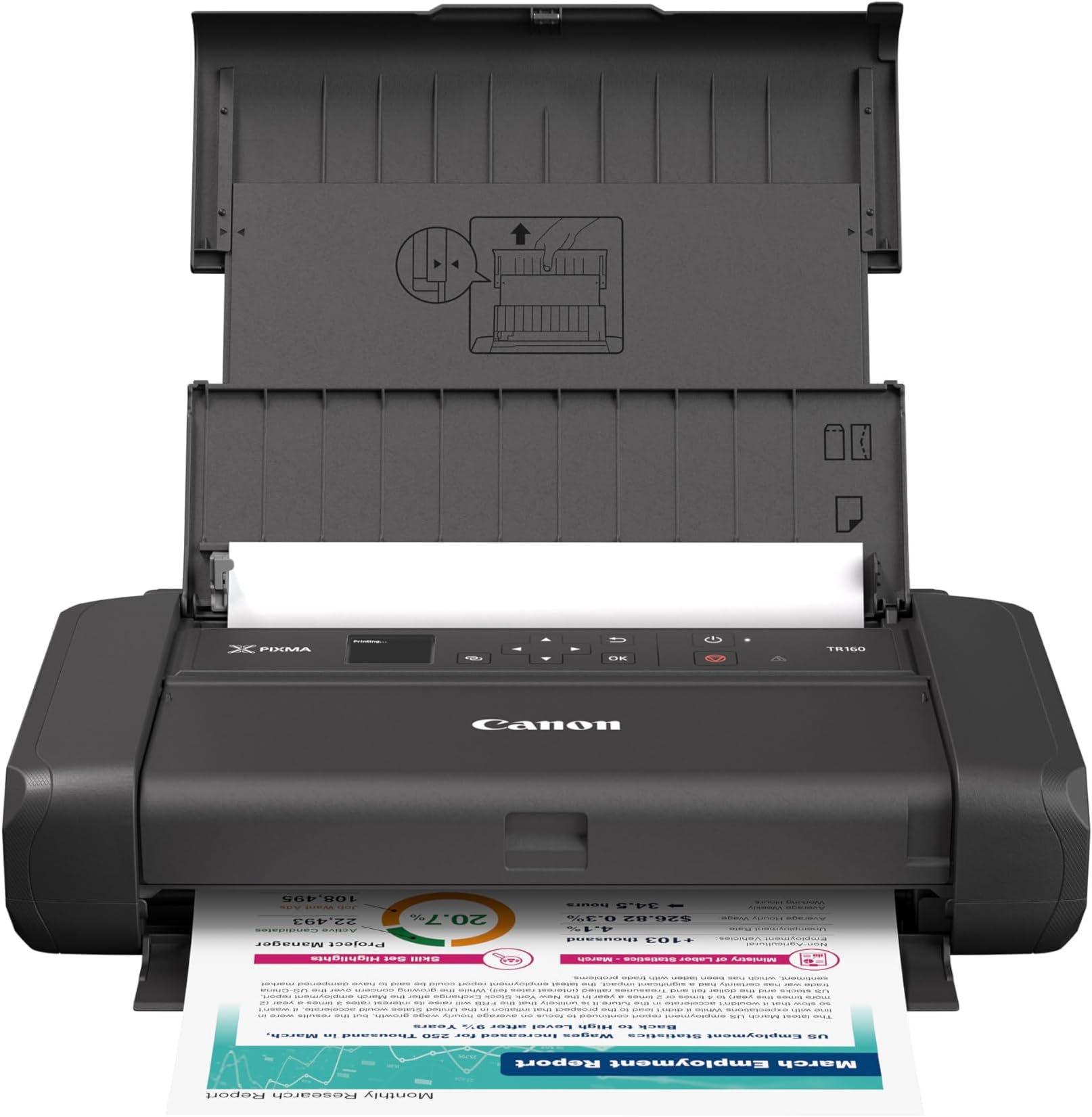
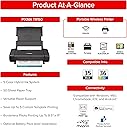
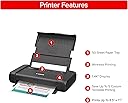
The Canon PIXMA TR160 is a lightweight, wireless portable inkjet printer delivering professional-quality prints up to 8.5” x 11” with a 5-Color Hybrid Ink System and 4800 x 1200 dpi resolution. Featuring a 50-sheet tray, 1.44” OLED display for easy status checks, and versatile connectivity options including Canon PRINT app, AirPrint, Mopria, and USB Type-C, it’s designed for seamless printing on the go. Perfect for busy professionals and creatives who demand sharp documents and vibrant photos wherever work takes them.

| ASIN | B0F1Z1VLV6 |
| Additional Printer Functions | Print Only |
| B&W Pages per Minute | 9 ppm |
| Best Sellers Rank | #2,098 in Office Products ( See Top 100 in Office Products ) #7 in Portable Photo Printers #13 in Inkjet Computer Printers |
| Brand | Canon |
| Built-In Media | Inkjet Cartridges |
| Color | Black |
| Color Pages per Minute | 5.5 ppm |
| Compatible Devices | PC, Smartphones, Tablets |
| Connectivity Technology | USB |
| Customer Reviews | 4.4 out of 5 stars 4,478 Reviews |
| Dual-sided printing | No |
| Duplex | Simplex |
| Hardware Interface | USB Type C |
| Ink Color | Black |
| Item Dimensions D x W x H | 12.7"D x 7.3"W x 2.6"H |
| Item Height | 2.6 inches |
| Item Type Name | Inkjet Printer |
| Item Weight | 4.5 Pounds |
| Manufacturer | Canon |
| Maximum Copy Resolution Black and White | 4800 dpi |
| Maximum Copy Resolution Color | 4800 x 1200 dpi |
| Maximum Copy Speed Black and White | 9 ppm |
| Maximum Print Resolution Black and White | 4800 x 1200 dpi |
| Maximum Sheet Capacity | 50 |
| Maximum print Resolution Color | 4800 x 1200 Dots Per Inch |
| Media Size Maximum | 8.5 x 14 inch |
| Model Name | PIXMA TR160 |
| Model Number | 7069C002 |
| Model Series | PIXMA TR160 |
| Number of Trays | 1 |
| Other Special Features of the Product | Energy Star |
| Output sheet capacity | 50 |
| Paper Size | 3.5” x 3.5” (Square), 4” x 6”, 5” x 5” (Square), 5” x 7”, 7” x 10”, 8” x 10”, Letter (8.5” x 11”), Legal (8.5” x 14”), U.S. #10 Envelopes, Card Size (91mm x 55mm) |
| Power Consumption | 8 Watts |
| Print media | Glossy photo paper |
| Printer Connectivity Type | USB |
| Printer Output Type | Color |
| Printer Type | Inkjet |
| Printing Technology | Inkjet |
| Resolution | 4800 x 1200 |
| Special Feature | Energy Star |
| Specific Uses For Product | Home |
| Total Usb Ports | 1 |
| UPC | 013803385298 |
| Unit Count | 1.0 Count |
| Warranty Description | 1 Year Manufacturer |
| Warranty Type | limited warranty |
T**B
Portable printer
I was looking for something small enough to tuck away when I'm not using it, and this one is super compact I can seriously take it anywhere.Setting up the Wi-Fi was easy; I had it connected to my phone and laptop quickly, which is a huge plus because I hate messing with complicated tech. For a portable printer, the quality is really sharp! It handles documents perfectly, but what surprised me was how good the colors look on my photos, even the square ones I tried. The little screen on the front is a nice touch for checking ink levels without having to open an app. If you need a reliable, small printer for work, school, or just occasional use, this is a winner. Great quality in a tiny package!
D**K
Very good. Excellent Value. Easy to set up and to use.
This portable printer is awesome. I'm doing a lot of traveling (by car), and this makes it easy to print from almost anywhere. The initial setup was not complicated and worked on the first try. It is quick and easy to take it out of the travel case and set it up for printing. It is wireless and/or wired. The print quality is great. The print cartridges are lasting a long time. I was a bit concerned about that, but it's good. The user interface is simple and works really well. This give a ton of value for the price.
C**.
Useful
The Canon PIXMA TR160 Wireless Portable Printer is a versatile and compact printing solution, perfect for on the go professionals and students. It offers wireless connectivity, allowing you to print directly from your smartphone, tablet, or laptop without needing a network connection. With high-quality printing capabilities, it handles documents and photos with ease. Its lightweight design makes it easy to carry, and the long lasting battery ensures you can print anywhere. Overall, it's a reliable choice for those needing portability without compromising on quality!
I**O
Great Portable Printer – Lightweight, Compact, and Reliable!
’m really impressed with this printer! The Canon PIXMA TR150 is perfect for travel and working on the go. It’s compact, lightweight, and fits easily even in a small backpack. Unboxing was smooth — everything was neatly packed, with clear instructions and all necessary cables included. The Wi-Fi connection was quick and easy. It prints fast and delivers sharp quality for both black-and-white documents and color images. The print quality is excellent for such a portable device. Battery life is great too, especially if you add the optional battery pack. I highly recommend it to anyone who needs a mobile, high-quality printer! 📦 Packaging: strong and secure 🖨️ Print quality: 5 out of 5 🔋 Portability: perfect even without constant power ⭐️ Overall: 5 stars, no doubt!
A**A
Compact, cute, but hard to set up!
The box looked perfect from the outside, and everything was packaged nicely. However, the instructional video had some inconsistencies that made me feel like I received a pre-owned printer. The top of the printer itself definitely needed to be dusted and wiped off as there were white markings and dust on the top. In addition, the orange security tape that was supposed to be on the printer was not present. I went through the quick configuration first because I figured it would be the easiest way to setup my new printer based on the little placard they slipped in with the printer. I use Mac 2013 (the trash can) on Catalina. Everything went through smoothly on the setup program in the first step, but the images and consequent video did not help me understand how to setup the print head or ink cartridges. I had to ultimately refer to the installation pamphlet to figure out how to install the printer head and ink cartridges. I wish the computer setup had better instructions during the installation process, or that the display screen on the printer had more concrete instructions instead of just telling me to open/close the printer cover. In addition, it took me over an hour to figure out how to set up the wifi connection. I have one router for my home and the printer screen kept saying there were multiple routers using the same name (even though there obviously weren't). I am now aware that the wireless printer works in way of switching over to the printer's own wifi, therefore disconnecting your device temporarily from your home WIFI. However, I was able to figure everything out in the end. I will be using this printer primarily via USB, but I want other members of home to use the printer if needed. It does bother me that the wifi symbol on the printer screen continually has a big 'x' over it though. This should've been easy, but it definitely was a lot harder than it was supposed to be.
G**K
Quality printing in a portable package
After my previous portable Canon printer, the Pixma iP90, finally gave up the ghost after a decade and a half, I needed a replacement. The TR160 prints documents pretty fast for such a small unit, and at good quality. I haven't tried photos yet, but I expect similar or better results than the iP90, and those were about as good as I could reasonably expect with a CMYK inkjet on photo paper. The fact that you can attach a battery to it and go fully portable is definitely a plus. It has built in networking -- which is something I didn't expect from a printer this compact -- and can print wirelessly directly to the printer without connecting to a network. It's a great option if you need to print on the go.
S**E
Looks small but packs big punch!
Wow! Compact, efficient, and super easy to use, the Canon PIXMA TR160 is exactly what I needed for printing on the go. Quick setup (very), reliable prints, and fits perfectly in my bag when I’m taking it on the go! I’m honestly wondering why I didn’t get this sooner! Great for documents while traveling, and I’ll most likely buy another one for other uses. If you need a portable printer that actually works, this is it. Priced right for me too.
R**N
Yay! I can print from my truck in the middle of nowhere!
This printer works great as a home printer, or on-the-go. At home, I set it up on my home WiFi and my whole family can use it. In my truck, I use the printer’s Wireless Direct feature, which is essentially that the printer broadcasts a WiFi signal (in place of my router) and I connect my phone or tablet (or laptop) to THAT wireless signal. The pages print FAST, even the ones with photos embedded. I loaded about 20 sheets of paper in the chute and had no issues. I don’t know what the max is that it can hold. My Contract paperwork is only 6 pages long, so 12 pages is all I need to load at one time, anyway. But I really love that I can print my estimates immediately from a customer’s kitchen table, or even in the truck if I never go inside their home — or even in the middle of their backyard if I had the battery. I don’t need a battery because my truck has an electric outlet that I can plug the printer into. A USB-A to USB-C cable is provided presumably to hardwire connect a laptop to the printer, but I found nothing in the printer’s paperwork that tells me this. I work strictly from iPhone/iPad anyway, so I have no need for this cable. I bought the carrying case also (co2crea Hard Travel Case) and the printer fits nicely with room for the power supply, paper and spare ink cartridges. I was hoping that the printer could be powered through the USB-C port by a portable recharging battery so that I wouldn’t have to buy the Canon proprietary battery, but this doesn’t work. But like I said, as long as my truck is nearby, I can always plug the power supply in there or anywhere there is a working electrical outlet and then I won’t need a battery. Setup was a bit involved setting up both home WiFi and on-the-go WiFi (Wireless Direct) on the printer and both my iPhone and iPad, but didn’t take more than 15 minutes. I *did* need to power off the printer and back on again for the wireless to connect. If printing from an app, just select the printer, whether on your home WiFi or Wireless Direct, like always. If you are printing files from the file system (i.e., not from within an app), you need to use the free Canon SELPHY app to choose the document and send it to the printer. I have noticed a bug with this approach, though. I was printing out a release form that I e-mailed a customer who signed it electronically (via PDF markup) and even though the signatures showed up on the print preview, the signatures didn’t print but the rest of the form did, including embedded photos! It was like the signatures were in invisible ink! I don’t know if this is a bug in the SELPHY software or the printer itself. Hopefully, I won’t run into more issues like that. But overall, I’m very happy with my purchase!
Trustpilot
1 day ago
1 month ago