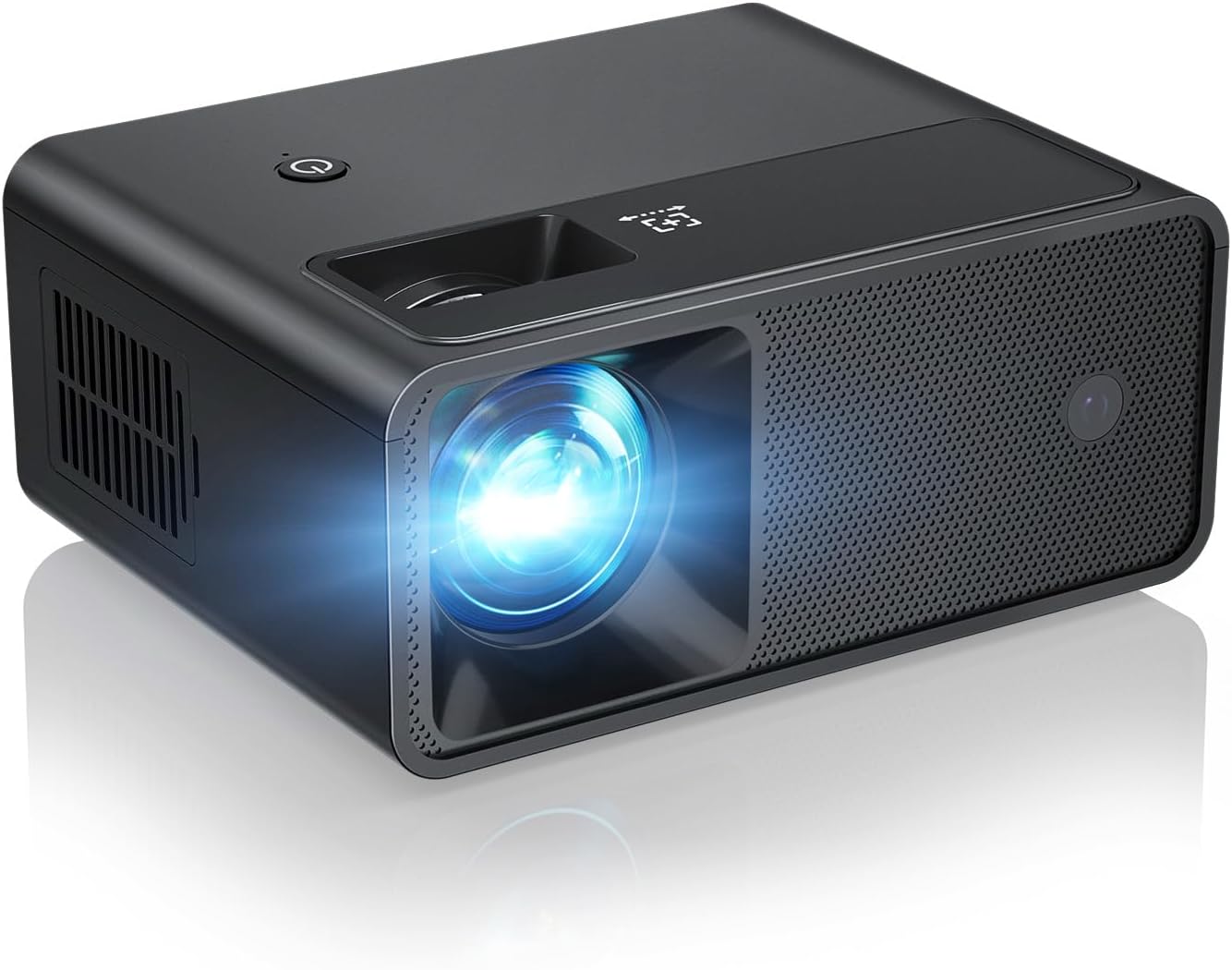
🎬 Elevate your space with big-screen magic in your pocket!
The CiBest Mini Projector 2025 edition delivers stunning 1080P Full HD visuals up to 200 inches with 8000 lumens brightness and advanced LED technology. Weighing just 0.52 kg, it’s designed for portability and universal device compatibility via HDMI, USB, and AV ports. Enhanced with built-in Hi-Fi speakers and whisper-quiet cooling, it’s perfect for immersive home cinema, gaming, or presentations. Backed by a 3-year warranty and responsive customer service, it’s the smart choice for professionals and creatives craving flexible, high-quality projection.


| ASIN | B0DRCRK3BQ |
| Additional Features | Built-In Cooling System, Lightweight |
| Antenna Location | Business, Education, Gaming, Home Cinema |
| Best Sellers Rank | #20 in Video Projectors |
| Brand | CiBest |
| Brightness | 8000 Lumen |
| Built-In Media | HDMI Cable, Power Cord, Remote, User Manual |
| Color | Black |
| Compatible Devices | Gaming Console, Laptop, Smartphone, Speaker, Tablet |
| Connectivity Technology | 3.5mm Jack , HDMI , USB |
| Contrast Ratio | 8000:1 Pixels |
| Control Method | Remote |
| Controller Type | Remote Control |
| Customer Reviews | 3.9 out of 5 stars 1,570 Reviews |
| Display Resolution Maximum | 1920 x 1080 Pixels |
| Display Type | LED |
| Display resolution | 1024 x 720 |
| Form Factor | Portable |
| Hardware Connectivity | 3.5mm Audio, HDMI, USB 2.0 |
| Item Weight | 0.5 Kilograms |
| Light Source Operating Life | 55000 Hours |
| Manufacturer | CiBest |
| Maximum Image Size | 200 Inches |
| Maximum Throw Distance | 11 Feet |
| Minimum Image Size | 30 Inches |
| Minimum Throw Distance | 2.72 Feet |
| Model Name | W13 |
| Model Number | W13 |
| Mounting Type | Tabletop Mount |
| Native Resolution | 1024 x 720 |
| Picture Quality Enhancement Technology | Advanced LED Technology, Diffuse Reflection Technology, Uniform Illumination Method |
| Recommended Uses For Product | Business, Education, Gaming, Home Cinema |
| Special Feature | Built-In Cooling System , Lightweight |
| Video Encoding | AVC |
| Warranty Description | 1-Year Warranty |
M**T
So far so good....
I have used this for 2 evenings now. I've been considering a projector for months, as I like to fall asleep to David Attenborough documentaries, but my eyes are bad and I can barely see my small TV (in a small room) especially once I take my glasses off. I wondered if I would more appreciate a projection onto the ceiling above my head. I hesitated buying a cheap one, as the reviews were hit & miss. But my pockets are shallow and I cannot afford an expensive one. I finally got tired of wondering and bought this one. I also bought a desktop stand to accommodate a Roku Stick, and still be able to tilt vertically. Setup was quite easy, internet connection/streaming has been flawless, and I am genuinely impressed with the image quality! I worried that the sound of the fan would interfere with my sleep, but it is rather quiet. The speaker is not amazing, but certainly adequate for my situation. I love that it has a sleep timer (which needs to be turned on each time you use it.) I also had to tilt the projector (which sits on my nightstand) in order to get the projection directly above my head. (Using a folded washcloth.) This made the screen edges slightly askew. But the screen is large enough on my ceiling that I hardly notice it. This is projected onto a dark gray ceiling with a smooth texture. Right now I rate it an enthusiastic 5 stars. If my opinion changes over time I will come back and edit.
V**H
Super fun for birthday party night
I picked this little projector to use at my kid’s birthday party because I wanted to do a movie night without spending a ton. We set up a sheet in the backyard, grabbed some popcorn, and hoped it would actually work. I was not expecting theater quality or anything, just something bright enough so the kids could see the movie. The setup was pretty simple once I figured out which cables went where. When it got dark, the picture actually looked pretty good for something this small. It was clear enough, and the colors were better than I thought they would be. The kids were super into it, sitting on blankets and yelling at the screen. It felt like a fun outdoor drive-in but with lawn chairs instead of cars. The sound was okay, but we hooked up a small speaker to make it louder, and that helped a lot. There were a couple of small hiccups though. You need a cable or a streaming stick to play stuff like Netflix, which I did not realize at first, so that took a minute to fix. Also, it does not like bright light much, so you pretty much have to wait until it’s dark outside. Once it’s dark though, it gets the job done nicely. Overall, this thing worked out great for the party. It’s small, easy to carry, and made the night feel special without a huge setup. The kids had a blast, and honestly, the adults ended up watching too. For the price, it’s a fun little gadget that can turn a regular birthday night into something memorable.
N**K
Very cool projector
Worth the purchase. Works as advertised and easily connected to my laptop. Good image quality and very easy to set up and focus. It’s small and compact so if you don’t have a mount it’s ok. Only issue I really have with it is that the light for it isn’t the strongest so the image does come out a little dark. Other than that it’s great.
J**E
Amazing
First the picture quality is fantastic. I was initially concerned that the small size of the projector might compromise the clarity and sharpness of the image, but I was pleasantly surprised by how crisp and clear the picture was. It was also surprisingly bright for its size, so even in a moderately well-lit room, the picture was still perfectly visible. I also love how portable this mini projector is. It's small enough to fit in my backpack, which means I can take it with me on trips or even just to a friend's house. Plus, setting it up is incredibly easy. All I need is a flat surface to project onto and a source of content, and I'm good to go. I'm very happy with my purchase of this mini projector. It's a great way to enjoy my favorite content on the go, and the quality and convenience of the device make it well worth the investment. I highly recommend it to anyone who wants a simple and effective way to watch movies and TV shows on the go.
J**D
Works perfect
I just moved into a new place and don’t have a TV yet, so this projector has been my everyday setup. I was honestly surprised by how good the picture quality is for such a small and affordable projector. It’s clear, bright, and works well even with some lights on. I project it onto a blank wall and get a clear picture. Setup was really simple—just plug it in and connect. I connected a fire stick to it and it’s perfect. Overall, this projector has been a lifesaver while I get settled in. For everyday streaming, movies, or even kids’ shows, it’s a really solid alternative to a TV. Definitely recommend!
J**Z
A nice projector.
This is my first projector purchase, and the experience has been excellent. I received it quickly; the shipping was the fastest I've ever had. Despite its 'MINI' size, I was relieved to find it is fully functional and performs wonderfully. The image quality is so bright and clear on a bare wall that I've canceled my plans for a separate screen. I set it up on my existing tripod, and connecting video from my iPad and phones via HDMI was straightforward. I figured out I can connect sound wirelessly via Bluetooth from my ipad and phones. The low operational noise is another unexpected benefit. This is a great product offering exceptional value.
T**A
– Decent for Casual Use, But Has Some Drawbacks
3 out of 5 stars – Decent for Casual Use, But Has Some Drawbacks I purchased the CiBest Mini Projector (2025 Upgraded) thinking it would be a solid option for casual movie nights. The image quality is surprisingly good for the price, and it’s compatible with a wide range of devices (iOS/Android/Windows/TV Stick/USB/HDMI), which is a big plus. That said, there are a few downsides to be aware of. First, the power cord is pretty short, so you’ll need to keep it close to an outlet unless you have an extension cord handy. Second, the projector fan is noticeably loud and it tends to overheat quickly if it’s not kept in a cool, well-ventilated area. It’s also worth noting that the remote doesn’t come with batteries, so make sure to have some on hand or you won’t be able to use it right out of the box. Setup is simple, and it’s fairly easy to use overall. I’d say this projector is best suited for kids, or for occasional use—something you pull out once in a while, not a daily go-to. If you’re sensitive to loud background noise during movies or need something more durable for regular use, this might not be the best fit. I’m currently on the lookout for a quieter projector that doesn’t overheat but also won’t break the bank. This one is okay for the price, but it comes with trade-offs.
B**Z
Blurry Picture at large screen sizes
We picked up this projector for the home theater we are constructing in our basement. We liked that it had the google TV module included. We ended up returning it because it's not quite what we're looking for. We had a couple of issues with the device. Most importantly, we could not get the screen to focus well at much over 90". There is some information that the manufacturers tend not to include that is very important for projectors. Namely, how far back the projector needs to be to get specific screen sizes. Our room is 16 feet long. At 16' the projector made a 150" screen, which is as large as the room could reasonably hold. This gives you just under an 8 foot high image, which is about a standard ceiling height, so at this distance the screen went almost floor to ceiling in our standard height basement. This is more or less what we want. If we want to go down in size we can adjust the picture down with the scaling tool, which allows you to reduce the size by up to 50%, so we're looking for the max size to take up the whole wall, and we'll decide on size preference from there. However, the screen was blurry at that range. You could adjust the keystone setting and make the screen oblong, and you could get either the top or the bottom clear, and the other side would be incredibly blurry. Or you could set the keystone accurately to have a square image and the whole thing was just a bit blurry. You can adjust the focus manually, but it still could not fix the slightly blurry image at that range. Setting the projector closer fixes the problem. The manual states that the maximum distance for a crisp image is 8 feet. It would have been nice if they'd mentioned that in the product information. At 8 feet we got a nice crisp image, but the screen size at that distance was 90", which is significantly smaller than we hoped for. At around 12-13 feet the screen size was 120", and was still slightly blurry. At 16 feet the screen size was 150" and blurry enough that you could barely make out text such as the time index on the screen. The manufacturers say this goes up to 300", and I'm sure it does at the appropriate distance from the screen, but you're not going to get a crisp, clear image at that size. Honestly it would probably be fine for watching most movies, but if you need to read text it becomes a problem. To sum that up, the projector needs to be 4-8 feet from the screen to get a clear image, and at 8 feet you'll get about a 90" screen. Also, this projector does not have any 4K support. I fully understood that this was a 1080p projector, but the information says that it supports 4K video, just with a downgrade in quality. A quick glance through the instruction manual reveals that this is not the case. This projector does not support video files in a 4K format in any way. This isn't a big deal for me, since I feel that 4K would probably be too taxing on the internal hardware anyways, but it was upsetting that they said that the thing supports 4K video formats, and it just doesn't at all. The screen was also not particularly bright. You really couldn't see very well if you turned on even any ambient lighting in the room. This was our first attempt at a projector, so we didn't know what to expect in terms of brightness. It's fine when the room is dark. But we have a light set up with an ambient lighting set up, where it only shines a dim light up away from the room, and all you get is dim reflected light, and even this light washed out the screen to where you could barely see it. This would have probably been alright for us. You turn the lights off when watching a movie on a projector. That's not unreasonable. Our main problem was the blurry screen. But again, just for reference, if you buy this, don't expect to be able to use it with any light in the room. It's not bright enough for that. Other than that, the projector is pretty decent. It comes in a nice case for storage or if you want to take it places. It has a google tv box that is a separate module that you plug into an internal housing on the side of the projector. We've got other google TVs in the house, so we're familiar with the interface. You can download aps from the play store, which gives you practically infinite functionality. If you have an android phone you can set it up just by telling your phone to set it up for you. It has one HDMI port and one USB port in addition to the small cables that plug into the google tv box. It also has your standard stereo audio in and out ports so you could hook it up to a speaker system. I believe it also had Bluetooth capability for speakers, but I didn't try that. The remote has to be pointed directly at the projector to work, which is awkward, since the projector is often going to be behind you, and probably off to the side. The remote works from the front of back of the projector, but you have to be pointing the remote at the projector, and you can't be too far to the side. I have some Visio TVs that the remote is way too sensitive and you can't get it to not work. It's too bad they didn't create an over-sensitive remote like that for a projector of this sort. This also does not have any horizontal keystone adjustment, so the projector must be directly perpendicular to the screen or you image will be skewed to the side. Vertical keystone adjustment is available, but it is manual adjustment that is done with a physical dial on the projector.
Trustpilot
1 month ago
1 week ago