Buy anything from 5,000+ international stores. One checkout price. No surprise fees. Join 2M+ shoppers on Desertcart.
Desertcart purchases this item on your behalf and handles shipping, customs, and support to Vietnam.
🎨 Elevate your creative game with precision, power, and pro-level color fidelity!
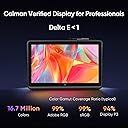
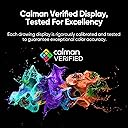
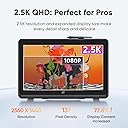
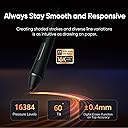
The XPPen Artist Pro 22 Gen2 is a professional-grade 21.5-inch drawing tablet featuring a 2.5K QHD full-laminated ADS-IPS display with 99% Adobe RGB color accuracy and Delta E<1 calibration. It offers a world-first 16,384-level pressure-sensitive stylus with tilt support, a wireless ACK05 shortcut remote with 40 customizable keys, and an ergonomic adjustable stand. Compatible across Windows, macOS, Linux, Android, and ChromeOS, it’s designed for artists and professionals seeking precision, vibrant visuals, and enhanced workflow efficiency.


| ASIN | B0DP6VPHQW |
| Active Surface Area | 475.392x267.408 mm |
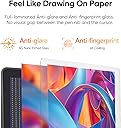
| Additional Features | 16384 Pen Pressure Stylus, 2.5K QHD Resolution, ACK05 Shortcut Remote, Calman Verified Display, Delta E<1, 99% Adobe RGB, Full-laminated AG Nano Etched Glass |
| Best Sellers Rank | #114 in Computer Graphics Tablets |
| Brand | XP-Pen |
| Built-In Media | Artist Pro 22 (Gen2) Drawing Display*1, Glove*1, Cleaning Cloth*1, ACS02 Stand*1, Power adapter and power cord*1, HDMI cable*1, USB-C to USB-C cable*1, USB-A to USB-C cable*1, Wireless Shortcut Remote and Bluetooth receiver *1, X3 Pro Smart Chip Stylus*1, Pen case with nibs (X3 Pro Stylus standard nibs *4, X3 Pro Stylus felt nibs*4), X3 Pro Stylus standard nibs*10, Pen Clip*1 |
| Color | Black |
| Compatible Devices | Desktop, Laptop, Smartphone |
| Connectivity Technology | HDMI , USB |
| Customer Reviews | 4.5 out of 5 stars 28 Reviews |
| Display Type | LCD |
| Item Dimensions L x W | 21.5"L x 14"W |
| Item Weight | 5534 Grams |
| Manufacturer | XP-PEN |
| Mfr Part Number | XPPen Artist Pro 22 Gen2 |
| Model Name | Artist Pro 22 (Gen 2) |
| Model Number | Artist Pro 22 (Gen 2) |
| Native Resolution | 2560x1440 |
| Operating System | Android 10.0 (or later), ChromeOS 88 (or later), Linux, Windows 7 (or later), macOS 10.13 (or later) |
| Screen Size | 21.5 Inches |
| Special Feature | 16384 Pen Pressure Stylus, 2.5K QHD Resolution, ACK05 Shortcut Remote, Calman Verified Display, Delta E<1, 99% Adobe RGB, Full-laminated AG Nano Etched Glass Special Feature 16384 Pen Pressure Stylus, 2.5K QHD Resolution, ACK05 Shortcut Remote, Calman Verified Display, Delta E<1, 99% Adobe RGB, Full-laminated AG Nano Etched Glass See more |
| Specific Uses For Product | Drawing,Amimation,Designing,E-Signature,Editing,Painting, Photo editing,lllustration,Online education,Document markup,Signing, Teaching,Online Education,3D Modelling,Writing,Remote Work,Graphic design,lmage |
| Target Audience | Artist, Student, Teacher |
| Warranty Description | 12-Month |
R**E
shmebulock
The XP Pen Artist Pro 22 Gen 2 has been an interesting purchase. I've watched every review I could find before buying and it's just as good if not better than I expected. The drawing quality is smooth, the set up was easy. The execution of the product is incredible. I can see myself having this for a long time. It's definitely worth the price tag. The screen is big enough to use as a second monitor (I have it connected to a monitor arm) and it doesn't feel like it's ever in the way, it sits in the background when I don't need it and it's perfect for whatever I'm doing. I mostly just video edit and draw/animate I use it as a second monitor to look up things when I'm editing on my main monitor. It's a life saver as a second monitor, ideal for a drawing set up. A perfect addition to my work flow. The only thing that's a personal issue for me is the fact I can't switch from the display tablet to my monitor when I'm drawing so it makes it harder to get into a flow state when drawing. But it's probably up to me and my settings. I'll figure it out. No real issues from the display tablet itself. Not that I know of. Recommended for any artist.
R**E
Great display for drawing for the aging eyes
Tested this again on Mac OSX M-2 MacBook Pro and this unit now support HiDPI! The drivers now work as intended and this is a gorgeous drawing tablet that I now own. Highly recommended now!
I**M
Pretty good
10/10 Pretty good would buy again 🌟
J**O
Product had issues out of the box.
I had issues as soon as it arrived. The USB-C display was non functioning which wouldn’t have been a big deal since you can use HDMI as well. The biggest issue was the screen would black out when I’d move the stand and would do the same as soon as I applied the slightest amount of pressure on the screen when drawing. This problem however was intermittent and would work from time to time. When it did I thought it was great, a shame it was faulty. So I gave it 2 stars for its potential.
P**.
Bad tech support or no tech support
We purchased the tablet could not wait to get it. When we set it up it did not work properly the pen did not track properly. Did not have pressure control as advertised. Tablet gets very hot. So what did we do contact the company for tech support. No customer service said we could set up an appointment to talk to a person and all they did was send a set up guide... we had already exhausted the set up guide and wanted to speak to tech support.. we tried for 2 weeks to get help and as the window for return was closing we decided it was safer to return. The tablet gets hot and since tech support could not or would not talk to use I decided to send it back.
D**F
Una gran herramienta de trabajo
Es una gran elección, la pantalla es muy grande, y por el precio una excelente compra
P**S
XPPen Artist Pro 22 (Gen 2)
Excelente compra, fue regalo de navidad para mi hijo y está encantado.
A**L
Buena compra
Llegó en tiempo y en buenas condiciones
C**O
great tablet!
Awesome big tablet that i love! ive had it for about 2 or 3 weeks now maybe ?? and i really enjoy it, very big screen to draw on and good for references, it is a bit fuzzy even with the 2.5k screen but i think my computer fixed it now. (and fuzziness is usually due to the screen thickness and such) but it feels very sturdy and well to draw on.
Trustpilot
5 days ago
2 months ago