

Buy anything from 5,000+ international stores. One checkout price. No surprise fees. Join 2M+ shoppers on Desertcart.
Desertcart purchases this item on your behalf and handles shipping, customs, and support to Vietnam.
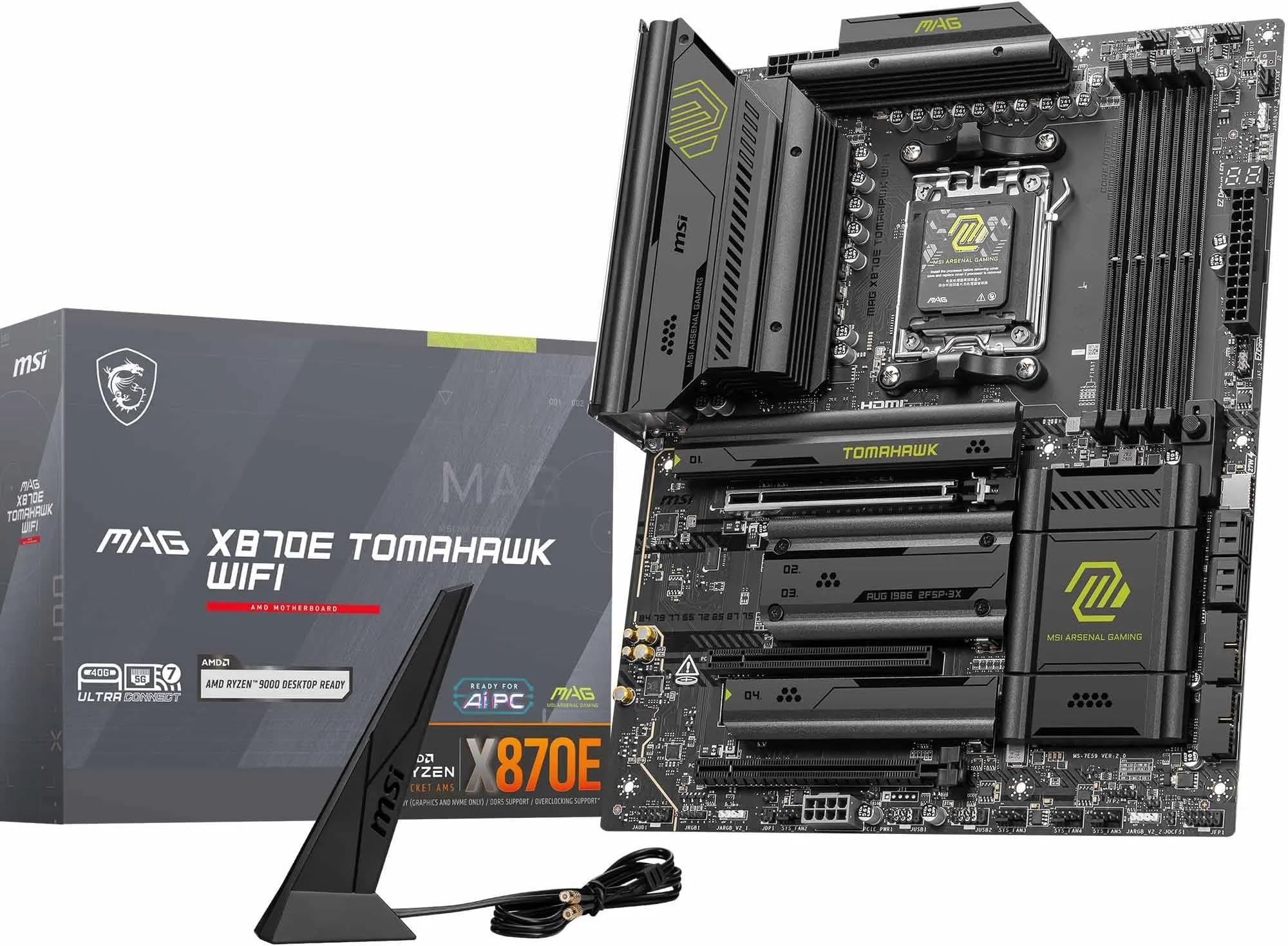
🔥 Power, speed, and cool confidence — the ultimate Ryzen 9000 motherboard experience! 🚀
The MSI MAG X870E Tomahawk WiFi is a premium ATX motherboard designed for AMD Ryzen 9000/8000/7000 processors, featuring a robust 14 Duet Rail 80A VRM power system, advanced FROZR cooling solutions, DDR5 memory support up to 8400+ MT/s (OC), PCIe 5.0 x16 graphics slot, and four ultra-fast M.2 storage slots including Gen5. It offers cutting-edge connectivity with Wi-Fi 7, Bluetooth 5.4, 5Gbps LAN, and USB4 Type-C, making it a top-tier choice for high-performance gaming and professional builds.


| ASIN | B0DT55ZJM7 |
| Best Sellers Rank | #9 in Computer Motherboards |
| Brand | msi |
| CPU Socket | Socket AM5 |
| Chipset Type | X870E |
| Compatible Devices | Personal Computer |
| Compatible Processors | Supports AMD Ryzen 9000/7000 Series Desktop Processor |
| Customer Reviews | 4.4 out of 5 stars 149 Reviews |
| Graphics Card Interface | PCI Express |
| Main Power Connector Type | 24-Pin |
| Manufacturer | MSI |
| Memory Clock Speed | 8400.0 |
| Memory Slots Available | 4 |
| Memory Storage Capacity | 256 GB |
| Mfr Part Number | MSI MAG X870E Tomahawk WiFi |
| Model Name | MAG X870E Tomahawk WiFi |
| Model Number | MAG X870E Tomahawk WiFi |
| Number of Ports | 5 |
| Platform | Windows 11 |
| Processor Socket | Socket AM5 |
| RAM Memory Technology | DDR5 |
| Total PCIe Ports | 1 |
| Total SATA Ports | 6 |
| Total Usb Ports | 2 |
| UPC | 824142395660 |
| Warranty Description | 3 Year Manufacturer |
J**L
Buy it!
One of the nicest motherboards I've ever worked with. The MSI bios is really nice, and Wi-Fi works great!
F**A
Great motherboard for the price
I used this motherboard to build a system with a 9950x3d, Nvidia 5090 RTX, MEG Ai1600T PCIE5, CORSAIR Vengeance DDR5 96GB, SAMSUNG 990 PRO SSD 4TB PCIe 4.0 M.2 2280 Internal Solid State Hard Drive in a Corsair 6500D case with noctua fans. Everything went great, absolutely no issues, and everything is extremely stable with PBO enabled and -30 on curve optimizer, and the expo profile on the RAM enabled. I used OCCT to stress test. I did have one minor hiccup with the 5GB Ethernet port. When I first plugged it in, it flat out didn't work. I turned everything off, including the power supply and back on. After doing that, the 5GB Ethernet port started working. I'm not sure why it happened, but it seems to be a common issue based on research. This only happened after the first start.
H**Y
Great board to build on
Lots of convenient features including tons of USB ports. I especially appreciated the many (6) system fan sockets.
Z**H
Wonderful Motherboard
I decided it was time for a new PC build after 8 years and researched a ton for all the parts. For the Motherboard I finalized it to this one, the MAG 870E Tomahawk, for both aesthetics and functionality. It comes with all the latest bells and whistles (WIFI7, Bluetooth, USB4, PCIe 5 and DDR5), which even if I don't make use of them all now, will probably need them down the line. The looks and quality are top notch (I love matte black, non-RGB aesthetic, though wish there was a non-neon yellow accent) and setup was super easy. Only needed to use screwdriver for the CPU/Cooler installation, otherwise the EZ stuff takes just a few seconds. BIOS is very straightforward and have had no issues running everything. No regrets!
G**Z
A good product overall but with several hiccups
It's a good product and it runs Ryzen 9950x + Radeon 9070 RX quite well. I didn't notice any hard defects after about a month. A dedicated display for post codes makes undervolting and memory tuning way easier. The BIOS and CMOS reset buttons are very convenient too. The product is not perfect though especially if you have a separate sound card and run dual boot. 1. The CPU undervolting is limited to either setting offset to a predefined curve or a constant voltage and frequency (per my understanding). A fine grained curve control would work way better for high end CPUs. I want to undervolt the high frequency and leave the low part of the curve alone. This mobo doesn't give me such control. I'm not a PC builder so maybe there are no mobos with such fine grained control. 2. The lower PCI express slot (3rd from the top) is low enough to cause problems with physical space. I can't use it for my sound card since it overlaps with the lower PSU connector. And it's not a big fat sound card at all. 3. The other PCI express slot (2nd from the top) works well for the sound card but it's getting close to the GPU and it may limit the air intake for the GPU cooling. If you buy a good GPU with 3 slot cooling solution, the sound card in a second PCIe slot can almost completely cover the air intake. 4. My sound card suddenly stops working. It doesn't happen very often but I have to reboot my PC to bring it back to life. 5. WiFi 6 is very flaky on Fedora Linux. Some days it works. Some days it can't connect and I have to downgrade to the 2.4Ghz one. It may be something related to the aggressive Fedora update strategy so I hope it starts working consistently one day. 6. BIOS update broke my dual boot. I usually configure grub to load windows and make grub the default boot loader in BIOS. The BIOS update reset my default boot loader to Windows but it's not a big problem since I can revert it and set grub back to default one in BIOS. The weird part is that grub lost ability to load windows and grub update didn't help. I'm using F11 to choose the boot sequence explicitly now. It's not a hard "blocker" problem but I miss my convenient grub managing all of boot loading.
Z**N
Ethernet Controller Problems
The Ethernet controller on the X870E Tomahawk model is apparently pretty unreliable. Mine went out and never came back, and customer support was useless in helping me (directing me to try to use an Intel, Dell-exclusive driver suite to try and resurrect the Ethernet controller after the "tried and true" methods of cutting off the power supply for a few minutes and then flushing CMOS failed). It otherwise works well, and out of your options for inexpensive boards this is probably the best one when it comes to PCIe slot/USB power diminishing as you plug in NVMe drives, but it still isn't great that its components can either fail or cut out in ways not specified in its specs. I need a stable connection, so I had to buy a PCIe Ethernet adapter. Will probably rebuild on a more reliable board next year.
A**S
Cumple con los estándares del cliente
Excelente producto
D**E
Research first
do your reseach, know what your buying. dont just read reviews. with that said, its exactly what i wanted and its perfect for my setup.
Trustpilot
5 days ago
2 weeks ago