


🚀 Elevate your home network to Wi-Fi 7 speed and coverage — because buffering is so last decade!
The TP-Link Deco BE33000 Quad-Band WiFi 7 Mesh System (Deco BE95) delivers next-generation wireless performance with up to 11520 Mbps speeds on dual 6GHz bands, covering up to 7,800 sq.ft. Its AI-driven smart antennas and Multi-Link Operation optimize device connections across four bands, supporting over 200 devices simultaneously. Equipped with 10G Multi-Gig Ethernet ports, it future-proofs your wired connections for ultra-high-speed internet. Enhanced by TP-Link HomeShield security and easy app management, this 2-pack mesh system replaces traditional routers and extenders to provide seamless, secure, and lightning-fast whole-home Wi-Fi.
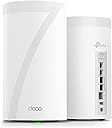


| Antenna Location | Home |
| Antenna Type | Internal |
| Asin | B0BRD7YGR6 |
| Best Sellers Rank | #23,237 in Computers (See Top 100 in Computers) #80 in Whole Home & Mesh Wi-Fi Systems |
| Brand | TP-Link |
| Built In Media | 1 x RJ45 Ethernet cable, 2 x Deco BE95 unit, 2 x Power Adapter, Quick Installation Guide |
| Color | White |
| Compatible Devices | Gaming Console |
| Connectivity Protocol | Wi-Fi |
| Connectivity Range | 7800 Square Feet |
| Connectivity Technology | Ethernet, Wi-Fi |
| Control Method | App |
| Controller Type | App Control |
| Coverage | up to 7,800 sq. ft |
| Customer Reviews | 3.9 3.9 out of 5 stars (250) 3.9 out of 5 stars |
| Data Transfer Rate | 11520 Megabits Per Second |
| Frequency | 6 |
| Frequency Band Class | Quad-Band |
| Has Internet Connectivity | Yes |
| Has Security Updates | Yes |
| Is Modem Compatible | No |
| Item Dimensions L X W X H | 12.8L x 12.8W x 23.6H centimeters |
| Item Type Name | Mesh WiFi |
| Item Weight | 3.03 Kilograms |
| Lan Port Bandwidth | 1× 10 Gbps ethernet/fiber Combo port + 1× 10 Gbps port |
| Manufacturer | TP-Link |
| Maximum Upstream Data Transfer Rate | 1000 Megabits Per Second |
| Mfr Part Number | Deco BE95(2-pack) |
| Model Name | Deco BE95 |
| Model Number | Deco BE95(2-pack) |
| Number Of Antennas | 1 |
| Number Of Items | 1 |
| Number Of Packs | 1 |
| Number Of Ports | 4 |
| Operating System | TP-Link OS |
| Other Special Features Of The Product | Access Point Mode, QoS |
| Router Firewall Security Level | High |
| Router Network Type | hybrid |
| Security Protocol | WPA3 |
| Unit Count | 2.0 Count |
| Upc | 840030706882 |
| Wi Fi Generation | Wi-Fi 7 |
| Wireless Compability | 802.11.be, 802.11ac, 802.11ax, 802.11g, 802.11n |
User
Fantastic mesh for Bell Fiber customers
**BELL CANADA FIBRE CUSTOMERS — THIS WORKS! (Bell Hub connection steps at the end)**I upgraded from an Asus mesh system to the **TP-Link Deco BE95** (check price history before buying!) — and the difference is massive.**Setup:**Super easy — TP-Link nailed it.**My layout:**1. Main router (wired) on 2nd floor2. Wireless node in bedroom across the hall (2nd floor)3. Wireless node in living room (1st floor)4. Wireless node near front door (1st floor)I kept each node within about 2 walls of the main unit, as recommended. Speeds jumped from **10–40Mbps** to **250–750Mbps**, depending on location. I now get solid signal even in the **basement, backyard, and driveway**, where I previously had none.**Speed test examples:*** 650 Mbps = across the hall* 740 Mbps = next to main router(Screenshots posted for proof.)### How to Connect Deco (or any router) to Bell Fiber Modem (hub 3000, hub 4000, and probably 5000).**TL;DR:**During Deco setup, choose **PPPoE mode** (not Access Point), and use your **Internet Username** and **Access Password** from Bell. Done.**Step-by-step:**1. **Get Internet Username:**Open the **MyBell app** → go to **Services** → tap **Internet** → your username usually starts with **b1...** followed by mix of numbers and letters2. **Get or Reset Internet Access Password:*** Recommended: **Call Bell** to request it.* Otherwise this method will disconnect you from internet temporarily. In the MyBell app while on the Internet screen → scroll to bottom of Internet screen → tap **Internet Access Password** → set a new one.3. **(Optional: If resetting password)*** Connect a laptop or desktop directly to your Bell modem with an Ethernet cable.* Go to **bell.ca/mymodem** or **192.168.2.1** in your browser.* Log in and go to settings and enter the internet access new password.4. **Disable Wi-Fi on the Bell Modem:**Log in to modem settings → find **Wi-Fi settings** → disable both 2.4GHz and 5GHz networks.5. **Set up Deco via app:*** Follow the prompts.* When asked for **Connection Type**, change it from **AP Mode** to **PPPoE**.* Enter your Bell **username and access password**.That’s it — your Deco system should now be online and fully functional.
User
Casi todo perfecto
Trabaja muy bien, super veloz.El único problema es el conector de alimentación a la corriente eléctrica se desconecta con mucha facilidad solo, no embona bien o es muy corto y no se alcanza a fijar bien al aparato.
User
Premium Quad Band Router With Massive Coverage And Maximum Speed
So this system has the best coverage and speed I have seen from a mesh system. So I purchased a 2 pack of these to cover a 3600sqft 2 story house. Now on average we have minimum of 55-60 devices on our network daily. Our family streams a lot of content and with the kids gaming our needs are quite great. My internet is 5gig fiber with symmetrical speeds. I have one unit upstairs and 1 downstairs both located centrally on each floor. Now these units are big and there heavy so I also purchased the wall mounts for this specific model which made things much easier. Now getting this system up and running was an absolute breeze using the deco app. I plugged my first unit in now with these it doesn’t matter which one you use and both units are identical in these sets. I have this first one plugged directly into my ONT with cat 6A cable. I then proceeded with the setup and once I got the first one up a running I plugged the 2nd one in and waited for that one to sync. Since these sets are matched pairs there’s no special sync process needed. Now once they were both up and running the deco app installed a new firmware update which took under 5 minutes to complete. Once both units were back up all my devices connected immediately without any problems. All devices came back online and the stability was outstanding everything from our tv’s to our cameras has absolutely excellent signal to each of them and speeds across my wifi 6E and WiFi 7 devices was incredible. Now I tried my satellite node both with wireless backhaul and my normal wired backhaul because I was curious what the speeds would be. Now wirelessly my download was 1.3gbps and on the upload I was at 1.2gbps which is absolutely outstanding. I then went back and plugged my cat6a cable into my downstairs satellite to achieve my wired backhaul with my device topping at a staggering 1.9gbps on the download and 1.6gbps on the upload and again outstanding performance. While there’s a definite difference with wired backhaul this systems performance is very good in both scenarios. Since this is the flagship model the overall value of this while steep on price your definitely paying for a premium quad band system that has insane coverage and speed capabilities. Bottom line this system has massive potential and controlling the system is very easy and it even has a very basic webgui if your not a big fan of cloud based apps either way this system performs as it should and does everything very well.
User
Lasted just over a year
Lasted about 15 months. The failure mode was pretty weird - uplink speed dropped to the point where it was almost non-existent (at first I thought it was my ISP, but that was quickly ruled out by connecting directly).Might be my largest waste of money to date, considering performance was always underwhelming. Now, I’m getting better performance than I ever got from the Deco mesh routers from a new, much less expensive set of mesh routers with theoretically lower specs. As a bonus, the new routers don’t throw off heat like the Deco did.
User
Just buy it!!!
I preordered last week of may and was given estimates ship date of June 15, then Jun 1 and to my happy surprise delivered on Memorial day.The packaging for this 2 system Mesh system is stellar. Clam Shell boxing reveling 2 cylindrical Mesh devices that are solidily built.Using the Deco app was the easy and had the Main router configured within 10 minutes. I had to change the IP address to fit within my network and once changed I was able to configure using the web browser.Both the web browser and app surprisingly gave me alot of configuration detail and the app is actually excellent giving the end user alot of great detail info...impressive.Once I had the main router configured, I simply powered the satellite and the Deco app immediately detected it and configured the satellite to my main router and network...easy!!!!. I moved the satellite to the living room area and did speedtests, not only did I have full wifi signal the speedtests were delivering phenomenal wireless speeds. I have 2 Netgear extenders and they are wireless connected to the Mesh system and is working well with one another in addition giving me better speeds at the extenders than my previous setup.In addition, I configured the IoT for both the 2.4 & 5 ghz band and that is made possible by WiFi 7. All of my IoT devices are on a dedicated band, freeing up the rest of the network to work on the other 2.4 band.The main unit is running about 120 F temp and the satellite is around 109 F. Definitely warm but not a deal breaker.I have been waiting for a good mesh system to arrive and WiFi 7 is the way to go, granted TP link Wifi 7 Mesh is pricey but worth it. I have used Asus routers and their mesh system and Netgear Orbi Mesh as well. To be fair my Asus system with 2 routers and mesh worked well, but I was not getting the wireless speeds that I have with TP link. The Netgear Orbi AX5300 is great, but the app is buggy and the amount of user info was lack luster and disappointing. Tp Links Deco app is well thought-out and gives me alot of great info including the actual wireless strength of all connected devices...it's really good and yes your able to monitor the system remotely because its connected thru their cloud system...nice.This is the Mesh system to have..2 devices covering 7000 sqft(overkill in my 2,300 sqft home) wifi dead zone killer and great app and configuration.JUST BUY IT
Trustpilot
2 weeks ago
1 month ago