Buy anything from 5,000+ international stores. One checkout price. No surprise fees. Join 2M+ shoppers on Desertcart.
Desertcart purchases this item on your behalf and handles shipping, customs, and support to Vietnam.
๐ Elevate your mini PC game with desktop-grade GPU power on the go!
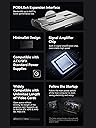
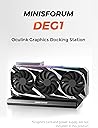
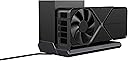
The MINISFORUM DEG1 Docking Station is a compact external GPU dock featuring a PCIe 4.0 x16 interface with blazing 64Gbps transfer speeds. It supports a wide range of full-size graphics cards without length restrictions and is compatible with both ATX and SFX power supplies for flexible power options. Designed for professionals and gamers alike, it includes a smart Force Power On feature for stable startups and a secure Oculink locking mechanism to protect your hardware. Perfect for upgrading mini PCs or laptops with desktop-class GPU performance anytime, anywhere.


| ASIN | B0DNJPGTHZ |
| Best Sellers Rank | #1,826 in Computers & Accessories ( See Top 100 in Computers & Accessories ) #182 in Laptop Docking Stations |
| Brand | MINISFORUM |
| Color | Black |
| Compatible Devices | ATX/SFX |
| Customer Reviews | 4.6 out of 5 stars 96 Reviews |
| Hardware Interface | PCIE x 16 |
| Item Dimensions L x W x H | 5.51"L x 2.56"W x 0.79"H |
| Manufacturer | Micro Computer (HK) Tech Limited |
| Model Number | DEG1 |
| Product Dimensions | 5.51"L x 2.56"W x 0.79"H |
| Warranty Description | 1 |
| Wattage | 65 |
A**M
Effective, easy, somewhat of a cable mess
I was sincerely impressed by the Minisforum DEG1. My desktop computer failed and needed to be sent across the country for warranty repairs, leaving me with a GMKtec NUCbox K8+ miniPC. That mini-PC is great for office work and web browsing, but its integrated GPU is pitifully inadequate. I confirmed with my desktop system's manufacturer that I could remove the RTX 4090 from my desktop before shipping it to them, and ordered the DEG1 to use with the MiniPC. Setup wasn't too bad, but could have benefited from a second pair of hands. Look closely at the instructions to see how the screws need to go to match your power supply, and to fit the GPU bracket, because it's not completely self-evident. Once the bracket is positioned correctly, however, it's just a matter of holding the GPU still enough to get screws in. Don't be careless here; if your GPU is loose and wobbles, it'll strain the PCIe connector in the dock's slot, and damage will be your own fault, since correct installation holds it in place perfectly. Once the card is physically installed, the second slightly challenging bit was cable management. The dock requires a user-supplied power supply capable of running the GPU, and the cables for such supplies are meant for desktop PCs. This can make getting the CPU power to the dock difficult, and the PCIe power can also be touchy, depending on how easily your cables will bend. Look at the photo I provided to see just how much extra cable I had. This isn't really the fault of the DEG1, though, so no points deducted. Once cables were managed, it's a simple matter of connecting the dock to the oculink port on your computer (it should go without saying, make sure it has one before buying!) and turning on the dock. With Minisforum mini-PCs, it's not necessary to press the dock's power button separately. For any other computer, you need to press the power button yourself before turning on your computer. This will cause the GPU fans to go full tilt initially as they're powered without anything controlling them, but they'll calm down as the computer boots, and will likely stop altogether when not under load. There was literally no software setup for me to handle, other than installing Nvidia drivers for the GPU. Windows detected the GPU perfectly, and installing drivers was as trouble-free as it is with the card inside the case. There is something of a performance hit when using Oculink compared to using the GPU inside the case, but if you're looking into eGPUs at all, you probably have a reason for which that's just not feasible. I found it worked great for gaming, and had absolutely zero trouble with it, but I would caution anyone with pets or small children to take care: your GPU will be out in the open, with fast spinning fans to hurt small fingers or noses, and susceptible to any spills or crumbs that fall in. Place the GPU with care, or protect it if necessary. Finally, my one minor complaint is that the power button is difficult to reach when using a large GPU. You can't even see it in my attached photo; it's underneath the portion of the GPU sticking out past the dock. It could be better placed.
R**L
Works just fine on other PCs. Just follow these steps.
This oculink gpu external dock works just fine with other PCs other than the miniforum mini. I have it hooked up to an old HP Prodesk 600 G3 mini getting 80+ fps in borderlands 3s built in bench test. Using an old Titan X gpu and a 650watt psu. I put an oculink adapter into the Prodeskโs empty m.2 slot, ran the cable out the back and connected that via oculink cable to the minisforum deg1. Everything just works. Before you hook all this up there are some things to keep in mind and you must do first. 1. Download the latest drivers for the gpu you are going to use on your pc. 2. Update your motherboard to the latest bios. 3. Leave the power off and hook up all cables to the pc from the deg1. 4. Turn on the psu then press the power button on the deg1. Then and only then turn on your PC. Now install the drivers to your external gpu. That should do it unless your hardware has been โwhite listedโ. Be sure to check that before trying this kind of setup. If you get an error code 43 there is a script you can download and run to fix that. Google is your friend here. If you are using an older gtx gpu like the gtx-980 and your seeing flickering or blank screens there is a firmware update to the gpu you can install from nvidia that fixes it. Iโve done quite a number of these external gpu dock setups and this is probably the easiest. There isn't any reason this external gpu dock shouldn't work unless you have faulty cables, the wrong cables, a bad gpu or your pc/motherboard is โwhite listedโ from your manufacturer not to allow this type of connection. Thats it. This is a very clean setup using the DEG1 dock and it works great. If you canโt get it to work the issues I've mention are most likely the problem and not the fault of the DEG1 dock. There is a dedicated external gpu dock forum on the net that has a lot of valuable info if you get stuck. Good luck.
P**K
GPU dock - great for upgrading your home studio
It is doing what is supposed to do - connect gpu with power source and make and ordinary minipc a gaming or studio pc with ease of installation, great product
S**N
Works with my GEM12 mini PC
Overall, this dock works great with my GEM12 mini PC. Hooked up with a nvidia 4070 super gpu and barely stuttered while running Alan Wake 2. Definitely worked better than the thunderbolt solution for now. Highly recommend this eGPU dock if you are not a gaming enthusiast who cannot accept any imperfections.
D**Y
Simple to hook up
Great piece of gear to add to my mini PC !! Love the power it gives my system now add a power supply and GPU and your off to the raceses
C**S
Simply works
To put it simply, the DEG1 eGPU dock simply works for me without issue. I use it with a 5070ti and a higher end mini PC for my use case. The oculink connection worked the moment I plugged it in without any issue, and there hasn't been a hiccup since. It's not a visually elegant setup, but it works and that's what I was after.
D**G
Smaller and faster than my huge PC!
Amazing product. Sold off my enormous 5900X based PC based on ROG Strix B550X motherboard and NZXT H5 Flow case for a minisforum UM890 Pro and this Deg1 Docking station. Both Minisforum parts cost less together than I realized selling off the bigger computer. I was concerned about performance, but the Minisforum is faster, for AI tasks that demand power from both the PC and external graphics card! 13496 geekbench 6 multi-core vs 11010x, 16479 superposition score vs 16020.
R**T
Easy and clean setup
Works exactly as described. Had no issues. Legit plug and play.
X**N
Great EGPU Dock!
I'm really happy with my MINISFORUM DEG1 Oculink eGPU dock. It's small and easy to carry, making it perfect for traveling. The dock is fast and can handle big graphics cards. I also like that it has a smart startup feature that makes it easy to use. Plus, it's safe and secure. If you need more power from oculink laptop, this dock is a great choice!
K**E
Great accessory for a minipc
Easy to setup, what more could you ask for. This is great for expanding a handheld or minipc.
S**N
Great dock
Works great
J**N
Solid Piece of hardware.
Feels solid and well-made. One issue: the bracket that mounts the video card to the power supply didn't come with a long enough thumbscrew, so it couldn't reach through the bracket to screw into the back of the power supply. This was easily solved with slightly longer screws overall. Also, since this is a Minisforum piece of hardware, I should mention an issue not related to this hardware but likely to affect other users. I am using this with the UM890 Pro. After putting everything together and setting up the Oculink daughter card in the UM890 Pro, I plugged in my two monitors. Then I realized that it would be a great idea to place the HDMI port and the Oculink port just 2mm apart. The head of the HDMI cable blocks half the port and makes it unusable. You will need to buy an HDMI cable with a very thin head to plug in both. Bad design. These two issues from the same company cause a star loss.
P**O
A nice graphics boost for my mini pc
I am running this with a gmktec k8 plus mini pc, and it does a nice job running games at 1440p in ultra. Only a few frames slower then my full size desktop.
Trustpilot
2 months ago
1 month ago