


Buy anything from 5,000+ international stores. One checkout price. No surprise fees. Join 2M+ shoppers on Desertcart.
Desertcart purchases this item on your behalf and handles shipping, customs, and support to Vietnam.
🚀 Power your enterprise network with lightning-fast 10G VPN routing and cloud-smart control!
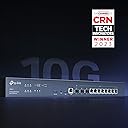
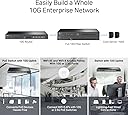
The TP-Link ER8411 is a high-performance enterprise VPN router featuring up to 10 WAN ports including 10G SFP+ connectivity, supporting over 2.3 million concurrent sessions and 1000+ clients. It integrates with Omada’s SDN platform for centralized cloud management and offers robust security features like SPI firewall and DoS defense. Designed for demanding business networks, it ensures optimized bandwidth, flexible port configurations, and future-ready scalability backed by a 5-year warranty.






| ASIN | B0BK9T1P5F |
| Antenna Location | Business |
| Antenna Type | Internal |
| Best Sellers Rank | #75,281 in Electronics ( See Top 100 in Electronics ) #94 in Routers (Computers & Accessories) |
| Box Contents | Omada 10G Multi-WAN Security Gateway ER8411, Power Cord, Quick Installation Guide, Rack-Mount Kit |
| Brand | TP-Link |
| Brand Name | TP-Link |
| Colour | Black |
| Compatible Devices | Personal Computer |
| Connectivity Protocol | Ethernet |
| Connectivity Technology | Ethernet |
| Control Method | App |
| Controller Type | Switch |
| Coverage | SSL, IPSec, OpenVPN, PPTP, L2TP |
| Customer Reviews | 4.3 out of 5 stars 80 Reviews |
| Data Transfer Rate | 1 Gigabits Per Second |
| EU Spare Part Availability Duration | 5 Years |
| Frequency | 2.2 GHz |
| Frequency Band Class | Single-Band |
| Is Modem Compatible | No |
| Item Dimensions L x W x H | 44L x 22W x 4.4H Centimeters |
| Item Weight Unit of Measure | 2.84 Kilograms |
| LAN Port Bandwidth | 10G |
| Manufacturer | TP-Link |
| Manufacturer Part Number | ER8411 |
| Maximum Upstream Data Transfer Rate | 1000 Megabits Per Second |
| Model Name | ER8411 |
| Model Number | ER8411 |
| Number of Ports | 10 |
| Operating System | MAC OS, Microsoft Windows 98SE, NT, 2000, XP, Vista™, 7/8/8.1/10/11, NetWare, UNIX or Linux |
| Other Special Features of the Product | WPS |
| Security Protocol | WPS |
| Special Feature | WPS |
| UPC | 840030703300 |
| Wireless Communication Standard | 802.11ax |
| Wireless Compability | 802.11ax |
V**D
Lack of knowladge about Er8411 when called to tp-link customer care for tech support
Very poor Tech support
A**H
ER8411 router A+ great value great router
If you have multi gig internet, you need an er8411. Powerhouse router, easy to use with Omada software controller. Link other Omada devices with ease
J**N
Get the most out of bell fibre internet with this multi wan 10 gig router
Had a issue with bell new giga hub. It has a software glitch. Tech's at bell know this and are waiting for a update. I had tried to use the ethernet 10gig jack. Bypassing the router. Using it as a modem. Had to call bell to down grade to bell hub 3000. Once it arrived bell tech showed up next day with the sfp adapter. Used the bell hub for one day making sure no dropping of internet. Once all was good I installed the sfp into the er8411 router. Had to update firmware and the speed jumped to above 1.5 gbe. Hit 1800 download and 1100 upload. Wow. It has sfp+ input and multi wan configurable inputs. I can use the tc4000 dual link wan connection. Trying to get my cable provider to allow this. This router is fantastic. Only wish it had a qsfp output. A 40 gbe lan. You can use the multi wan as a 4 link aggregation to a tp link switch and really move data from point to point. The unit also has usb 3.0 for printer or better yet a USB lte stick. Wish tplink has a USB lte 5g coming soon. If you want me to test one i am happy too try.
M**D
بائع محترم
بائع محترم
M**R
Super fast easy to install/setup.
Works very well, was relatively easy to set up. I'm using Wireguard and I'm getting 500u/d on gigabit fiber.
S**N
Great product
This is a great core switch for both small office / home office and residential to help take advantage of multi-gig internet connectivity. I've had the switch installed for about 10 days now and it has been functioning seamlessly. My only complaint is that the switch is configured default for private IP 192.168.0.1; I failed to catch this fact during the initial installation, and it crashed my network due to an IP address conflict with my router, which has the same IP address. After realizing this, I disconnected the switch from the network and connected a computer directly to it (manually configured for IP address on the 192.168.0.x network) and logged into the switch's web interface to change the switch's IP address to one that is available on my live network; and then reconnected the switch to my main network. After doing this, I was able to easily adopt the switch via Omada SDN controller (OC300). TP-Link should have this switch default to DHCP for IP addressing, which I believe the majority / all of their other Omada SDN switches do.
Trustpilot
1 week ago
1 month ago