Buy anything from 5,000+ international stores. One checkout price. No surprise fees. Join 2M+ shoppers on Desertcart.
Desertcart purchases this item on your behalf and handles shipping, customs, and support to Vietnam.
💧 Cool your CPU, light up your rig, and own the future of PC performance.
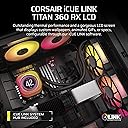
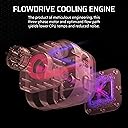
The CORSAIR Titan 360 RX LCD is a premium all-in-one liquid CPU cooler featuring a 360mm radiator with three high-performance RX RGB fans, a cutting-edge FlowDrive pump, and a vibrant 2.1” IPS LCD display for real-time monitoring and customization. Designed for Intel LGA 1851/1700 and AMD AM5/AM4 sockets, it integrates seamlessly with the iCUE LINK ecosystem to streamline connectivity and lighting control, delivering whisper-quiet, efficient cooling with advanced thermal engineering and modular customization options.


| ASIN | B0DF7CZ9D8 |
| Best Sellers Rank | #5 in Water Cooling Systems |
| Brand | Corsair |
| Brand Name | Corsair |
| Compatible Devices | Desktop |
| Cooling Method | Water |
| Customer Reviews | 4.6 out of 5 stars 1,107 Reviews |
| Global Trade Identification Number | 00840440482956 |
| Included Components | Item |
| Item Dimensions L x W x H | 15.59"L x 4.92"H |
| Item Weight | 3.75 Pounds |
| Manufacturer | Corsair |
| Material Type | Aluminum, Copper |
| Maximum Rotational Speed | 2100 RPM |
| Model | CW-9061023-WW |
| Noise Level | 36 Decibels |
| Number of Items | 1 |
| Part Number | CW-9061023-WW |
| Power Connector Type | 4-Pin |
| Product Dimensions | 15.59"L x 4.92"H |
| UPC | 840440482956 |
| Unit Count | 1.0 Count |
| Voltage | 12 Volts |
| Warranty Description | 6 Year Manufacturer |
I**Z
Amazing cooler!
Great AIO cooler! This cooler was significantly better than my tower cooler, my tower cooler (dark rock slim) averaging around 50 to 60 Celsius, and with this cooler, it went down to 40 to 50 Celsius, granted I have a 7600x CPU, but I bought it for aesthetics, and it looks amazing of course! Installing this though, took me about 3.5 hours to try setting this up, took way too long, but the mounting wasn't so bad, it was easy, not too difficult. connectivity works just fine, needing iCUE to work properly, it had plenty of cables verifying in size but make sure you use the right one, I personally used a youtube video so I knew i didn't do anything wrong and installed it right. The only negative I'd say is that, theres so many cables, about 6 of them? compared to just 1 cable for my previous cooler but for the RGB and aesthetics? so worth it!
S**E
Highly recommend for the gamers
Built my first new PC in 10 years and chose the parts carefully as I know I won’t be able to afford another for a while. And I wanted to go with an all White build as I like the look, especially when all the lights are set to white too. Went with the Corsair AIO because every PC I have built for me or others I have always used Corsair and never had an issue That combined with the looks and lcs info screen made this the obvious choice. The quality is there for everyone to see and it just feels well made When it came to installation it was very straight forward and before putting it in place I was a little concerned about the pre applied paste. It just didn’t look like enough but I trusted Corsairs judgement on this. Everything is included for installation on Intel and Amd bird as which I am going with an AMD 9800X3D Got it installed and finished the rest of the build and hit the switch. Was greeted with a beautifully clear lcd screen showing the Corsair splash screen and once windows fired up I installed the Icue software to provide the temp info for the lcd. Also have to mention the ability to show images and custom graphics on the display is awesome. Everything was very easy to follow and I have to say I am very impressed with the temps. On idle the PC sits around 30c and when in a heavy load the max I have seen it reach was 80c but on average when gaming it stays around the 50c mark Overall extremely happy with the outcome and my choice of AIO
M**L
Great AIO, Corsair makes good stuff!
You know, what sold me on this was the temp display. I have a Ryzen 7 and I considered the 3 fan, but it would have been overkill. As far as cooling, this does a fantastic job. As far as system link connections, this is a game changer. I honestly don't think I'll put any other fan type in my cases in the future. 1 cable linking all my fans? What a time to be alive. I bought another fan and chained it off of one side of the radiator. If my 4000x case didn't already have AF-120s mounted to the front into a lighting core I would have replaced those as well. The system is quiet. I walk in the room and I honestly can't tell if it's on or not. Everything stays cool. The system link and lighting core sync up and the plug-ins for my gigabyte board and msi GPU work well. iCUE gets better every day. I really like that I can set device memory mode and turn off icue if necessary or in my case turn off the lighting when I lock my system and walk away. I highly recommend this AIO, but if you want even more color, the "groove" modular piece puts off even more light and you can swap it out for the LCD. The modular pieces are easy to swap.
M**E
Corsair Titan RX 360 - a standout in the AIO crowd
Corsair gets a bad wrap sometimes and with a market so flooded with different AIOs, it’s rare a product stands out as much as the Titan Rx 360. The first thing that really struck was the packaging and build quality. This Titan Rx feels like a premium product, well made and packaged. Clear instructions for install. And it looks great. Beautiful, crisp screen that can show anything from GIFs to temperature or power draw. Great color from the LEDs. All of which is controlled through the Corsair iCue software which is MILES ahead of anything else I have ever used for RGB or fans. The software is clean, easy to use, with tons of options to dial in LED color, patterns, fan speed. The fans are quiet and responsive, kicking in quickly when they need to keep my 9800x3d. Have to say I am more than happy with my purchase. I feel that for the money, I got a premium quality product that does exactly what I need from it and would recommend it to others.
J**Y
Excellent Cooler
This is by far best aio I have tried so far! I bought this because my Deep cool 360mm aio pump failed and caused constant crashes, it was a decent cooler, but this one though is a whole different beast! Stock, before tuning my chip it would keep my Intel i7 13700k around 41c idle and 62c heavy CPU games! But after tuning in bios, I am now sitting cool around 31c idle and 38c heavy gaming full settings all ray tracing enabled! I do have push pull setup with 6 fans on the rad. The rad has some thought put into it when it comes to the fins/airflow they are perfectly spaced not smudged together allowing great airflow! Allowing it to run quite even under heavy loads, with the balanced tune on ICUE not the extreme, with these temps I have no need in the extreme setting. I am very impressed with this cooler, if you are looking for a good looking and good working cooler, this is it!
A**R
Corsair's Best AIO cooler yet, as long as you don't mind iCue
The CORSAIR iCUE Link Titan 360 RX is a beautiful CPU cooler with performance that is sufficient for most tasks. I went with the white and I absolutely love the looks. The rest of the fans in my system are white iCue Link fans, and these go well with those. They have a different side-plate and appearance than the rest, but that's ok. Pros: The Titan RX is the best version of the Corsair liquid AIO coolers yet. The fans perform better, the pump is improved, and the whole thing looks excellent. The big selling point to this is the LCD screen. While not completely customizable, you have plenty of options in the iCue software for what you want to display. And if you wish, you can load your own GIFs. The shroud around the screen is much larger than previous generations, but it is also much more vivid and customizable in terms of colors. It's a little shiny and smooth, which may not fit everyone's preference. But it works well in my build. The fans on the Titan RX are very quiet, and they appear to push more air through than previous generations, which is good considering some previous Corsair coolers were a little weak. But this one has kept my Core Ultra 265k very cool, and that's with using the included thermal paste application that comes on the pump block. If you haven't used the iCue Link system for fans, this is a great way to get started. The amount of wires needed for most RGB fan systems is downright annoying, ESPECIALLY the Corsair pre-Link fan generations. But with Link, I've never enjoyed the building process more, and I'll never go back. Cons: iCue is still a little bulky. It has become a necessary evil at this point. It is a powerful utility, and the functionality is pretty awesome, but it's buggy and tends to glitch at times. Regardless, if you want to go the Corsair route, you have to deal with it. This cooler uses the Corsair iCue Link system, which is excellent. However, the pump/screen combo still has two cables you have to run to it. This isn't a huge deal, but it's a step back from the previous generation of Link coolers. Overall, you are still using less cables, and the Link ecosystem is fantastic. Just know that you will have to route two cables. Also, if you have existing iCue Link hubs, they may not work with this cooler because there is an additional port needed. So you may have to switch to the hub included with the Titan RX. Definitely not a deal breaker at all, but worth noting. Overall, I'm quite happy with this purchase. I would recommend it, but if you want the top end cooling performance in the market, this won't give you that. For the large majority of users, this 360mm Titan RX is going to be more than sufficient, and it looks outstanding in the case. It's a little pricier than some options, but if you want a screen and a 360 cooler, it's about right.
R**S
Relatively easy and efficient
Recommend using the QR code inside the package to read/download PDF instructions. Included instructions are otherwise absent. All components are a good quality and fit together well. Controller is a bit of a rat's nest with no fewer than 3 connections to motherboard and PSU and yet another for fan. Pump is yet another additional USB2 motherboard connection. All connectors are unique and only plug in the right places. Cooling efficiency seems excellent, and the display is very versatile in how and what is shown. Functionality through single software (must be downloaded and installed) is very neat and easy. Practically silent operation. There are lower cost solutions but most take lots more cabling tangle and confusion, so for me this was a best choice.
J**P
Extremely quiet, nice cooling performance
I've used various LCs, and this one is by far the most quiet liquid cooler I've used. Cooling performance at full load did fall slightly behind coolers like Arctic LF, but still excellent performance. This one feels worth it compared to the non-lcd version since only $25 difference. One thing to note, I did experience issue where LCD is not properly recognized and unable to configure screen via ICUE, but after reseating the cables, the issue was resolved.
J**S
10/10 - Beautiful, clean, and efficient
The TITAN 360 RX LCD is a premium AIO cooler that delivers strong thermal performance and quiet operation. The LCD screen is a nice touch, and if you're already using Corsair’s iCUE ecosystem, it fits in seamlessly. Setup can be a bit fiddly with the cabling, and it’s definitely on the pricey side—but if you want a cooler that looks great and performs well, it’s a solid choice. It comes with Intel and AMD brackets, so can be used on most CPU/mobo combinations. Great cooling, sleek design, but best for those already in the Corsair ecosystem.
T**D
Puissant, silencieux et stylé – un AIO premium digne de son nom
Monté sur une config AMD AM5, ce refroidisseur liquide Corsair Titan 360 RX est clairement un produit haut de gamme qui allie performances thermiques, design soigné et simplicité d'installation. 🔧 Installation : Le nouveau système iCUE Link simplifie vraiment le câblage. Un seul câble pour toute la chaîne : plus propre, moins de galères à gérer derrière la carte mère. Le Link Hub est inclus, ce qui évite d’acheter un accessoire séparé. 🌡️ Performances : Refroidit un Ryzen 9 7950X sans broncher, même en stress test (Cinebench, jeux, encodage). Les températures restent très stables, avec des pics rarement au-dessus de 70 °C. La chambre FlowDrive semble bien faire son boulot. 🔇 Silence : Les 3 ventilateurs RX120 RGB sont performants sans être bruyants. En usage normal, on ne les entend quasiment pas. En charge, le bruit reste contenu. 💻 Écran LCD : L’écran personnalisable ajoute une vraie touche esthétique. On peut afficher des stats système, des GIFs ou des visuels custom. Le rendu est net, lumineux et réactif. 🎮 Logiciel iCUE : Toujours aussi complet. Contrôle précis des vitesses, effets RGB synchronisés avec d’autres composants Corsair, personnalisation facile. 🟡 À noter : Format 360 mm : prévoyez de la place dans votre boîtier. Prix élevé, mais justifié par les composants, l’écran LCD, et l'intégration iCUE Link.
ぺ**ぺ
安定して使いやすい
Aura GC9Mに設置するために購入しました。ギリギリ設置出来ました CPUはRyzen9 9950X3Dで用途はフロムゲーとデータ分析プログラム(kaggle)です。 OC運用はしていません 特に問題なく冷やせました。MAXでも70°C台だったと思います
M**K
Great Product and Great Quality
No issues with this product! It works well and keeps my CPU cool when overclocking. I couldn't find a white one at my local stores, so amazon to the rescue!
F**E
Muito bom para R9 9950X3D
Watercooler muito bonito e funcional Ryzen 9 9950X3D + RTX5090, jogos em 4k (BF6, RDR2, etc.) média de temperatura 46°- 48° durante o gameplay. Fácil instalação inclusive para push and pull, fiz a instalação na vertical.
Trustpilot
1 day ago
2 weeks ago