Buy anything from 5,000+ international stores. One checkout price. No surprise fees. Join 2M+ shoppers on Desertcart.
Desertcart purchases this item on your behalf and handles shipping, customs, and support to Vietnam.
🎮 Dominate your digital realm with the Odyssey G9 — where epic visuals meet pro-level speed!
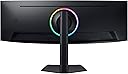
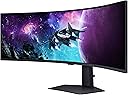
The Samsung Odyssey G9 (G95C) is a 49-inch ultrawide curved gaming monitor featuring a 1000R curve and Dual QHD 5120x1440 resolution. It boasts a blazing 240Hz refresh rate and 1ms gray-to-gray response time for ultra-smooth, blur-free gaming. With DisplayHDR 1000 certification and a 1,000,000:1 contrast ratio, it delivers vibrant, high-contrast visuals. AMD FreeSync Premium Pro ensures tear-free gameplay, while ergonomic adjustments and eye comfort technologies support long sessions. Additional features include CoreSync ambient lighting, multi-source viewing (PBP/PIP), and Auto Source Switch+ for instant input detection.


| ASIN | B0DHJBWY52 |
| Adaptive Sync | FreeSync Premium Pro |
| Additional Features | Curved, Ultrawide Screen |
| Aspect Ratio | 32:9 |
| Best Sellers Rank | #1,429 in Electronics ( See Top 100 in Electronics ) #55 in Computer Monitors |
| Brand | Samsung |
| Brightness | 1000 Candela |
| Built-In Media | DisplayPort Cable, Power Cable |
| Color | Black |
| Compatible Devices | Devices with HDMI, DisplayPort, USB, and FreeSync Premium Pro support |
| Connectivity Technology | HDMI |
| Contrast Ratio | 1000000:1 |
| Customer Reviews | 4.2 4.2 out of 5 stars (260) |
| Display Resolution Maximum | 5120x1440 Pixels |
| Display Technology | VA |
| Display Type | QLED |
| Hardware Connectivity | DisplayPort, HDMI, USB 3.0 |
| Has Color Screen | Yes |
| Item Dimensions D x W x H | 16.6"D x 45.2"W x 22.4"H |
| Item Weight | 23.4 Pounds |
| Manufacturer | Samsung |
| Model Name | G9CE |
| Model Number | LS49CG950ENXZA |
| Mounting Type | Wall Mount |
| Native Resolution | 5120x1440 |
| Picture Quality Enhancement Technology | CoreSync, Core Lighting+, Advanced eye comfort technology |
| Power Consumption | 120 Watts |
| Refresh Rate | 240 Hz |
| Resolution | QHD Ultra Wide 1440p |
| Response Time | 1 Milliseconds |
| Screen Finish | Curved |
| Screen Size | 49 Inches |
| Shape | Curved |
| Specific Uses For Product | Gaming |
| Total Number of HDMI Ports | 2 |
| Total USB 2.0 Ports | 2 |
| Total USB 3.0 Ports | 2 |
| Total Usb Ports | 2 |
| UPC | 887276792132 |
| Viewing Angle | 178 Degrees |
| Voltage | 240 Volts |
| Warranty Description | 1 year manufacturer |
| Warranty Type | 1 Year Manufacturer Warranty |
J**R
Very big, great colors and nice resolution for picture clarity
Incredible nice monitor with good resolution. It is very big and with that it weighs a lot too. However, once you get it setup you shouldn’t have to worry about moving it. The picture quality is very good, not only because it has good resolution but the color accuracy and range is nice.
S**T
Great monitor
Wish I bought a widescreen monitor a long time ago. I use this in place of 3 monitors and LOVE IT. Great for flight sims and FPS games alike. Works well for normal work too. All around great monitor at a great price.
A**A
Nice Big Screen
this screen is amazing, I feel like I'm the captain of a star ship when using it! It's super impressive and I love having so many things up on my screen from my office at home.
O**Z
Not so bright (of me buying it). It's been in a box longer than on a desk.
I've had this since October 2025 and haven't been able to use it for more than a week. It has now been serviced twice by Samsung (well, their outsourcing repair company they use in Florida). These guys don't fix anything, they just swap main circuit boards. Fine, SMD troubleshooting is a lost art. As an Electrical Engineer myself and via some online research, I know what the issue is. The problem is a design flaw that Samsung refuses to acknowledge, likely due to the cost of a major recall or simply ineptness. The flaw is a bad thermistor on the main board. This component is meant to sense abnormally high temps and prevent further more expensive thermal damage. However because of a bad design (wrong placement, improper component specs), this component trips and your left with functioning back lights without any logic board (on screen display or video signal). Online, people have simply desoldered the component if they were out of warranty. However, I am still covered under warranty for another 3/4 year so I will play the game to watch hilarity ensue. The issue is, I keep having to work from home so these "repair" guys can come out to swap a part. What happened so far: Dec 2nd - Ticket was created for repair (don't get me started on the 90 minute chat session) The following week the main logic board was replaced. Worked for ~4 hours in the office and then POOF. Had to pack it up (its at work) and bring it home. Dec 11th - new Ticket - same symptoms....another at least 60 minute chat session where we spend 90% of the time talking about "did you unplug it and plug it back in" - how novel. The guy came out and replaced the board and the entire LCD panel. He powered it up to prove to me he "fixed it". I pointlessly described to him that it will fail again since the core design is bad. He just looked at me as if I spoke some Klingon dialect banned centuries ago for being too nerdy. Boy this is getting expensive for Samsung considering paying this third party to drive out... Dec 28th (today) - new ticket - same issue. This time I decided to put the monitor on the kitchen table and give it a good 24 hour burn in to avoid having to haul it to work and home again. It ran for a total of ~30 minutes before failing. Wonderful, the failures are getting faster - maybe it will fail next time when the guy is onsite. This time I was able to reach a human in some far away call center. Another 60 minute call - a call where the guy was asking me if I had two tickets before or if it was fixed twice under the same ticket. Bewildered why he was asking (don't they keep records??? what kind of junior operation is Samsung running?). Anyway, I dug up both ticket numbers and he wanted to argue that one of the tickets was canceled. Ok? Whatever - you guys figure your internal paperwork out and leave me out of this. I can lecture you about electrical design issues, but I suspect he would have about the same interest as me being intrigued by his internal ticketing system. Anyway, here we are. Now we wait for the local service center guy to call and proceed to tell me first available is 'some' Wednesday between the hours of 9am and 4pm. I will proceed to schedule another work from home day and they will proceed to swap boards they already swapped. Rinse and repeat. I'm actually curious how long this can go. I have plenty of time and I don't really NEED a 49" at work - most of the guys love to come around and laugh and my ridiculously sized monitor layout on my desk and then laugh harder as I have to haul this monstrosity away. I guess my goal should be "let's hope it works this time" instead of the negative vibe I've somehow managed to whip up of "Let's see how much we can drain Samsung- maybe the design engineer in Korea will find out and resolve issue at its core". Whatever, I'd say buy an LG monitor instead (never had any issues with multiple TV and monitor products, but that could simply be luck. Update: January 9th. After a ton of back and forth calls to Samsung, they finally gave up sending someone out to "fix" the unit. Instead, they offered a refund which I accepted. They'll be sending a truck out to the house to pickup the unit and (?) dispose of it. After its picked up, I'm supposed to be issued a refund. One thing for sure, I am not going to purchase another Samsung monitor. Total waste of time considering being without a monitor for now 3 months.
A**R
0 Complaints
Absolutely awesome, it came perfect, no damage all items were perfectly packaged. It is a LARGE box so be prepared. This is great for all the things I do, gaming work, casual, editing, and video. Display is stunning and very responsive, I do not use the RGB on the back of the monitor. The stand is sturdy and very large so be sure you have the desk space if you are not mounting on an ARM. This replaced a 3 monitor setup with an arm, so to have one large screen is great. No complaints and I opted for the extended warranty as well. Adjust your settings so that the monitor turns off with inactivity to prevent risk of any possible burn in. There are so many options, you can adjust to fit your needs.
D**Y
Curved Ultrawide Convert - great monitor for many, perhaps not all
I've had decent gaming PC's before, always used a 1080p, 60hz monitor. Finally, in anticipation of Battlefield 6, I pulled the trigger on this product. I was debating on whether to go ultrawide, or get a 4k display, but ultimately decided to go with the G9. First and foremost, being able to see the extra FPS in my games is very satisfying. I'm running a relatively powerful rig, with a 4070ti, and I can finally appreciate the extra frames my rig is capable of. I'd say that the difference between 30fps and 60fps is obviously massive, but the difference between 60fps and 120fps is also pretty stark. Getting the full 240fps is harder in more demanding games, but in the games where I can see those frames, there is an smoothness that I can notice and I do appreciate. My panel does have some light leak spots on the edges, but it's something I rarely notice, unless the screen goes completely black, if you're sensitive to that kind of thing you might want try exchanging your product, but for me, its rarely noticeable and I think that the monitor looks great. I think that this product is worth a look, when on sale. Its a steeper price at MSRP, but I think a good value when marked down, which appears to happen relatively frequently. I also appreciate the ability to run multiple devices. I use my PC in the DisplayPort, and my M2 Mac Mini in the HDMI. Switching inputs is pretty easy, but a remote would've been a great addition, to more easily navigate the menu system. I'm giving it 4 stars, as I think that the light leak issue would annoy others perhaps more than myself, for such a premium-priced product. That being said, I rarely notice it and have been otherwise extremely impressed with the experience of using this monitor so far. You can also use both HDMI, and DisplayPort, into the same PC to simulate a dual monitor setup, which could be useful to some. I've yet to experiment with using this monitor in that way, but its a nice option. Most of the drawbacks you may experience are up to personal preference. This is a large monitor, and your desk setup will most likely need to accommodate that. For example, I no longer use multiple displays as there is just not enough room on my desk to fit them, without blocking my speakers. In the future, I may mount them above this monitor, to use for productivity, etc. I also wasn't convinced about curved monitors, until this product. It's a natural way to game and provides a slight enhancement to immersion, but isn't distracting, like I thought it might be. Ultimately, this monitor sold me on the value of curved ultrawides, and I don't see myself going back. If this product looks a little to big for your desk setup, or just too much for you, consider a 21:9 ultrawide, it may be the best of both worlds for you. I like the 31:9 because it feels like having two monitors during browsing, editing, etc, but when I game, I get the benefit of the whole screen, and no bezels. I also think that its easier to drive than a full 4k display, which is a benefit to FPS in games. When gaming it's almost like having a triple monitor setup, with a wide FOV. I'm excited to mount a TV above it on my wall, and use that for a second monitor/console gaming setup, and I think that is probably the best way to use multiple monitors in a setup like this. I think its a good product, you most likely won't regret it, just be extra vigilant in setup as it is a heavy product and breaking the panel would be extremely disappointing. I'd recommend designing your space with this product as the centerpiece, and going from there. It's even larger than I thought it would be, and i have plenty of desk space, but conversely, I now have much more screen space which is something I value a lot. I'd always have at least two, but preferably three monitors, and this one negates the need for that, in my opinion. Using my laptop for youtube/media is just as good and better in some ways because I'm not constantly Alt-Tab'ing out of games or using borderless windowed mode. It would still be nice to have a second monitor for OBS or discord, but like I said earlier, this monitor can act as two separate monitors with the addition of that extra HDMI. For me, I want a large TV overhead, and I would be satisfied with using that for those other programs I may want open during game sessions.
Trustpilot
3 weeks ago
1 month ago