Buy anything from 5,000+ international stores. One checkout price. No surprise fees. Join 2M+ shoppers on Desertcart.
Desertcart purchases this item on your behalf and handles shipping, customs, and support to Vietnam.
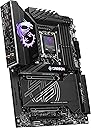
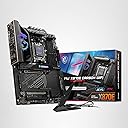
🚀 Dominate your build with MSI MPG X870E Carbon — where power meets precision.
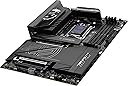
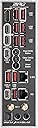
The MSI MPG X870E Carbon WiFi motherboard is a premium ATX board designed for AMD Ryzen 7000/8000/9000 series processors. It features cutting-edge PCIe 5.0 Gen5 support delivering up to 128GB/s bandwidth, advanced thermal solutions with high-quality MOSFET heat sinks, and next-gen connectivity including Wi-Fi 7 and Bluetooth 5.4. With support for up to 256GB DDR5 RAM at speeds up to 7800 MHz, dual LAN ports, and a user-friendly EZ PCIe release, this motherboard is engineered for high-performance gaming, content creation, and future-proof PC builds.


| ASIN | B0DG3QW9TJ |
| Best Sellers Rank | #32 in Computer Motherboards |
| Brand | msi |
| CPU Model | Ryzen 9 |
| CPU Socket | Socket AM5 |
| Chipset Type | AMD X870 |
| Compatible Devices | Personal Computer |
| Compatible Processors | AMD Ryzen 9000/8000/7000 Series Processors |
| Customer Reviews | 4.4 out of 5 stars 319 Reviews |
| Global Trade Identification Number | 00824142382219 |
| Graphics Card Interface | PCI Express |
| Item Dimensions L x W x H | 13.6"L x 3"W x 10.7"H |
| Item Weight | 4 Pounds |
| Main Power Connector Type | 24-Pin |
| Manufacturer | MSI |
| Memory Clock Speed | 7800 MHz |
| Memory Slots Available | 4 |
| Memory Storage Capacity | 256 GB |
| Mfr Part Number | MPG X870E CARBON WIFI |
| Model Name | X870ECARBONWIFI7 |
| Model Number | MPG X870E CARBON WIFI |
| Number of Ethernet Ports | 2 |
| Number of Ports | 13 |
| Platform | Windows 11 |
| Processor Socket | Socket AM5 |
| RAM Memory Technology | DDR5 |
| Ram Memory Maximum Size | 256 GB |
| Total Number of HDMI Ports | 1 |
| Total PCIe Ports | 3 |
| Total SATA Ports | 4 |
| Total Usb Ports | 13 |
| UPC | 824142382219 |
| Warranty Description | 3 Years |
P**.
Good 500ish motherboard
Aside from the constant BIOS updates, avg 1-2/mo, and initial BIOS setup that can be rather tedious to do properly; the setup was very straightforward with no initial boot issues. I haven't found any nonfunctional ports or malfunctioning in 3 months of use; albeit I haven't tested every feature. It has a good quality PCB, with some real heft to it. It doesn't flex under its own weight or with a hefty heatsink and GPU; motherboard mounted vertically. Thermals and VRMS are slightly warm, but stable under load and stress tests; which is all that really matters. The #1 M.2 slot heatsink keeps temps on a Samsung 9100pro below 55c according to Samsung Magician, even under prolonged use; and may do better if your CPU is water cooled, since I think some of that heat is being generated by other components. G-SKill cas30-6000 32x2 1.4v kit on MSI's QVL ran at advertised speeds on stock voltage printed on the DIMMS. They posted on first boot without issues, passed a 30 minute Prime95 stress test. On kits over 96gb, maximum frequency drops on most kits, and 4x kits are generally not recommended as they usually perform worse with most desktop CPUs in most non-productivity tasks. 64 seems like plenty to me, currently; and haven't seen utilization over 55% in any case. CPU is a 9950x3D running at OEM specs. It posted just fine but had some issues on early BIOS releases. Core utilization could have been better but is greatly improved with the current release. CPU speed is limited by my air-cooling setup to some degree (Noctua D15 G2) but does reach boost to 5725mhz on performance cores when heavy workloads are limited to 1-3 cores. Lighting looks okay, but LEDs are not binned properly as custom color schemes are hard to match and need individual settings. They don't hold the settings after a cold boot and require a background process to run in order to keep what you set; otherwise, they revert to the rainbow loop. It would be better if it were addressed in BIOS instead, at least for ease of use and efficient use of system resources. There have been no system stability issues that couldn't be attributed to Windows 11 or other software flaws, that I've found. With one exception- AMD Hybrid Graphics don't play well with older NVidia cards like a 3090. It messed the fan controller for the graphics card, linking fan speed to the CPU which caused the GPU to overheat. I couldn't use it. I'm unsure if it is caused by the motherboard, CPU or graphics; however. Sound quality is very good from the stereo/mix and TOSLINK fiber connections but lacks separate channels that my last MSI motherboard had. This may require a separate external audio processor if your sound equipment requires it. It sounds very good, but not high-end production quality on pro grade headphones (Beyerdynamic). Most people will probably think it's better than anything on most consumer devices with good equipment. No pops, hisses or noticeable distortion. No connection issues either. Not bad for under $500 if you can get it for that price and find it in stock. If you are coming from an x670 gen board, it's probably not worth upgrading yet unless you absolutely need something like pcie-5.0; and probably makes better sense to wait for the next gen. I didn't like the placement of the SATA connectors at all. Graphics card blocked access to them completely and needs cables to be connected before installing the graphics. It seems like they are an afterthought. I loved the new PCIE clip design. Very easy to use. M.2 is a bit wonky depending on the size of the card 2280 size was fine in the M1 slot. The locking mechanism is difficult to figure out, and instructions are lacking a good explanation. I had to youtube it. The packaging has a lot less waste inside than previous motherboards; and was secure inside, arriving in excellent condition. There wasn't a pile of junk leftover, which was a nice change. Setup for reference- 9950x3D cooled by Noctua D15-G2 LBC model / Arctic MX-6 G-Skill Neo Cas 30 - 6000 1.4v Samsung 9100pro 4TB m.2 Corsair HX 1200i (2025) Lian-Li Lancool 216 Noctua 3000rpm Industrial fans for exhaust. (not a quiet setup) Reused a 3090 from my last build.
P**K
Best High End Gaming X870E Board out there
This is the third AM5 board I've owned. The other two were the X670E-E and X870E-E. The X670E-E outright did not work. Just crashed a lot with random error messages in the event viewer that didn't make any sense. The X870E-E worked, but would drop all USB connections and then reconnect which made the machine unusable for the purpose in which I purchased it for. It has been a while since I purchased an MSI board, last one was a Z270 Gaming M7. I switched to ROG products because I have a smooth brain and they looked cool. But thinking back, I've had nothing but problems. So now I'm through with ASUS and thought back to that AMAZING MSI board I purchased for my 7700K 8 years ago. Thing still works great & MSI released a BIOS update for it about 18 months ago which for a product that old is fairly amazing. So when I went back to the decision table MSI was my first choice and boy am I glad I made the move. *Improvements over ASUS AM5 Boards* -Realtek LAN instead of Intel -Qualcom Wifi instead of Intel -5gbe LAN port + a 2.5gbe instead of one 2.5gbe which is awesome because I have a 10gbe network with a NAS that can take advantage of it. -Came with a USB flash stick that has drivers and a more recent BIOS versions instead of a packet of ROG stickers and lanyard. -Weekly BIOS updates after launches (most are Beta, but nonetheless) instead of BIOS updates every 45 days. This is crucial for new product launches such as the 9800X3D. LAN was wonky when I switched from 7800X3D to 9800X3D at first. 3 days later a Beta BIOS came out that fixed it. This would not have happened with ASUS. -PCB quality of MSI board is superior and you can tell just looking at it. Traces are noticeably thicker and separated than on the ASUS boards. -Easy release, tool free M.2 heatsink covers for all slots compared to only one quick release on the more recent ASUS board and manual screws on the older ones. -Far easier to manage driver updates without OEM bloatware (MSI Center/ArmorCrate) on MSI than on ASUS. -AM5 cooler mounting bracket is of far higher quality. Even the screw threads are machined superiorly. -Has additional PCIe 8 Pin Power connector at the bottom of the board for additional board power delivery for anyone planning on installing multiple PCIEx16, PCIEx8, PCIEx4 & PCIEx1 cards. -Memory training is MUCH faster and stable -BIOS boot time is 1/4 of what the ASUS boards were even after CMOS clearing. This product and the X870E-E are direct competitors of one another. Same feature set, same IO, same color scheme, same RGB, same price. The MSI board wins on everything. If you are deciding between the two please do yourself the favor and buy this one. You might get a good ASUS board, or you might get a dud. I'm 0 for 2 with AM5. So far I've never purchased a deflective MSI board they are 2/2. Just going right to MSI from now on. Thanks MSI!
Z**R
Very nice high-end motherboard, with a few caveats (Spoiler: It's the LAN)
I've never owned a motherboard this nice. This thing is very nice, it has lots of features which have saved my bacon more than once so far in three months of ownership. I find that it has plenty of USB support, plenty of filtering for smooth power delivery to my GPU and CPU, and the RGB is tastefully unique. I appreciate MSI's model for the wifi adapters, even if they're a bit cheesy. It's easy to install and setup the BIOS, though nothing particularly exciting there for me. The standout things I really enjoy here are the EZ code display (which doubles as a temp display), the sheer number of USB ports, the premium layout, and the wicked heatsinks. I don't think it's worth the price, though. For one, we're still talking about a board with limited Gen 5 PCIe support. Yes, that's on AMD to open it up a bit, but that doesn't change the fact you're missing out on a whole NVMe port if you want to run your GPU at x16. And forget about dual GPU with x16 either. For two, the USB4 support is lackluster. For three, MSI software is still a hot mess. The AI features are a joke, the RGB software is trash, and MSI doesn't let OpenRGB easily interface with its stuff. I let MSI Center start with Windows and then close it first thing. Worst offender? The LAN ports are trash. You get a 5 Gbps port and a 2.5 Gbps port. Sure, that'd be fine... if this were a budget board. But for a top-of-the-line board, you really couldn't even get 2x10Gbps? That's such a cheesy place to cheap out on what should be an enthusiast or high-end gaming board. It's not even the speed as much as it is the principle of it all.
@**A
Best High End AM5 Board
The MSI X870E Carbon has been one of the best AM5 motherboards I’ve ever used. The build quality is premium, the VRMs are strong, and it handles my Ryzen 9 9950X with zero stability issues. Even during long sessions, the board stays cool thanks to the thick heatsinks and excellent power delivery design. Overclocking on this board is super clean. The BIOS is well organized, and tuning options are easy to access whether you’re adjusting PBO, Curve Optimizer, or memory timings. I was able to dial in a stable CO undervolt and a mild all-core boost without any crashing, and my G.Skill 6000 CL30 kit ran perfectly with XMP no training loops or instability. Connectivity is loaded (PCIe 5.0, multiple M.2 slots, plenty of USB), and the overall design looks sleek without over-the-top RGB. Everything about this board feels high-end and reliable. If you’re planning to overclock or run a high-performance AM5 setup, the X870E Carbon is absolutely worth it. Rock solid, feature-packed, and extremely stable.
T**W
x870e Carbon, high quality & RGB at a premium price.
This motherboard has everything you could probably need in an AM5 board. Its priced quite a bit higher than the next step down, the x870e tomahawk. You are paying about a $200 premium for RGB and styling which makes it a bit of a hard sell unless you really like the look. Quality: MSI always has really good quality and this is no different. Stability: After the latest bios update, it has been as stable as can be. It handles DDR5 CL30 6000 ram fine with expo enabled. Installation: Super easy to add/remove m.2 drives due to the toolless design, however the top m.2 with the RGB connection is a bit finnicky to get aligned correctly.
J**D
Works well with my chosen hardware
PC Build: New components: MSI MPG X870E Carbon Gaming Motherboard AMD Ryzen 9 7950X CPU 4.5 GHz G Skill Trident Z5 DDR5 6400 MT/s RAM (2 x 48 GB) Samsung 990 Pro Gen 4 M.2 NVMe SSD (2 TB) Components from previous PC build: Corsair iCUE H100i LCD AIO CPU cooler NVidia RTX 3090 FE GPU Samsung 970 Pro M.2 NVMe SSD (512 GB)--windows boot drive Samsung 870 EVO SATA SSD (2 TB) Seagate 7200 RPM SATA HDD (3 TB) EVGA Supernova 1000 G2 1000 W PSU (80 Gold Rated) Was looking to upgrade my PC build this year to enable support for a transition to Windows 11 later this year, and also wanted to add additional RAM to allow me to take advantage of the full 24 GB of VRAM from my 3090 in 3D modeling programs. Initially I tried an ASUS X670E-E motherboard with the Ryzen 9 7950x and 128 GB of DDR5 6400 RAM (4 x 32 GB), but upon attempting to overclock the RAM to 6400 MHz the motherboard failed, and possibly damaged/blew out the CPU and RAM (I got a second X670 motherboard and put the questionable CPU and RAM in it and it failed to power up). Returned the motherboard and RAM and initiated a RMA of the CPU with AMD. Further research indicated that X870 motherboards are more robust and supportive of large memory configurations so I decided to go with the MSI X870E board as a replacement along with only running 2 DIMMs or RAM instead of 4. The MSI website showed that the motherboard, CPU and RAM combination I list above were officially supported so I ordered the new board and RAM, which arrived along with the replacement CPU from AMD. Installing all the new components and bringing over the legacy components from my previous PC was pretty straightforward--I particularly like the ease of installing the NVMe drives in the M.2 ports with the new pin connectors (I used the #3 and #4 M.2 ports on the board since I don't have a Gen5 NVMe drive--this allows me the option to add a Gen5 NVMe SSD into the #1 M.2 port down the road). The system powered up successfully and posted straight to BIOS. I flashed the latest BIOS version and went about setting up my CPU and RAM settings--I did run into a slight problem where a reboot after making BIOS changes would result in the system posting to idle but there being no video output either from my GPU or the iGPU from the Ryzen CPU. Powering down and restarting the system would restore video output. Once I was able to get to Windows and perform a clean Windows 10 install on my system along with installing all the latest drivers, this problem went away, so there may be a slight issue with whatever default display driver is being used prior to Windows install. I have been running the new system for a week now with no issues--the RAM posted instantly and turning on XEMP in the BIOS allowed it to overclock to 6400 MHz with no problems. I have also enabled Precision Boost Overdrive in the BIOS on the CPU with a thermal limit of 75 C and the CPU currently idles at 45-50 C and ramps up to 70-75 C under load as I would expect it to perform. Monitoring the CPU clock frequency in MSI Afterburner I see it is able to overclock the CPU up to 5.5 GHz in games, which has led to a nice performance boost from the new hardware. The extra RAM now allows me to utilize all of the available VRAM from my 3090 on 3D modelling software--scenes requiring 23 GB of VRAM now take up 70-75 GB of RAM which gives me plenty of headroom to work with in the software. Overall I am well pleased with the performance of this board--I have not tried to use the USB-C or USB 4.0 ports on the back of board nor the Wifi 7 capability (which I understand is only supported by Windows 11 at the moment), but it is nice to know they are there if I should need them in the future.
B**N
Reliable & Powerful Motherboard for High-End Builds
I purchased the MSI Carbon WiFi X870E for my new gaming PC build, and I’m thoroughly impressed with its performance. The motherboard supports the latest AMD Ryzen processors and offers excellent features like WiFi 6E, which provides fast and stable wireless connectivity; perfect for gaming and streaming. The build quality is premium, with a sleek design and robust heatsinks that keep temperatures down, even during all day gaming sessions. One of my favorite aspects is the easy BIOS interface, which made overclocking a breeze, and the PCIe 5.0 support ensures future-proofing for next-gen GPUs and SSDs. Overall, this motherboard exceeds my expectations for performance and features. If you’re looking for a reliable and feature-packed option for a modern AMD build, the MSI Carbon WiFi X870E is the best choice!
D**O
Not really worth it, avoid if possible...
If i could give zero stars... What a piece of crap mobo. Buy something else. Thankfully i'm a developer and the core stuff it does is good but paying as much as i did I'm certain any other mobo from ASUS, and others would do as well without the issues. Posting a few time on MSI support forum, no help at all. As mentioned the core performance after having to buy replacement components i'm back to where this board should have been out of the box. The 5Gbps network connection at best gave about 1.2Gbps or the 5Gbps expected and up would do about 4.1Gps. The 3rd party card i purchased i'll get 5.1/5.3Gbps, strange up is faster, not complaining about that 😉. Audio, i have a number of CD's still and wanted to rip them. Absolutely abysmal each ripped track sounds like my cereal "Snap Crackle && Pop!" Ya i user Exact Audio Copy, worked perfectly with my old system and if i put the CD/DVD in my old box still allows copying perfectly... Not on this Mobo. Again asking on support, no joy... And the other real annoyance at times there seems to be abnormal pauses and shuddering... Too bad, i've has many MSI mobo but this one really gets me to thinking purchase any other mobo that is not MSI for ever releasing/selling something this bad, especially this isn't a low end board price-wise, but functionality, really is the bottom tier... OUCH!
J**.
Potente
Una chulada de tarjeta madre, muy recomendada, la compré con descuento y no decepciona, tiene muchas funcionalidades que no sabía que necesitaba jaja además de que el rgb se ve muy bien, la compré para una 9950x3D y una 5080 (que aún no llega) y de momento va de maravilla.
A**S
Premium Performance and Rock-Solid Stability for High-End Builds
The MSI MPG Carbon WiFi motherboard is an outstanding choice for anyone building a high-performance system. From the moment you handle it, the build quality feels premium, and the carbon-style design looks fantastic in both gaming and professional setups. The layout is well thought out, making installation straightforward even in complex builds. Performance and stability are excellent. The VRM cooling system does a great job keeping temperatures under control, even during heavy workloads or gaming sessions. Integrated WiFi and Bluetooth work reliably right out of the box, providing fast and stable connectivity without needing additional adapters. One of the highlights is MSI’s BIOS interface. It’s clean, intuitive, and offers extensive tuning options for enthusiasts who want to fine-tune performance, fan curves, or overclocking settings. The motherboard also provides plenty of connectivity options, including multiple USB ports, M.2 slots, and strong expansion capabilities. While there are a few minor considerations—such as needing a BIOS update for some newer processors or limited configurations when using multiple Gen 5 SSDs—these are small trade-offs given the overall feature set and performance. Overall, this is a feature-rich, reliable, and beautifully designed motherboard that delivers excellent performance for modern AMD systems. For anyone building a premium PC, it’s an easy recommendation.
M**E
Placa mãe MSI MPG X870E Carbon
Placa-mãe excelente, sem ressalvas. Extremamente completa, oferece tudo o que você precisa e ainda mais. Muito robusta, com construção de alto nível, além de ser linda.
E**.
Great premium feature-rich motherboard for AMD Ryzen 7000 and 9000 processors
What is your favorite aspect of the product and how did it improve your user experience? The MSI X870E Carbon WiFi’s new high-resolution BIOS interface, fan control settings, and overclocking capabilities are standout features. Navigating the BIOS is intuitive, and the detailed fan controls allowed me to fine-tune cooling with ease. The robust overclocking options added a noticeable boost to performance, elevating my overall user experience. Why did you choose this product over another? I needed a motherboard that offered dual PCIe 5.0 slots and support for up to 256GB of RAM, and the MSI X870E Carbon WiFi checked both boxes. Its advanced specifications ensured future-proofing, making it the ideal choice over other options on the market. Does the product fulfill your needs? Does it deliver beyond your expectations? This being my first MSI board, I’m thoroughly impressed. It delivers everything I was looking for in a premium motherboard, from performance to features, meeting my needs and exceeding expectations with its quality and reliability. What do you feel are the strengths and weaknesses of the product? The board’s layout is excellent, and the setup process was seamless—it just works. The intuitive design makes navigating and configuring settings straightforward. The only minor drawback is that, when tuning memory, it doesn’t automatically revert to a safe mode after a couple of failed POSTs. Other brands like ASUS and Gigabyte implement this feature, which saves the hassle of resetting the CMOS. Nonetheless, this is a small critique in an otherwise fantastic product.
I**Z
Excelente Motherboard
Excelente Motherboard de alta gama con todo para una PC de alto desempeño y con muchas opciónes extras.
Trustpilot
2 weeks ago
4 days ago