Buy anything from 5,000+ international stores. One checkout price. No surprise fees. Join 2M+ shoppers on Desertcart.
Desertcart purchases this item on your behalf and handles shipping, customs, and support to Vietnam.
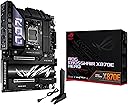
🚀 Power your ultimate AMD build with AI-driven precision and future-proof speed!
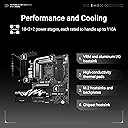
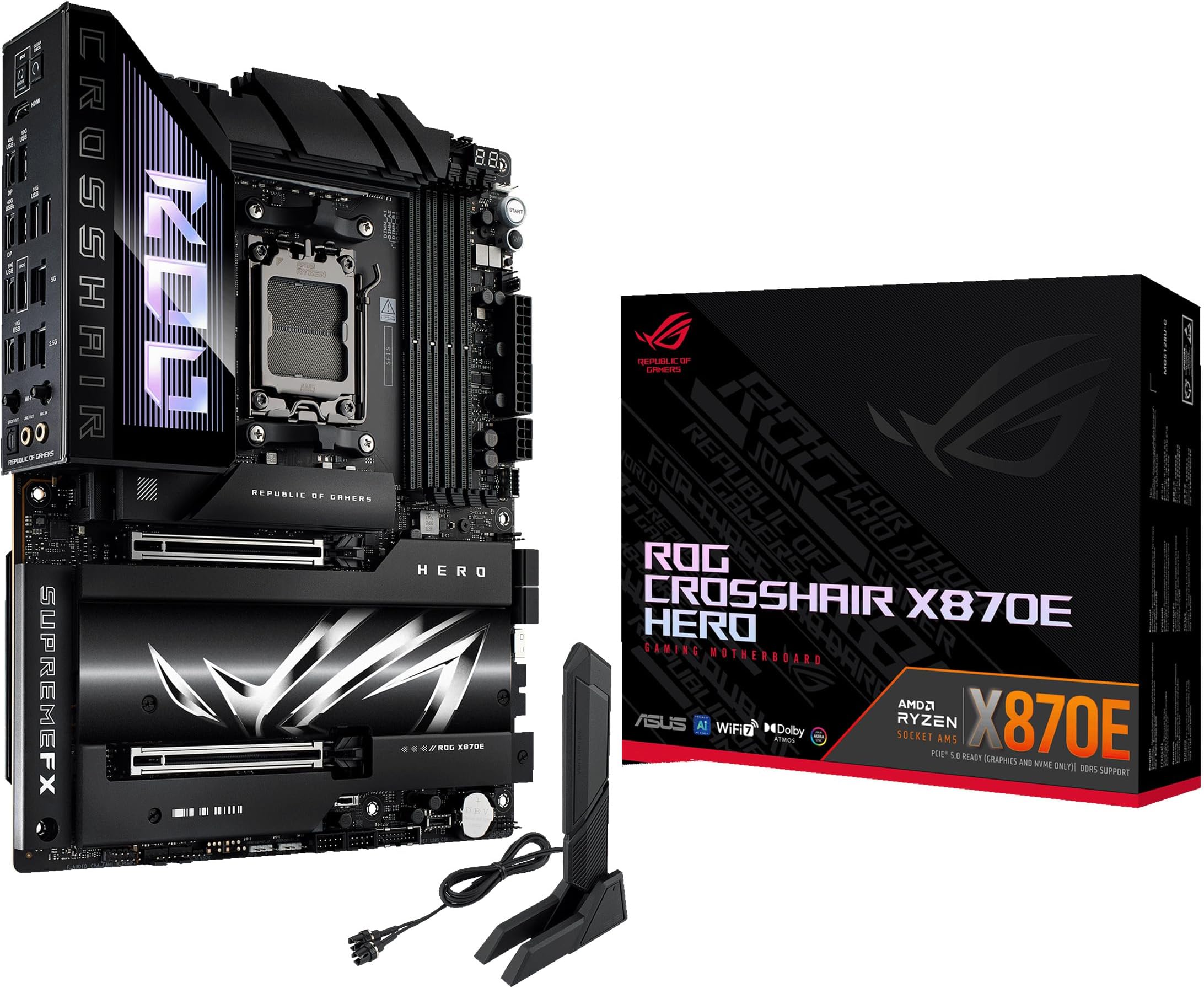
The ASUS ROG Crosshair X870E Hero is a premium AM5 motherboard designed for AMD Ryzen 7000-9000 series processors, featuring advanced AI overclocking, 18+2+2 power stages, PCIe 5.0, DDR5 support, Wi-Fi 7, USB4, and 5 M.2 slots. It combines cutting-edge connectivity, robust power delivery, and intuitive diagnostics in a sleek, durable design tailored for high-performance gaming and professional workloads.


| ASIN | B0DDZSP2BG |
| Best Sellers Rank | #7 in Computer Motherboards |
| Brand | ASUS |
| CPU Model | AMD Ryzen 7 |
| CPU Socket | Socket AM5 |
| Chipset Type | AMD X870 |
| Compatible Devices | Personal Computer |
| Compatible Processors | AMD Ryzen™ 9000 & 8000 & 7000 Series |
| Customer Reviews | 4.4 out of 5 stars 316 Reviews |
| Graphics Card Interface | PCI Express 4.0 |
| Item Dimensions L x W x H | 14.6"L x 12.2"W x 4.4"H |
| Item Weight | 2.63 Kilograms |
| Main Power Connector Type | 22 Pin |
| Manufacturer | ASUS |
| Memory Clock Speed | 320 MHz |
| Memory Slots Available | 4 |
| Memory Storage Capacity | 192 GB |
| Mfr Part Number | ASUS Vivobook 16 Laptop |
| Model Name | ROG CROSSHAIR X870E HERO |
| Model Number | ROG CROSSHAIR X870E HERO |
| Number of Ethernet Ports | 2 |
| Number of Ports | 20 |
| Platform | Windows 10, Windows 11 |
| Processor Socket | Socket AM5 |
| Ram Memory Maximum Size | 192 GB |
| System Bus Standard Supported | SATA 3 |
| Total Number of HDMI Ports | 1 |
| Total PCIe Ports | 2 |
| Total SATA Ports | 4 |
| Total Usb Ports | 20 |
| UPC | 197105710306 |
| USB 2.0 | 2 |
| Unit Count | 1.0 Count |
| Warranty Description | 3 years |
F**Z
Feature-Rich, Rock-Solid, and Future-Proof — AM5 Board That Delivers
The ASUS ROG Crosshair X870E Hero has been the perfect foundation for my high-performance AMD build. Paired with a Ryzen 9 9950X3D, G.SKILL DDR5-6000 CL28 EXPO memory, and an XFX RX 9070 XT GPU, this motherboard has delivered exceptional stability, thermal management, and overclocking headroom. Out of the box, it booted without issue and recognized all components immediately. The BIOS is intuitive and robust, offering AI Overclocking, Core Flex tuning, and excellent fan curve controls — all of which are ideal for my configuration, which includes the ARCTIC Liquid Freezer III Pro 360 A-RGB cooler and full ARGB fan control via a hub. Connectivity is outstanding with PCIe 5.0, USB4, Wi-Fi 7, and 5x M.2 slots, leaving plenty of headroom for future expansion. I also appreciate the attention to physical build quality: reinforced PCIe slots, debug LEDs, and Q-Release features make working with the board stress-free. This board fit perfectly in my Corsair 7000D Airflow case after I had to upgrade from the Fractal Torrent due to space limitations. It’s a powerhouse platform for overclocking and high-performance gaming, especially in VR and 4K environments. I did need to update the BIOS to ensure full compatibility with my DDR5 EXPO memory. Once updated, EXPO enabled cleanly, and the system has been stable under heavy workloads and VR gaming.
W**E
A premium board with premium features.
I bought this for a 9000-series build because I wanted something that wouldn’t give me any stability issues. It’s a solid board. Definitely the best looking x870e in my opinion. Pros Build Quality: Extremely heavy-duty with a metal backplate; it feels and looks like a $700 flagship. Tool-Free Everything: "Q-Release Slim" lets you pop out the GPU just by pulling it, and "M.2 Q-Latch" means no more tiny SSD screws. High-Speed Networking: Dual LAN (5Gb + 2.5Gb) and a snap-on Wi-Fi antenna that doesn't require screwing in cables. Front Panel Fast Charging: The USB-C header supports 60W Quick Charge 4+, enough to fast-charge a laptop or handheld while you're gaming. Next-Gen RAM Tech: "NitroPath" slots improve signal stability, making it easier to hit 8000MT/s+ on DDR5 kits. * im running 96gb ddr5 at 6400mhz Overkill Power: 18+2+2 power stages that will handle any current or future AM5 chip without breaking a sweat. Onboard Diagnostics: Physical Start/Retry buttons and a Q-Code LED display for instant troubleshooting if a boot fails. overall its a premium board with premium features and quality. a good buy.
M**T
Love thiis
Works amazing! Great and easy to set up for a new person. Works really well and I am happy with my purchase 4 months after
B**T
Almost Perfect
Almost perfect but had to do a few tinkering to set it up: I got the Arctic Freezer III Pro and the M.2 Heatsink was in the way, so had to get a low profile heatsink. bought 6000mhz cl 30 ram and no EXPO profiles would work, I had updated the bios so I downgraded it and it didn't work so finally after manually changing the SOC Voltage to 1.25v and VIDDIO Voltage to 1.25v it finally trained and worked, other than that it has been great
O**W
So far so good except for one bios issue
Bought to replace my gen 2 threadripper setup. Still operating strong, but time to invest in a smaller workstation and now find a good new home for the retired threadripper. Bought this board for a few reasons. Top on the list is ASUS`s Q-code feature which gives you the ability to troubleshoot new builds and current ones. Will not boot, check and see what the Q-code is on the LED panel, and you should be able to solve issue without having to deal with ASUS tech support. This is the main reason for me to purchase ASUS motherboards. Now to the Crossfire X870E Hero. Pro`s: 4- motherboard chassis fan-controlled ports. Great for managing case fans 2- 20 Gbits/sec type c usb ports. One is capable of 60w for changing and 2 high speed usb ports is a big plus. Q-code troubleshooting future proof for awhile bios updated to latest amd 9950x3d and 9950x3d2 processors. Installation was easy and once I got past the fact that all I was willing to buy was one 32gb ram kit for now and using my old gpu card install was good. So far performance has been great. I installed a 9950x3d and that is working well. For cooling, I am using a Thermalright Royal Preytor Ultra 130 and this air cpu cooler does the job and excellent job at that. Idling at low cpu workloads shows cpu temps around low 30c`s to upper 30c`s and stress testing with cpuid is showing around 75c which is good. All in all, new system is working well. Now for the cons: m2.1 heatsink below cpu and above gpu is a joke for NVMe cooling. I am using the same Samsung 990 Evo I purchased this summer and the cooling setup on the threadripper boards always showed, even under heavy loads, temps between 28c and 35c. This cooler is a joke. They have strip on bottom of mounting plate that touches nothing. It should make contact if you have a double sided NVMe drive installed. Single sided NVMe boards, well not going to make contact with thermal pad. The top is a 1.25mm strip and it didn`t even touch the top of the NVMe memory strip. If you don`t use the foam spacer over that mounting screw hole on bottom plate the problem is worse. Regardless of the quick guide suggestion, use the spacer especially if the NVMe drive is single sided. Drive needs support and needs to stay flat and straight. To solve issue with better contact to top side of drive, I used a piece of Arctic TP-3 and 1.5mm in place of the ASUS factory tape and now when assembled these pieces snapped together snuggly and temps now hover around 41c under low loads and 46to 48c under heavy loads. Prior heavy loads were in the mid to upper 50c`s which sucked. Last issue is with the bios. When booting for the first time, make sure you plug in a usb keyboard and then your hdmi monitor cable into the onboard IGPU hdmi port. If you plug into graphics card, nothing on monitor if you are using an older gpu card or one that does not use the UEFI standard. You just sit there wondering what's going on because the Q-code system finds no fault. This is an issue after you get going because you're going to switch to your gpu card output and that's where this issue compounds. So, till you have Windows 11 installed and working, stay connected to the motherboard hdmi port. What happens after you switch is, when bios starts to boot and you want to get into bios, no screens are present like the rog welcome screen you saw using the igpu hdmi port. You see nothing and then system starts and next is Windows 11 desktop. When you search net for solutions, you get asinine recommendations to keep pounding on the delete key till bios menu appears. Really, if UEFI isn`t mapped to the gpu card, the screen info you see on the igpu hdmi port connection, isn`t going to be on the gpu card screen so banging on the delete does nothing. Update on the last sentence I made. AMD has added to the UEFI bios a feature that going to require future amd and probably all manufactures to enable future gpu cards to compatable and use the UEFI standard. Currently AMD R9000 series gpu`s are certified with this new AMD standard. If I ever hear back from ASUS, I suspect that they will tell me the current gpu card I am using will not meet this standard, and it`s video bios is old and not supported by new motherboard. Sucks mixing new and old hardware, so I am out of luck. They will probably tell me to work with the CSM option in the bios. Nope that not going to happen. So, if you experience this issue like I have, now you know what the issue probably is. Only way to get back into bios is to switch monitor back to igpu hdmi motherboard port. Not a good design but this is where the industry is headed and we have no voice. So long story short, my old video card runs after Windows 11 starts and runs just fine. New cards are way overpriced, so I will wait to solve this issue. Other than these issues, this is a good purchase so far. System is stable and quick.
M**H
Failed by itself after just a few months of use.
After working without issues for months now it's giving me a RAM error, I replaced the RAM, it didn't work. It's giving me Q-codes that are not in the manual. I tried calling support, they wouldn't help, they even hung up saying they couldn't hear me when they clearly could. I've tried everything, BIOS won't update, CMOS cleared, changed other components, checked ground, voltage, EVERYTHING. Where's the durability? Where's the value for money? This is a top of the line motherboard and I get better support at a gas station? In amazon they only give a month for a return for a product that should at least have a one year warranty?! I'm never buying anything from ASUS again.
C**H
An amazing powerhouse of a motherboard
An amazing powerhouse of a motherboard does everything I want it to do and functions quite well.
D**9
Want a feature packed/Clean Lane sharing Board to pair with your 9800x3d? Get it!
It just works out of the box with a 9800x3d, Royal 6000mhz cl26 2x24 and a 5090 Astral at full speed. Was nice I got the board broke down my pc, installed the x870e Hero and no issues everything just worked unlike my apex that I returned. If you get a 9800x3d and do not want to thermal throttle Enable PBO-Curve-All Core-Negative offset 15-20 should just work depending on your chip. Will keep temps under 80c at full load and no thermal throttling. Check your MC voltage a lot of board makers are setting it over 1.4v you do not want to hit or go past 1.35v if you plan on being on your build for a long time. Board Makers are doing that to reduce expo not working tickets at our expense in the end. Boots fast with a gen5 m.2, Has more than enough M.2 slots you can use without it slowing down your gpu slot just be sure to use m.2_1, M.2_4 and m.2_5. Has an intel and realtek ethernet, sadly it has a mediatek Wifi/BT chip. The lane sharing on this is really clean its why the same kit of ram will run faster on a hero over an apex, to everything will just work including your gpu not seeing noise on the pcie lanes and slowing down. For the price it's not that bad.
R**J
High-Performance Motherboard with Premium Features
The ASUS ROG Crosshair X670E Hero is a top-tier motherboard designed for enthusiasts aiming to maximize the potential of AMD’s Ryzen 7000 series processors. After several weeks of hands-on experience, here’s an in-depth look at its performance and features. Design and Build Quality The motherboard boasts a sleek black and silver aesthetic, complemented by customizable RGB lighting through ASUS’s Aura Sync software. The robust construction includes substantial heatsinks over the VRMs, ensuring efficient thermal management during intensive tasks. The layout is well-organized, facilitating straightforward installation and cable management. Performance and Features • Power Delivery: Equipped with an 18+2 phase power design rated at 110A per stage, the X670E Hero provides stable power, accommodating overclocking endeavors with ease.  • Memory Support: The board s up to 128GB of DDR5 RAM, with speeds reaching DDR5-6400 MHz (OC). However, some users have reported compatibility issues with certain EXPO-certified memory kits, necessitating careful selection and potential BIOS updates.  • Expansion and Storage: Featuring two PCIe 5.0 x16 slots and five M.2 slots (two PCIe 5.0 and three PCIe 4.0), the motherboard offers extensive options for high-speed storage and future-proofing for upcoming hardware.  • Connectivity: The rear I/O panel includes 12 USB ports, comprising USB 4.0 and USB 3.2 Gen 2x2, alongside Intel 2.5G Ethernet and Wi-Fi 6E, ensuring versatile and high-speed networking capabilities.  Pros: • Robust Build and Aesthetics: High-quality materials and a visually appealing design make it a centerpiece in any build. • Comprehensive Feature Set: From advanced power delivery to ample expansion slots, it caters to high-performance needs. • User-Friendly BIOS: The intuitive BIOS interface simplifies overclocking and system tuning.
C**B
Not LINUX Friendly. Flimsy NVME mounting.
Good board, though it has two major issues. Fragile nvme connectors, and not linux friendly (any flavour). The easy connect system for the nvme is very fragile. A little spring went flying out of one of them. My rog crosshair x670e had a much simpler, reliable system. Asus got too clever and introduced new points of failure. Warning. This board is not linux friendly, unlike its predecessor. The wifi/bluetooth card they ship it with is well over a year old and has no driver in any kernel, and none in development. The manufacturer isn't doing anything and an independent effort has been abandoned. As this is not available in any kernel, it will not work in any linux flavour. This is not likely to change. Asus should use their buying power to force the lazy manufacturer. This is a popular board series for home workstations on Linux, not just gamers. Almost no one uses windows for coding or as a workstation. Have linux, want wifi or bluetooth? Buy usb dongle. Or, if you want to really take stuff apart, under the rear panel output area, remove heatsinks, and you will find a tiny wifi card that is in a socket, not soldered. But you still have to buy the new card. Amazon have some. Thats what i did. Annoying after spending so much on a board. Also, unlike it predessor, there is no manual, just a quick start guide which is for more than one board. A manual has detail that is very relevant to the type of user who will buy this board. For example, now much current a fan or pump header can handle. All this was in the x670e hero manual. If asus are cost cutting on the manual, it stands to reason they are also doing so in board design. I think this will be my last asus board, they are going in the wrong direction.
E**O
perfetto
tutto bene, spedizione, qualità e sigilli antimanomissione intatti. la scheda poi è una top di gamma asus, quindi nessun problema. ottimo
R**R
Premium price but quality feels justified and comes with peace of mind
Premium motherboard, feels extremely heavy and comes with a fancy ASUS VIP Card which I have no idea what it's for, but it sure as heck makes me feel VIP. That aside, I enjoy the AI tweaker/auto-tuning features because all I did was plug in the motherboard with everything and start up my PC—it did the usual RAM tuning tests and did everything for me. I normally do some light tweaking, so this saves me the hassle of even having to do that—it was literally plug and play. I come from using a Gigabyte X670e Aorus Master, and that motherboard was garbage—3 RMA attempts, and the board kept on running into issues within 3-6 months of getting it replaced. It wasn't even a cheap board—it cost $670. So this board is a bit more expensive, especially after the tariffs as of May 2025 but for the $300 uptick in price; the hassle and stability this board brings I have no regrets with my purchase. Gigabyte - 0 Asus - 1 Bad cable management—no idea how to tighten that loose one above the fans but it works so w.e!
M**S
Top tier motherboard
An outstanding motherboard with ultra-premium finishes. It’s a motherboard for demanding users. The very best of the best when it comes to motherboards.
Trustpilot
2 days ago
3 weeks ago