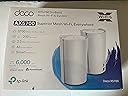
🌐 Elevate your home network to pro-level speed and coverage — don’t get left buffering!
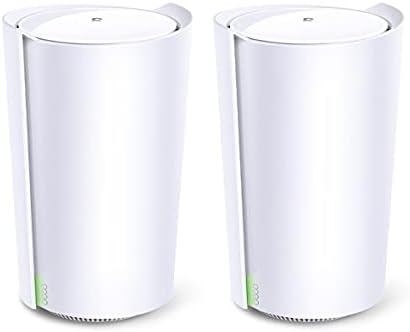
The TP-Link Deco AX5700 is a cutting-edge Tri-Band Wi-Fi 6 mesh system designed to deliver ultra-fast speeds up to 5700 Mbps. Featuring AI-driven mesh technology and smart antennas, it intelligently optimizes your home network for maximum coverage and reliability. With support for up to 200 connected devices, this 2-pack system ensures seamless, high-performance Wi-Fi throughout your entire space.
| ASIN | B09KT3TBC3 |
| Antenna Location | Home |
| Antenna Type | Fixed |
| Box Contents | 2 TP-Link Deco AX5700 units |
| Brand Name | TP-Link |
| Colour | White |
| Compatible Devices | Laptop, Personal Computer, Smart Television, Tablet |
| Connectivity Protocol | Wi-Fi |
| Connectivity Technology | Wi-Fi |
| Control Method | App |
| Controller Type | Amazon Alexa |
| Coverage | 6000 square foot |
| Customer Reviews | 3.9 3.9 out of 5 stars (23) |
| Data Transfer Rate | 5700 Megabits Per Second |
| Frequency | 5 GHz |
| Frequency Band Class | Tri-Band |
| Is Modem Compatible | No |
| LAN Port Bandwidth | 1000 Mbps |
| Manufacturer | TP-Link |
| Manufacturer Part Number | AX5700 |
| Maximum Upstream Data Transfer Rate | 1900 Megabits Per Second |
| Model Name | AX5700 |
| Model Number | AX5700 |
| Number of Ports | 1 |
| Operating System | RouterOS |
| Other Special Features of the Product | WPS |
| Security Protocol | WPS |
| UPC | 840030702341 |
| Unit Count | 2.0 count |
| Voltage | 12 Volts |
| Wi-Fi Generation | Wi-Fi 6 |
| Wireless Compability | 802.11ax |
R**S
Es un excelente sistema mesh, resalta la facilidad de configuración y una muy buena potencia, tengo dos en diferentes casas y simplemente un producto de calidad
J**S
The Deco AX5700 gives me 95% of the features I need at an affordable price. It connected with just a few easy steps on with the phone app, but Customer Service was quick to respond by chat and phone with my related questions. The 2017 TPLink AC1750 was still going strong. It’s such a good router that it’s still competitive and is selling at a price close to my original price that never had any issues, so TP Link was first on my list when I needed more memory and couldn’t update. I researched a LOT and decided that I wanted tri band, Wi-Fi 6 but didn’t need a 6GHz band. TP Link came out on top so I went to Best Buy where I could get Geek Squad installation and support (no, Amazon was not my first choice). Best Buy didn’t sell this model, Costco used to offer a 3Pack but they were sold out without an ETA, and other places charged shipping and didn’t have Amazon to stand behind me! Costco recently got these back but in a four pack. The two pack that Amazon offers is enough for our home which is 2200 sq feet, lathe and solid plaster - built in 1927. I went into the carport and side yard and got full signal with just a two pack. I bought another 2 pack so that we could connect one of our televisions directly through Ethernet, and the fourth unit we’ll probably use in the farthest room addition. The Deco App clearly shows each unit by name and which devices are connected to each, whether wireless or Ethernet, and I can access this info from my phone, wherever I am. Some reviews I read mentioned very concerns about very detailed privacy and technical features, but I checked out each item feel like I’m reasonably safe with other virus and other protections from 3rd parties and with the privacy precautions used by my bank and other accounts where I enter credit card info. I think that safety within reason, is the best that I can do without chasing my tail. Things that concerned me most about this model were not being able to use a web-based format for setting up each of the specs, and not being able to fine tune the feature wanted on each band. Ultimately, I realized that we’ve been doing very well and without any issues in spite of not micro managing deep-level features on our old router. This being said, is not to discount the genuinely serious issues raised. We don’t support or host any other enterprises, so simplicity has worked so far. For the price, the Deco AX5700 offers great specs, compared to the bells, whistles, and other high-level features that we’ll never use.
A**R
My experience with this Deco system has been very positive in contrast to some other users. In the 6 months since I bought this mesh kit, not once have I experienced any type of crash. It's quite possible this is due to their newest firmware (v1.4.0) since, as a first step, I typically upgrade to the newest firmware available. The range is very good as I get a strong signal throughout my house and even in my front and back yards are decent. My property lot is approximately 7,000 sq.ft. so it's not huge but certainly not small. I have used pretty much all of the features and it works beautifully with one exception: the 2.5G Ethernet backhaul. Though it utilizes the 2.5G wired backhaul, if for any reason it goes wireless, it will never revert back to 2.5G wired. This issue does not occur when using 1G Ethernet wired backhaul. It's an annoyance as I have 2.5/5/10G Ethernet but just unable to take advantage of the faster speed. In any case, despite this minor annoyance, it is very much deserving of 5 stars for it's stability, long range, and numerous built-in features like the VPN Client and VPN Server.
I**R
One unit is functioning properly, while the other is not. The setup for the working unit was not straightforward, but the range is acceptable. I appreciate that I can move it from one location to another, and it reconnects automatically. This unit is connected to a mesh system consisting of three TP-LINK AXE5300 units. In contrast, the AX5700 unit that is not operational only connects when within five feet of any of the other units. Additionally, it consistently loses connection or forgets its settings when moved further away.
K**S
I had a cheap dual band mesh system that had set up easily and worked adequately for years. I wanted to upgrade and after reading many reviews I gave these a try. I spent hours trying to get these set up. Did all the recommended trouble shooting guides. Contacted TP Link support. Checked Ethernet cords, switched units, tested to see if I had faulty units. Changed DNS settings and logged into my modem as suggested to find error codes. Contacted my cable service to reset my connection and rebooted everything over and over. Finally support helped me get it going by very specifically connecting items to the WiFi in a certain order and it was working fine. Coverage and speed was good. Less than 30 days later my wifi goes down. Same process, go through all troubleshooting guides and get on with support for hours. Looked up and cloned my MAC address and changed other advanced router settings. I was getting frustrated because I never had to do this with my old router. Support couldn’t fix it and escalated me to level 2 support (24 hour wait). While I awaited to hear from level 2, I bought an ASUS Zen router to try. Plugged it in and it worked immediately out of the box. After 10+ hours wrestling with TP Link I had my new ASUS mesh fully operational in 30 min with no setting changes needed. 2 stars cause support tried hard to help me but overall I cannot believe this just couldn’t work while two other brands had no issues (using my same cable provider and modem). So much time and energy spent unnecessarily struggling with this TP Link system.
Trustpilot
4 days ago
1 week ago