Buy anything from 5,000+ international stores. One checkout price. No surprise fees. Join 2M+ shoppers on Desertcart.
Desertcart purchases this item on your behalf and handles shipping, customs, and support to Vietnam.
๐ Elevate your everyday grind with power, style, and security in one sleek package!
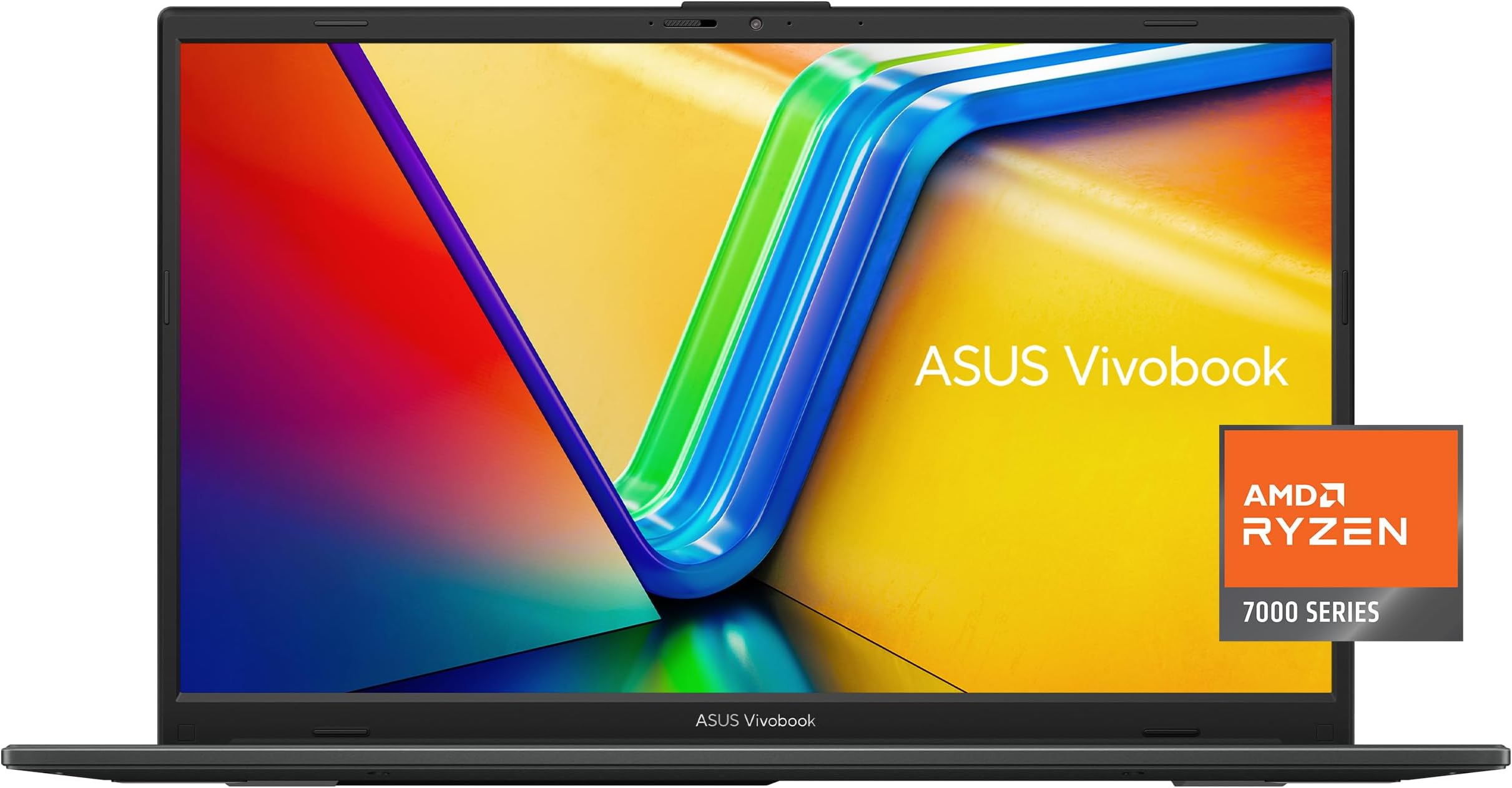
The ASUS Vivobook Go 15.6โ FHD laptop combines a vibrant NanoEdge display with a powerful AMD Ryzen 3 7320U quad-core processor and 8GB DDR5 RAM, delivering smooth multitasking and productivity. Its lightweight, military-grade durable chassis features fast charging, comprehensive ports including USB-C, and a privacy webcam shutter, making it an ideal companion for professionals seeking reliable performance and security on the move.


| ASIN | B0CWHYV27D |
| Audio Output Type | Speakers |
| Audio Recording | Yes |
| Audio features | Crisp, multi-dimensional sound with built-in speakers and an array microphone (Sonicmaster technology) |
| Automatic Backup Software Included | Windows 11 Home |
| Battery Cell Type | Lithium Ion |
| Best Sellers Rank | #784 in Computers & Accessories ( See Top 100 in Computers & Accessories ) #68 in Traditional Laptop Computers |
| Bluetooth Version | 5.0 |
| Bluetooth support? | Yes |
| Brand | ASUS |
| Built-In Media | E1504FA-AS33, Powercord and Adapter, User Guide |
| CPU Codename | Zen3 |
| CPU Model | Ryzen 3 |
| CPU Model Generation | 7th Gen |
| CPU Model Number | R3-7320U |
| CPU Model Speed Maximum | 4.1 GHz |
| Cache Memory Installed Size | 6 |
| Camera Description | Front |
| Chipset Type | AMD chipset for Ryzen 3 7320U |
| Color | Black |
| Compatible Devices | USB storage devices, Bluetooth accessories, external displays |
| Connectivity Technology | Bluetooth, USB, Wi-Fi |
| Control Method | App |
| Customer Reviews | 4.3 out of 5 stars 967 Reviews |
| Display Resolution Maximum | 1920x1080 Pixels |
| Display Technology | LED |
| Display Type | LED |
| Form Factor | Ultra-Portable |
| Graphics Coprocessor | AMD Ryzen 3 7320U |
| Graphics Description | Integrated |
| Graphics Ram Type | DDR5 SDRAM |
| Hard Disk Description | SSD |
| Hard Disk Interface | Solid State |
| Hard Disk Size | 128 GB |
| Hard-Drive Size | 128 GB |
| Hardware Interface | Bluetooth, USB |
| Has Color Screen | Yes |
| Human-Interface Input | Keyboard, Microphone |
| Item Dimensions L x W x Thickness | 14.19"L x 0.7"W x 9.15"Th |
| Item Weight | 4.8 Pounds |
| Keyboard Description | Chiclet |
| Keyboard Layout | QWERTY |
| Lithium-Battery Energy Content | 42 Watt Hours |
| Manufacturer | ASUS |
| Maximum Display Brightness | 250 Nit |
| Memory Slots Available | 1 or more |
| Memory Speed | 5200 MHz |
| Microphone Form Factor | Array microphones |
| Model Name | Vivobook Go |
| Model Number | E1504FA-AS33 |
| Model Year | 2024 |
| Native Resolution | 1920 x 1080 pixels |
| Notebook Pointing Device Description | touchpad |
| Number Of Cells | 11 |
| Number of Drivers | 1 |
| Number of Ports | 7 |
| Operating System | Windows 11 Home S |
| Optical Storage Device | No Drive |
| Other Special Features of the Product | Sound by Sonicmaster |
| Power Device | AC adapter |
| Processor Brand | AMD |
| Processor Count | 4 |
| Processor Series | Ryzen 3 |
| Processor Speed | 4.1 GHz |
| RAM Memory Installed | 8 GB |
| RAM Memory Slot Total Count | 1 |
| RAM Memory Technology | LPDDR5 |
| RAM Type | DDR5 SDRAM |
| Ram Memory Maximum Size | 8 GB |
| Resolution | 1080p |
| Screen Finish | No specific surface description provided |
| Screen Size | 15.6 Inches |
| Speaker Description | Built-in speakers with SonicMaster sound technology |
| Specific Uses For Product | Personal |
| Total Number of HDMI Ports | 1 |
| Total Usb Ports | 3 |
| Touch Screen Type | No Touchscreen |
| Touchpad Feature | Precision |
| UPC | 197105170896 |
| Unit Count | 1.0 Count |
| Video Output | HDMI |
| Video Processor | AMD |
| Voltage | 5 Volts |
| Warranty Description | 1 Year Limited |
| Warranty Type | Limited |
| Webcam Capability | Yes |
| Wi-Fi Generation | Wifi 5 |
| Wireless Compability | 802.11ac, Bluetooth |
| Wireless Technology | Bluetooth, Wi-Fi |
M**A
Recommended to me and I'm happy with it.
I had an average Chromebook that I needed to replace that couldn't be fixed by the IT man and he recommended this exact model. It is a nice change going back to a laptop! It does everything that I need it to do. Has lots of space for pictures and documents. The processing speed is fast and I can have multiple tabs open at a time with no glitches or slow downs. It charges fairly quickly and have never found it to be too hot or overheating, even in the summer. I sometimes use it for work and the battery will last all day with fairly constant use. It was simple to set up. The only thing I could complain about is the power button. You hold it for a few seconds and the screen comes on, but if you hold it for one second too long the screen just flashes on and off. It kept doing this to me at first and I thought it was damaged lol. Once you get the "timing" just right, it is fine though. The price was also very fair and it arrived quickly and in new condition. This is my first Asus laptop, and overall, I'm very satisfied with this brand and model. I even recommended this laptop to someone else with similar needs and they are also satisfied.
J**T
This no-frills laptop is doing its job good.
This laptop replaced a 14-year-old laptop. This is a low-cost, no-frills laptop and not very powerful, but it will do the job I need it for. I have a very powerful computer at home. But if I am away from home, this laptop will work for me. The setup right out of the box was fast and painless. Very good Size for the cost. The Speed is good if you don't need to run very powerful stuff to run on it. I was running Non-modded Minecraft just fine on it. Sound Quality and Durability are decent for a no-frills laptop like this. I give it an 8 out of 10 for a low-cost laptop. Can use some more RAM memory and a bigger hard drive capacity. Note: this laptop cannot be updated hardware-wise at all; it is what it is.
D**N
Rock solid construction and performance
Bought this to replace an ASUS Vivobook Model 1504Z which has been nothing but trouble from day one with the Intel I5 and Iris Chipset -- graphics, audio, and streaming were constantly cutting out and slowing down to a crawl and no combination of new drivers or different settings helped. Even though this Vivobook Go with the AMD I3 equiv chipset is supposedly a slower machine with less RAM it runs circles around the other laptop and there have been no problems whatsoever. Smooth, solid performance and streaming plus noticeably better graphics and sound. And at only $300 it was half the price of the other machine. I should have done this months ago and saved me all those hours wasted trying to troubleshoot the old machine.
R**N
Great laptop, but...
My only issue with this laptop is that it forces you to create a Microsoft account on setup without giving you the option to skip, it also is locked in S Mode, which you cant turn off unless you make a Microsoft account also. May not be a big issue for some but for me it seems a bit inconvenient having to create a new email address/Microsoft account to use this laptop and to turn off S Mode. Otherwise, this is a great laptop for anyone, speakers are loud, looks sleak and built durable, quality screen and works smooth.
L**T
For Gamers!
If You are a gamer looking for a budget computer this is it! The video shows you games that run well on this device and some tech rambling enjoy!
C**E
very nice basic laptop; a note about Battery Care mode; drive space is lean so get an external drive
I'm real happy with my Vivobook; my needs are simple (Internet / office software) and the VIvobook handles everything I need it to like a champ. My only point of frustration, such as it is, is that I've got only 35 GB left after installation, updates, and installing software. That's not a lot of space for media such as music or movies, but that is easily rectified with an external drive. One of the things the MyASUS software offers is "Battery Care mode", where the battery charges only to 80% in order to protect your battery life. That's a good idea if, like me, your laptop is plugged in 99.9% of the time. But Battery Care mode didn't seem to be working; my battery was still charging to 100%. Solution: you need to first drain your battery to below 80%, and then Battery Care mode will simply charge it no more than 80%. In other words, it's not smart enough to let the battery level go down to 80% if it's above 80%. Feels like an oversight, but maybe there's a reason, and anyway it's easy enough to cope with.
H**R
Not The Best, But Still Manageable
This laptop kind of sucks, but it meets basic requirements for everyday use. It serves its function just fine. However, there is no touchscreen which should come standard for every computer nowadays. The screen on my computer is also too bright, so the graphics driver may be busted and it is hard and confusing for me to fix. I am not sure this will be the case for other computers of its kind, but I would recommend it only if you want an unremarkable computer to use at home to fulfill your daily needs. It's also a bit tricky to turn on since the start button may not respond sometimes or takes a while to do so. There are better and more outstanding laptops out there that you can purchase, but you can go ahead and get this one if you're looking for an average computer with up to date specs. The cord of the laptop charger is a bit too short for my taste, and the battery life seems shorter than advertised as well.
R**E
Difficulties to Update Software.
Purchased the ASUS Vivobook Go 15.6" FHD for my elderly roommate. Have built PC's in the past and never had so much trouble trying to load Google Chrome. Had to call my neighbor's son. The following is his observations. "Alright laptop for the price. For some reason, the network driver wasn't working with IPv6 which was preventing the installation of Google Chrome and other updates. Once I disabled IPv6 in the advanced windows settings, everything worked fine. It takes a while to reboot during updates, but that's a Windows problem - not a problem with this laptop. The machine also came with 'Windows S Mode' enabled which initially prevented the installation of Google Chrome and other 3rd party apps. Turning this off was a bear but once it was off, I was able to install whichever program I wanted, including Chrome. To turn off S mode, I followed the prompts in Windows 11, but for some reason I had to do it multiple times for the change to stick. I give it four stars for the relatively cheap cost, but I wish there was a Linux option from the factory because Windows is TRASH. I never have these problems on my Linux PC. (I run Debian 13)."
G**Z
5/5
5/5
M**.
Recomiendo la laptop
Utilizo la laptop como auxiliar en ediciones cuando se me va la luz, o salgo de viaje, y saca el trabajo, utilizo Ps y Lr las licencias originales y las ha sacado sin problemas. Por el precio, estรก muy bien. Claramente si noto la diferencia porque mi trabajo lo realizo en una pc gamer, pero para auxiliar me ha funcionado.
C**Y
Calidad y precio
Hasta el momento muy buen equipo, excelente calidad y buen precio. No tengo queja
Trustpilot
1 day ago
2 weeks ago