We remain fully operational. Our teams are working around the clock to ensure your deliveries continue safely.

DOWNLOAD THE APP


Copyright © 2025 Desertcart Holdings Limited
DOWNLOAD THE APP


Buy anything from 5,000+ international stores. One checkout price. No surprise fees. Join 2M+ shoppers on Desertcart.
Desertcart purchases this item on your behalf and handles shipping, customs, and support to Vietnam.
🚀 Upgrade to the speed that leaves others in the dust!
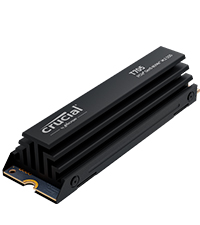
The Crucial T705 PCIe Gen5 NVMe 2TB SSD delivers cutting-edge performance with blazing 14,500MB/s read speeds and 12,700MB/s write speeds, optimized for the latest Intel and AMD platforms. Its integrated heatsink ensures stable, silent operation during heavy gaming and creative workloads. Backed by Micron TLC NAND reliability and a 5-year warranty, it also includes a 1-month Adobe Creative Cloud subscription, making it the ultimate storage upgrade for professionals and gamers craving speed and capacity.


| ASIN | B0CTS93WML |
| Additional Features | Hardware Encryption |
| Best Sellers Rank | #8 in Internal Solid State Drives #98 in Computer Internal Components |
| Brand | Crucial |
| Built-In Media | 1month Adobe Creative Cloud All-Apps, Crucial Storage Executive, Internal SSD, Quick start guide |
| Cache Memory Installed Size | 2 |
| Color | Black |
| Compatible Devices | Desktop, Laptop |
| Connectivity Technology | PCIe |
| Customer Reviews | 4.4 4.4 out of 5 stars (341) |
| Data Transfer Rate | 14500 Megabytes Per Second |
| Digital Storage Capacity | 2 TB |
| Enclosure Material | Nand |
| Form Factor | M.2 (2280) |
| Global Trade Identification Number | 00649528940339 |
| Hard Disk Description | Solid State Drive |
| Hard Disk Interface | PCIE x 4 |
| Hard-Drive Size | 2 TB |
| Hardware Connectivity | PCI Express x4 |
| Installation Type | Internal Hard Drive |
| Item Dimensions L x W x Thickness | 3.15"L x 0.92"W x 0.83"Th |
| Item Weight | 55 Grams |
| Manufacturer | Crucial |
| Media Speed | 12700 Megabits Per Second |
| Model Name | Crucial T705 PCIe Gen5 NVMe M.2 SSD |
| Model Number | CT2000T705SSD5 |
| Number of Items | 1 |
| Read Speed | 14500 Megabytes Per Second |
| Specific Uses For Product | Business, Gaming, Personal |
| UPC | 649528940339 |
| Unit Count | 1.0 Count |
| Warranty Description | 5-year limited warranty |
P**T
Buy naked version – not this heatsink version
You might think (as I did) that you’re doing better by getting this OEM heatsink version – paying about $30 extra. I learned the lesson in a hard way that; exactly the opposite holds true. Crucial periodically runs deals; selling heatsink version even cheaper than naked drive. Don’t fall for that and simply buy the naked drive, whatever the price. Otherwise (if you buy heatsink version); you’ll either have to do below surgery (which is not for the faint-hearted) or your drive will fail earlier (because of heat) and Crucial will blame you running it that way (and very likely not honor your warranty – more on that later). This Gen.5 T705 is an extremely fast M2 drive. I’m very happy with its unbelievable performance. I use it on my new Asrock Taichi Lite Z890 motherboard. After I assembled my PC, I noticed that the hottest temperature on my system is this M2 drive. Not CPU, not GPU, not RAM modules and not my Gen.4 Samsung 990 Pro M2. While PC is completely idle (not running anything); that Crucial M2 displayed 61C temperature. I stress-tested my GPU (which is milimeters away from this Crucial) and that 61C quickly rose close to 80C (mind you; I’m not even stressing that drive itself). I immediately decided to replace that tiny OEM heatsink, as it’s completely not up to par for a decent cooling job. I’ll number my attached pics – so you can relate to my text here. I use HWiNFO64 freeware to check all my system characteristics. When you look at its reporting for this Crucial drive (pic-1); you’ll see that the drive keeps (in it) record of how long you used it at above 87C (warning) and 89C (critical). So if you (without even being aware) barbecue your drive and send it in for warranty replacement (when it fails); you can guess who Crucial will put the blame on? Now all new MBs put both that Gen.5 M2 slot and Gen.5 GPU slot right next to CPU (distance has to be short). You can see from (pic-2) that; this M2 drive is literally sandwitched between towering wall of GPU (no heat escape that direction) and my humongous Noctua NH-D15 G2 CPU cooler (airflow is there, towards rear suction fan). But it’s absolutely clear that; this OEM Crucial heatsink is just too small to provide adequate cooling. I even didn’t try Asrock MB’s original heatsink for that slot (as it’s even smaller). So it’s not even a matter of preference; you simply got to replace that OEM heatsink. That’s why it’s much easier to buy a naked drive to begin with; so you can avoid below pain of surgery. Another point; those Gen.5 M2 drives are just going thru initial growing pains (in fact, Crucial is still the only company to offer such speed-demon drive). Why is it putting out that much heat?; that is the first question (even more heat than Z890 chipset itself – which works fine with about same size heatsink). You’ll see on one of my attached pics (when I took out the naked drive); there is metal body Phison controller there (where actual two RAM chips have plastic body). Probably that much heat is coming from that Phison controller – not the RAM chips. If those Gen.5 M2 drives are all to put out so much heat; then industry will probably evolve to a different casing – so they can be cooled like CPUs. Time will tell. After searching many M2 heatsinks (active and passive); I decided on this passive Thermalright HR-09 2280 PRO (pic-3). There are ones with active fan cooling. But such small fans always fail in short time and they are noisy. So I went with this largest passive heatsink I could find. I hope that Noctua also starts making large M2 heatsinks. My Phanteks full-tower case can even house twice the height. Width-wise (as you are seeing in pic-3) it’s literally 1 milimeter from CPU cooler. Even if it touches there; no problem, as nothing moving (it might even get better cooling that way). When I run my PC with this new heatsink; Crucial M2 fall back to 47C. Still the hottest component on that motherboard; but much better than previous 61C with OEM heatsink on it. My other Gen.4 Samsung 990 Pro M2 runs at 42C anyway (under Asrock’s large metal surface heatsink). If I ever see my usage pushing it to above 80C; I’ll simply tweak my BIOS fan curve, to run my case fans faster / earlier. So far, 14C saving is good enough for me. Now on to surgery : how to remove naked Crucial drive from it’s OEM heatsink. I repeat: this process needs only two special tools (that you have to use), but more importantly very precise hand control (I happened to make my living as field service engineer – so it’s all easy for me). If you slip your hand once; you can instantly ruin your expensive drive. If you are not sure; don’t even try, I’d humbly suggest. You’ll need an anti-static mat (see wrist connection on pic-4) and blade opener tool (pic-5). No, you can not use a knife or flat-blade screwdriver instead. You were warned. On the side of the drive, you’ll notice two dimple dots on the edges and one flat line (blue arrows on pic-6). Insert your tool firmly but very slowly till you only pass that middle-line (if you push it all the way in; you’ll instantly damage the board/components of your drive; you can throw it away at that point). Once you merely pass that middle-line apply sideways leverage to rock it out of its grasp. Also do the same on both dimple dots. You’ll feel that the bottom casing cover slightly moved (pic-7). Now switch to other side with your tool and do the same there. As you slowly and patiently repeat that left & right few times; the bottom cover will start to come out (pic-8). Attention to the blue sticker indicated by arrow on that pic. As slowly pulling out that bottom metal cover; you’ll be peeling that sticker. No hasty movements there, as you don’t want to damage anything. Now that cover completely comes out (pics 9, 10). Now you remain with your naked drive sticking to actual heatsink, by blue-stickers on the other side (pic-11). This is the step needing utmost precision: you insert your tool between that blue-sticker and heatsink (and NOT between blue-sticker and the chip!). See detail on pic-12. You very slowly push your tool deeper towards other side (so; sideways, not length-wise). You are separating that blue-tape from the heatsink. Don’t you dare to yank the board by pulling length-wise; It’s a very thin board and you’ll simply snap it in two. Just be patient and do above described on those 3 blue-stickers from side to side. After enough loosening of stickers; finally lift your naked drive sideways (never pull length-wise). Pic-13. Now you have to clean all remnants of blue-stickers from both side of your naked drive. You’ll use your fingers and nails doing that (do not use any tool, as you can damage those microscopic components on board. Now your drive is finally ready to be mounted on to new heatsink (pic-14). Follow the simple instructions which come with heatsink. Just pay attention to orientation before you stick on to it; so you don’t put upside down. You’ll also need to align screw-hole of your drive and heatsink. After you place the bottom metal cover; you first firmly push it towards heatsink (firm, but not crushing hard) > then you tighten 4 side screws. So it gets good thermal conductivity thru new stickers on both sides. The hole of that new heatsink lines up with “screw-hole” of your drive. My Asrock motherboard has such “tool-less” rotating notch for that hole. So I was able to slide that notch between heatsink and M2 board. Pay attention how your motherboard mounting is (actually even before starting all this adventure). Because if you need to use an actual screw to mount your M2 drive to your MB; now you’ll need much longer version of this very tiny mounting screw. If your MB also has such “tool-less” thingy, I hope that it’ll also slide in as described above. If you are reading this before you actually bought your drive; I presume that at this point you decided to buy the naked version and avoid that Crucial heatsink nightmare at all cost, correct?!
K**M
Easy to install
Excellent product from crucial. Was very easy to install and make my new c: drive
B**D
Fast SSD
Product is fast and works great.
F**K
Did not work in my system. Returned and refunded
Did not work in my system so it was returned. Refund processed proptly
J**E
The heatsink on the T705 is horrible -- drive is too hot even at idle
Before this drive I had a Corsair MP700 PCIE 5.0 drive with a third-party heatsink+fan combo on it that kept it between 33-38C during normal workloads. This T705 with heatsink sits at 58-62C at idle load in a very well-cooled Hyte Y70 case. HUGE disappointment. I wish I bought the non-heatsink version so I could have slapped on the same $15 cooler+fan that I had on the Corsair. There doesn't appear to be a way to remove the heatsink from this model, so I highly recommend avoiding the heatsink version at all costs and get the T705 without a heatsink and buy a heatsink with a fan on it for $15. You'll thank me. Before it gets too hot, I get the full advertised speeds on my T705 until the heat throttling kicks in and slows it down. I hate this drive's heatsink and wish I could exchange it but it's too late. EDIT: I spoke at length with Crucial support a week after first using. After grilling me for over 30 minutes, they blamed the ridiculous heat (80C on heavy load, 60C at idle) on the fact that I keep my computer on overnight. I suspect even if I turn it off at night that it will have the same issue. None of my other drives, including another PCIe 5.0 drive I have from Corsair, have this heat problem in the same machine. The Corsair that I used to use as my boot would be on 24/7 and never got over 45C with the $15 fan/heatsink combo I had on it. So 1 star for the T705 with horrible heatsink, and 1 star for their poor policy of not allowing customers with this problem to exchange for the non heatsink version so they could get one with a fan on it to keep it cool. They said even if it fails they would replace with another heatsink version only, and if it was too hot for too long, it would be MY fault and void my warranty. My advice: get the T705 without the heatsink and get a heatsink with a fan on it, or avoid Crucial altogether.
R**D
Fast and coolish. Warning - heat sink can't be removed
I contacted Crucial support about the heat sink. They said it should not be removed. I bought this thinking that I could remove the heat sink. (I wanted the heat sink just in case. And there was some incorrect advice suggesting it could be removed. Actually, it's likely possible to remove it with a bit of work provide you don't mind voiding the warranty.) I returned the one with the heat sink and got the one without the heat sink. My motherboard has a heat sink that's much better then the stock heat sink with the SSD. Also, it would not fit in my MB with the stock heat sink. The same SSD - minus the heat sink - is fast and runs fairly cool using the m.2 slot on the MB under the GPU. (Gigabyte x870e AORUS PRO ICE.) It's idling at 35C. Under stress it peaked at 65C. I had a slower SSD idle at 60C and peak at over 80C in the same slot, so I consider a 65C peak great.
M**8
This Drive Is "AWESOME" Just Totally Impressed !!!
Put this drive in my new Gigabyte x870 Arous Pro Motherboard. It copied a 10GB video file from one partition to another in LESS THAN 5 SECONDS!!! Also warm and cold boots are ~30 seconds. The warmest I have seen it get is 50C with the stock motherboard cooler. If you deal with large files...this is the one to get.
S**E
Nice speedy drive that gets blisteringly hot. Get an aftermarket heatsink, OEM one is not enough.
This drive is great. It's super-fast but also gets super-hot. Do not get this drive with the OEM heatsink. It does not do a good enough job of cooling this nvme. I was getting up to 60-62 degrees Celsius at idle. I removed this oem heatsink and installed the drive in a Thermaltake MS-1 nvme cooler and now the drive runs at 50-52 degrees at idle. Still hot, yes, but these gen5 drives all run hotter than the previous. Just get this drive bare without a heatsink then buy a good aftermarket one. Thermalright has some nice ones too but since everything else is ThermalTake in my pc I went with them.
G**O
très satisfait d'avoir acheté cette article , Crucial T705 SSD 2To PCIe Gen5 NVMe M.2 SSD Interne Gaming avec Dissipateur , pour tous les futurs acheteur n'ayez aucune crainte d' acheter c'est l'un des meilleurs SSD avec sont dissipateur qui fonctionne a merveille
G**I
Perfetto. Ottimo prodotto
M**E
très bon prix pour ce ssd je recommande, il est très pratique
A**I
great performance and very fast, but beware that it also runs very hot even with the heatsink version (55-60c idle / 75c under load) it throttles at 80c and shuts down at 90c. temps were better using the larger motherboard heatsink (asus b850) but still running toasty, I would highly recommend a dedicated active cooling addon (check clearances as they are pretty high) or just stick a 92mm fan at 50% speed (silent) facing it directly (what I opted for) and it now barely hits 60-65c under load and 35c idle. room temp is 18c for all the above readings.
K**D
Als "so gut wie neu" gekauft - und alles OK. Geschwindigkeit, Kühlung, Preis - alles passt. Ist übrigens ein M.2 NVMe "Kaugummi". Läuft unter Windows 11, PCIe 4.0.
Trustpilot
1 month ago
1 month ago