

🔋 Power your HP Envy X360 like a pro—stay charged, stay ahead!
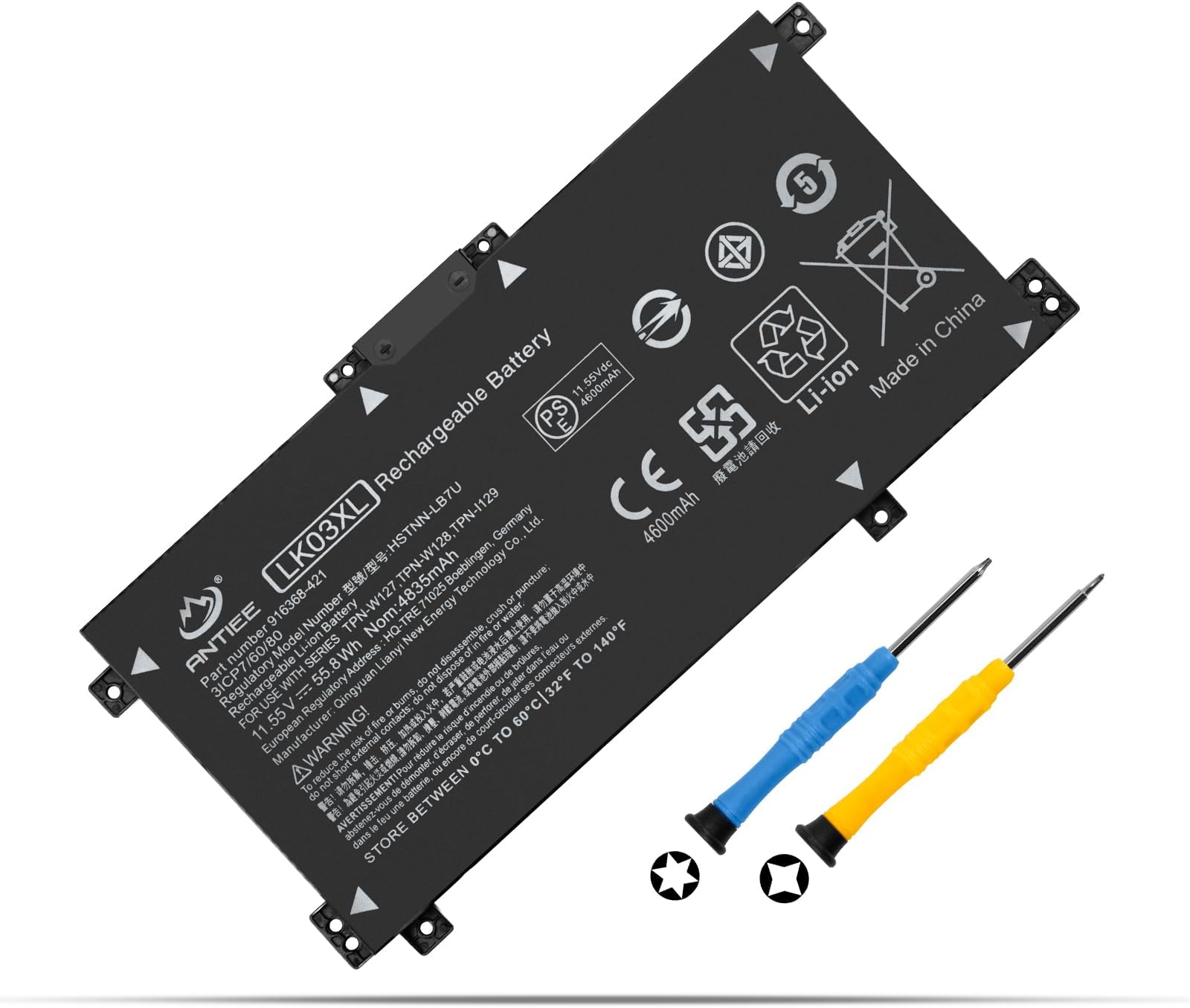
The LK03XL battery is a high-capacity 55.8Wh Li-ion replacement designed specifically for HP Envy X360 15 and 17 series laptops. Operating at 11.55V and featuring smart chip technology with premium circuit boards, it guarantees reliable, long-lasting power. Compatible with numerous HP model numbers, it comes brand new with a 12-month warranty and round-the-clock customer support, making it the go-to choice for professionals seeking dependable laptop performance.


| ASIN | B072PRS9B3 |
| Batteries | 1 Lithium Ion batteries required. (included) |
| Best Sellers Rank | #17,951 in Electronics ( See Top 100 in Electronics ) #137 in Laptop Batteries |
| Customer Reviews | 4.2 4.2 out of 5 stars (1,082) |
| Date First Available | November 7, 2014 |
| Is Discontinued By Manufacturer | No |
| Item Weight | 10.6 ounces |
| Item model number | LK03XL |
| Manufacturer | Dongguan jiataiyuan electronics Co., Ltd |
| Product Dimensions | 10.63 x 4.72 x 1.18 inches |
R**S
Had to find HP service manual
Videos were helpful, but the service manual had all the info. I found it by searching for my model on Google. After replacement, the new battery had 41% and on first bootup, got a checksum warning, but pressed on and the laptop finished booting up normally. I can't comment on battery life because I just installed it. Points: This replacement comes with a tiny cross point and a tiny torx drivers. I ruined the tork on the middle angled screw because I was not careful with getting the angle right. The screw was unharmed and I finished with my own bit set. The rubber strips across the bottom have to be removed to get at more cross point screws. On reassembly, the rubber strips had stretched and I had to cut off about 1/8" so that they would fit in their channels. Before prying off the back with a spluger, you must pop out the DVD drive -- it overlaps a screw hole. The service manual said to remove a screw, but there was no screw. The case bottom had a hole but there was no screw-hole in the body of the laptop, at least on my model. Still, you have to pop out the DVD with a bent paperclip. Once you have removed the bottom, close the DVD to protect it. And don't forget to pop it back out before snapping the bottom back on My original battery had a metal shield glued to the bottom (visible side) but the replacement battery did not. I could not get the metal off the original battery to transfer it. I hope it does not matter. Prying the back off was nerve racking. I did not have an actual spluger and a credit card did not have enough strength, so I used the can-opener/slotted screwdriver on my Swiss Army knife. I inserted it about 1/4" between the plastic part, slid it until it hit an obstacle and then twisted. The catches easily popped free. Try to keep the screws organized, there are differences. Have tweezers ready to remove and replace the screws. One oddity on my model, the replacement battery had an extra screw tab. Just look at the old battery and use that as a guide to where to put the screws. Since HP no longer makes this battery, you have to use this one or some other non-oem battery. HP's website admits its battery lasts about one year, so their failure to keep them available is ******. While my HP battery lasted 3 years in light use, it got quite bulgy and begged for a replacement. One general tip you may not have heard of: Put the laptop bottom up on a big dishtowel. As you take out the screws, lay them on the towel near where they will go back.
M**P
Excellent replacement battery
Great value, Replace the original three years ago, which is about how long any laptop battery tends to last. Just replaced it today and marked it as my favorites. I will probably get longer life out of this one as I have been educated on battery life management woo hoo! Super easy to install And a perfect fit!
D**A
Works great, easy to install for a non-tech person.
Fairly easy to replace old factory installed lithium battery. I felt confident I could do this because I watched a YouTube on how to do it! Trust me, I am Low-tech to No-tech. If I can do this anyone can! The only reason I gave this replacement battery 4 stars, is for whatever reason...and maybe it was me...it was darn near impossible to get the tiny screw holes to line up...even though it looked like it was an exact match. I forced it to make it fit! Fired right up. I read the install instructions saying to let it fade down to 5% and then fully charge. It was 67% right off so it will go down over time. Overall, the battery is working and compared to genuine HP parts ($99) was much more reasonable.
N**E
Easy DIY replacement
replacement battery arrived on schedule - replacement was fairly simple with the view of a You Tube tutorial. I have zero experience with this kind of stuff so I was a bit aprehensive - but the local computer repair shop that I have previously used for any of my computer repairs has closed - owner retired - so I decided to try this myself instead of shipping the laptop off or driving 200 miles to repair shop. Installation was easy and replacement was exactly what it said it would be - excellant experience and laptop is back functioning like new! Great value!
C**G
3 months and it doesn't hold a charge!!!!!
Ordered on october 3rd 2025. ABSOLUTELY DO NOT PURCHASE THIS PRODUCT. I have had this battery for only 3 months and it dies within minutes. I charge it to 100% unplug it and within 15 minutes it is dead. It's a complete piece of JUNK.
G**T
Great HP Battery Replacement
Works great so far. Keeps a good charge. Seems a great option for your HP battery replacement.
L**O
Fitted & working well. As good as the Original.
R**C
Cette batterie n'est pas compatible avec HP Envy 17 contrairement à ce qui est écrit dans les spécifications. Le PC ne reconnait pas la batterie. Pourtant elle fonctionne, mais impossible d'avoir un indicateur de charge, et le plus gênant est qu'il n'est pas possible de démarrer l'ordi si l'alimentation n'est pas branchée. Une fois le PC démarré, on peut débrancher l'alim et la batterie fonctionne, mais le pc indique néanmoins "Aucune batterie détectée". Apres avoir bataillé 2j avec les solutions proposées en ligne pour ce type de pb, j'ai jeté l'éponge .. je vais la mettre aux ordures et acheter une batterie du constructeur... Une vraie arnaque !
C**N
Au top pour la les 1ère utilisation, bien pris en charge par la carte mère après plusieurs démarrage. La durée de mon PC avec batterie re-vie. Voir sur le long terme
H**R
Hält was versprochen wird
B**B
bonjour je ne sais pas comment procéder pour un échange puisque le produit est sous garantie
Trustpilot
3 weeks ago
1 month ago