We remain fully operational. Our teams are working around the clock to ensure your deliveries continue safely.

DOWNLOAD THE APP


Copyright © 2025 Desertcart Holdings Limited
DOWNLOAD THE APP
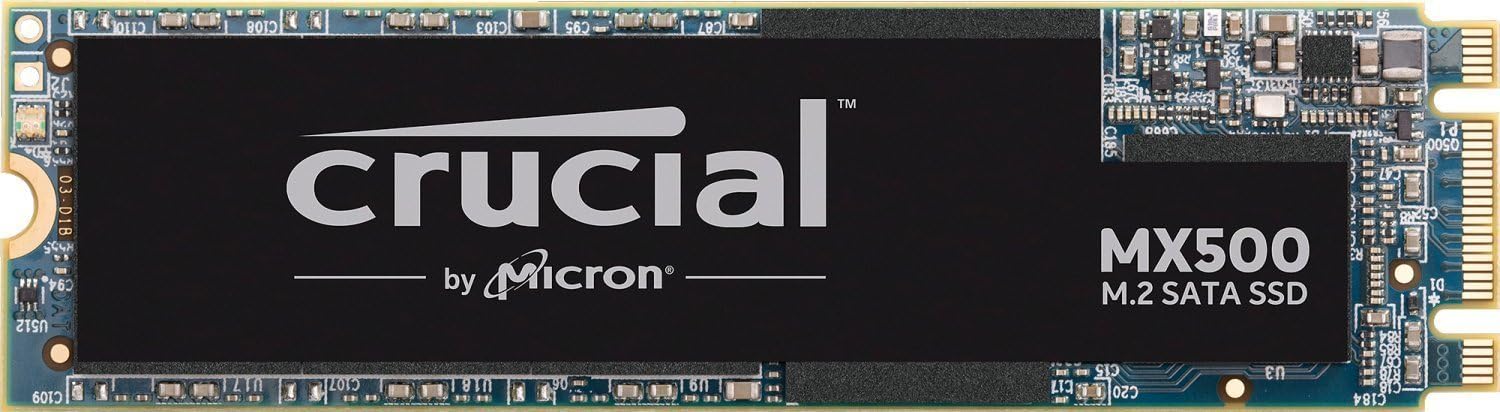



🚀 Elevate Your Storage Game!
The Crucial MX500 1TB 3D NAND SATA M.2 Internal SSD delivers exceptional performance with read speeds up to 560MB/s and write speeds of 510MB/s. It features advanced data protection with AES 256-bit encryption and power loss immunity, ensuring your data remains secure and intact. Compact and reliable, this SSD is perfect for both PC and Mac users looking to enhance their storage capabilities.








| ASIN | B0784SY515 |
| Additional Features | Portable |
| Best Sellers Rank | #807 in Internal Solid State Drives #12,457 in Computer Internal Components |
| Brand | Crucial |
| Built-In Media | Internal Solid State Hard Drive |
| Cache Memory Installed Size | 1 |
| Color | Multicolor |
| Compatible Devices | This drive is compatible with desktops and laptops that accept M.2 Type 2280SS SATA drives |
| Connectivity Technology | SATA |
| Customer Package Type | FFP |
| Customer Reviews | 4.6 out of 5 stars 3,537 Reviews |
| Data Transfer Rate | 6 Gigabits Per Second |
| Digital Storage Capacity | 1 TB |
| Enclosure Material | 3D NAND flash |
| Form Factor | M 2 |
| Global Trade Identification Number | 00649528785107 |
| Hard Disk Description | Solid State Drive |
| Hard Disk Form Factor | 2280 Inches |
| Hard Disk Interface | ATA-4 |
| Hard Disk Rotational Speed | 1 |
| Hard-Drive Size | 1 TB |
| Hardware Connectivity | SATA 6.0 Gb/s |
| Installation Type | Internal Hard Drive |
| Item Type Name | Crucial MX500 1TB M.2 Type 2280SS Internal Solid State Drive - CT1000MX500SSD4 |
| Item Weight | 9.07 g |
| Manufacturer | CRUCIAL TECHNOLOGY |
| Media Speed | 510 |
| Model Name | MX500 |
| Model Number | CT1000MX500SSD4 |
| Number of Items | 1 |
| Read Speed | 560 Megabytes Per Second |
| Special Feature | Portable |
| Specific Uses For Product | personal, gaming, business |
| UPC | 649528785107 |
| Warranty Description | Limited 5-year warranty |
D**N
I like that they included the tie down screw as most ...
Received the 1TB M.2 SSD today and plugged it in my desktop. It recognized it right away and so I used Easus to clone my primary platter drive that had my operating system on it in about an hour. Then I restarted the computer and pressed F12 to select which drive to boot from and selected the crucial drive. Then I pressed windows button + R to gain access to HD manager and proceeded to format my old drive designating it to a data drive for photo's etc. The whole operation was quite painless. It started right up and no problems. Ran a speed test with performance mark and it reads at 561 mb/s and writes at 520 mb/s so it's operating at optimal specifications. Not a single problem installing and getting it set up. I like that they included the tie down screw as most SSD's do not. My mother board didn't come with one so this was nice. Everything runs butter smooth now which is a huge difference from having a platter HD that ran at 7200 rpms. It's night and day. Thank you crucial for a fair priced SSD. The drive temp never climbs over 55 degrees celsius.
C**A
super fast and excellent quality
I have been very pleased with crucial ssd drives. I put one in my iMac and now I purchased this one for my gaming PC. I'd say the 1TB storage is worth the money because of the amount of programs you can install on it. My machine runs very smooth and fast and loads games and programs with ease. I went with the M.2 version because it's very small and really easy to install. Definitely recommend this for a PC.
G**Y
Works well, included software (download) is great, good price.
After upgrading the RAM in my laptop, I was able to see how easily it would be to upgrade the SSD. The OEM SSD was 256GB, even though the "Crucial" website recommended an upgrade to 512GB, I opted for this 1TB SSD. This new (Crucial MX500) SSD comes with instructions to download a utility package that includes Acronis True Image "cloning" software. The software cloned my installed SSD (with over 200GB of data used) to the new SSD in under 10 minutes.. (impressive). The software instructed me to S/D the computer, swap SSD's, and restart.. The whole process was simpler and quicker than I would have imagined, and I now have a laptop with a 1 TB SSD! The amazon price is quite good.. The support from "Crucial memory" systems is also quite good. I also bought a M.2 SATA SSD to USB 3.0 External SSD Reader Converter Adapter Enclosure (from Amazon) to be able to perform this "cloning".. Now I have an external 256GB SSD available.. I swapped the drives as the
L**L
Fantastic game drive.
Installed easily in my eluktronics mech-17. Speed is fast enough for a game drive. It's about as fast as my 1tb Samsung 860 EVO that sits in the 2.5 Inch sata bay, so no complaints. If you have a laptop like mine that can use all 4 channels in a m.2 slot I would pass on this as an OS drive. But it does perfectly fine for data storage.
W**E
Great drive with one huge flaw
This is 1TB of storage for a great price from a reputable brand. Performance is what you can expect from a premium SATA III SSD. One of the great things about M.2 SSDs is that there are no wires to deal with. That said, there is one huge disadvantage to this specific drive. The MX500 has a flashing activity LED on the SSD. Now if this was some type of optional feature and it was well advertised, that would be one thing. But this was a pretty big surprise the first time I booted a game from it. I do not want an orange light blinking 10 times a second at me. This is absolutely jarring expecially with a tempered glass side panel. If it wasn't for this constantly blinking orange LED I would be pretty happy with the drive, but I kinda wish I had chosen a different drive as it bothers me.
C**F
Nice upgrade
This is my first M2 drive; it is not one of the fancy new super fast drives, but that's OK. Since my laptop has space only for 1 SATA drive, with this I can double the capacity available, so it is a good deal for sure. The price is fair, cost as much as a good SSD SATA3 drive; and the performances are obviously the same as a SSD SATA3; so you get the same read and write speed. If you have a laptop that support NVMe M2 drives; get one of these and then when the prices go down, get the faster NVMe drive; I play games on this drive and they run as fast as it could be, so if someone tell you that you need a NVMe drive to play games; they are just making a fool of you and cleaning your wallet. Of course SATA3 is slower than NVMe but the difference at this level, unless you use server grade applications, is fundamentally saving you a second or 2 in loading, at the cost of 2.5x the cost of the SATA3 M2 modules. The choice is yours....
J**L
Easy to Use...
I bought this as a replacement for the 1TB SSHD in my Dell Inspiron i7559, and the difference was night and day. The overall process of installing the Crucial M.2 SSD and cloning the pre-existing volume from my old SSHD was fairly painless thanks to the free software provided by Crucial. Would highly recommend this M.2 SSD. Points of Interest: - The original Seagate SSHD (1TB HDD + 8GB SSD hybrid) in my Dell laptop was a little slower than I would have preferred (averaging 90/Mbs R/W) and I knew that I would eventually replace it. When the 1TB version of the Crucial SSD went on sale, I decided it was a good time to upgrade (averaging 400Mbs R/W) - incredible difference. - My Dell laptop only had room for one 2.5in HDD/SDD from what I could tell, so it was essential that I purchase an M.2 SSD, that luckily my computer was capable of using. This is something I kept in mind as I knew I would need space to have both drives in the laptop in order to clone from one drive to the other. - The free software provided by Crucial (which you can download from here: "http://crucial.com/clone"), was fairly easy to use, and the overall cloning time for my particular SSHD took about 2 1/2 hours. - I did not have to format the newly purchased Crucial SSD after installing it. After you have the SSD plugged in, simply run the software mentioned above, and choose which drive to clone from. The process is lengthy and will require an immediate restart, as it will begin the cloning immediately after restarting. After it had finished, the laptop shutdown and I then re-started the laptop. Once I was sure the machine was booting fine, I shut it down, removed the older SG SSHD, and started the machine again to make sure that it booted the OS from the correct drive. Once it did, I re-installed the old SG SSHD, formatted it, and it now serves as my backup drive.
M**Y
Dell XPS 13 9370 upgraded
Replacing the 125 gb SSD with the Crucial 1Tb SSD went without difficulty. I had the linux version but the clone software provided only works for windows. No problem, Macrium Reflect version 7.2 free edition makes a boot thumbdrive using another windows machine that boots the Dell XPS fine (tap F12 on bootup until blue line appears, then select UEFI boot usb). Then clone the original OS into the Crucial SSD (I used the M.2 SSD enclosure from https://www.amazon.com/gp/product/B07D6MMRD5/ref=oh_aui_detailpage_o00_s00?ie=UTF8&psc=1). This worked flawlessly and it can now be used as a 125gb thumb drive. Before installing the new SSD I used the linux utility GParted to expand the partition to use the full 1Tb. Swapping the SSD went without incident and it booted up normally on the first try. The only hiccup was finding a #5 Torx wrench to remove the screws from the back of the computer! The drive came with two screws but they are not needed for installation. I am a happy customer.
Trustpilot
3 weeks ago
1 month ago