Buy anything from 5,000+ international stores. One checkout price. No surprise fees. Join 2M+ shoppers on Desertcart.
Desertcart purchases this item on your behalf and handles shipping, customs, and support to Vietnam.
⚡ Empower your home, slash your bills, and join the energy-smart elite!
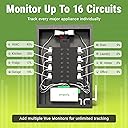
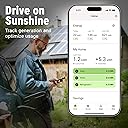
The Emporia Vue 3 is a UL and CE certified home energy monitor featuring 16 clamp-on sensors that deliver ±2% accurate real-time electricity usage data. Compatible with most residential electrical panels, it supports solar and net metering while providing seamless WiFi connectivity for instant app-based monitoring and automation. Designed for professionals seeking granular control and cost savings, it offers detailed appliance-level insights and automated energy management to optimize consumption and reduce bills.


| ASIN | B0C79PNK84 |
| Best Sellers Rank | #4,573 in Tools & Home Improvement ( See Top 100 in Tools & Home Improvement ) #1 in Home Automation Modules |
| Brand | EMPORIA |
| Brand Name | EMPORIA |
| Color | White |
| Compatible Devices | Smart Plugs, EV Chargers, Home Battery Systems, 3rd Party Thermostats, Appliances |
| Customer Reviews | 4.6 out of 5 stars 770 Reviews |
| Included Components | Energy monitor, Current Transformers, Wire Harness, WiFi Antenna Assembly, Wire Nuts, Splicing Wires |
| Item Dimensions | 10 x 5 x 5 inches |
| Item Type Name | Energy Monitor |
| Item dimensions L x W x H | 10 x 5 x 5 inches |
| Manufacturer | Emporia Corp. |
| Model | EMV3A-2P-16 |
| Part Number | EMV3A-2P-16 |
| Smart Home Compatibility | Smart Home Compatible |
| Specification Met | CE, UL |
| Style | whole home monitor with 16 circuit sensors |
| Style Name | whole home monitor with 16 circuit sensors |
| UPC | 850019360165 |
C**T
Excellent product, amazing app!
Update-was able to find problem areas in the home and got the lowest electric bill in 9 months! Home humidifier was running way too much, made adjustments and it’s fixed. Devices drawing power but not being used now turned off. Furnace setting adjusted to make it more efficient. This will pay for itself in 2.5 months. Solid product, quality components and killer app! Installation was quick and painless. The connection viaWiFi was flawless and it started reading my panel instantly. Responds to changes in loads almost instantly and provides very accurate readings throughout the day. The app has everything you need to monitor your home. It’s clear they have thought of just about everything. My only complaint is the length of the cable they provide for the WiFi antenna. I mounted it on the bottom of the panel and haven’t had connection issue but would have preferred to have it on top.
M**6
Easy to install and great accuracy
7/26/24 update: This is still going strong with zero issues. I see some low reviews about signal but we ran the antenna outside of the panel and have zero issues. This has really helped provide granularity in our energy use. I saw today they annouced a fix for my complaint around my solar CT reporting production at night when my combiner box was consuming. now you can specify in the app if a CT is bi-directional. Lastly, we were able to use the info provided by the monitoring to decide to get rid of our electric dryer and switch to a combination heat pump washer/dryer. We were spending $50+ in electricity a month to wash clothes. Now we don't even spend $15.00. At current prices the new washer will pay for itself in 3.5 years. I know all this because of the granular detail provided through the vue3. We're going to deploy these at any of our rentals that include utilities in the rent. Original review: This is a great product using tried and try technology (CT monitors). I have plenty of space in my panel so installing this was a breeze. My panel is recessed into the wall so I bought a 3rd party antenna extension cable so I could mount my antenna outside the panel. This monitors 220v(use 1 CT and double in app), 110v, solar and you can add external emporia smart plugs to save a CT. So for my dishwasher and server, instead of using a CT, I used their smart plug and was able to add it to the whole house monitoring. This has provided great insight into our energy usage. I like that the cable length can be adjusted to get rid of extra cable length. My main compliant is 16 CT were not enough nearly enough for my 3000 sq ft house with a 200amp panel. I would probably need 2 of these to cover my whole house but I was able to get most of our key loads. My other complaint is that the CT monitor for solar registers regardless of whether it sends back to breaker or uses from breaker. At night, my solar uses some power to control enphase controller and it registers it production instead of consumption. It is minor but something to note.
S**Y
Emporia Vue 3 Home Energy Monitor – High Quality Hardware & Works with Home Assistant
The Emporia Vue 3 Home Energy Monitor is high quality hardware and works well with Home Assistant. Everything feels solid about this device – Molex connectors for the power and CT connections, and it’s UL listed. All things considered it was easy to install and it supports our grid tied solar PV system. I used it for 8 months now without issue and there is good correlation between the power utility and Vue 3 calculated monthly energy use. I can’t speak to Emporia’s firmware or apps because I installed ESPHome on it and use Home Assistant’s app. I appreciate that Emporia designed and built this hardware in a way that supports the user installing custom firmware if they want.
E**K
Already saving money!
This is a great product that has been very reliable and provided peace of mind for my house. It would be 5 starts if they allowed local control or live control for 3rd parties like home assistant or if it was matter enabled. It's been installed for a week and has been great. Tracks less then 2% variance from my electrical meter. It has helped me same energy already.
E**S
Great Way to Monitor Energy Consumption
I ordered this to compliment my Sense energy monitor. I’ve been using Sense for several years and while that was great for some things, it didn’t give me enough information on what was actually using power. The Emporia functions differently than Sense, and each have pros and cons. From an installation standpoint, Sense was much easier because it doesn’t need individual circuit sensors. My circuit breaker panel was very crowded to begin with, and it was a challenge to get the 18 CT clamps in place for the Emporia and now my panel looks very messy inside. I get much more accurate readings with the Emporia than I do with Sense. Emporia shows the actual power being consumed by each circuit, where Sense only makes a guess at each detected device. For example, Sense detected my heat pump compressor, but it always uses the same power value when it detects that it turns on so it always reports 3.2kW. With Emporia’s sensor directly at the circuit breaker, I can see that the power ranges between 2.8kW and 4.2kW depending on the outside temperature. During the hot summer months, Sense will drastically under count my heat pump’s consumption. From an app standpoint, I like Sense a lot better. The Emporia app looks very dated in comparison, but it does what it is supposed to I guess. There are some things that I wish it could do, like let you pinch or spread to adjust the graphed data. There are also some things that should be a feature but aren’t for some reason. For example, I can’t set it up to get accurate readings for my clothes dryer in one entry. My dryer uses 240V for the heating element, but it uses a single 120V leg for everything else including the tumbler motor. I have a clamp on each leg so I can see the total power consumed, but it’s in two separate circuits that I have to add together. It should be easy to combine both into one sensor and let the app do the math, but this isn’t an option. On the Emporia forums it seems like this is an common request and Emporia says that it will be implemented “soon”, but they have been saying this for years so “soon” must have another meaning for them. It’s very handy for keeping an eye on malfunctions. I have a septic system that has an always-on aerator pump. When something goes wrong with the system, the pump turns off. I have an alert set up so that I get a notification if the pump stops working so I immediately know if there is a problem. I use Home Assistant at my home, and it was very easy to integrate the Emporia data into it. It works very well. It’s hard for me to say which is better, Sense or Emporia, because each one is so different. Sense is better at displaying real-time information, but Emporia is much more accurate on an individual circuit basis. The Sense app seems to be generations ahead of the Emporia app.
M**.
amazing energy monitor tool, very accurate!
This is an amazing tool for anyone curious to where their electricity is going. In my case, I wanted to confirm electrical usage of my heat pump vs auxiliary heat mode and also map out my base consumption for battery backup. Installation the unit can be easy or hard depending on the setup- I have 2 panels and circuits on both that I wanted monitoring so it took some work to get it done without having to purchase 2 Emporia Vue 3. The box is a bid big for my sub panel so I installed it on the side, mid point between both panels for easy of installation. I also had to extend the cables and used the recommended 22 gouge cable to do it with the addition of a crimper and cable binders. I saw no difference with the extended cables. The app registers energy change instantly and accurately as I compared it to my professional amp rating tool.
W**L
Excellent Value!
I just received my Vue 3 this week and it has been online for less than 24 hours, but I'm already impressed with the value this system provides. I installed it myself, and it took less than two hours. I'm not an electrician, but I am pretty handy with household DIY, and am used to working with electronics, etc. Working in a breaker panel is very dangerous, so if you have any doubts, please just pay an electrician a few hundred dollars to install it for you. The installation documentation is very good, and straight-forward. Emporia also has a lot of information on their website. I had a complete gameplan and realistic expectations going in. I have a total of 20 breakers, so i knew I would need to be creative to get full coverage. The only 2-pole breaker that I didn't use a single CT and multiplier on was my dryer, because I knew dryers are notoriously unbalanced. This was confirmed by my readings washing and drying 4 loads of laundry last night. Good call. My HVAC and water heater seem balanced enough to use one CT and a 2x multiplier going by my readings so far. I also combined several circuits on the same legs (2 wires/alternating breakers) to achieve full coverage with 16 CTs. This works well. I also have a couple of breakers for items I rarely use, like a floor heater in the basement, so I opted to just leave them unmonitored and if I do use them, they'll show up in the "balance" from the mains. The last atypical part of my setup was to connect the hot wires for the monitor to 20 amp breakers instead of the recommended 15s. This was just due to their proximity to the monitor and required me to replace the supplied 14 gauge pigtails with 12 gauge THHN. Easy peasy. I also bought a four-pack of Emporia's smart plugs to cover one outlet at the panel that has its own breaker, and to give me the flexibility to drill down individual appliances on a monitored or unmonitored circuit. Adding the Vue and the SPs to the app literally could not have been easier. If you prepare by reading their documentation first, you'll be ready to hit the ground running. Write down the circuits and ports to which they're connected. Know any CTs that will need to be merged, like my dryer. I also nested my unmonitored SPs under the main device, and monitored SPs under the appropriate circuits. All was easy to do in the app. So far, the balance, or the difference between the reporting from the mains and the totals from the monitored circuits has been negligible. I know this will vary, but I think I've got it as good as I'm going to get it with 16 CTs. I'm happy. The provided data in the app is great. If I could make any suggestions, one would be to make it easier to look at a specific time on the graphs. You have to slide the graph to the right to go back in time and you're limited by the width of your screen. Going back several hours can take dozens of swipes. That's annoying. Put a drag-bar at the bottom, and/or allow me to pick a time manually. Also, you can only see spikes (such as HVAC startup) at the "second" resolution, so if you're trying to determine peak loads for an alternate energy source, there's no easy way to get them in the app. The export feature certainly helps by generating granular spreadsheets at all resolutions, though. It just emails a link once created, which is pretty slick. The whole Emporia Vue system is meeting or exceeding my expectations at this point. If anything changes, I will update my review.
P**N
Amazing service and data, but graphics are light
Product and service are exceptional. Both Zach and Collin answered all my questions and offered advice for my setup. Instructions were very easy to understand. I love the data in the app. However, I do wish the app has better graphics. I came off Curb energy monitoring when they discontinued service. Curb didnt offer data export or customized views, but their graphs were awesome. I wish Emporia can replicate some of those same timecharts in their app.
R**Y
Outstanding, accurate, easy to install, iPhone app available
So far I love this thing. Works great and is relatively simple to use with an iPhone. So long as this company does not brick people device by trying to force some paid subscription I will always recommend this to anyone that has a reason to monitor/track their consumption. I would like a model that offers more connection though. Sounds crazy but a 32 input model would be real good. Setup was very easy. If you have any electrical knowledge you will not struggle to setup. If you do not YouTube is a great resource to show you how to get it all connected. But even then the guides do great as well. App performs well on iPhone. Once you get a hang of it it’s real easy to see your power consumption under almost any unit time interval. 1min to years at a time. You can see your live consumption. You can name each circuit so you know which is which without having to reference your breaker. If not they give you labels you can place in your breaker to known which number is which. Packaging was acceptable. Now I know people want to know about accuracy. So far, I have to say, it’s near identical match to my utility providers logs on my consumption. Most of the time I think the error if any is caused by rounding by my provider. In other words Emporia is giving me a more precise measurement which I love to see. Oh and as a bonus. If you aren’t lazy like myself you can adjust the length of the wires for better wire management with some wire splicers and a little screw driver. I’m only a week in though. I will modify this review if things change but so far I am super happy with the simplicity of setup and in its performance. If you can still read this portion you can be certain I love it. I’m back. It’s been longer. My experience with this has only gotten better as the app has improved drastically. Very very happy with this product. Accuracy has been spot on. Helped me lower my bills too. You will find after the first couple months you will probably not use the app much but it’s very nice to have at the end of the month to see if everything adds up and if you can reduce power consumption. Thank you Emporia— love knowing there are still people doing good work out there. All around impressed.
G**E
Funziona molto bene
Volevo sapere dove andavano i miei watts e con questo ho le idee molto chiare. Supporto post vendita veloce e preciso via email solo in Ingelse ma non credo sia un problema con i traduttori gratuiti a disposizione di tutti. Di facile isntallazione previo stacco della corrente dal contatore e non solo sul quadro! Per noi che abbiamo praticamente solo monofase basta collegare solo una delle pinze amperometriche più grandi sulla fase in ingresso, dunque ne avanzerete due di quelle grandi. Consigliato
P**K
Simple à installer et à utiliser
C**N
EXELENTE SISTEMA 👍
Exelente sistema, muy facil de instalar y facil de usar desde su aplicación, muy intuitivo en los valores de la demanda eléctrica de cada centro de carga y de cada fase en particular Yo compre 2 sistemas Uno de 12 circuitos Uno de 8 circuitos Tengo 2 centros de carga principales Y en la aplicación puedes fusionar ambos sistemas y te suma el total de consumo de energía eléctrica de mi hogar Lo recomiendo al 100%
A**.
Ganz gut aber nicht Normkonform und Somit eigentlich auch nicht CE Konform
Das Gerät ist eigentlich ganz Gut. 1 Stern Abzug da es mit der Original Firmware nur über die Cloud nutzbar ist und in Homeassistant dann nur mehr 5 Min. durschnittswerte ankommen. 2 Sterne Abzug da die Stromkabel mit Falschen Farben angeschlossen sind und ich somit ein Gerät Zerstört habe. !!! Blaue Kabel sind im Wechselstromkreis immer Nullleiter und niemals eine Phase !!!
Trustpilot
3 weeks ago
1 week ago