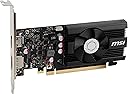
🎮 Power up your rig with MSI’s sleek GT 1030 — where compact meets capable!
The MSI Gaming GeForce GT 1030 4GB GDDR4 graphics card delivers a solid performance boost for casual gamers and creative pros alike. Featuring a 1430 MHz boost clock, 4GB of GDDR4 memory on a 64-bit interface, and versatile DisplayPort and HDMI outputs, it’s a compact, efficient upgrade that enhances HD gaming, video editing, and multimedia experiences with effortless driver management.
| ASIN | B0CBL3HQ68 |
| Box Contents | Graphics card; quick setup guide |
| Brand | MSI |
| Brand Name | MSI |
| Compatible Devices | Desktop |
| Customer Reviews | 4.6 out of 5 stars 409 Reviews |
| GPU Clock Speed | 1430 MHz |
| Graphics Card Interface | PCI-Express x16 |
| Graphics Card Ram | 4 GB |
| Graphics Coprocessor | NVIDIA GeForce GT 1030 |
| Graphics Description | NVIDIA GeForce GT 1030 with 4GB GDDR4 memory and 64-bit memory interface, boost clock speed 1430 MHz |
| Graphics Processor Manufacturer | NVIDIA |
| Graphics RAM Size | 4 GB |
| Graphics Ram Type | GDDR4 |
| Item Weight Unit of Measure | 0.6 Pounds |
| Manufacturer | MSI |
| Manufacturer Part Number | G103044PC |
| Memory Clock Speed | 1430 MHz |
| Model Name | GeForce GT 1030 |
| Model Number | G103044PC |
| Number of Fans | 1 |
| UPC | 824142327654 |
| Video Output Interface | DisplayPort |
| Video Processor | NVIDIA |
K**R
My old computer just got new life
My faithful gen 8 i5 desktop computer began struggling with graphics (game and other video) on a 2560x1440 resolution monitor. Task Manager showed that the onboard Intel gpu and main processor were both working hard to keep up. After wincing at the cost to replace it, I started looking for a good way to help it stop choking. This GeForce card showed up while browsing and comparing features and it looked good. It has 4GB of DDR4 RAM, which is the same speed as the memory my computer already runs. Plus, it also has a Display port output, which I already use. That made good sense to me and the price was right, so I thought I'd give it a try. Installation was easy. Just remove a screen for the PCI Express slot, insert the card and connect the monitor cable. When Windows started up, it found the new video card and automatically installed the drivers. I rebooted one more time and everything seemed to be working well. To test, I started up a G5 game that had choked the system before. Now the game runs smooth as silk and task manager shows that the NVIDIA GeForce gpu and the i5 processor were both just idling along. Separating the video from the main board really took a load off the system. It runs like a new machine now and text especially is sharper, or more crisp and well defined. My eyes are very happy with the improved clarity. I am super happy with the end result. This upgrade was a test and spending $120 on it saved me at least $800 over the new machine I had been looking at. It may not run quite as fast as that new machine would have, but everything it runs is very smooth and fast enough for me. Thinking back, I should have bought it sooner.
B**S
Not the best but for the price it's good
It's worth the price but I would like to know what the best model is I don't want super great GPU but I wouldn't mind one a little better and the driver for it isn't anywhere near as good as some others out there
O**6
buen producto
buen producto super compatible
G**N
iade
ürün kurulumu yapılamadığı için iade etim fakat iadem hala geçmedi yardımcı olabilirimsiniz.
C**G
Save an old computer for the garbage
Works very well in an old computer on which I need to run Windows 11.
Trustpilot
2 weeks ago
1 week ago