We remain fully operational. Our teams are working around the clock to ensure your deliveries continue safely.

DOWNLOAD THE APP


Customer Services
Copyright © 2025 Desertcart Holdings Limited
DOWNLOAD THE APP


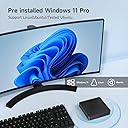

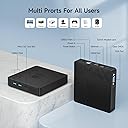
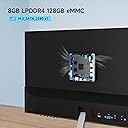
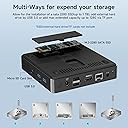


🚀 Power Meets Portability in Your Pocket!
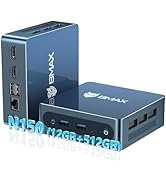
The BMAX B1Pro Mini PC is a compact and efficient computing solution featuring an Intel Celeron N4000 processor, 8GB of LPDDR4 RAM, and 128GB of eMMC storage. With support for 4K HDMI output and dual-band Wi-Fi, this fanless mini PC is perfect for both home and office use, offering versatility and performance in a sleek, portable design.




| ASIN | B0CLV2MG5N |
| Aspect Ratio | 16:9 |
| Best Sellers Rank | 53,040 in Computers & Accessories ( See Top 100 in Computers & Accessories ) 384 in Desktop PCs |
| Box Contents | 1 x BMAX Mini PC, 1 x British Standard Power Adapter, 1 x HDMI Cable, 1 x User Manual, 1 x VESA Mount with Screws |
| Brand Name | BMAX |
| CPU Model Number | Gemini Lake N4000 |
| CPU Model Speed Maximum | 2.6 GHz |
| Cache Memory Installed Size | 4 MB |
| Colour | Black |
| Compatible Devices | External Storage, Keyboard, Monitor, Mouse, Speaker |
| Cooling Method | Passive |
| Customer Reviews | 4.0 4.0 out of 5 stars (34) |
| Display Type | 4K |
| Graphics Card Interface | Integrated |
| Graphics Card Ram | 8 GB |
| Graphics Coprocessor | Integrated Graphics |
| Graphics Description | Intel UHD Graphics 600 |
| Graphics Ram Type | DDR4 SDRAM |
| Hard Disk Description | emmc |
| Hard Disk Interface | Serial ATA |
| Hardware Interface | Ethernet, HDMI, USB, USB Type C |
| Human Interface Types | Keyboard |
| Keyboard Description | Standard (assumption based on available information) |
| Keyboard Layout | QWERTY |
| Manufacturer | BMAX |
| Maximum Display Resolution | 3840x2160 |
| Memory Storage Capacity | 8 GB |
| Model Name | B1Pro |
| Model Number | B1Pro |
| Model Year | 2021 |
| Native Resolution | 3840 x 2160 |
| Network Connectivity Technology | Ethernet |
| Operating Systems | Windows 11 Pro |
| Personal Computer Design Type | Mini PC |
| Power Plug Type | Type C |
| Processor Brand | Intel |
| Processor Count | 2 |
| Processor Series | Celeron N4000 |
| Processor Socket | LGA 1151 |
| Processor Speed | 2.6 GHz |
| Product Features | Dual Screen Display, 4K HDMI Output, Wake-on-LAN, Auto Power on, Fanless Design, Compact Size |
| Product Warranty | 1 |
| RAM Memory Installed | 8 GB |
| RAM Memory Technology | LPDDR4 |
| RAM Type | DDR4 SDRAM |
| Ram Memory Maximum Size | 8 GB |
| Resolution | 3840 x 2160 |
| Security Features | Windows Defender, Windows Hello, Wake-on-LAN |
| Specific Uses For Product | Business |
| Style Name | Minimalist |
| Total HDMI Port | 1 |
| Total USB Ports | 2 |
| Total Video Out Ports | 2 |
| Video Output | HDMI |
| Video Output Interface | HDMI |
| Video Processor | Intel |
| Wireless Compability | 802.11ac, 802.11n |
| Wireless Network Technology | Wi-Fi |
| Wireless Technology Type | Bluetooth, Cellular, Wi-Fi |
M**N
Mighty Little Beast.
Bought the basic model (£133) with the voucher (£26 off) so total cost was only £107. I'm very impressed. Put a 256 Gb S/D card in the SD card slot and so have respectable storage. Physically it is tiny. About the size of 2 decks of playing cards side by side. YouTube videos play smoothly at 1080p res. on my 1080p res. monitor without dropping any frames in a 4 hour test. I don't play games so I can't comment on that. Runs all banking and home-business apps that I use without a hitch. For such a tiny cheap little thing its performance is quite amazing.
A**T
Perfect for what I'm using it for - needed some work to get it to the most recent release of Windows
The PC was easy to set up and works fine. However, after having used it for several weeks I noticed it wasn't receiving much in the way of Windows updates. I checked it out and discovered it was running the 23H2 release of Windows 11 Pro and even in I checked for updates it wasn't offering to update to the current 24H2 release. After quite a lot of hunting for a solution to this, the one that worked was to download the Windows11 Installation Assistant to the mini computer and run it. It took it a little while to run (but less time than I expected) and updated the mini PC to Windows 11 Pro 24H2. It left all apps and configured settings, user accounts etc. intact and everything seems to be running perfectly well now. It's being used as a small always-on server that runs a few automated tasks each day and it performs very well for that. It makes no noise, looks good and takes up very little space. During the initial setup I connected it to a keyboard, mouse and screen. Now that it's up and running I access it using Remote Desktop software so it no longer needs its own screen, keyboard or mouse. The fact that the PC runs Windows 11 Professional (rather than the home edition) makes it easy enough to set this up. It's replacing a 5 year old Mini PC that can't be upgraded to Windows 11. The new PC has a better specification (RAM, solid state disk, CPU and connectivity options) than the one that it's replacing and also cost less than the old one, so overall it seems pretty good value. I'm not using it for general day to day work like web browsing, word processing, video streaming, game playing so I can't comment on how well it would perform at these tasks.
O**R
Good buy for price.
Very good product for price, works perfectly, cannot understand why "Frequently returned due to low quality" is displayed on product page, I find nothing to justify this.
F**H
Windows 11 and Linux work great Update 2025
I've put both Linux Mint 21.3 Edge version and Zorin os on this mini pc and had no issues with drivers etc. The Windows 11 Pro installed on the main drive is activated. It's optimised to run efficiently on the machines specs, it seems just some of the animations are turned off - stuff I would do myself anyway. Plus it logs you into Windows using a local account. Am happy with it. Update - Linux Mint 21.3 regular version works ok too. Update 2025 Have installed own fresh copy of Windows 11 using Rufus (on usb stick) and iso downloaded from Microsoft. No probs activated fine, as its Pro version i have complete control over updates etc. Backed up Bmax rescue partition onto external storage (just in case) and deleted from drive.
Y**M
Bad from the very start
This was the first ever mini pc I have bought and my experience from the start was bad. As soon as it was booted the pc started lagging. As I went to install very few apps windows explorer (the windows pop up dialog to press execute) would not respond which for the most part is very odd as that has never happened to any computer I have owned. And the most suspisious part is the computer came installed with Google Chrome, and for the people that know, no Windows computer ever comes with that pre installed on the very first usage of the pc. I later bought another mini pc (that isn't this one) and it was miles better than this (with no GChrome installed in the installation of windows). Avoid.
C**S
Plex Media Server, perfect!
I bought this specifically to host a Plex Media Sever for audio-only files. So I didn't need high spec. The ad is a bit misleading quoting up to 2.4, whereas this is only a 1.1 CPU. This thing is SILENT and TINY (picture is vs a standard smart phone) It's clipped to the back of my monitor. Minimal power and left on 24/7. A USB-C socket would have been nice and the VGA socket it a bit outdated (it already has an HDMI port). Note: when you add the SATA M.2, you'll need to go to disk utilities and initialise the SSD.
A**Z
Brilliant little box of tricks
Phew! Where to start, for the record I really wasn’t confident this would be upto snuff, but I wanted a computer to operate several apps I use for my crafting needs, so it didn’t need to be very powerful, it was only for simple thing, I have many devices for surfing the web etc… First impressions, it was Tiny, easily fit in my pocket, I went through the plugging in, it’s so light the rigidity of the HDMI Cable, meant I couldn’t put it exactly where I wanted, it found it’s own position on my desk, so I set it up, which I’m happy to say was a breeze, Microsoft Windows has changed a lot since I last encountered it, but happily the user interface was pretty familiar, and as I said, it didn’t need to be anything special, but I was very surprised, it is pretty quick, and quiet, so far not heard a peep out of it, doesn’t get hot, while the plastic body does feel cheap, it’s not pretending to be anything flash, it holds the bits in place inside perfectly well, good value for money, I very pleased, especially as it runs the apps I wanted and unlike my Mac, doesn’t put up a fight, and it even has its own Anti-Virus software built in, Microsoft Defender, it’s a smashing little thing, and is running rings round my Mac, it’s nothing like the windows PCs I used to have, big bulky noisy desk top things, it’s about half the size of a standard Hard Drive, and Windows 11, Top Notch, I’m very pleased
P**R
Pc
No probkems so far
Trustpilot
1 month ago
2 days ago