Buy anything from 5,000+ international stores. One checkout price. No surprise fees. Join 2M+ shoppers on Desertcart.
Desertcart purchases this item on your behalf and handles shipping, customs, and support to Vietnam.
🖇️ Label Like a Pro, Never Chase Cables Again!
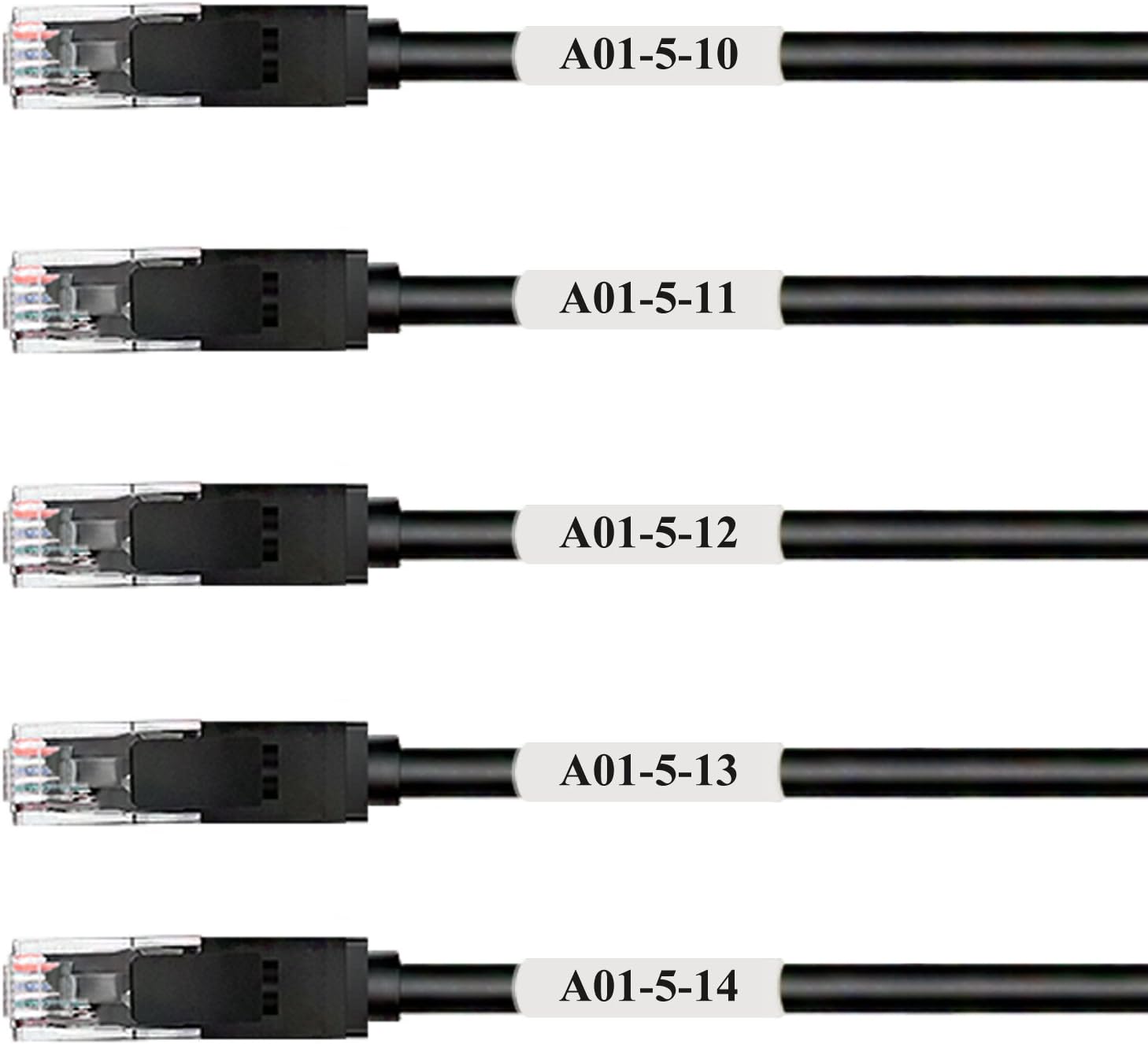
Mr-Label Self-Laminating Wrap Around Cable Labels offer 800 high-quality, laser printer-compatible labels designed for professional wire identification. Heat resistant up to 120°C, these self-adhesive, laminated labels fit cables between 6.1mm and 12.1mm diameter, ensuring durable, smudge-proof marking for network, power, and audio cables. Perfect for managers and tech pros aiming to streamline cable management and avoid costly rewiring headaches.


| ASIN | B078XR72Y7 |
| Best Sellers Rank | #33,618 in Office Products ( See Top 100 in Office Products ) #377 in Laser & Inkjet Printer Labels |
| Brand | MR-LABEL |
| Brand Name | MR-LABEL |
| Color | White |
| Customer Reviews | 4.1 out of 5 stars 512 Reviews |
| Finish Type | Laminated |
| Ink Color | White |
| Item Shape | Rectangular |
| Item Weight | 0.77 Pounds |
| Line Size | 1 inch |
| Manufacturer | MR-LABEL |
| Manufacturer Part Number | LA500070 |
| Material | Plastic |
| Material Type | Plastic |
| Model Number | LA500070 |
| Number of Items | 800 |
| Number of Labels | 800 |
| Pattern | Solid Color |
| Shape | Rectangular |
| Size | 25 Sheets (800 Labels) |
| Unit Count | 800 Count |
| Warranty Description | 1 year manufacturer |
C**K
Good labels
The labels stick well to cables, and also stick to themselves well. Printing with a laser printer works well, but the template for libre office took a bit of revision. After a few rounds of trial and error, printing with libre office and a laser printer did work. Writing by hand with a permanent marker also worked well, and is faster for making just one or two labels at a time. The downside to good adhesion is that removing these labels can be difficult. I don't know about durability, I've only been using them for a few weeks.
K**N
if you actually need to read the print, just get white labels
haven't tried printing on these yet. sharpie, precise sharpie, and ballpoint pen all work fine. very sticky tape and seems like it will be durable but i won't know until months/years from now. i'm using these on cables for music gear, some of which will see alot of abuse. just take your time when you're applying them to cables and they'll go on without wrinkling (or wrinkling too much). So far for the larger cables, no problem. But for very very small cable (think 1/4 headphones), already a tiny edge of the tape has come up. It's no undoing itself but i can see that this will catch on the cables. I think for permanent installations like network closet this is no problem at all; but if you're using this for music gear for live shows, it's something to watch out for.
C**.
Overall I like them
I like them with some help. If you put these on cables directly they are very hard read. I put some 1" white duct tape under them and a huge difference in legiblity. The template for printing wasn't the best but with a little bit of time you can make it work. I would definitely follow the directions and print on regular paper first before printing on the labels themselves. I will continue to use them as I like that there are multiple colors so I can denote length with the color and help keep my cables from walking away with the text. They seem pretty durable but haven't had them long enough to know for sure.
P**S
Works As Advertised But Test First
Even though there are several reviews about the labels coming off during printing or delaminating I wanted to give them a try due to cost. Before printing I checked to see that they were well attached to the backing sheet and they seemed to be securely attached so I printed 8 labels as a test. The Open Office template you can download from their website worked perfectly. They came through my Lexmark laser printer with no issues. I then affixed them to each end of 4 new patch cords and waited for a few days. They are still attached solidly. I think there may have been some lots that had poor quality control with the adhesive, but mine appear to be good. They compare to the Panduit labels I have used previously at a fraction of the cost or the need to buy in a large volume. Note: some text in picture redacted. Its not a printing smudge.
K**K
Several Issues
I've had an issue with these pretty much on every step. The Template I use LibreOffice. I downloaded the LibreOffice TEMPLATE. DID NOT WORK. I made it work by inserting a text box on each of the labels that I needed to print. Suggestion: Test several times, until perfect. Printing Had I printed from the single/manual feed tray, something would have probably peeled off and stuck to the printer. Instead, I placed in the normal paper tray. SEVERAL TIMES IT STUCK TO THE PAPER BENEATH it, and they'd both cycle through the printer. Suggestion: Print as many labels as possible at once. Don't do 2 to see how they turn out, then another small batch, etc. After you've tested the template, make sure you've got everything you want to label, and print them all at once. Placing the Label I found it easy to place the label. Adhesive Roughly half of the labels have started to peel off. This is probably the most annoying problem and why I give them 1 star. I applied the labels and checked them daily for the first 3 days. 1 had begun to peel on day 1, the rest were good. I've just checked today (2 weeks later), and nearly half have started to peel off. Maybe a little bit of tape will fix it but completely defeats the purpose. I might as well just print on a regular sheet of paper, cut it, and tape it in the first place?
J**Y
Not all colors work on black cables!
Not sure yet how well these hold up (just out them on), but I will say be careful of what colors you buy if you’re intending to put them on a black cable. It turns out the yellow and orange are really translucent so the black underneath almost overrides the color (it’s super dark yellow and super dark orange) and the big problem with that is then you can barely see the black ink on them. Red is slightly hard to read but better. Basically the white and the blue worked well, red was fine, orange and yellow are no good. On white cables it would be no issue, but on black cables don’t use the red, orange or yellow labels.
I**.
Worth trying
I'm impressed. Labels are running through a xerox printer, using manual feed of printer. Have only feed one sheet at a time. Took some test runs aligning rows and columns using excel. Labels did not peel when going through printer. I would not try running sheet twice. Label width is decent. It would be nice if they made a double wide label also. Recommended.
D**S
Excellent value for labeling network cables.
Labels work great! I received them after only 3 days. Downloaded template. Worked fine with MS Office. Everything lined up correctly. Characters were just too small for me to read. I increased font size until I could read it easily. I just had to reduce the number of characters. I love them.
Trustpilot
2 months ago
2 months ago