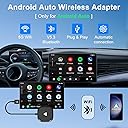
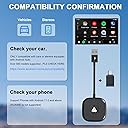
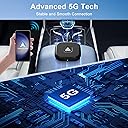
🚀 Upgrade your drive: wireless Android Auto freedom, no strings attached!
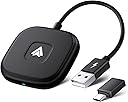
The LXJTHT Android Auto Wireless Adapter is a 2025 latest-generation plug-and-play dongle that converts wired Android Auto systems into wireless ones. Featuring a powerful 5.8GHz dual-band chip, it delivers fast, stable connections with minimal latency. Compatible with over 1000 car models, it supports full Android Auto functionality including voice commands, navigation, calls, and media apps, making your in-car infotainment smarter and cable-free.


| Asin | B0C539CV12 |
| Best Sellers Rank | #107 in Car Audio & Video Power Adapters |
| Brand | LXJTHT |
| Color | Black |
| Compatible Devices | Smartphone |
| Connector Type | USB Type C |
| Current Rating | 0.8 A |
| Customer Reviews | 3.7 3.7 out of 5 stars (364) 3.7 out of 5 stars |
| Manufacturer | XinCeng |
| Mfr Part Number | Wireless Android Auto Adapter |
| Model Number | Wireless Android Auto Car Adapter |
| Number Of Items | 1 |
| Number Of Ports | 1 |
| Package Quantity | 1 |
| Power Plug Type | No Plug |
| Unit Count | 1 Count |
User
Made my connection reliable again!
This has been a great addition to my sync 3 system. I had connection issues with my phone where I would have to flip the cable, get a new cable and I even replaced my USB port of my phone in frustration. All would be temporary fixes because Android auto seemed pretty critical of the connection. Sync always seemed fine with the connection which made it even more annoying.THIS SOLVED ALL OF THOSE PROBLEMS.It has been rock solid for connectivity and function. It connects quickly and I can tell no difference between it and the wired connection minus charging my phone. I was able to have this dongle and my phone both plugged in to my head unit without issue however I eventually switched to an accessory charger for my phone which let me relocate my phone to inside the center console, secured out of the way.The only hiccup I have had is it connecting to my phone when unlocking my doors or remote starting my truck and being in range while on a call. This isn't the fault of the unit as it is simply getting power at that point but I have to switch back Bluetooth devices to continue my call until I get to the vehicle.I do wish the cable was a little longer so the weight of it wasn't only being supported by the USB port in my dash configuration but I used a small piece of VHB tape to secure it to provide some strain relief. I'm still not dropping a star for this however as I was looking for something to make my Android Auto experience reliable again in my vehicle and this has done it. I've shared this with several other people I know on sync 3 as a result.
User
!Buyer Beware! Poor quality product and ZERO customer service. Only Self-help nonsense
The unit connects to Android auto as It should. 2019 Ram LaramieWhen using maps that is where the problem arises.Every time there Is a notification from the map my all my speakers turn off with the exception of the right front door speaker, which is so low you can hardly hear it. To remedy this i have to turn my system off then turn it back on but the next notification it does the same thing. This just started doing this after my 30 days ran out, which was 3 days ago so now I'm stuck with this trash. Save yourself some time and find a better option.
User
Starts Android Auto Automatically, like iPhone!
So glad my bro-in-law told me about this device. My 2024 Camry did not play music directly from my phone; I had to go through a couple of steps every time i wanted to hear my own playlists. With this device, the Android Auto works automatically -- just like the iphone! My Toyota sales person did not know about this device and she owns a Camry. Now you know. Oh, and since it automatically connects your phone, you can also automatically use your phone's GPS system and see the map on your car screen -- just hit Map. It's simple to use and works great!
User
Works great!
It works great in my car. The Android auto in my car kept cutting out so this adapter is perfect!
User
Frustrating Setup, But Totally Worth It Once Connected
I picked up this wireless Android Auto adapter because I was tired of dealing with cords every time I got in my truck. Between running errands, school drop-offs, and weekend outings with the kids, the less I have to plug in and fumble with my phone, the better. This little device definitely delivers on convenience—once it’s working.The setup, though, was rough. It wasn’t plug-and-play like I expected. I had to reset the connection multiple times and troubleshoot a bit before my phone and the truck's infotainment system finally synced up. The instructions included were a bit vague, and I ended up searching online for tips after the first couple of failed attempts. If you're not the patient type, this might be frustrating right out of the box.But once it finally connected—and stayed connected—it was like a night and day difference. Now I just hop in the F-150, and Android Auto fires up automatically within a few seconds. No more messing with cables, which is a lifesaver with four kids asking for music, directions, or to call Mom. I’ve tested it with Google Maps, Spotify, phone calls, and text dictation, and it’s been rock solid. The audio quality is clear, and I haven’t had any major connection drops during regular use.It’s also super compact, so it doesn't clutter the console, and I was able to tuck it out of sight with a short USB cable. My wife wants one for the Odyssey now because she's seen how smooth it is once it’s set up.All in all, the initial setup was a pain, but now that it’s working, I love it. It’s made driving just a little simpler and a lot more enjoyable.
User
Lasts less than a year.
Works great- for about 7 months, then refuses to boot past the initial welcome screen. This is the second unit to have this same failure. Of course it's beyond warranty.
User
Must read before buying/returning
The initial setup was really hard for me. I drive a 2017 Tucson, which has android auto on it. When i connected the dongle, i didnt even respond. No andriod auto pop up on screen. I trird playing with the setting and couldnt figure out.Then i tried updatating the device, after the update it worked well. Normall, when you connect, android auto should pop up on your car display. If not, then update the device. (Not sure why it doesnt come auto updated).The update process is kinda hard, you have to be a bit tech savy to figure it out. Basically, plug the deivice into a wall adapter, connect to the device wifi (smartbox, pass:88888888) (stay connected even though no internet). Open the browser and enter "192.168.1.101" on the url to open up the device setting. Click on switch to p2p, then ok.Once you reach this point, the phone automatically disconneccts from the wifi, the next step is to go to the wifi setting and find, 'Wifi direct option' (super important). Then click on the device wifi (called smartbox). also your device will automatically connect to the regular home wifi at this point. Then go back to the url/browser and click on update to, update the device. This step is required, it the device doesnt work out of the box. I wish it was much easier, but nope.Otherwise, it definitely works as advertised. easy conectivity, very reliable and fast response, similar to connecting with a wire.
User
Goodbye to the cables! It works perfectly
This adapter has completely changed my driving experience! I had my doubts about whether there would be delays or if the connection would be unstable, but after trying it, I can't be more satisfied.
User
Excellent product
Initially I had issues with it disconnecting every once in a while on my Note20 Ultra. But after I upgraded my phone to S25 Ultra, I never faced any kinds of issues. Really happy with the product. Perfect investment
User
Device is a scam, DON'T EVEN THINK ABOUT BUYING IT !!!
It's not working at all, NOT EVEN ONCE, tried to connect with several mobile phones on 3 different types of cars (all support wired android auto) and tried all trouble shooting steps in manual, Only shows that it's trying to connect but IT NEVER DID.
User
Great purchase
This was a great upgrade for my car. . Instead of connecting through the car, I connected the new device directly to the head unit. Before installation, I read comments from others who had done similar upgrades, and their advice was invaluable. Following their guidance, I first uninstalled my phone’s connection from the radio system and then removed the radio connection from my phone. After starting fresh, I plugged the device into the car’s USB port, asked the radio to find it, and it connected on the first try. My Pixel 9 then found the Bluetooth Android Auto transmitter, but since my car is older, it didn’t work directly through the vehicle’s system.Realizing the issue, I plugged the unit directly into the head unit—the same one I use for Android Auto. It connected flawlessly, with no lag in calls or app usage. Setup took less than a minute, giving me enough time to start the car, buckle up, and shift into drive before my phone connected to the screen. I placed the unit behind the glove box, out of sight, and it works perfectly. At one point, my phone unexpectedly shut off and rebooted, but I believe this was due to a recent Android Auto update rather than the Bluetooth transmitter. I highly recommend following the reset steps I mentioned to ensure a smooth connection. Now, I can drive with my phone in my pocket, avoiding fines in Quebec, where phones must be mounted. My wife’s phone remains connected to the radio for calls but doesn’t interact with the Android Auto device—she doesn’t use it much anyway and prefers not to drive my sports car, so it works out well for both of us!
User
not working at all
not working at all
User
Unfortunately this item not support nissan altima 2018 sl
Unfortunately is not support my vehicle _ nissan altima 2018 SL
Trustpilot
1 week ago
2 weeks ago