Buy anything from 5,000+ international stores. One checkout price. No surprise fees. Join 2M+ shoppers on Desertcart.
Desertcart purchases this item on your behalf and handles shipping, customs, and support to Vietnam.
❄️ Stay Cool, Stay Ahead: The Ultimate RGB Turbocharged Laptop Cooler
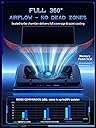
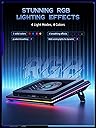
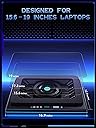
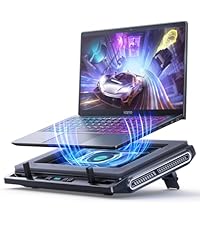
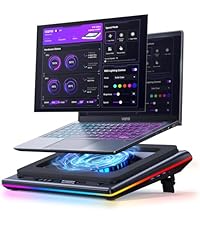
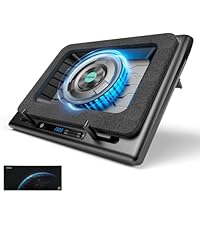
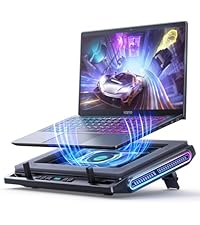
The llano V12 Gaming Laptop Cooling Pad features a powerful 5.5-inch turbo fan that reduces laptop temperatures by up to 44°C within 90 seconds, ensuring optimal performance during intense gaming or 4K rendering. Equipped with a 3-port USB hub, it expands connectivity for your peripherals, while a removable dust filter protects your laptop’s internals from debris buildup. Its reinforced chassis supports laptops from 15.6 to 19 inches with three ergonomic tilt angles, complemented by customizable RGB lighting with 10 modes and touch controls. Designed for professionals and gamers seeking quiet, efficient cooling and workspace enhancement.


| ASIN | B0C69BVWGB |
| Best Sellers Rank | #1,636 in Electronics ( See Top 100 in Electronics ) #4 in Laptop Cooling Pads |
| Brand | llano |
| Color | Black RGB |
| Cooling Method | Air |
| Customer Reviews | 4.5 out of 5 stars 2,642 Reviews |
| Enclosure Material | Acrylonitrile Butadiene Styrene (ABS) |
| Item Dimensions L x W x H | 16.9"L x 12.9"W x 2.7"H |
| Item Weight | 1.8 Kilograms |
| Manufacturer | llano |
| Material | Acrylonitrile Butadiene Styrene (ABS) |
| Mfr Part Number | V12 |
| Model Number | V12 Black (Hub+RGB) |
| Number of Fans | 1 |
| Product Dimensions | 16.9"L x 12.9"W x 2.7"H |
| UPC | 704444171967 |
| Unit Count | 1.0 Count |
| Warranty Description | One Year |
E**Y
Top tier cooling system!
After 3 weeks of using this product. I would like to give it a 4 star, but understanding how machines with power work, it’s a 5! 😇 I’ve had several laptop cooling systems in the past, sure they all had RGB lights, but the power, space, and quality were no comparison. First, let’s talk about how this can connect with your laptop. (Note: I don’t use it in this form because I have a docker station, but I did test it to ensure the usb ports are working). The cooling system comes with a USB-C to USB-C connector that connects to your laptop (cable included). After connecting this piece, you can then connect a mouse and keyboard to the USB slots on the cooling system instead of your laptop, and boom, you can send the signal of both devices and use them as normal. Awesome! Next, the power of the fan. It actually cools my laptop by around 20-25 degrees Fahrenheit. It comes with a nice pad that you can place your laptop on so that the bottom does not get scratched. This was carefully thought of and well crafted to include. It also comes with a dust proof filter so that the fan underneath does not intake dust. This machine can blast cold air like no other. The trade off is that with lots of power coming from the fan, it will sound loud when it’s at max speeds. However, it’s understandable, it’s blowing powerful cold air. The RGB lights make it look pretty, and there are several types of settings you can use for the lights. It all depends on how you like your light settings to be, there are static colors and there are dynamic colors as well. I use the dynamic rainbow function of light settings, there’s no life without colors! To summarize it all together, this fan was well worth it. It’s a good weight, it’s durable, powerful and pretty. I have a MacBook Pro from 2019, 15 inch sitting right on top of the pad, and the cooling system gets the job done. ✅ If there are any questions about this cooling system, feel free to comment below. I am nerdy with tech and enjoy sharing my experience with others for the best recommendations.
R**E
Effective external cooling.
I'm one of those weirdos that likes to use a laptop on a huge monitor and when I'm not home I just take it with me. Laptops for a while now have had issues with cooling because they try to make them as thin as possible. Naturally this creates issues with cooling as you can imagine. I have a dell g15 5515 and it runs warm. It does not matter what kind of pads or paste I use, it just gets warm. Well I also live in the desert and thats an issue in its own right with the balming heat. So what's the solution? Well chill pads have come a long way since my 20's. They are no longer these basic plastic plates with 3 fans on them. We have THESE now. This chill mat is a pretty big evolution. It has a gusset that runs all the way around that creates a seal that forces air through the laptop. It's a very simple design that features just an ON button and a basic control knob that you can use to crank it up if you need to. It also features a USB hub that you can use if you so desire. So how does it function? Well it's pretty loud and you can hear the fan crank up. However, the temps are worth it. Normally my setup isles at 50. It's dropped it down to 37. Normally under max load I'm running at 77. It now sits at 55. Yea, the noise is worth it. It sports a pair of arms down at the bottom to hold your laptop up but if I lean my laptop on them I don't get a proper seal. It's not a big issue to me as it's up there pretty firmly and I don't believe that it's going anywhere anytime soon. I can't comment on how long it's going to last. It's only day 1 and only time will be able to tell what it's longevity is. It's worth the price I feel. If anything goes wrong it has a 1 year warranty.
O**O
Great cooling and design
Works really well—keeps my laptop cool even during heavy use. Strong airflow, solid build, and the RGB lights are a nice touch. Quiet and easy to use.
B**T
Actually works!
This has taken me a couple years to write. This unit has a few different uses. First it has a filter so dust doesn't get into your laptop. Two and three are kinda the same, but let me explain. On the high setting it is not practical to run unless you are going for max scores on 3Dmark(benchmark). There are more usable settings because this thing gets very loud. Which brings me to the third thing. When using a practical setting like (400-700) for every day gaming use. You will see a difference in your benchmark scores between this product and just a metal stand with no fan. I will list four benchmarks scores with performance and turbo settings and fan speeds of 400, 700, and cross reference with metal stand scores. Metal stand will be (MS), laptop settings performance will be (P), turbo will be (T), for this product I will use cooling pad (CP) and the fan speed setting. Benchmark scores, --Time Spy MS: P 17458, T 19468 CP400:18170,T 19675 CP700: P 18205, T 19710 Portable Royal MS: P 12901, T 13687 CP400: P12978, T 13881 CP700: P 13060, T 13968 Steel Nomad MS: P 4743, T 5071 CP400: P 4760,T 5079 CP700: P 4824, T 5021 Night Raid MS: P 66494, T 70792 CP400: P 71257, T 72948 CP700: P 73001, T 73681 As you can see there is a difference in these results, and from realistic decibel levels that match the fan sounds from my laptop. Im telling you at max speed this thing sounds like a 90's two stroke 2.5L Mercury outboard engine at 7K RPM's. It's ridiculously loud, but at normal levels its ok and it works! I highly recommend this product.
R**D
Works, but feels cheap and fragile
First off, yes this does cool extremely well. I even saw another review claim it didn't work well for a ROG Strix 18 because of size but that is also what I have and it does a remarkable job because mine was having severe over heating issues while gaming. I don't use the placement hooks, it doesn't slide off the cooler so it doesn't seem to matter about the placement. Now for the bad. The power button concerns me since you have to hold it down for a moment to power on/off and you can't even tell you are pushing on it. From my experience, this button will likely wear out extremely quickly. The foam pad came off the first day, which may not be a big issue for everyone if it stays in the same place. and finally, this thing is very loud. It's not so bad at the lower speeds, but the lower speeds are worthless. Have to set to a minimum of 1000 to get good results.
J**M
This is the one to get for larger laptops, best buttons compared to IETS
UPDATE -- After having streamed with it, like the IETS 600, it's not a perfect solution my computer still runs pretty hot. I'd say maybe there's a 5-10% reduction in temps, I crank it up to about 1800 rpm for gaming/streaming. I do believe this fan is quieter than the IETS 600, another reason to pick this one up. Per the original review below, the power button is rather unpredictable to operate, it usually doesn't work, I'll live with it. Otherwise the color changing buttons are fun, but I can't turn the LEDs off, no key combo I can find does that. -------------- Original review: I had a "cheap" cooler over the years, but lately I'm trying to stream and play games on my laptop. It's a gaming laptop, and it ran really hot, certainly hot enough to get CPU throttling at times, though I never tested for that. We're talking Core Temp reporting peaks of 100 degrees and average temps in the 80s-90s. At rest, with the Llano fan at 1000 rpm, my Laptop 3060 GPU is reporting 37 degrees, as opposed to 48 degrees on the old cooling stand. (the old one is a Thermaltake you can't get anymore) I haven't gamed/streamed yet with the Llano cooling pad, I'm mostly writing this review to constrast this with the IETS 600 cooler using the same MSI Pulse GL76 laptop. BUTTONS -- the plus The reason I returned the IETS 600 cooler, it was working (not as well as the Llano at idle, though). But the button drove me crazy! They are "solid state buttons" meaning there's no movement in the button. It's just sensing your fingertip. On the IETS 600, all three buttons are like this. You'll read below why my laptop was overhanging these buttons, but it was frustratingly impossible to make the buttons do what I wanted on the IETS600. Much improved design is on the Llano cooler pad here, yes the on off button is a bit tricky and honestly as I write this I can't turn the thing off. But the fan control is a roller button, it's great! I can control the fan speed exactly where I want this running, no fuss, no frustration. Honestly I can live with the power button I'll just turn the fan down to 300 when the laptop is off, if I can't get the power button to work. And I have had issues with iPads in the past where at most angles my finger isn't recognized, so maybe I'm weird and the buttons will be fine for you. FIT - a minus on both cooling pads, but you can make it work Here's the real problem with these coolers and they can't really "fix it" unless they make a new foam piece for different laptops. Before you buy this, check out the bottom of your laptop. Do the cooling vents come to the edge of the base of your laptop? Then let's hope it's only on one edge, otherwise this cooler won't work for you. Basically, you set your laptop on the foam base and it makes an air seal. That means ideally there's at least about a 1/2" edge with no cooling vents around the base of your laptop. In my case, on the left side, the vents come right to the edge. In the back, they are within 3/8" of the laptops "rear edge" (the rear base is not a straight line on these MSIs). So this seems to work, I have the laptop barely sitting on the foam in the back, not at all sitting on the foam on the left side (just butted up against the foam to make a seal) and the bulk of the weight is on the right and front edges of the base. But your mileage may vary and you may find you can't use this type of cooler, depending on how funky your laptop base is. RISK -- don't blow up your built in fans If your laptop is anything like mine, apparently the fans are regular maintenance item, like brakes on your car. You just expect them to go out. Mine did after two years, and I replaced them recently. Now think about what this cooling does, it forces air into your laptop. If you force air into your laptop at a high enough rate, you create positive air pressure (higher than ambient pressure). If you are pushing air into your laptop so fast that there's positive pressure, then you're probably making your laptop's fans race along faster than they want to go. I would assume there's a point where the air being moved through the laptop, at higher rpms, will be too much. Bottom Line... So bottom line I strongly recommend this model even with the issues related to funky laptop bases where the cooling vents come to the edge. It cools my laptop a bunch at idle, I'm sure it will work as well as the the IETS 600 or better, but I'll maybe update this once I stream/game with this setup.
R**L
Laptop cooler
Works perfect for my gaming laptop. It keeps the 22” laptop nicely balanced and cool enough to be able to function (which is a feat in itself). It is very sturdy. The fan can get loud if you turn it all the way up (which even my laptop keyboard feels icy at), but since sound is objective, I will say I could not hear the fan over my neighbor’s music when they had an outdoor party.
N**E
This cooling plate works like a Husky, Loud but man it will out run anything else.
I have burned through laptop fans and chill plates in the past. The longest I've had one last is maybe two, to three months. I have spent as little as $20 and before this as much as $110 trying to find a chill plate, cooling fan for laptops that didn't just crap out. So, when I got my high end gaming laptop either I needed to buy stock in cooling fans and suck it up or... I needed to find something that worked like a champ. I did my research I read my reviews and this one I landed on showed it being a cooling fan for my laptop. My specific type... the Alien Ware, high end Gaming Laptop. My thought was well, it can't do any worse than some of the others I've tried so... lets give it ago. It worked so well I bought a second one for my child's school laptop. Pros: 1. This fan comes with filters to keep the dust from getting up into your machine, it also has a foam ring that rests under the laptop and the fan to keep space between the two and prevent air from just being blown out the side between the fan and the laptop. It's kind of like a hermetic seal. 2. There is a dial so you can turn the fan up and down depending on what your doing your fast pace FPS turn it up, Stardew Valley, turn it down. 3. Buttons on the fan to control the lights, and power. 4. USB slots in the side so if you need to charge your wireless mouse, your headset, your phone... your good. Pro/Con 1. Independent power source that is not your laptop. I find this is a good thing and a bad thing. Good as it doesn't run off your lap top's power so it's not a drain on your battery, but it's also a con, you need another plug in to run this thing. Con 1. They said it was quiet, but it's not quiet. Just like Husky's aren't quiet this is loud, it's a mean powerful fan and it's loud so... I would invest in a good gaming headset that will filter out background noises when your live chatting with people in game, and ones that can block out noises that your hearing... 2. Because it needs it's own plug in, when you turn off your laptop the fan lights which are bright do not turn off... It can be frustrating sometimes. Other than that, it's a great beast of a machine. My first one is still going strong after 5 months (all the other ones I've purchased have crapped out well before now) so... I will update this at the 8 month mark and the 6th month mark.
J**S
Muy bueno
Lo recomiendo completamente, sólo ten en cuenta que hará mucho ruido pero con audífonos se soluciona
ي**R
Excellent Product & Outstanding Service! ⭐⭐⭐⭐⭐
I've been using the Llano V12 Cooling Pad for a while now, and it's honestly one of the best cooling pads I've ever tried! The build quality is excellent, and the performance is outstanding—it keeps my laptop cool even during heavy use. The fans are quiet yet very effective. The seller also provided amazing service! I had a minor issue with a part, and when I reached out, they responded quickly and professionally, sending a replacement without any hassle. Truly exceptional customer support that reflects the brand’s quality. Highly recommend this product to anyone looking for effective cooling and top-notch quality! 🔥💻
S**R
ممتاز
تبريدة مره ممتاز لكن عيبة ان القابس مايناسب الي موجود عندنا بالسعودية وغير كذا كان اكبر من الابتوب حقي وهذا غلط مني ما تأكدت منه قبل مااعتمد الطلب ولهالسبب رجعته
C**O
Super pad cooling !!
Super matériel, fait le taf, il a calmé les hardeurs de mon i9, chute de 10 degrés. Je le recommande fortement.
C**S
20 degrees celsius or more drop in CPU/GPU temps under load
This cooling pad actually works! The Llano V12 Cooling Pad can siginificantly reduce both CPU and GPU operating temperatures, especially under gaming loads. My system: Lenovo Legion 5i Pro 12700K CPU, 3070TI GPU. I was sketpical prior to buying but using this for the past few days has proven it isn't a gimmick. Refer photos and the before and after video showing the reduction in CPU and GPU temps when in game. At full fan speed: 2800 RPM - CPU reductions from 100 degrees down to 79/80. - GPU reductions from 85 degrees down to high mid to high 60s (observed last few days) Average reduction appears to be 20 degrees and above in some cases. Even on lower fan speeds (1200 - 1500 RPM), I see temperature drops up to 10 degrees or more. I have also observed FPS changes in certain games from 30 to 50FPS at times. Unable to confirm 100% if this is from the cooling pad, but I noticed these improvements when the cooling fan is operating at high settings. ONE THING TO NOTE: the higher fan speed setting is quite noisy. This is not really something you can avoid. Noise cancelling headphones will help, but it is still audible on higher settings (1500 and above). It can be a little bit of a challenge to hear subtle footsteps when playing extraction based shooters, or games where footstep audio is critical. Besides that, playing most games won't be an issue and the performance boost is definitely worth the noise.
Trustpilot
1 month ago
2 months ago