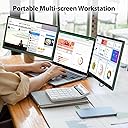
🚀 Triple Your Screen, Triple Your Edge!
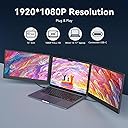
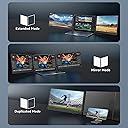
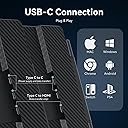
The APILDELLA 14’’ Triple Laptop Screen Extender is a portable, plug-and-play dual monitor setup that adds two 14-inch 1080p FHD IPS displays to your laptop. Compatible with 13’’-17.3’’ laptops across Mac (including M1/M2/M3 with adapter), Windows, Chrome, and Switch, it features HDR color enhancement, eye-care technology, and 180° adjustable foldable screens. Designed for professionals on the move, it boosts productivity by enabling multi-screen workflows with vivid visuals and easy portability.


| ASIN | B0CDW485BJ |
| Additional Features | Built-In Speakers, Eye Care, Portable |
| Aspect Ratio | 16:9 |
| Best Sellers Rank | #5,652 in Electronics ( See Top 100 in Electronics ) #214 in Computer Monitors |
| Brand | APILDELLA |
| Built-In Media | ( Technical support x24h ), 14'' triple Monitor x1, HDMI to C cable x1, USB-A to C cable x2, USB-C to C cable x2 |
| Color | black |
| Compatible Devices | Laptops with screen size between 13''-17.3'', Mac (with USB-C port that supports DisplayPort or with a special 2-in-1 USB-A/C Video Signal Conversion Cable for M1/M2/M3 Chip Macbooks), Windows, Chrome, Switch. |
| Connectivity Technology | HDMI |
| Contrast Ratio | 1000:1 |
| Customer Reviews | 4.0 out of 5 stars 941 Reviews |
| Display Resolution Maximum | 1920 x 1080 Pixels |
| Display Technology | IPS |
| Display Type | LCD |
| Hardware Connectivity | USB Type C |
| Has Color Screen | Yes |
| Image Contrast Ratio | 1000:1 |
| Manufacturer | APILDELLA |
| Model Name | Triple Laptop Screen Extender |
| Model Number | S2 |
| Mounting Type | Desk Mount |
| Native Resolution | 1920x1080 |
| Number of Component Outputs | 1 |
| Picture Quality Enhancement Technology | HDR |
| Pixel Pitch | 0.28 |
| Processor Count | 1 |
| Refresh Rate | 60 Hz |
| Resolution | FHD 1080p |
| Response Time | 3 Milliseconds |
| Screen Finish | Glossy |
| Screen Size | 14 Inches |
| Screen Surface Description | Glossy |
| Shape | rectangular prism |
| Total Number of HDMI Ports | 1 |
| UPC | 605832075631 |
| Viewing Angle | 180 Degrees |
| Warranty Description | 2 Year |
C**J
Great monitor, lightweight but large enough! (just make sure you have enough computer ports)
This was an excellent monitor. I set it up when I received it and it worked great, right out of the box. It was very intuitive and easy to set up. Both screens worked. I set them up as two extended screens. They are responsive fairly quickly after first plugging them in. I ended up having to return it because it requires TWO ports, one for each monitor. My laptop only has a total of TWO ports, so I couldn't use both monitors and charge my laptop at the same time. I couldn't find any external hubs or splitters that could power both and charge at the same time either. My laptop is old, so the battery doesn't last long. I wish it would have worked, but I will try it again once I have a new laptop. I imagine most laptops have more than two ports and it would work just fine. The weight of the monitors was great. It was compact enough for me to take with me when I travel (lots of working out of hotels), but big enough to be very useful as 2nd and 3rd screens. I spend all day on the computer and am barely functional without additional monitors. As long as you have enough ports, this is a great travel monitor!
N**R
Great product.
Edit: customer care is 100% amazing! really wanted to love this. What a cool concept, especially for working from home. The monitors, though small, are great picture quality! Clear and colorful. Easy to set up and clasp on. Two issues that made me decide to return this item are the audio and the weight of the screens making my laptop close. The audio from my laptop switches to this device and the volume is too low to hear over background noise( with the volume setting as high as it goes) additionally when I go back into the office it screws up my audio settings when connecting there. The weight of the screens, unless balanced perfectly, will slam shut, risking damage to the screens. I had to prop it up with books. ( which really isn’t a big deal, but shouldn’t have to rearrange my desk every time I use them.) So! They work great , but just have flaws that me, personally, don’t want to deal with. You will like them of those aren’t a big deal to you.
A**Z
Great Quality, Easy Setup, and Truly Improves Efficiency
I purchased this triple laptop screen extender because I often need to juggle multiple tasks at once, and it has exceeded my expectations so far. The installation was very simple—just connect with USB-C or HDMI and it works right away. No complicated setup, which is a big plus for me since I’m not very technical. The two additional screens are very clear and sharp at 1080P, and the brightness is adjustable, so I can work comfortably even in different lighting conditions. I use one screen for reference materials, another for communication apps, and keep my main laptop screen for my primary work. This setup has really improved my efficiency. What I appreciate most is the balance of portability and stability. Even though it provides two extra screens, the extender folds neatly and fits into my laptop bag without adding much weight. When attached to my laptop, it feels very sturdy and fits perfectly. Overall, this is a fantastic tool for both work and study—if you often switch between multiple windows, it will save you time and keep your workflow more organized. Definitely worth the purchase
J**W
Double and triple are excellent! Works well on a 13" laptop, just evaluate your space carefully.
For context: I work from home, space is at a premium, I usually don't have a full desk or table to work at - I'm typically working at a narrow shelf or on a lap desk. My laptop is 13" and I really needed more working screen space while keeping everything as small and portable as possible. Short version: double and triple are both great! Exactly as pictured and described. Packaging is very secure and they worked wonderfully with included cables and instructions. Space-wise, just keep in mind that the triple especially needs support from the kickstand so you need suitable space behind your laptop. Double ultimately worked better for my needs. Long version: I initially ordered the triple display, since it seemed like maximum screen for minimum footprint. It was packaged extremely well: the screens were well padded and protected, the cords were very neatly wrapped, and the included sheets gave all the necessary setup instructions in a very clear format. My laptop has two USB C ports but I need one of those for the power supply, so I followed the instructions and used the included cables to connect one screen to a USB-C port and the other to my USB-A and HDMI ports. The monitor connected to USB-C powered up and connected immediately. The one connected to USB-A and HDMI didn't seem like it was getting a signal at first, but when I came back after a bit it was working fine as well. Both screens had good picture and brightness - I especially like that you can adjust the backlight specifically in addition to color, brightness, etc. The only issue I had with the triple was that the weight of the display on my small laptop meant that I absolutely needed to use the built-in kickstand for support. That meant that I needed about 6" of desk/table space behind my laptop so the kickstand had somewhere to sit, and that plus the width of the two added monitors made using it impossible in most of my work spots. I started the return process, but I was so happy with the quality that I immediately ordered the double extender in hopes that the single additional screen would be light enough to use without the kickstand. It's working out perfectly so far! It sits securely and it doesn't seem to be straining the hinges at all (although I'll use the kickstand when I can, just to help protect them). It was packaged just as well as the triple, and it connected instantly with the included USB-C to USB-C cable. Picture quality and brightness are great, I'm extremely happy with the purchase and this is going to be a massive help in my day to day work.
K**.
It’s great except a few things
I’ve had this product for 4 months now and it’s a great concept that is great when it works. It plugs in with either HDMI or USBC into your device and just slides right on. You can also plug your power cord into the back of the monitor to charge your device while using it (big perk). It comes with a great carrying case that keeps everything together also which is really nice! HOWEVER, after about 3 months of periodic use, the Right monitor occasionally doesn’t work. It won’t turn on but if the charger is plugged into it, it still charges my laptop …. So it is working? It will also short out and everything (including my laptop) will just flash whatever is on it and black for a long time. Once it gets going, it’s good and stays on. But it struggles to get there after a few months. I can usually fix it by unplugging and replugging it in again a bunch of times but that’s annoying. Also, big con. The webcam on my laptop does not work when I’m using these monitors. I hate being on video for work meetings but when I need to be, I have to unplug these screens so my camera will work
J**N
Great Productivity Boost, Minor Learning Curve with Wires
The PILDELLA 14’’ Triple Laptop Screen Extender has completely changed the way I work on the go. Having two extra full HD screens makes multitasking so much smoother—spreadsheets, research, and video calls all fit neatly without constantly switching tabs. The picture quality is sharp, and the screens are bright and clear even in well-lit rooms. Setup does involve quite a few wires, which can feel a little confusing at first. But once everything is plugged in correctly, the system works very well and stays stable without random disconnects. The extender is lightweight and folds up nicely, so I can slip it into my bag and bring it anywhere. It’s been especially helpful for travel and coffee shop work sessions where I miss my dual-monitor setup from home. Overall: Fantastic purchase for productivity, solid build quality, and well worth the slight hassle of figuring out the wiring.
S**S
Heavy but a great bargain at 160
I paid 160$ for this "used-like new". Basically an open box item. Everything was there, and the protective films were still in place on the screens. Instructions aren't terribly clear but its not difficult to figure out and cabling is provided for a variety of connection configurations. Read the listing carefully, and make sure you have enough ports to get both displays working. My laptop has hdmi out, 2 standard USB A, and a fully powered USB C and I was able to get both screens running simultaneously with the included cabling and had one USB-A port left over. Resolution looks great no notable latency Only complaint is it is heavy, and while it clips onto 3 sides of your laptop, do not imagine you will be picking this up and moving it around as a single unit. As a result of the weight, angle adjustment is limited to the angles supported by the supplied kickstand. It would be easy to 3d print or macguyver something to address this, and as Im using it with and adjustable standing desk, the concern is negligible. Note that I did not stress test anything for high end gaming or other demanding use cases, but for remote work coding and developing mainframe reports this is a great buy.
K**.
Works great - directions are a bit
Update: Now that I know how to set these up properly with the cords, they work amazingly! The quality is great, the screen clarity is crisp, and the sound from the monitors (yes, they appear to have speakers) is actually pretty good. When I received the other monitors I ordered I couldn't get those to work either - it was the same exact set of screens from a different company which was quite annoying - I reached out to my IT department and they had to physically send someone to come help me. The instructions are not clear at all and it took about an hour to figure out which combination of wires works. A small docking station does not work with this. Essentially, you have to use the USB wires to power both monitors, so that takes away 2 USB ports. Then for the screens, you have to use an HDMI and the Type-C connections - which leaves you helpless for power unless you have another power port. Luckily I did. Now that everything is set up, they work great, but it didn't really help me when I needed it. Original Review: I ordered this one because it was going to come the day I needed the extra help with the projects I'm working on. I received the item, set it up as per the instructions but could only get one monitor to turn on. No matter what I did. There was no phone number to call in the User's Guide and the online support through Amazon had no other way to help. The "support video" was pointless. returning these immediately to try one of the other products I was looking at - would not recommend.
Trustpilot
3 weeks ago
2 months ago